The Army Safety Management Information System (ASMIS) 2.0 provides tools for reviewing mishap reports through the MNMR module. Users receive notifications for active reviews and can access their profiles directly on the platform. It's essential to choose the correct UIC for reviews and manage report filters effectively in the "For My Review" workspace. Reviewers can comment, concur, or non-concur on reports, ensuring documentation flows smoothly within the Army’s safety framework.
Please find below an Image/Link to download the presentation.
The content on the website is provided AS IS for your information and personal use only. It may not be sold, licensed, or shared on other websites without obtaining consent from the author. If you encounter any issues during the download, it is possible that the publisher has removed the file from their server.
You are allowed to download the files provided on this website for personal or commercial use, subject to the condition that they are used lawfully. All files are the property of their respective owners.
The content on the website is provided AS IS for your information and personal use only. It may not be sold, licensed, or shared on other websites without obtaining consent from the author.
E N D
Presentation Transcript
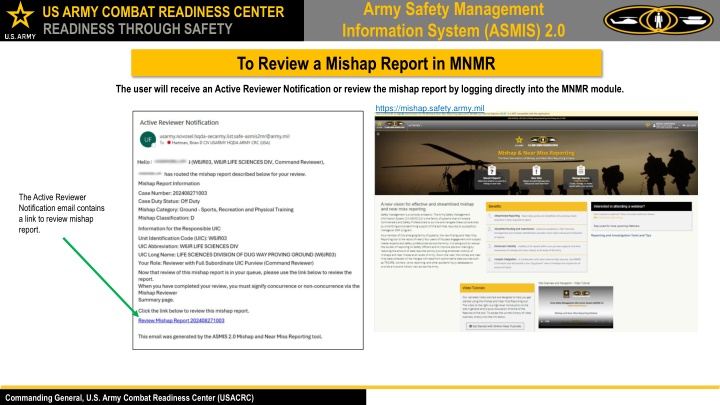
Army Safety Management Information System (ASMIS) 2.0 US ARMY COMBAT READINESS CENTER READINESS THROUGH SAFETY To Review a Mishap Report in MNMR The user will receive an Active Reviewer Notification or review the mishap report by logging directly into the MNMR module. https://mishap.safety.army.mil The Active Reviewer Notification email contains a link to review mishap report. Commanding General, U.S. Army Combat Readiness Center (USACRC)
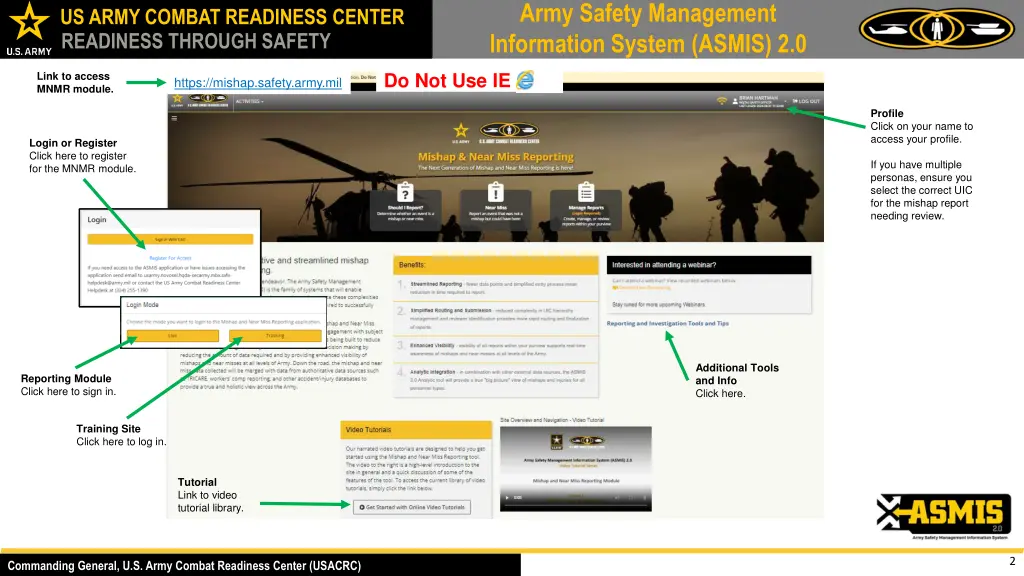
Army Safety Management Information System (ASMIS) 2.0 US ARMY COMBAT READINESS CENTER READINESS THROUGH SAFETY Do Not Use IE Link to access MNMR module. https://mishap.safety.army.mil Profile Click on your name to access your profile. Login or Register Click here to register for the MNMR module. If you have multiple personas, ensure you select the correct UIC for the mishap report needing review. Additional Tools and Info Click here. Reporting Module Click here to sign in. Training Site Click here to log in. Tutorial Link to video tutorial library. 2 Commanding General, U.S. Army Combat Readiness Center (USACRC)
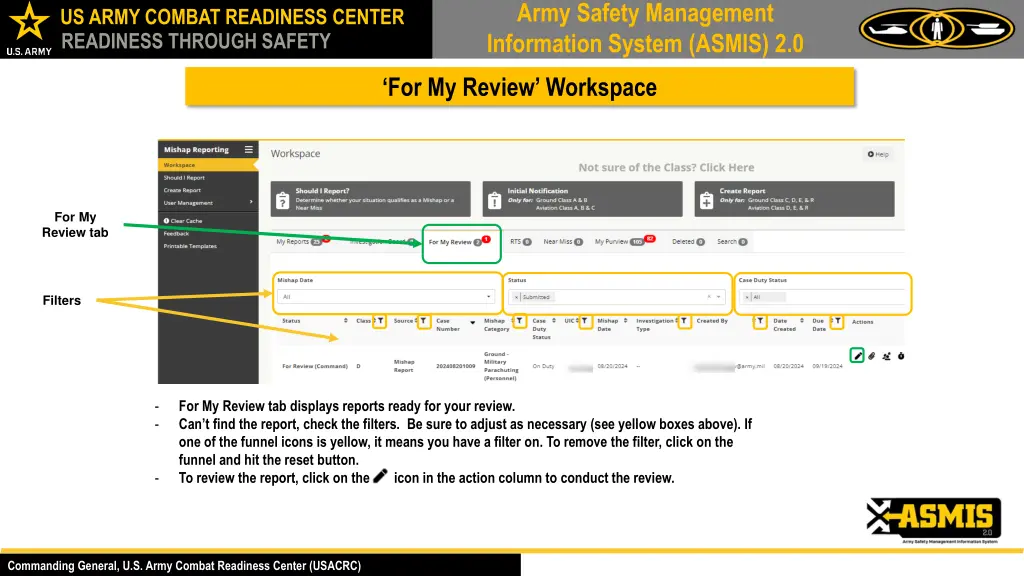
Army Safety Management Information System (ASMIS) 2.0 US ARMY COMBAT READINESS CENTER READINESS THROUGH SAFETY For My Review Workspace For My Review tab Filters - - For My Review tab displays reports ready for your review. Can t find the report, check the filters. Be sure to adjust as necessary (see yellow boxes above). If one of the funnel icons is yellow, it means you have a filter on. To remove the filter, click on the funnel and hit the reset button. To review the report, click on the icon in the action column to conduct the review. - Commanding General, U.S. Army Combat Readiness Center (USACRC)
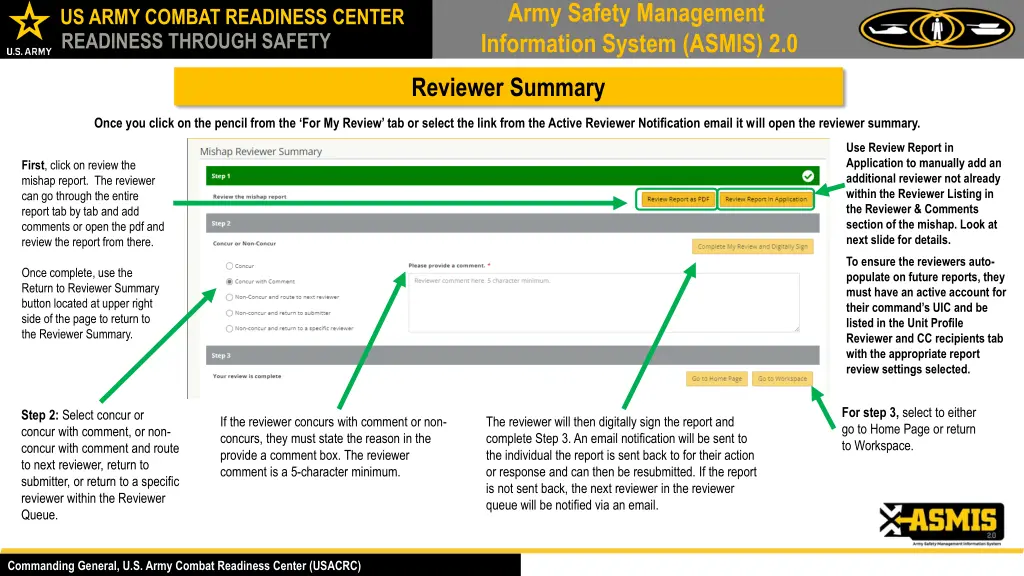
Army Safety Management Information System (ASMIS) 2.0 US ARMY COMBAT READINESS CENTER READINESS THROUGH SAFETY Reviewer Summary Once you click on the pencil from the For My Review tab or select the link from the Active Reviewer Notification email it will open the reviewer summary. Use Review Report in Application to manually add an additional reviewer not already within the Reviewer Listing in the Reviewer & Comments section of the mishap. Look at next slide for details. First, click on review the mishap report. The reviewer can go through the entire report tab by tab and add comments or open the pdf and review the report from there. To ensure the reviewers auto- populate on future reports, they must have an active account for their command s UIC and be listed in the Unit Profile Reviewer and CC recipients tab with the appropriate report review settings selected. Once complete, use the Return to Reviewer Summary button located at upper right side of the page to return to the Reviewer Summary. For step 3, select to either go to Home Page or return to Workspace. Step 2: Select concur or concur with comment, or non- concur with comment and route to next reviewer, return to submitter, or return to a specific reviewer within the Reviewer Queue. If the reviewer concurs with comment or non- concurs, they must state the reason in the provide a comment box. The reviewer comment is a 5-character minimum. The reviewer will then digitally sign the report and complete Step 3. An email notification will be sent to the individual the report is sent back to for their action or response and can then be resubmitted. If the report is not sent back, the next reviewer in the reviewer queue will be notified via an email. Commanding General, U.S. Army Combat Readiness Center (USACRC)
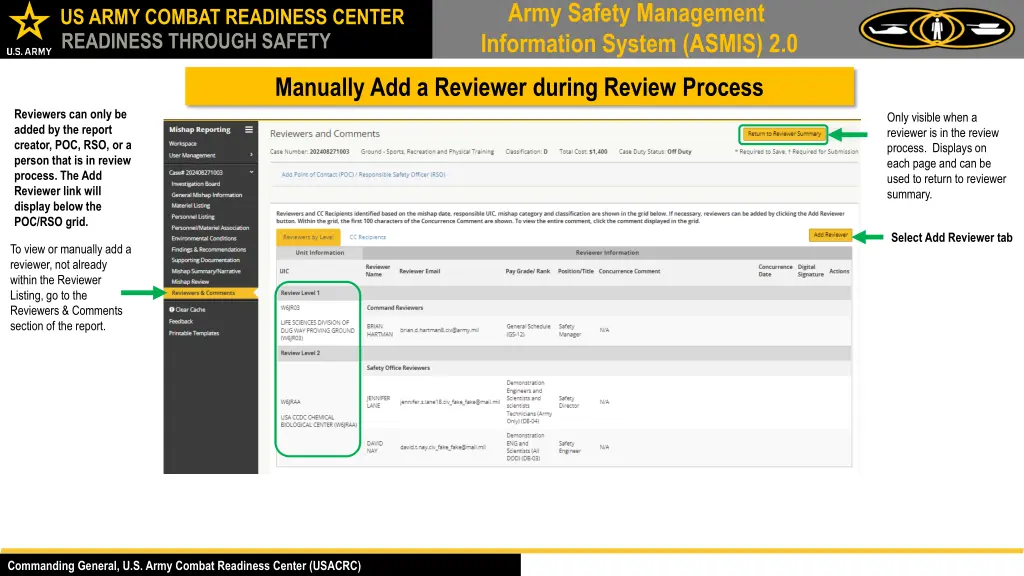
Army Safety Management Information System (ASMIS) 2.0 US ARMY COMBAT READINESS CENTER READINESS THROUGH SAFETY Manually Add a Reviewer during Review Process Reviewers can only be added by the report creator, POC, RSO, or a person that is in review process. The Add Reviewer link will display below the POC/RSO grid. Only visible when a reviewer is in the review process. Displays on each page and can be used to return to reviewer summary. Select Add Reviewer tab To view or manually add a reviewer, not already within the Reviewer Listing, go to the Reviewers & Comments section of the report. Commanding General, U.S. Army Combat Readiness Center (USACRC)
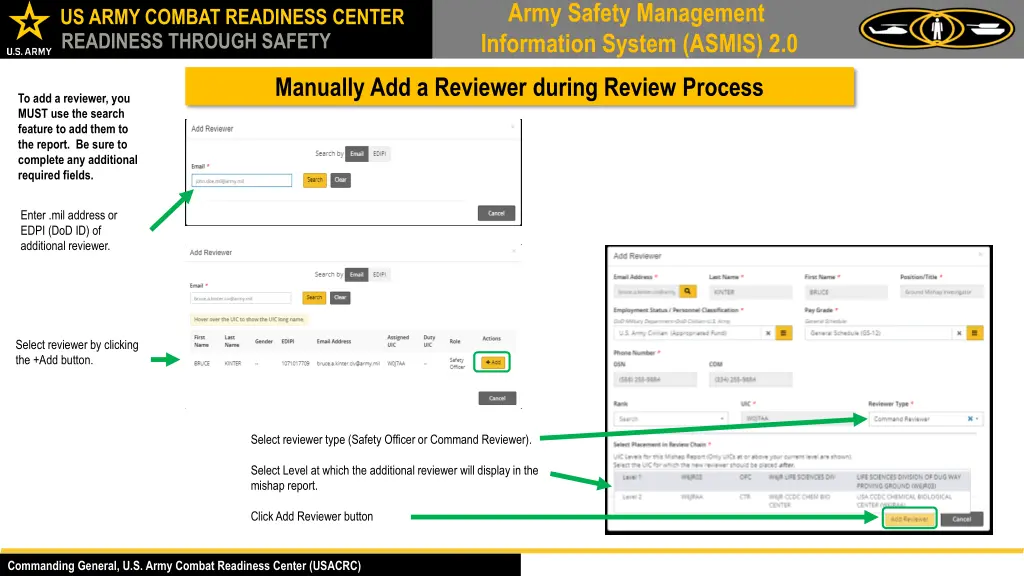
Army Safety Management Information System (ASMIS) 2.0 US ARMY COMBAT READINESS CENTER READINESS THROUGH SAFETY Manually Add a Reviewer during Review Process To add a reviewer, you MUST use the search feature to add them to the report. Be sure to complete any additional required fields. Enter .mil address or EDPI (DoD ID) of additional reviewer. Select reviewer by clicking the +Add button. Select reviewer type (Safety Officer or Command Reviewer). Select Level at which the additional reviewer will display in the mishap report. Click Add Reviewer button Commanding General, U.S. Army Combat Readiness Center (USACRC)
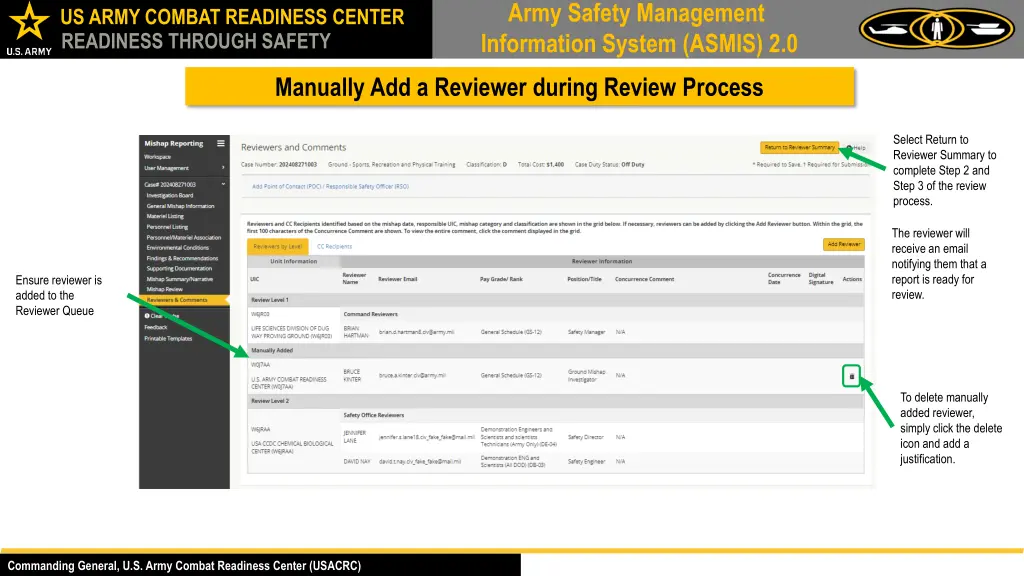
Army Safety Management Information System (ASMIS) 2.0 US ARMY COMBAT READINESS CENTER READINESS THROUGH SAFETY Manually Add a Reviewer during Review Process Select Return to Reviewer Summary to complete Step 2 and Step 3 of the review process. The reviewer will receive an email notifying them that a report is ready for review. Ensure reviewer is added to the Reviewer Queue To delete manually added reviewer, simply click the delete icon and add a justification. Commanding General, U.S. Army Combat Readiness Center (USACRC)