Computer System Operation and I/O Structure

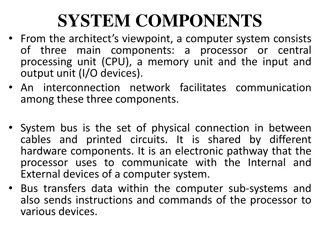
A modern general-purpose operating system consists of a CPU and multiple device controllers connected via a common bus. Upon startup, an initial bootstrap program initializes system components. Device controllers manage I/O operations by moving data between peripheral devices and local buffers. They signal the CPU upon completion. High-speed I/O devices can utilize Direct Memory Access (DMA) to transfer data efficiently without CPU intervention. Understanding these operations is crucial for grasping system functionalities.

Download Presentation

Please find below an Image/Link to download the presentation.
The content on the website is provided AS IS for your information and personal use only. It may not be sold, licensed, or shared on other websites without obtaining consent from the author.If you encounter any issues during the download, it is possible that the publisher has removed the file from their server.
You are allowed to download the files provided on this website for personal or commercial use, subject to the condition that they are used lawfully. All files are the property of their respective owners.
The content on the website is provided AS IS for your information and personal use only. It may not be sold, licensed, or shared on other websites without obtaining consent from the author.
E N D
Presentation Transcript
Operating system Lecture two part1 Dr jamal altuwaijari
2 2. Computer System Operation . Computer System Operation A modern general purpose o/s consists of a CPU and a number of device controllers that are connected through a common bus that provide access to. shared memory (figure 2.1).
2 2. Computer System Operation . Computer System Operation When the computer to start running, it is powered up or rebooted, it needs to have an initial program to run. This initial program, or bootstrap program tends to be simple. It initializes all aspects of the system from CPU registers to device controllers to memory contents. The bootstrap program must know how to load the 0/S and how to start executing that system. The bootstrap program must locate and load into memory, the 0/S-. The 0/S. then start executing the first process such as "init" and wait for some event to occur. The occurrence of an event is usually signaled by an interrupt from either HAV or S/\V. The Hardware may trigger an interrupt at any time by sending a signal to the CPU by way of the system bus. Software may trigger an interrupt by executing a special operation called a system call.
2.1 I/O Structure Each I/O device connected to the c/s through its controller. A device controller maintains some local buffer storage and a set of special purpose registers. It is responsible for moving the data between the peripheral devices that is controls and its local buffer storage. 2.2 I/O Interrupts To start an I/O operation the CPU loads the appropriate registers within the device controller. The controller examines the contents of these registers to determine what action to take. For example if it finds a read request the controller will start the transfer of data from the device to its local buffer. Once the transfer of data is complete the device controller informs the CPU that it has finished its operation.
2.3 2.3 DMA DMA Structure A high Speed device such as a tape, disk, or communication network may be able to transmit information at close to memory speeds; the CPU would need 2 microseconds to respond to each interrupt. That would not leave much time for process execution. To solve this problem 'Direet Memory Access (DMA) is used for high speed I/O devices. After setting up buffer, pointers, and counters for I/O device; the device controller transfers an entire block of data directly to or from its own buffer storage to memory with no intervention by the CPU. Only one interrupt is generated per block rather than one interrupt per byte (or word) generated for low speed devices. The DMA controller interrupts the CPU when the transfer has been completed.
2.4 2.4 Storage Structure Storage Structure The programs must be in main memory to be executed. Main memory is the only large storage area that the processor can access directly. Each word in memory has its own address. Interaction is achieved through a sequence of load or store instruction to specific memory addresses. The load instruction moves a word from main memory to an internal register within the CPU whereas the store instruction moves the content of a register to main memory. We want the programs and data to reside in main memory permanently. This arrangement is not possible for the following two reasons: a. Main memory is usually too small to stare all needed programs and data permanently. b. Main memory is a volatile storage device that loses its contents when power is turned off or otherwise lost. Therefore most C/S provide secondary storage as an extension of main memory. It be able to hold large quantities of data permanently. The most common secondary storage device is a magnetic disk which provides storage of both programs and data: Theit'ai Other inah3i Media such as floppy disks, CD . . - . ADM's, and DVD's.
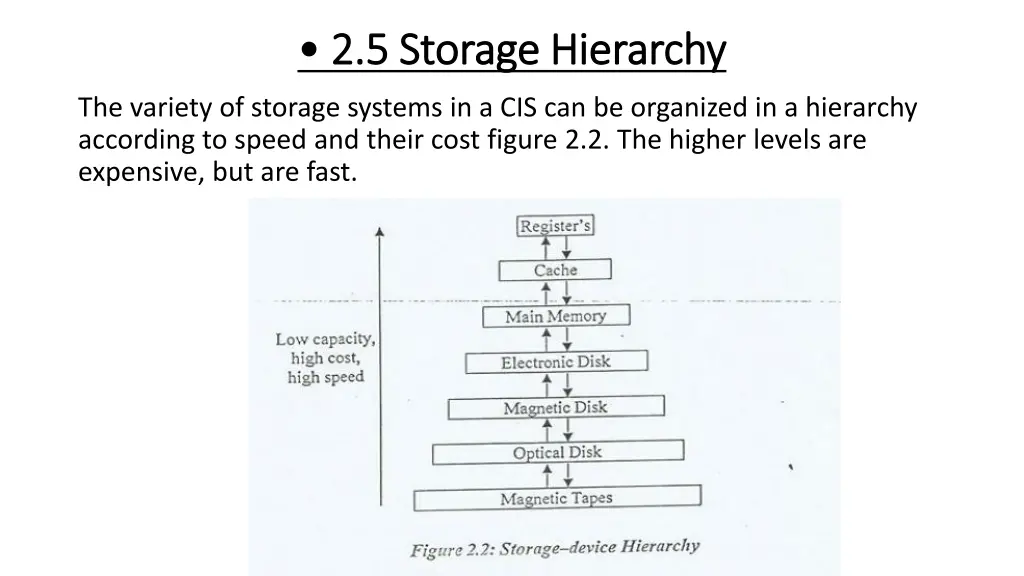
2.5 2.5 Storage Storage Hierarchy Hierarchy The variety of storage systems in a CIS can be organized in a hierarchy according to speed and their cost figure 2.2. The higher levels are expensive, but are fast.
2.6 2.6 Hardware Hardware Protection Protection To improve system utilization, the O/S began to share system resources among several programs simultaneously. Multi programming put several programs in memory at the same time. This sharing created both improved utilization and increased problems. When the system was run without sharing an error in a program could cause problems for only the one program that was running. With shiring many processes could be affected by a bug in one program.
2.6.1 2.6.1 Dual Dual- -Mode Operation Mode Operation To ensure proper operation we must protect the 0/S and all programs and their data from any malfunctioning program. Protection is needed for any shared resource. The approach taken is to provide H/W support to allow as to differentiate among various modes of executions. Therefore we need two separate modes of operation: user mode and monitor mode (also called supervisor mode, system mode, or privileged mode). A bit called mode bit is added to HAV to indicate the current mode; monitor (0) or user (1). With the mode bit we are able to distinguish between an execution that is done on behalf of the 0/S, and one that is done on behalf of the user. The dual mode of operation provides us with the means for protecting the O/S from errant users and errant users from one another. The HAV allows privileged instructions to be executed in only monitor mode.
2.6.2 2.6.2 I/O Protection I/O Protection To prevent a user from performing illegal 1/0 we define all I/O instructions to be privileged instructions. Thus users cannot issue I/O instructions directly they must do it through the 0/S. For 1/0 protection to be complete we must be sure that a user program can never gain control of the Computer in monitor mode.
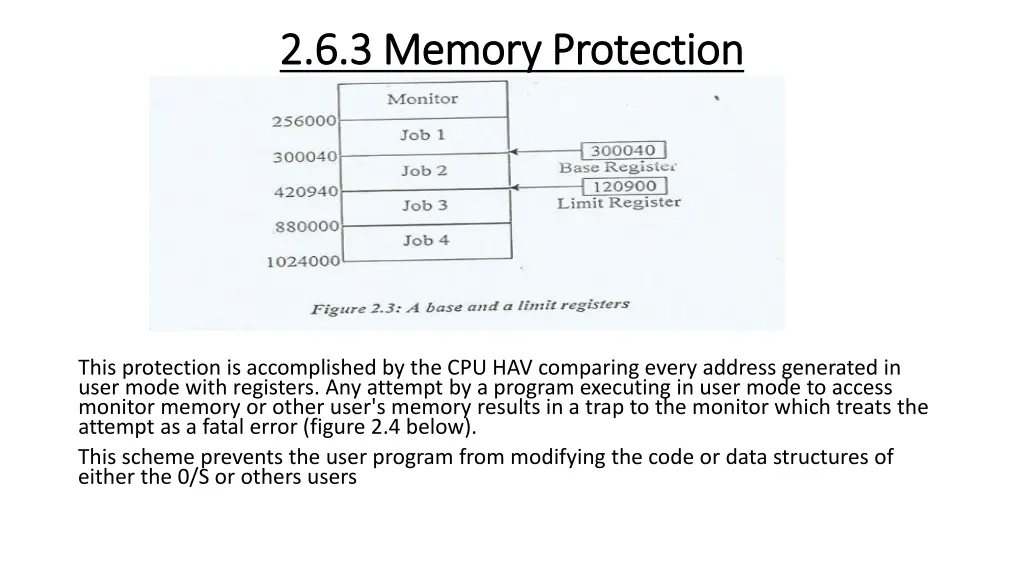
2.6.3 2.6.3 Memory Protection Memory Protection To ensure correct operation we must protect the interrupt vector from modification by a user program. Also we must protect the interrupt service routines in the 0/S from modification. What we need to separate each program's memory space is an ability to determine the range of legal addresses that the program may access, and to protect the memory outside that space. We can provide this protection by using two registers usually a base and a limit as illustrated in figure 2.3. The base register holds the smallest legal physical memory address; the limit register contains the size of the range. For example if the base register holds 300040 and limit register is 120900 then the program can legally access all addresses from 300040 through 420940 inclusive.
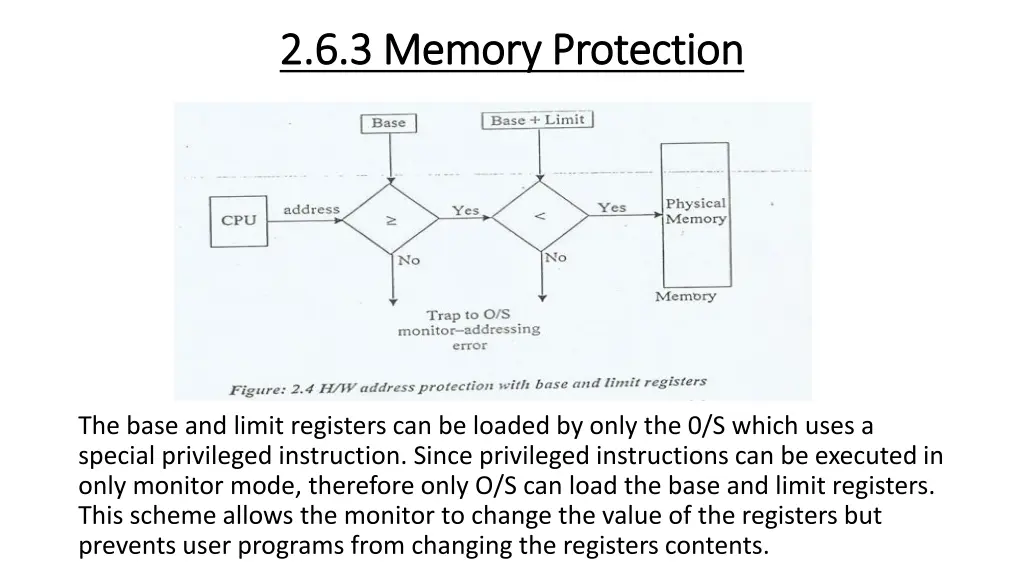
2.6.3 2.6.3 Memory Protection Memory Protection This protection is accomplished by the CPU HAV comparing every address generated in user mode with registers. Any attempt by a program executing in user mode to access monitor memory or other user's memory results in a trap to the monitor which treats the attempt as a fatal error (figure 2.4 below). This scheme prevents the user program from modifying the code or data structures of either the 0/S or others users
2.6.3 2.6.3 Memory Protection Memory Protection The base and limit registers can be loaded by only the 0/S which uses a special privileged instruction. Since privileged instructions can be executed in only monitor mode, therefore only O/S can load the base and limit registers. This scheme allows the monitor to change the value of the registers but prevents user programs from changing the registers contents.
2.6.4 2.6.4 CPU Protection: CPU Protection: The third piece of the protection is ensuring that the 0/S maintains control, we must prevent a user program from an infinite loop, and never returning " control to the O/S. To achieve this goal we can use a timer. A timer can be set to interrupt the computer after a specified period. The period may be fixed (1/60 second) or variable (from 1 msecond to I second). To control the timer the O'S sets the counter, according to fixed rate clock. Every time that the clock ticks the counter is decremented. When the counter reaches (0) on interrupt occurs, and control transfers automatically to the 0/S, which_ may. treat the interrupt as a fatal error or may give the program more time


![❤Book⚡[PDF]✔ The Apollo Guidance Computer: Architecture and Operation (Springer](/thumb/21611/book-pdf-the-apollo-guidance-computer-architecture-and-operation-springer.jpg)