Computer System Organization and I/O Overview: Interaction with Environment
Explore how a processor interacts with its environment in the context of computer system organization and input/output (I/O) operations. Learn about different I/O devices and their data rates, as well as concepts like programmed I/O, interrupts, and direct memory access (DMA).

Download Presentation

Please find below an Image/Link to download the presentation.
The content on the website is provided AS IS for your information and personal use only. It may not be sold, licensed, or shared on other websites without obtaining consent from the author. If you encounter any issues during the download, it is possible that the publisher has removed the file from their server.
You are allowed to download the files provided on this website for personal or commercial use, subject to the condition that they are used lawfully. All files are the property of their respective owners.
The content on the website is provided AS IS for your information and personal use only. It may not be sold, licensed, or shared on other websites without obtaining consent from the author.
E N D
Presentation Transcript
I/O Prof. Kavita Bala and Prof. Hakim Weatherspoon CS 3410, Spring 2014 Computer Science Cornell University See: Online P&H Chapter 6.9 (5th edition): http://booksite.elsevier.com/9780124077263/downloads/advance_contents_and_appendices/section_6.9.pdf Also, Online P&H Chapter 6.5-6 (4th edition)
Goals for Today Computer System Organization How does a processor interact with its environment?
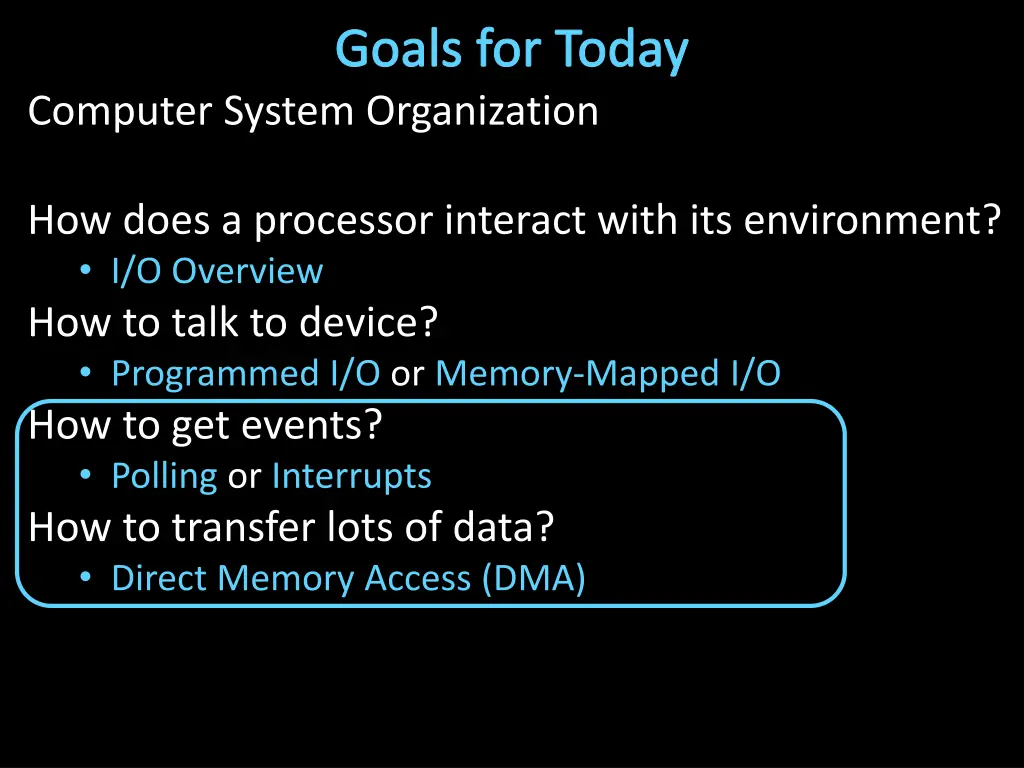
Goals for Today Computer System Organization How does a processor interact with its environment? I/O Overview How to talk to device? Programmed I/O or Memory-Mapped I/O How to get events? Polling or Interrupts How to transfer lots of data? Direct Memory Access (DMA)
Next Goal How does a processor interact with its environment?
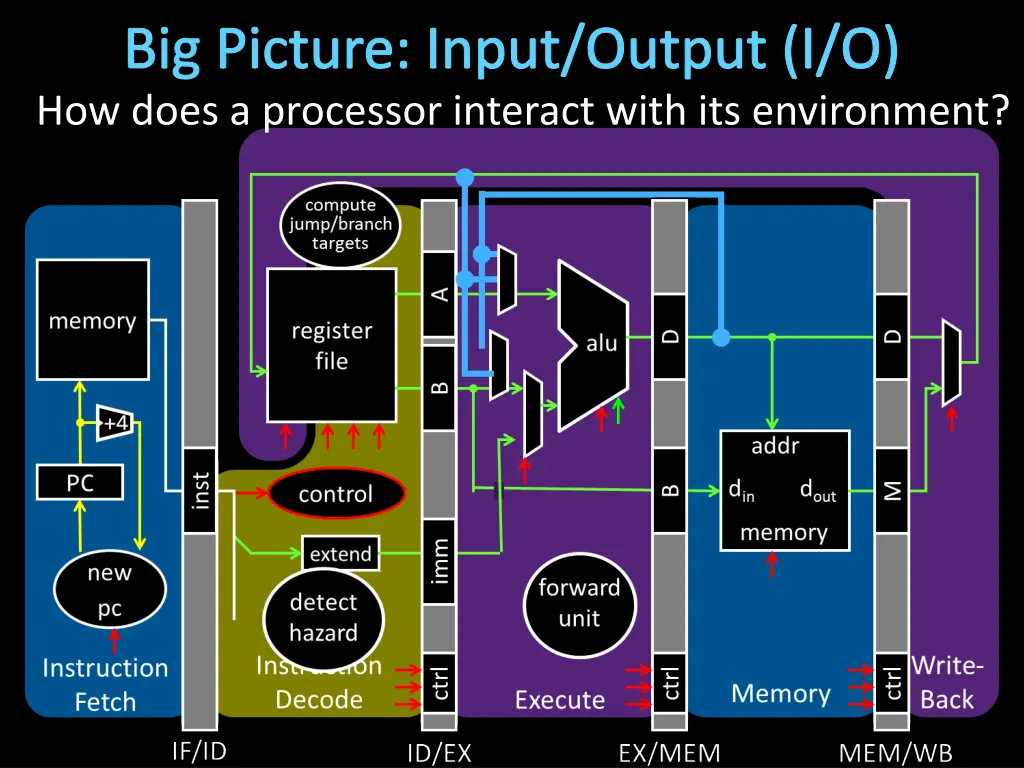
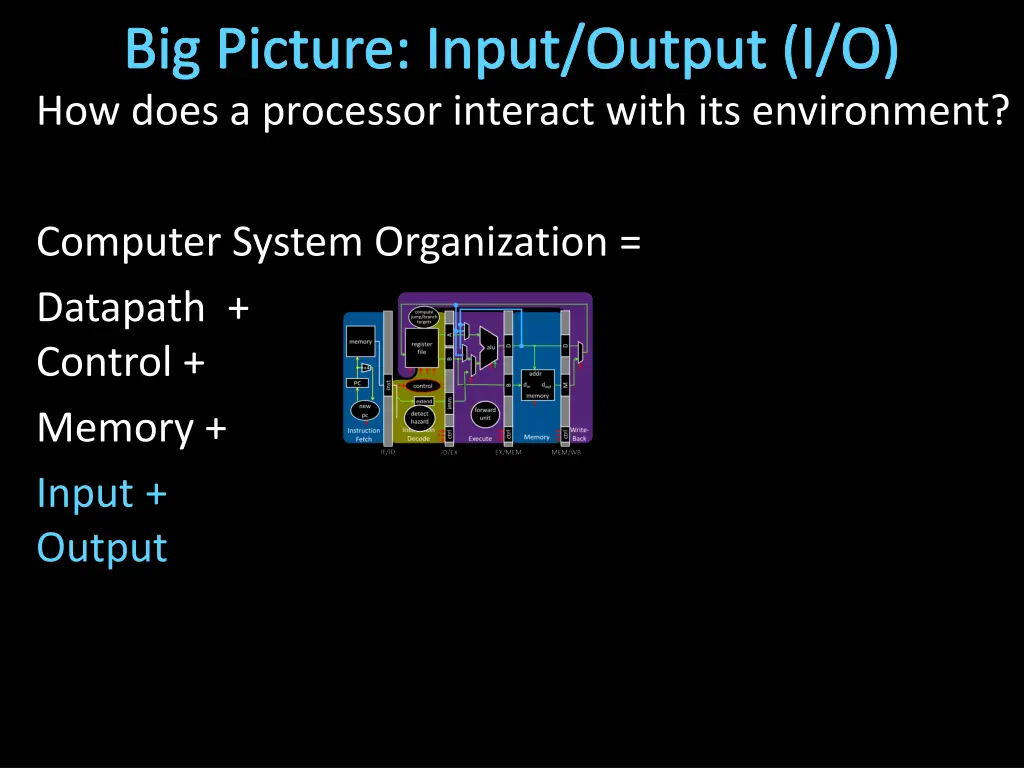
Big Picture: Input/Output (I/O) How does a processor interact with its environment?
Big Picture: Input/Output (I/O) How does a processor interact with its environment? Computer System Organization = Datapath + Control + Memory + Input + Output
I/O Devices Enables Interacting with Environment Device Behavior Partner Data Rate (b/sec)
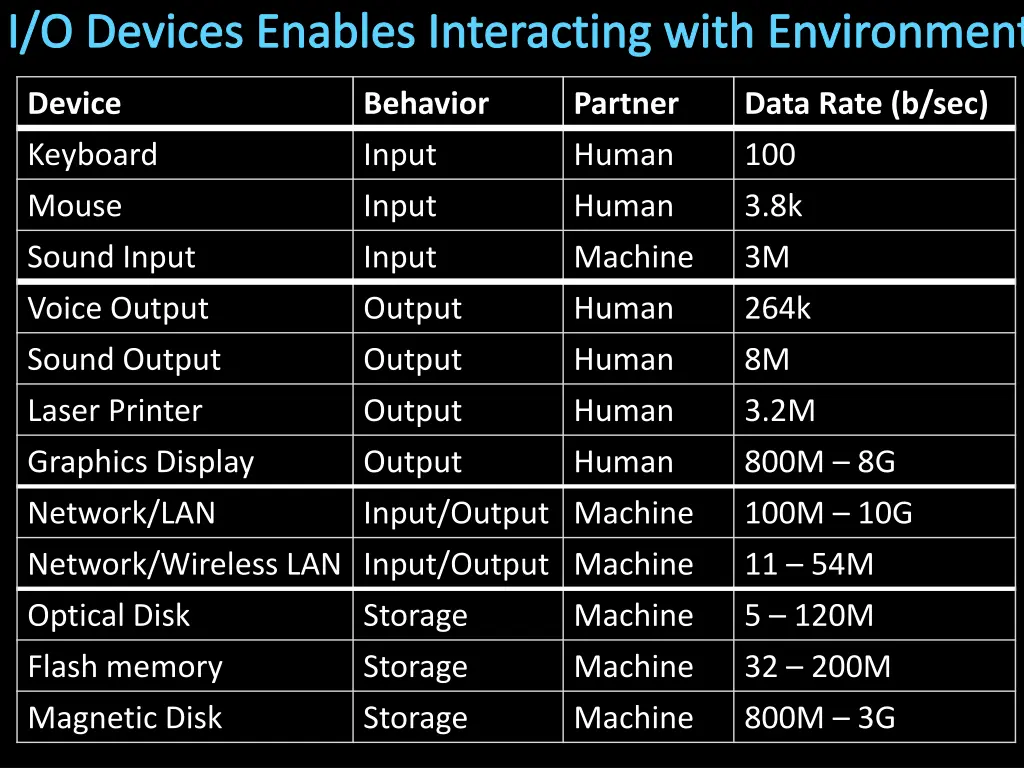
I/O Devices Enables Interacting with Environment Device Behavior Partner Data Rate (b/sec) Keyboard Input Human 100 Mouse Input Human 3.8k Sound Input Input Machine 3M Voice Output Output Human 264k Sound Output Laser Printer Output Output Human Human 8M 3.2M Graphics Display Output Human 800M 8G Network/LAN Network/Wireless LAN Input/Output Machine Input/Output Machine 100M 10G 11 54M Optical Disk Storage Machine 5 120M Flash memory Storage Machine 32 200M Magnetic Disk Storage Machine 800M 3G
Attempt#1: All devices on one interconnect Replace all devices as the interconnect changes e.g. keyboard speed == main memory speed ?! Unified Memory and I/O Interconnect Memory Display Disk Keyboard Network
Attempt#2: I/O Controllers Decouple I/O devices from Interconnect Enable smarter I/O interfaces Core0 Core1 Cache Cache Unified Memory and I/O Interconnect Memory Controller I/O I/O I/O I/O Controller Controller Controller Controller Memory Display Disk Keyboard Network
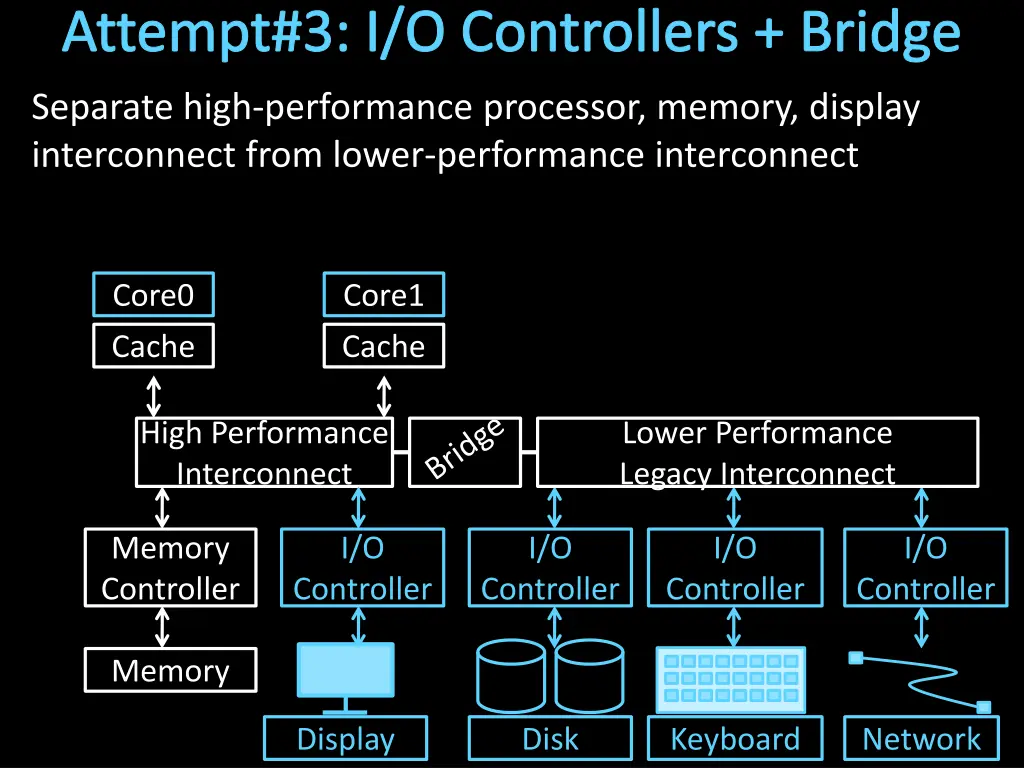
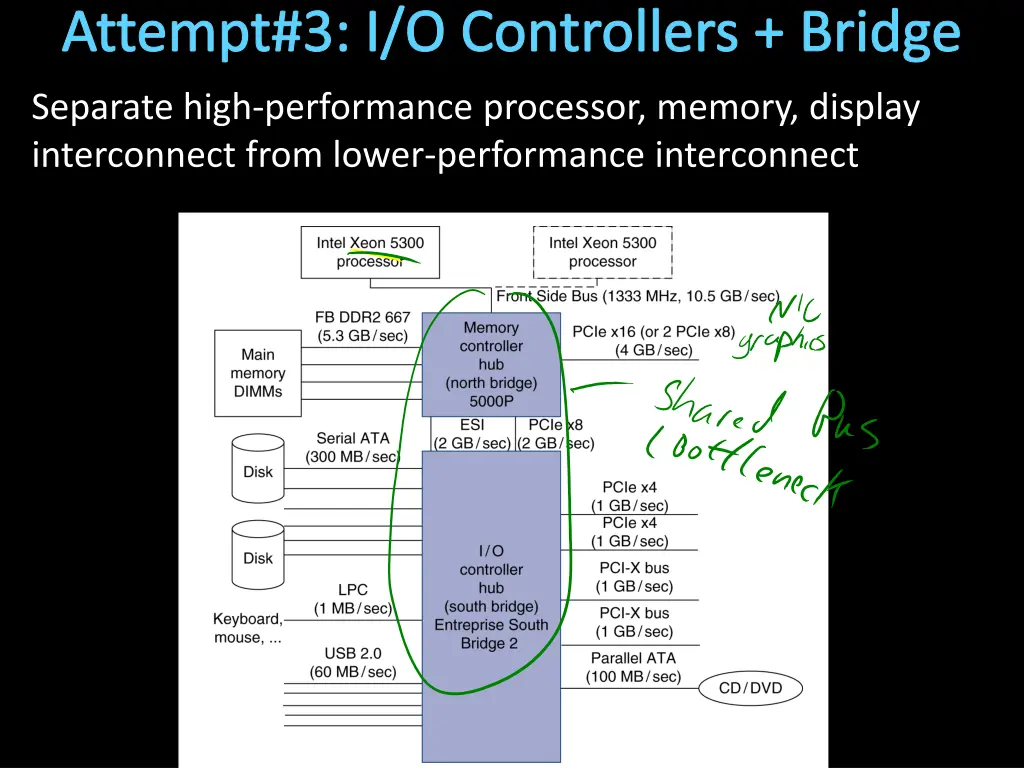
Attempt#3: I/O Controllers + Bridge Separate high-performance processor, memory, display interconnect from lower-performance interconnect Core0 Core1 Cache Cache High Performance Interconnect Lower Performance Legacy Interconnect Memory Controller I/O I/O I/O I/O Controller Controller Controller Controller Memory Display Disk Keyboard Network
Bus Parameters Width = number of wires Transfer size = data words per bus transaction Synchronous (with a bus clock) or asynchronous (no bus clock / self clocking )
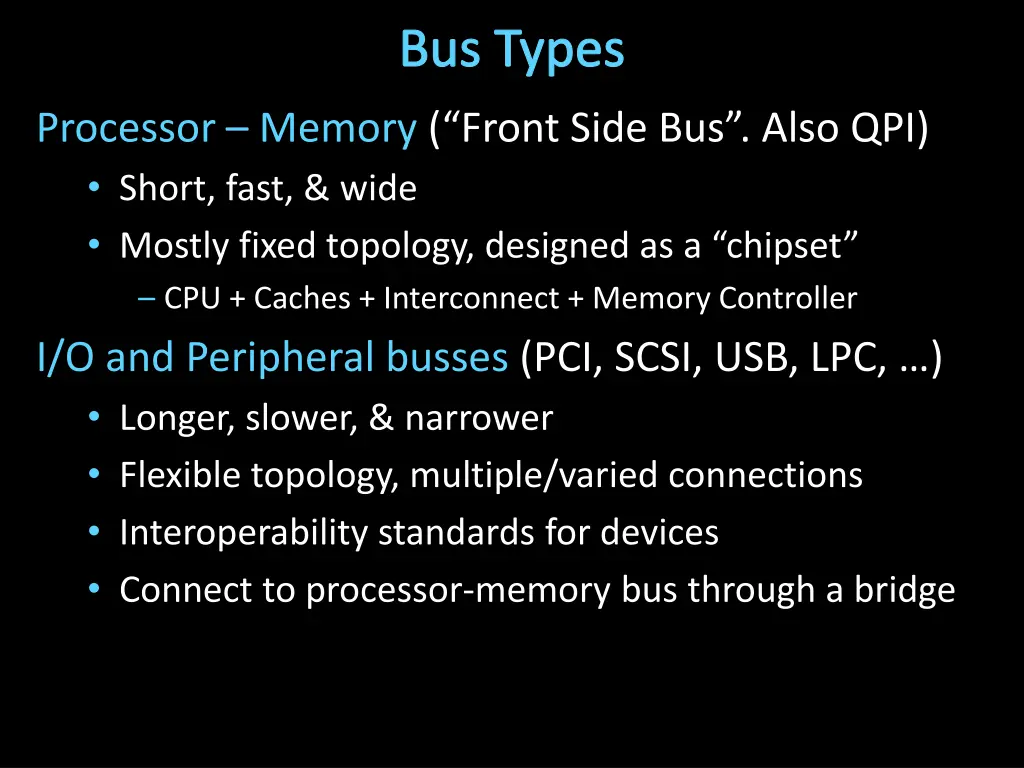
Bus Types Processor Memory ( Front Side Bus . Also QPI) Short, fast, & wide Mostly fixed topology, designed as a chipset CPU + Caches + Interconnect + Memory Controller I/O and Peripheral busses (PCI, SCSI, USB, LPC, ) Longer, slower, & narrower Flexible topology, multiple/varied connections Interoperability standards for devices Connect to processor-memory bus through a bridge
Attempt#3: I/O Controllers + Bridge Separate high-performance processor, memory, display interconnect from lower-performance interconnect
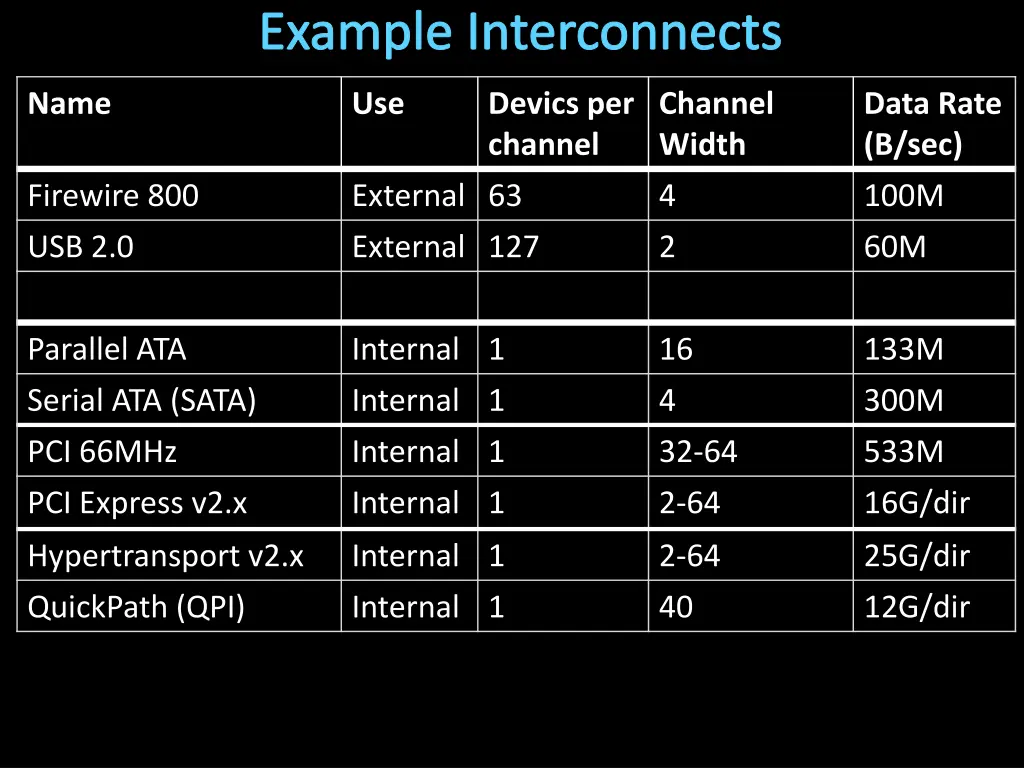
Example Interconnects Name Use Devics per channel Channel Width Data Rate (B/sec) Firewire 800 External 63 4 100M USB 2.0 External 127 2 60M Parallel ATA Serial ATA (SATA) Internal 1 Internal 1 16 4 133M 300M PCI 66MHz Internal 1 32-64 533M PCI Express v2.x Internal 1 2-64 16G/dir Hypertransport v2.x Internal 1 2-64 25G/dir QuickPath (QPI) Internal 1 40 12G/dir
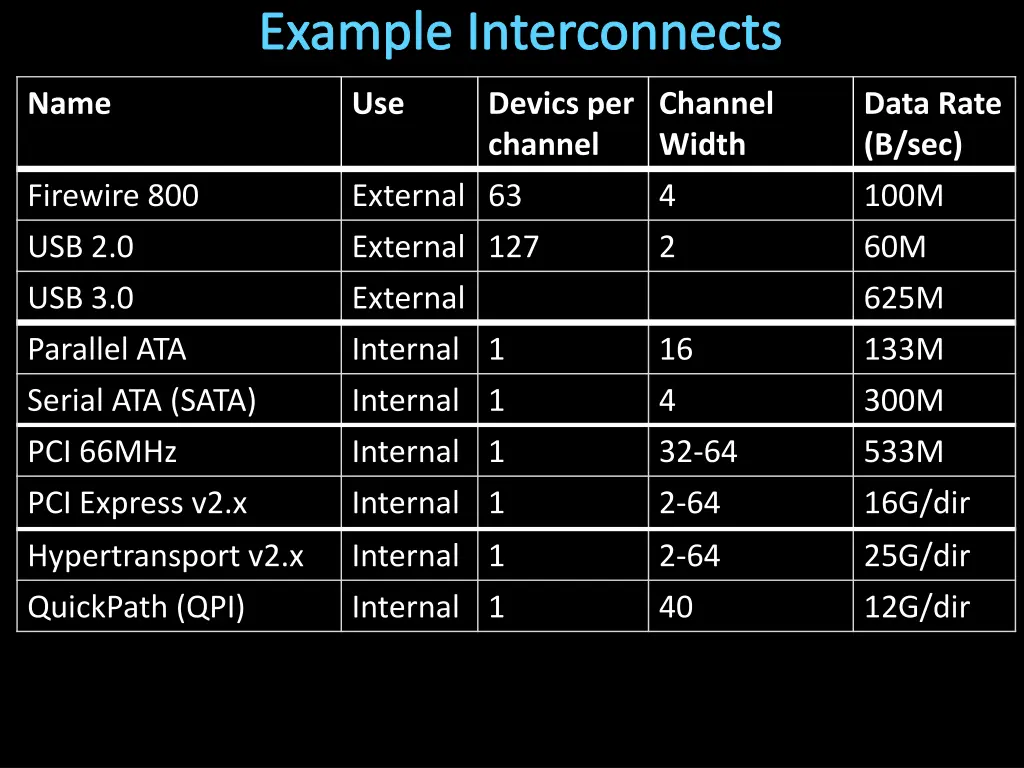
Example Interconnects Name Use Devics per channel Channel Width Data Rate (B/sec) Firewire 800 External 63 4 100M USB 2.0 External 127 2 60M USB 3.0 External 625M Parallel ATA Serial ATA (SATA) Internal 1 Internal 1 16 4 133M 300M PCI 66MHz Internal 1 32-64 533M PCI Express v2.x Internal 1 2-64 16G/dir Hypertransport v2.x Internal 1 2-64 25G/dir QuickPath (QPI) Internal 1 40 12G/dir
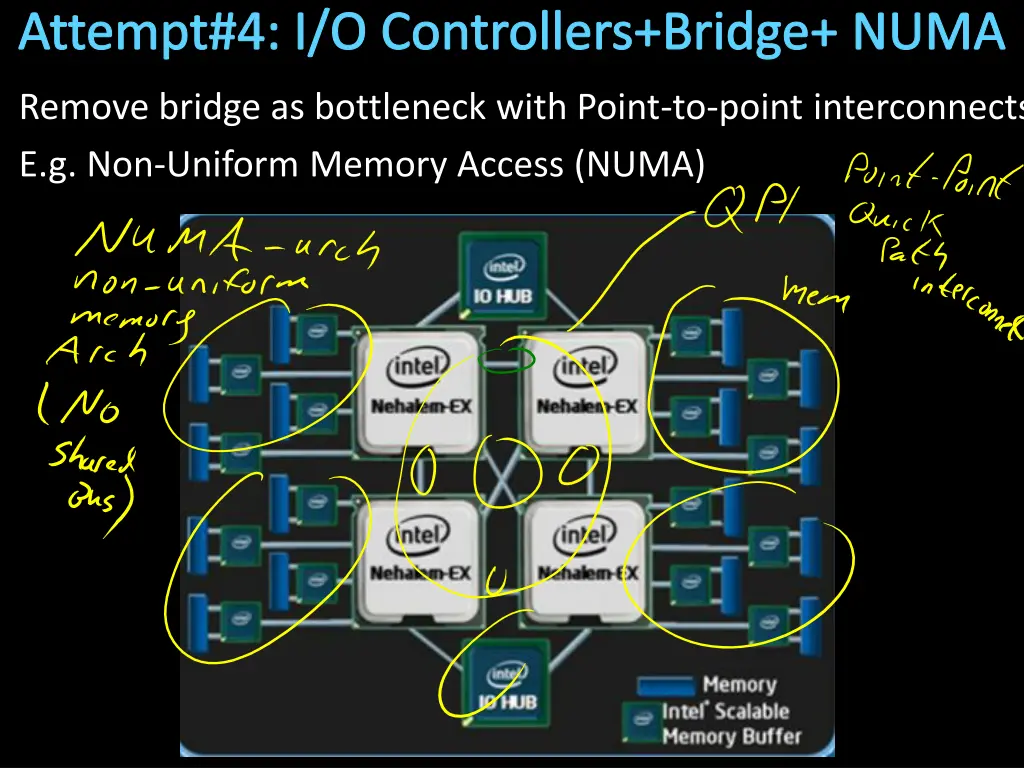
Interconnecting Components Interconnects are (were?) busses parallel set of wires for data and control shared channel multiple senders/receivers everyone can see all bus transactions bus protocol: rules for using the bus wires e.g. Intel Xeon e.g. Intel Nehalem Alternative (and increasingly common): dedicated point-to-point channels
Attempt#4: I/O Controllers+Bridge+ NUMA Remove bridge as bottleneck with Point-to-point interconnects E.g. Non-Uniform Memory Access (NUMA)
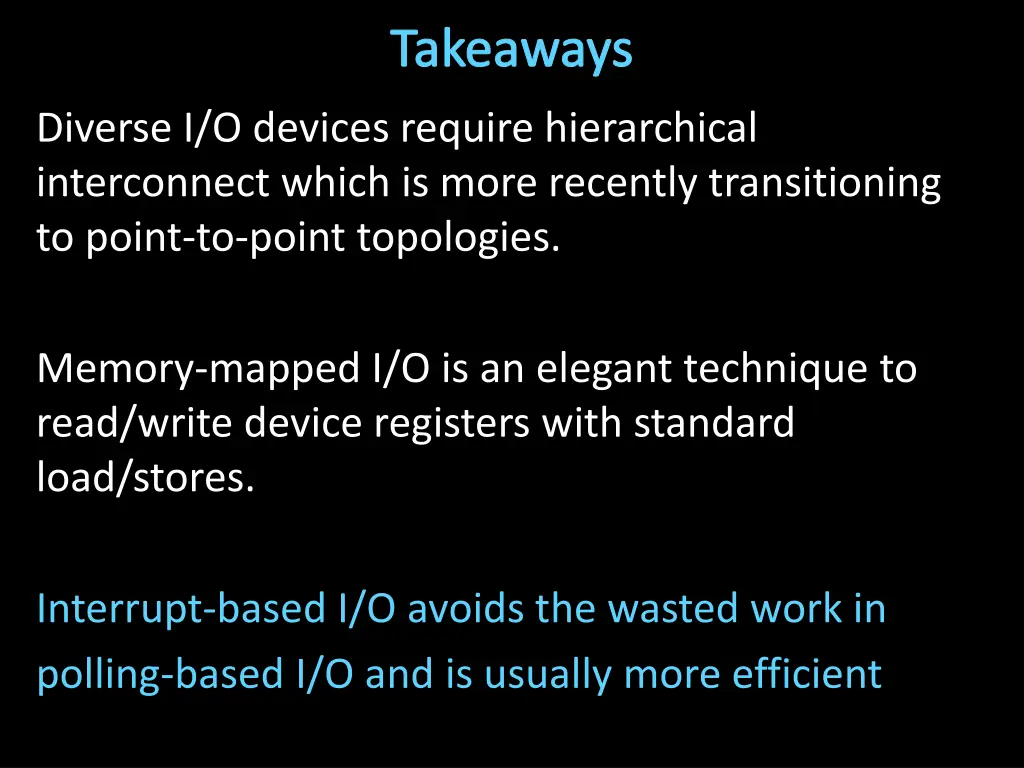
Takeaways Diverse I/O devices require hierarchical interconnect which is more recently transitioning to point-to-point topologies.
Next Goal How does the processor interact with I/O devices?
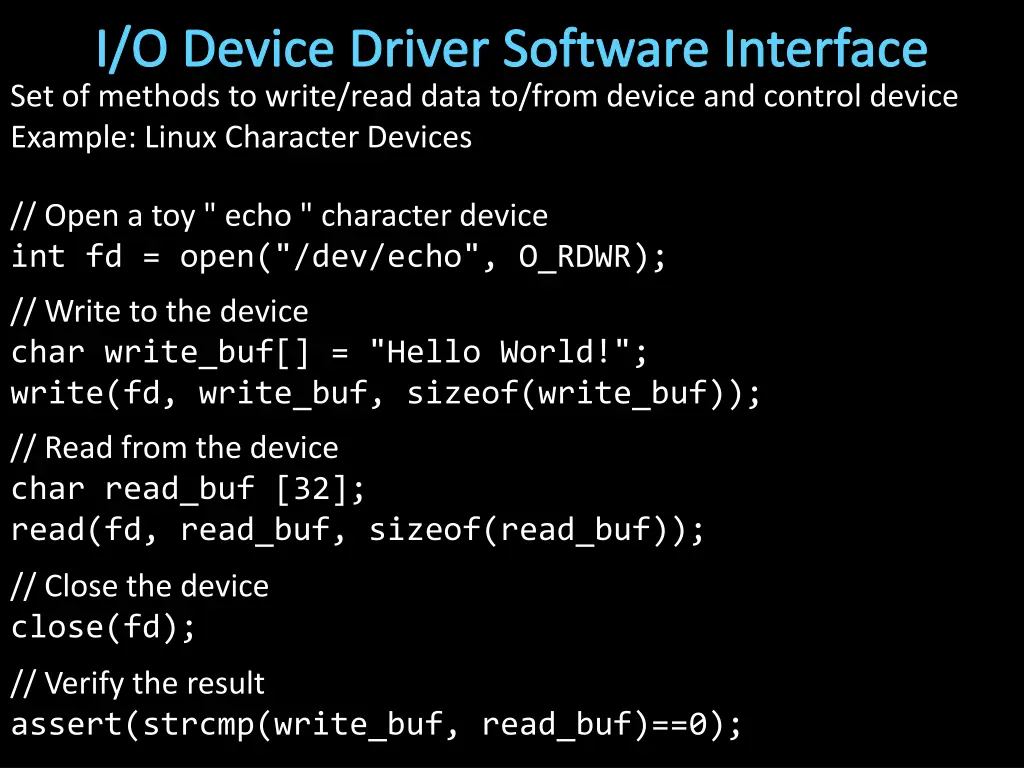
I/O Device Driver Software Interface Set of methods to write/read data to/from device and control device Example: Linux Character Devices // Open a toy " echo " character device int fd = open("/dev/echo", O_RDWR); // Write to the device char write_buf[] = "Hello World!"; write(fd, write_buf, sizeof(write_buf)); // Read from the device char read_buf [32]; read(fd, read_buf, sizeof(read_buf)); // Close the device close(fd); // Verify the result assert(strcmp(write_buf, read_buf)==0);
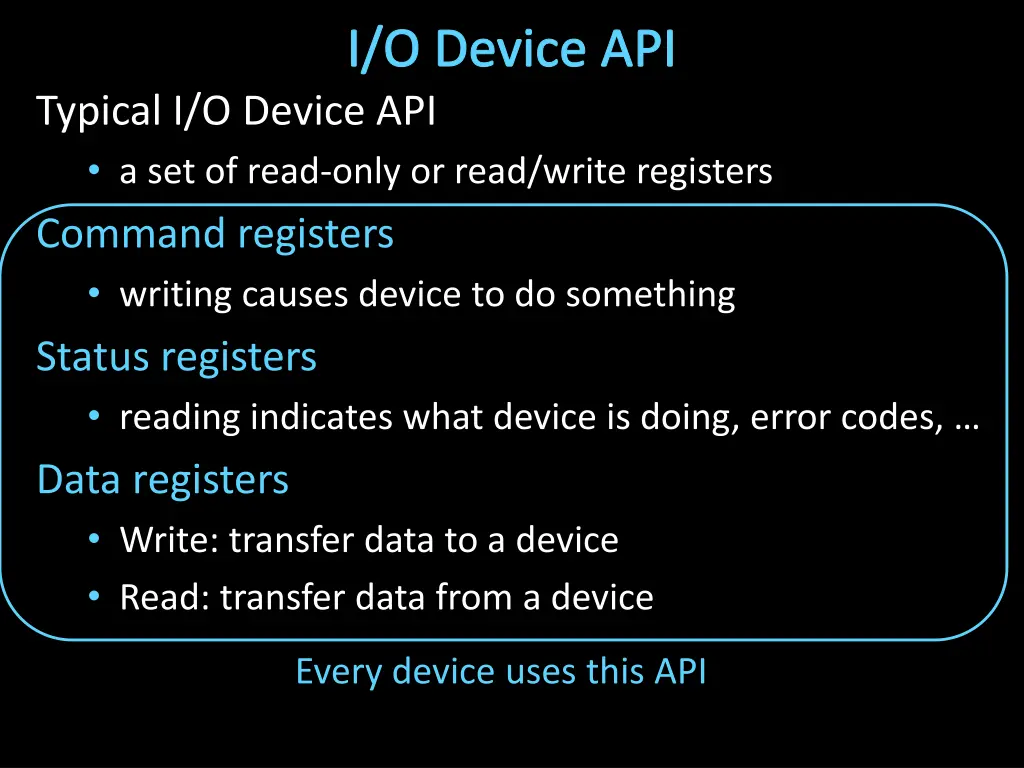
I/O Device API Typical I/O Device API a set of read-only or read/write registers Command registers writing causes device to do something Status registers reading indicates what device is doing, error codes, Data registers Write: transfer data to a device Read: transfer data from a device Every device uses this API
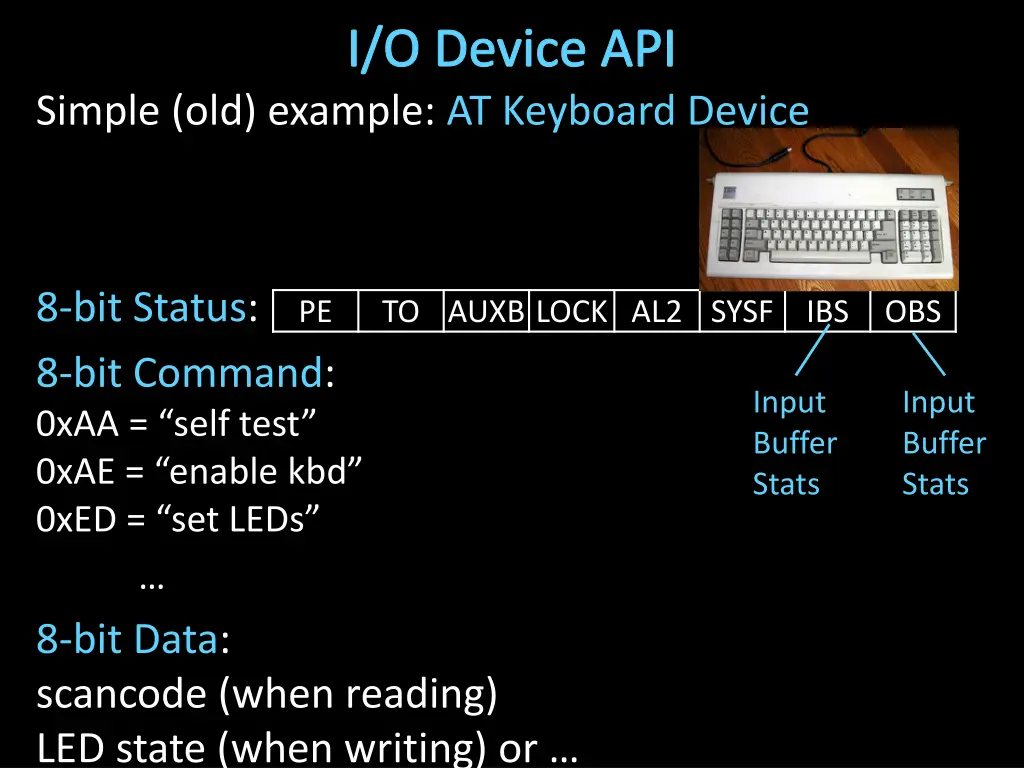
I/O Device API Simple (old) example: AT Keyboard Device 8-bit Status: 8-bit Command: 0xAA = self test 0xAE = enable kbd 0xED = set LEDs 8-bit Data: scancode (when reading) LED state (when writing) or PE TO AUXB LOCK AL2 SYSF IBS OBS Input Buffer Stats Input Buffer Stats
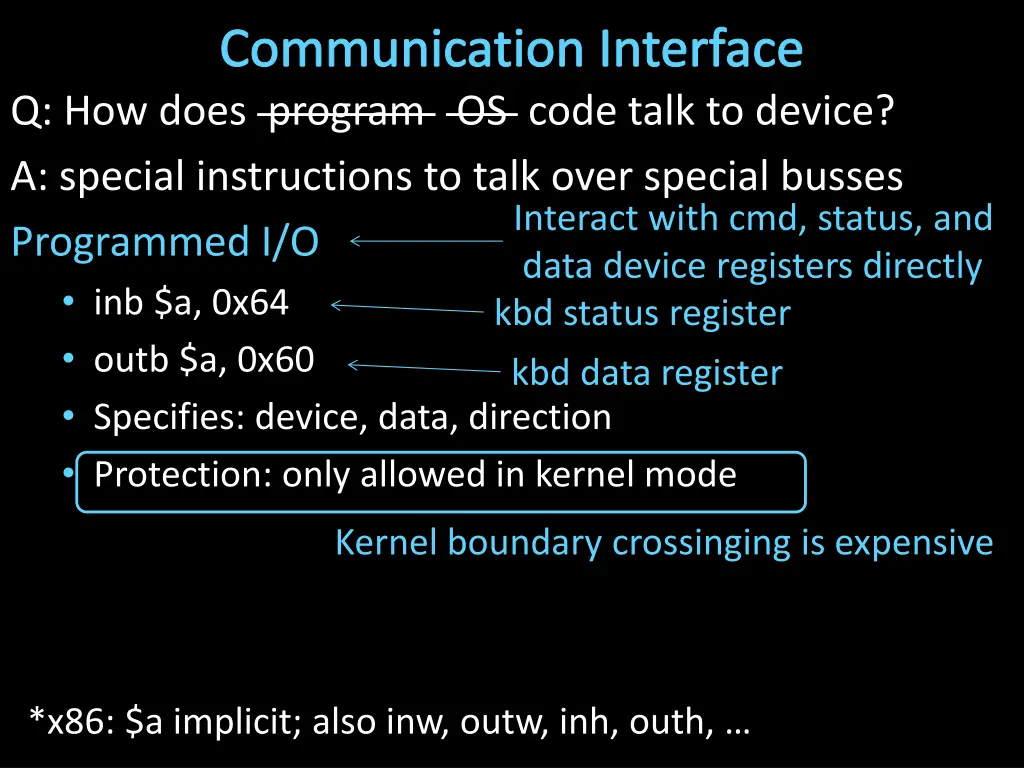
Communication Interface Q: How does program OS code talk to device? A: special instructions to talk over special busses Programmed I/O inb $a, 0x64 outb $a, 0x60 Specifies: device, data, direction Protection: only allowed in kernel mode Interact with cmd, status, and data device registers directly kbd status register kbd data register Kernel boundary crossinging is expensive *x86: $a implicit; also inw, outw, inh, outh,
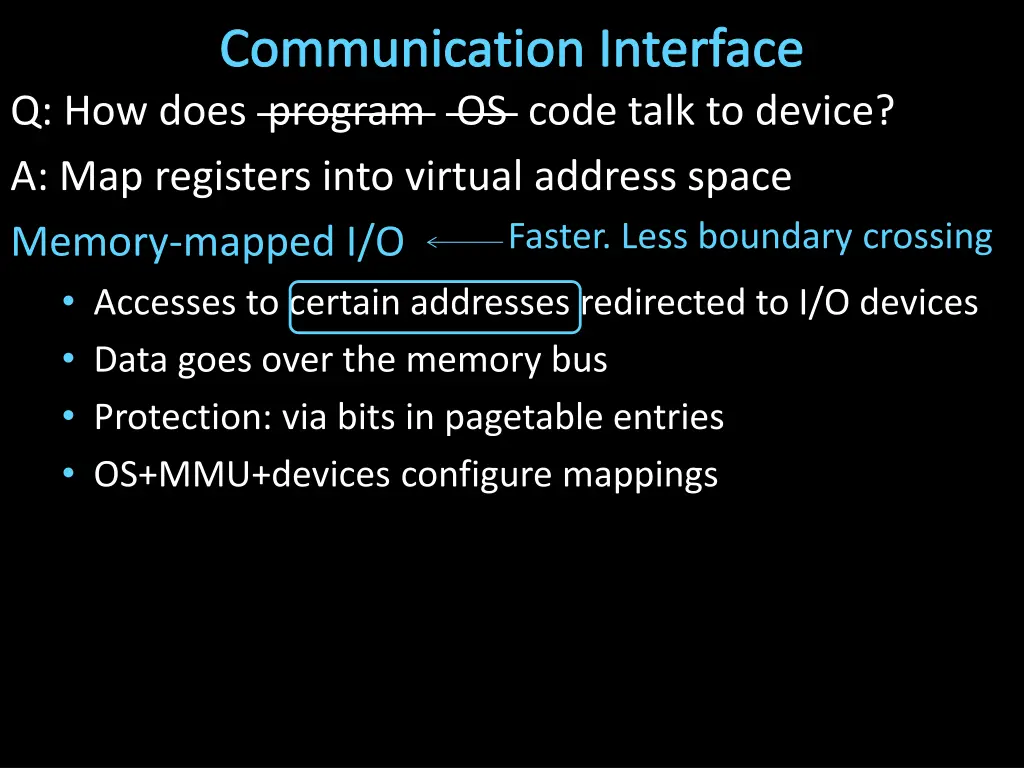
Communication Interface Q: How does program OS code talk to device? A: Map registers into virtual address space Memory-mapped I/O Accesses to certain addresses redirected to I/O devices Data goes over the memory bus Protection: via bits in pagetable entries OS+MMU+devices configure mappings Faster. Less boundary crossing
Memory-Mapped I/O 0xFFFF FFFF I/O Controller Display 0x00FF FFFF I/O Controller Virtual Address Space Disk Physical Address Space I/O Controller Keyboard I/O Controller Network 0x0000 0000 0x0000 0000
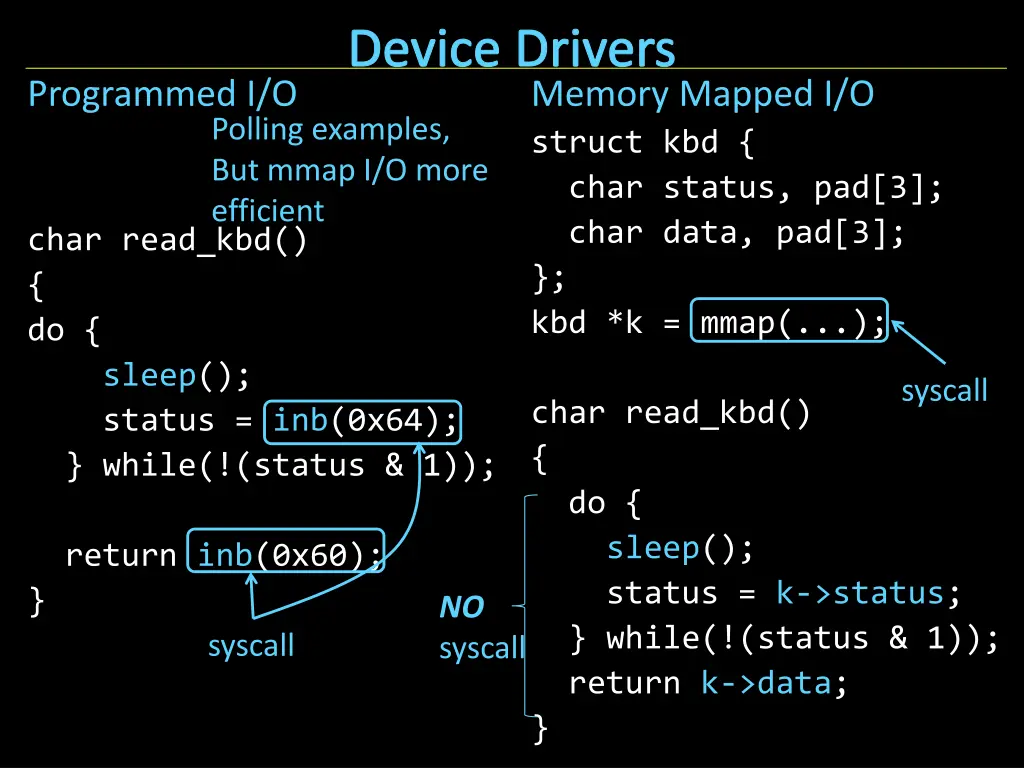
Device Drivers Programmed I/O Memory Mapped I/O struct kbd { char status, pad[3]; char data, pad[3]; }; kbd *k = mmap(...); Polling examples, But mmap I/O more efficient char read_kbd() { do { sleep(); status = inb(0x64); } while(!(status & 1)); syscall char read_kbd() { do { sleep(); status = k->status; } while(!(status & 1)); return k->data; } return inb(0x60); } NO syscall syscall
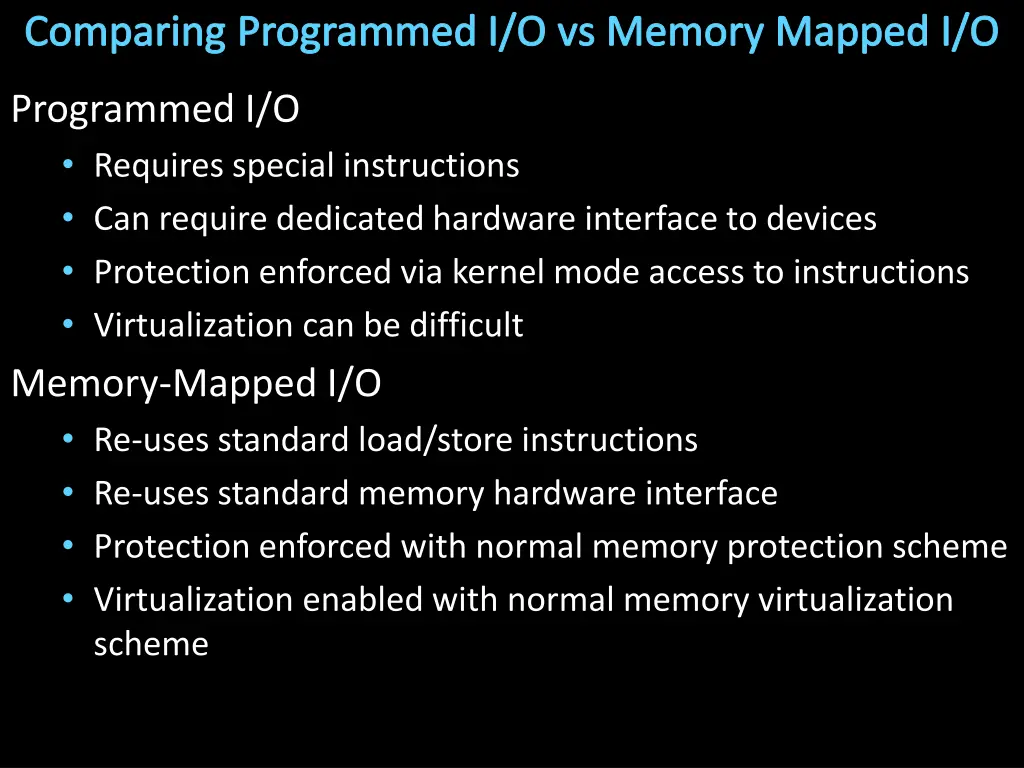
Comparing Programmed I/O vs Memory Mapped I/O Programmed I/O Requires special instructions Can require dedicated hardware interface to devices Protection enforced via kernel mode access to instructions Virtualization can be difficult Memory-Mapped I/O Re-uses standard load/store instructions Re-uses standard memory hardware interface Protection enforced with normal memory protection scheme Virtualization enabled with normal memory virtualization scheme
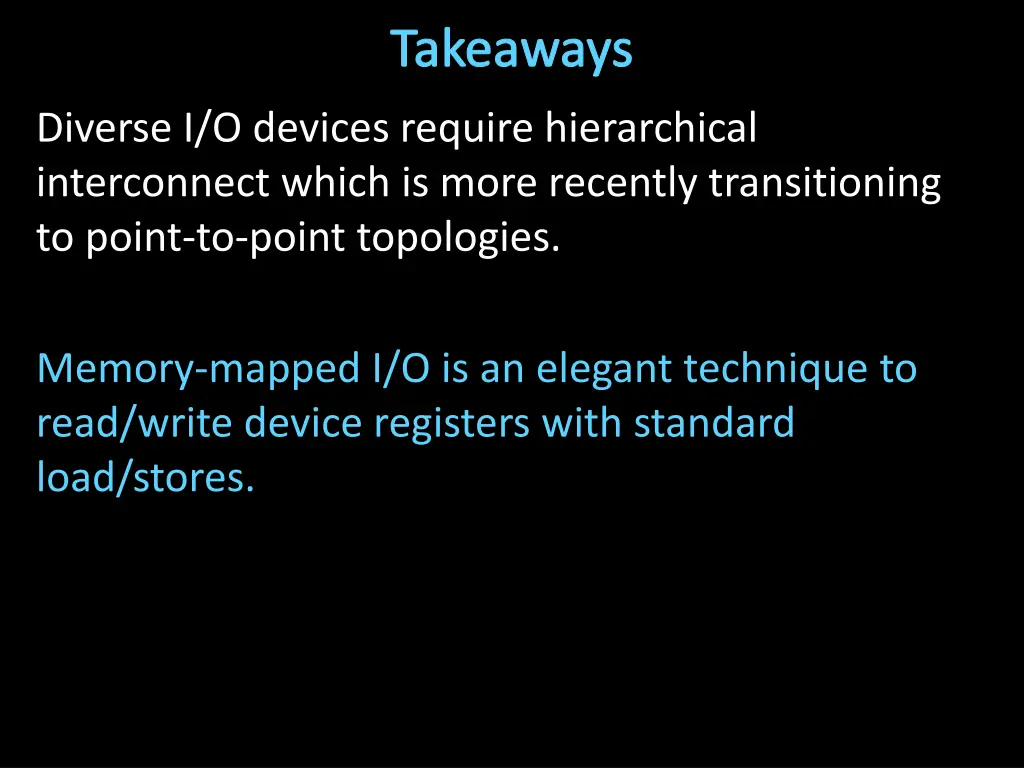
Takeaways Diverse I/O devices require hierarchical interconnect which is more recently transitioning to point-to-point topologies. Memory-mapped I/O is an elegant technique to read/write device registers with standard load/stores.
Next Goal How does the processor know device is ready/done?
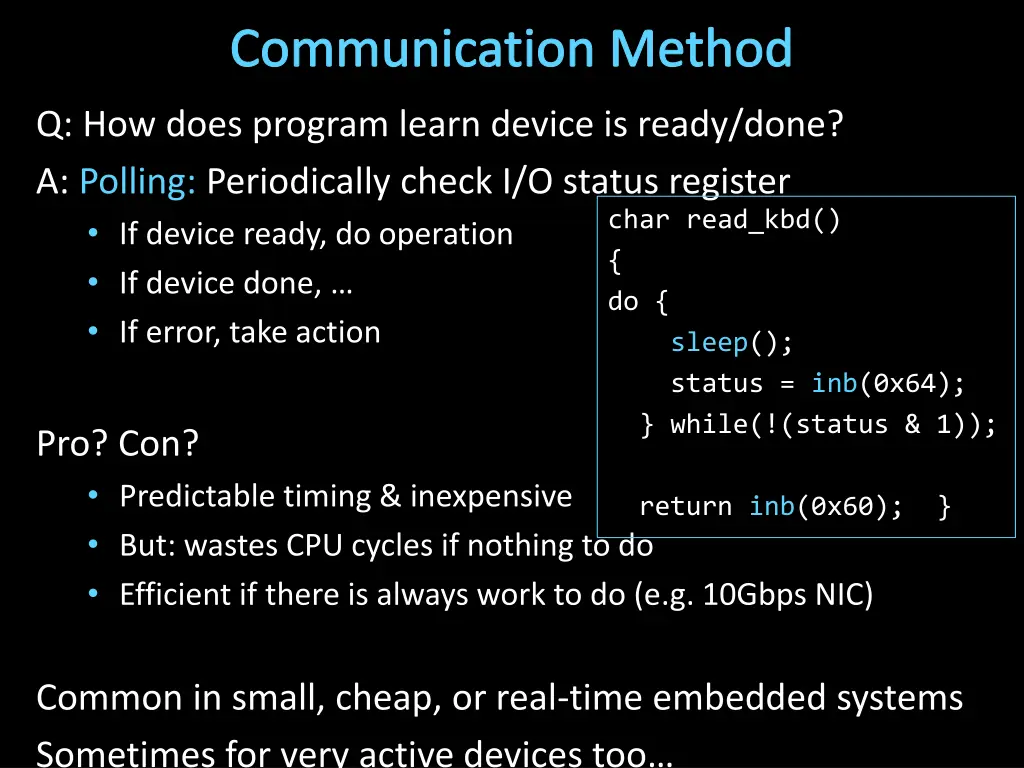
Communication Method Q: How does program learn device is ready/done? A: Polling: Periodically check I/O status register If device ready, do operation If device done, If error, take action char read_kbd() { do { sleep(); status = inb(0x64); } while(!(status & 1)); Pro? Con? Predictable timing & inexpensive But: wastes CPU cycles if nothing to do Efficient if there is always work to do (e.g. 10Gbps NIC) return inb(0x60); } Common in small, cheap, or real-time embedded systems Sometimes for very active devices too
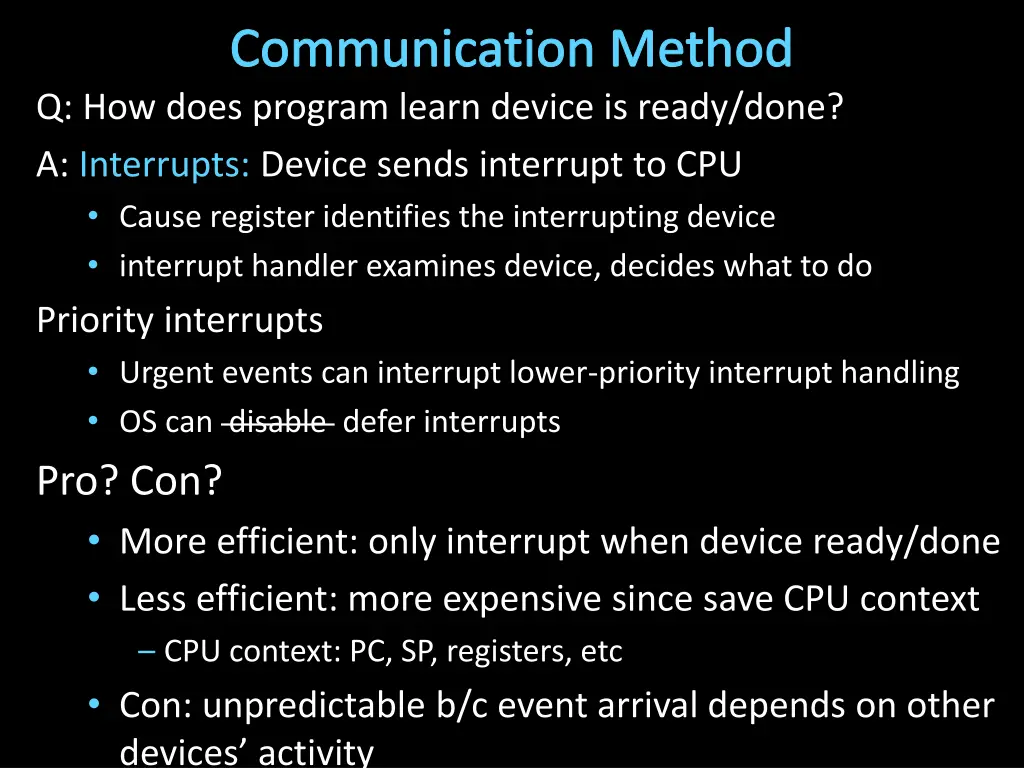
Communication Method Q: How does program learn device is ready/done? A: Interrupts: Device sends interrupt to CPU Cause register identifies the interrupting device interrupt handler examines device, decides what to do Priority interrupts Urgent events can interrupt lower-priority interrupt handling OS can disable defer interrupts Pro? Con? More efficient: only interrupt when device ready/done Less efficient: more expensive since save CPU context CPU context: PC, SP, registers, etc Con: unpredictable b/c event arrival depends on other devices activity
Takeaways Diverse I/O devices require hierarchical interconnect which is more recently transitioning to point-to-point topologies. Memory-mapped I/O is an elegant technique to read/write device registers with standard load/stores. Interrupt-based I/O avoids the wasted work in polling-based I/O and is usually more efficient
Next Goal How do we transfer a lot of data efficiently?
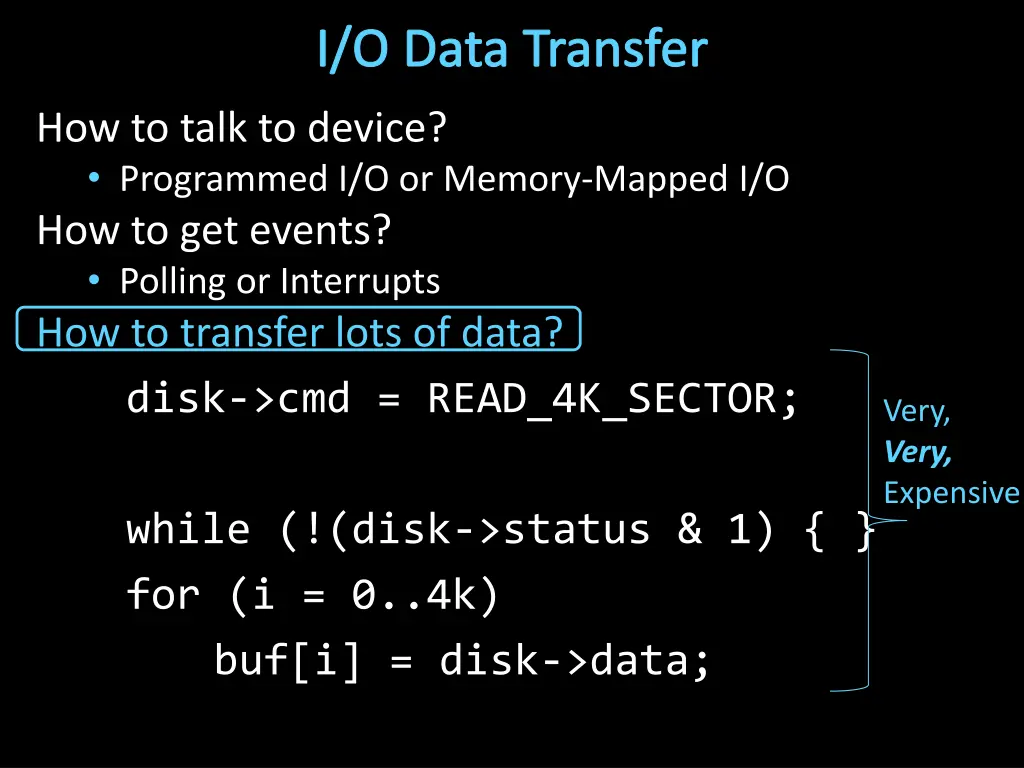
I/O Data Transfer How to talk to device? Programmed I/O or Memory-Mapped I/O How to get events? Polling or Interrupts How to transfer lots of data? disk->cmd = READ_4K_SECTOR; Very, Very, Expensive while (!(disk->status & 1) { } for (i = 0..4k) buf[i] = disk->data;
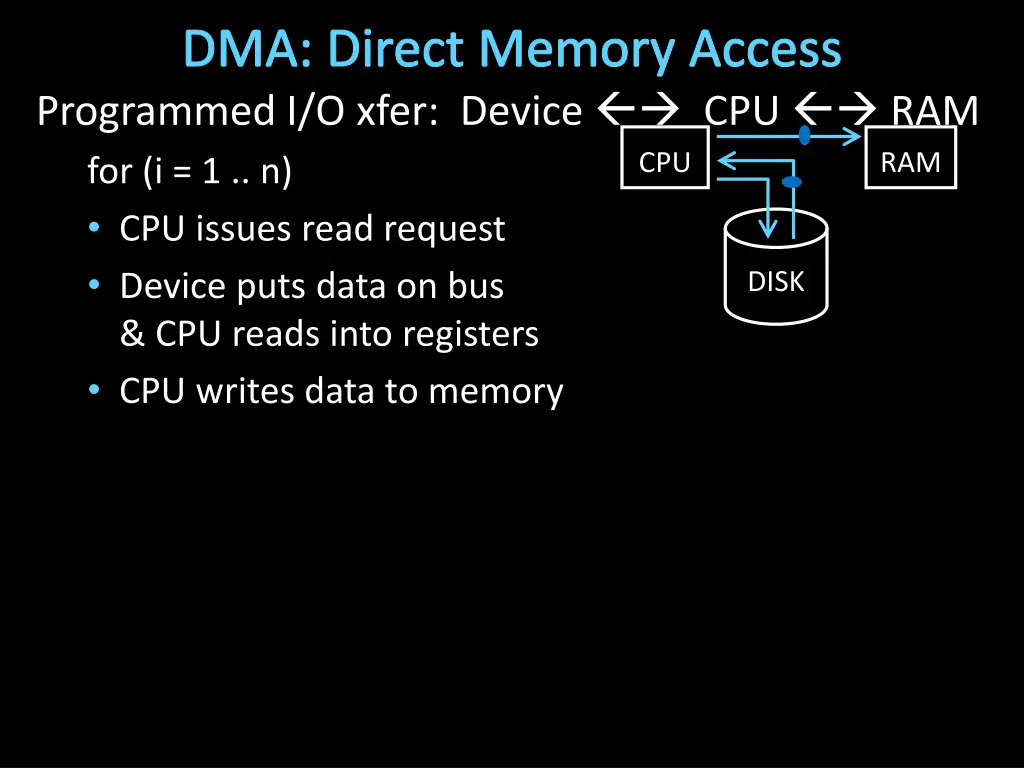
I/O Data Transfer Programmed I/O xfer: Device CPU RAM for (i = 1 .. n) CPU issues read request Device puts data on bus & CPU reads into registers CPU writes data to memory Not efficient CPU RAM DISK Read from Disk Write to Memory Everything interrupts CPU Wastes CPU
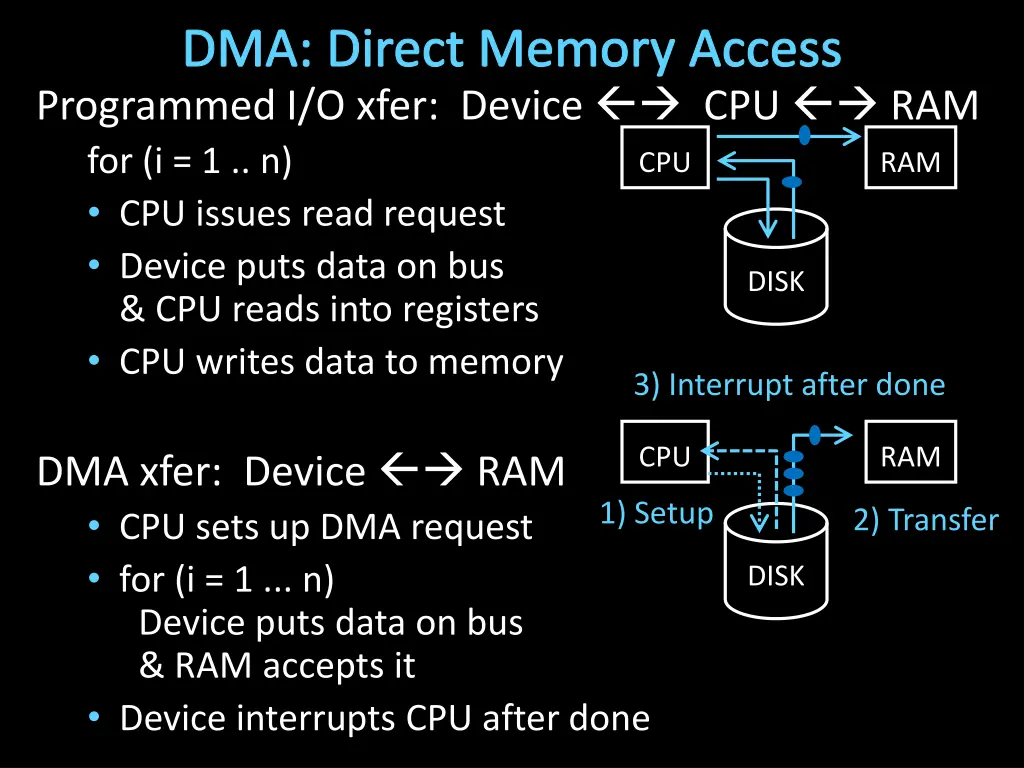
I/O Data Transfer Q: How to transfer lots of data efficiently? A: Have device access memory directly Direct memory access (DMA) 1) OS provides starting address, length 2) controller (or device) transfers data autonomously 3) Interrupt on completion / error
DMA: Direct Memory Access Programmed I/O xfer: Device CPU RAM for (i = 1 .. n) CPU issues read request Device puts data on bus & CPU reads into registers CPU writes data to memory CPU RAM DISK
DMA: Direct Memory Access Programmed I/O xfer: Device CPU RAM for (i = 1 .. n) CPU issues read request Device puts data on bus & CPU reads into registers CPU writes data to memory CPU RAM DISK 3) Interrupt after done CPU RAM DMA xfer: Device RAM CPU sets up DMA request for (i = 1 ... n) Device puts data on bus & RAM accepts it Device interrupts CPU after done 1) Setup 2) Transfer DISK
DMA Example DMA example: reading from audio (mic) input DMA engine on audio device or I/O controller or int dma_size = 4*PAGE_SIZE; int *buf = alloc_dma(dma_size); ... dev->mic_dma_baseaddr = (int)buf; dev->mic_dma_count = dma_len; dev->cmd = DEV_MIC_INPUT | DEV_INTERRUPT_ENABLE | DEV_DMA_ENABLE;
DMA Issues (1): Addressing Issue #1: DMA meets Virtual Memory RAM: physical addresses Programs: virtual addresses CPU MMU RAM DISK Solution: DMA uses physical addresses OS uses physical address when setting up DMA OS allocates contiguous physical pages for DMA Or: OS splits xfer into page-sized chunks (many devices support DMA chains for this reason)
DMA Example DMA example: reading from audio (mic) input DMA engine on audio device or I/O controller or int dma_size = 4*PAGE_SIZE; void *buf = alloc_dma(dma_size); ... dev->mic_dma_baseaddr = virt_to_phys(buf); dev->mic_dma_count = dma_len; dev->cmd = DEV_MIC_INPUT | DEV_INTERRUPT_ENABLE | DEV_DMA_ENABLE;
DMA Issues (1): Addressing Issue #1: DMA meets Virtual Memory RAM: physical addresses Programs: virtual addresses CPU MMU RAM uTLB DISK Solution 2: DMA uses virtual addresses OS sets up mappings on a mini-TLB
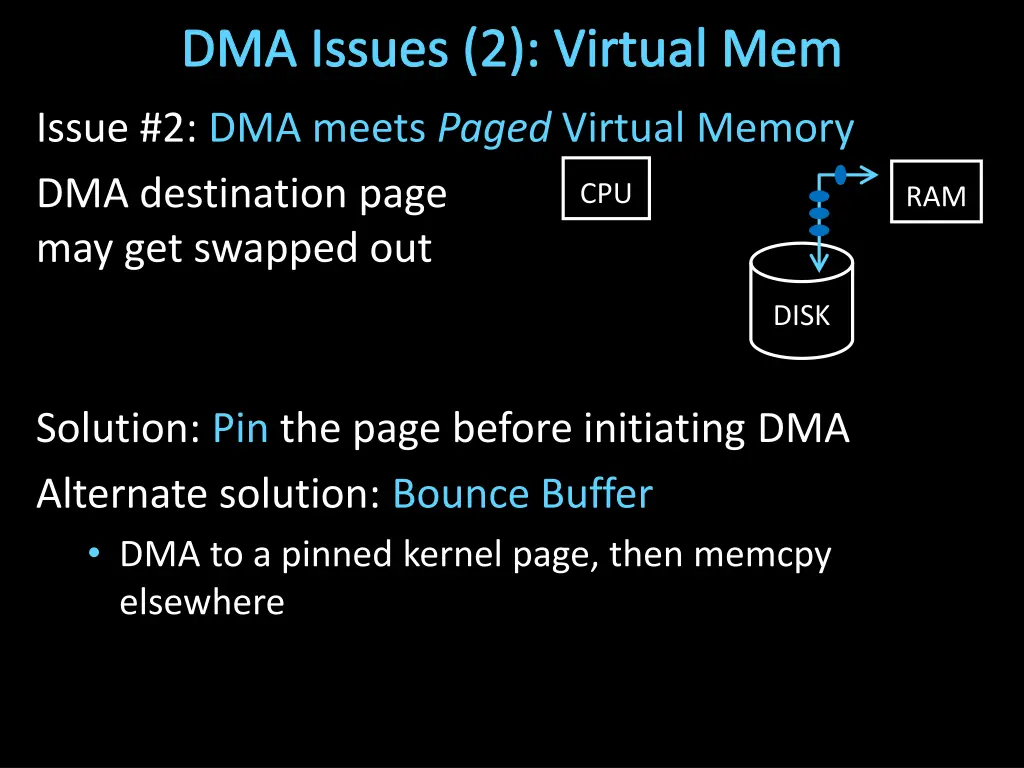
DMA Issues (2): Virtual Mem Issue #2: DMA meets Paged Virtual Memory DMA destination page may get swapped out CPU RAM DISK Solution: Pin the page before initiating DMA Alternate solution: Bounce Buffer DMA to a pinned kernel page, then memcpy elsewhere
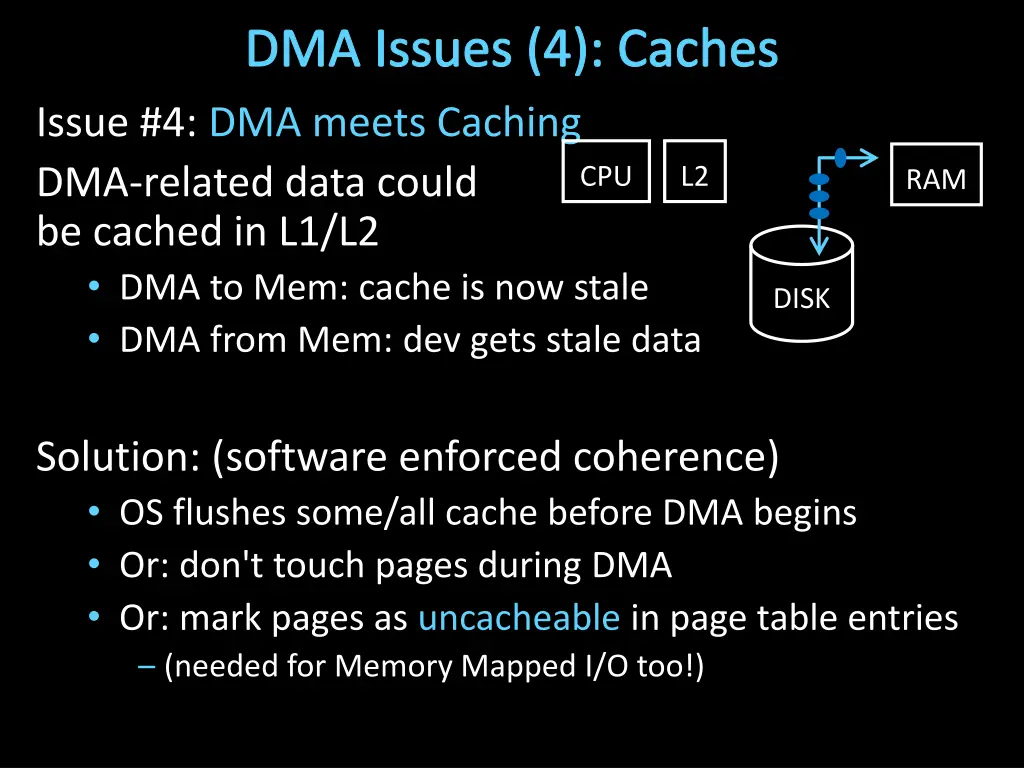
DMA Issues (4): Caches Issue #4: DMA meets Caching DMA-related data could be cached in L1/L2 DMA to Mem: cache is now stale DMA from Mem: dev gets stale data CPU L2 RAM DISK Solution: (software enforced coherence) OS flushes some/all cache before DMA begins Or: don't touch pages during DMA Or: mark pages as uncacheable in page table entries (needed for Memory Mapped I/O too!)
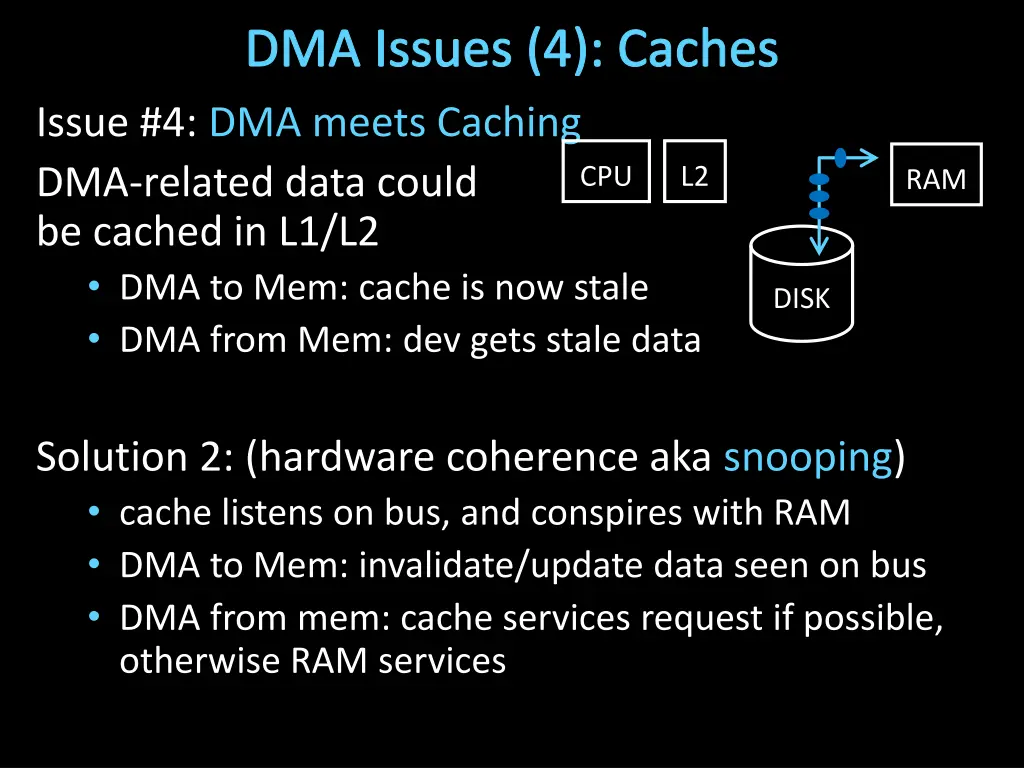
DMA Issues (4): Caches Issue #4: DMA meets Caching DMA-related data could be cached in L1/L2 DMA to Mem: cache is now stale DMA from Mem: dev gets stale data CPU L2 RAM DISK Solution 2: (hardware coherence aka snooping) cache listens on bus, and conspires with RAM DMA to Mem: invalidate/update data seen on bus DMA from mem: cache services request if possible, otherwise RAM services
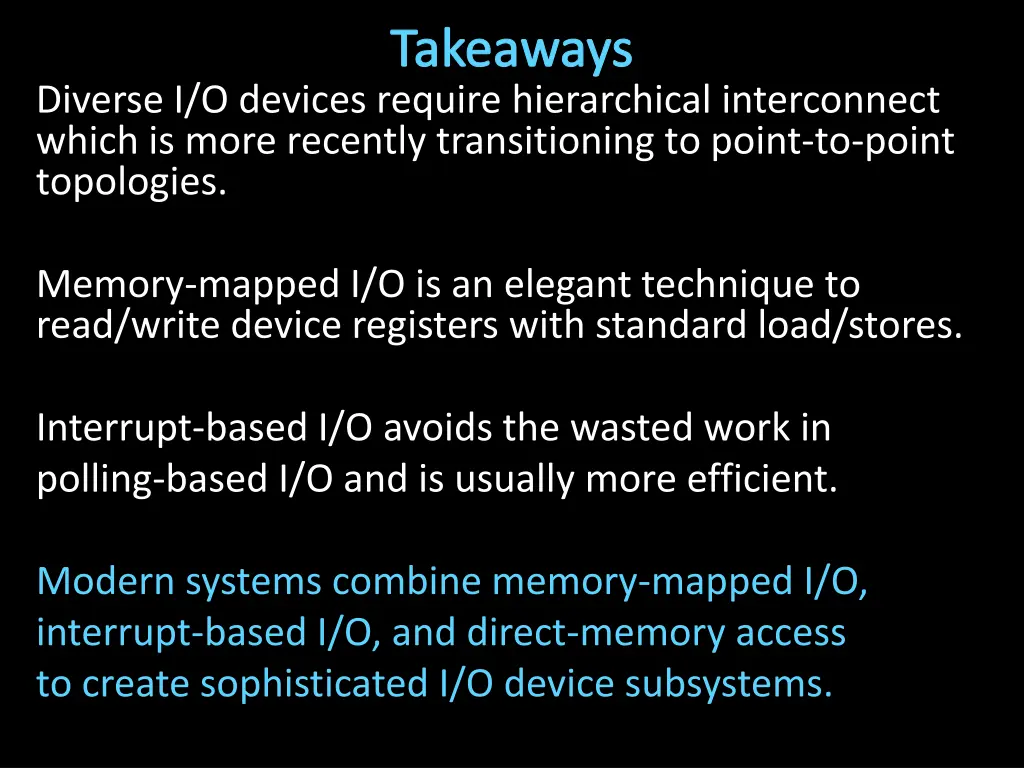
Takeaways Diverse I/O devices require hierarchical interconnect which is more recently transitioning to point-to-point topologies. Memory-mapped I/O is an elegant technique to read/write device registers with standard load/stores. Interrupt-based I/O avoids the wasted work in polling-based I/O and is usually more efficient. Modern systems combine memory-mapped I/O, interrupt-based I/O, and direct-memory access to create sophisticated I/O device subsystems.
I/O Summary How to talk to device? Programmed I/O or Memory-Mapped I/O How to get events? Polling or Interrupts How to transfer lots of data? DMA
Administrivia Project3 submit souped up bot to CMS Project3 Cache Race Games night Monday, May 5th, 5pm Come, eat, drink, have fun and be merry! Location: B11 Kimball Hall Prelim2: Today, Thursday, Maynd in evening Time: We will start at 7:30pm sharp, so come early Two Locations: OLN155 and URSG01 If NetID begins with a to g , then go to OLN155 (Olin Hall rm 155) If NetID begins with h to z , then go to URSG01 (Uris Hall rm G01) Project4: Design Doc due May 7th, bring design doc to mtg May 5-7 Demos: May 13 and 14 Will not be able to use slip days
Administrivia Next 2 weeks Prelim2 Today, Thu May 1st : 7:30-9:30 Olin 155: Netid [a-g]* Uris G01: Netid [h-z]* Proj3 tournament: Mon May 5 5pm-7pm (Pizza!) Location: Kimball B11 Proj4 design doc meetings May 5-7 (doc ready for mtg) Final Project for class Proj4 due Wed May 14 Proj4 demos: May 13 and 14 Proj 4 release: in labs this week Remember: No slip days for PA4