Effective PowerPoint Presentation Guidelines
In creating a powerful PowerPoint presentation, it's essential to employ strategic design elements and content organization. Emphasize impactful visuals, limit text, use consistent imagery, and maintain a logical structure to engage and inform your audience effectively.

Download Presentation

Please find below an Image/Link to download the presentation.
The content on the website is provided AS IS for your information and personal use only. It may not be sold, licensed, or shared on other websites without obtaining consent from the author.If you encounter any issues during the download, it is possible that the publisher has removed the file from their server.
You are allowed to download the files provided on this website for personal or commercial use, subject to the condition that they are used lawfully. All files are the property of their respective owners.
The content on the website is provided AS IS for your information and personal use only. It may not be sold, licensed, or shared on other websites without obtaining consent from the author.
E N D
Presentation Transcript
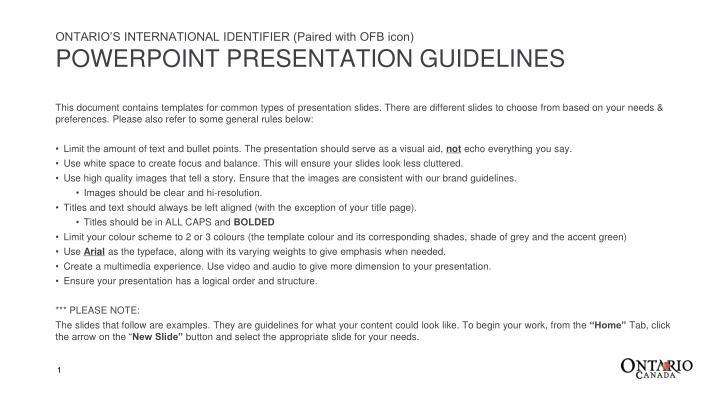
ONTARIOS INTERNATIONAL IDENTIFIER (Paired with OFB icon) POWERPOINT PRESENTATION GUIDELINES This document contains templates for common types of presentation slides. There are different slides to choose from based on your needs & preferences. Please also refer to some general rules below: Limit the amount of text and bullet points. The presentation should serve as a visual aid, not echo everything you say. Use white space to create focus and balance. This will ensure your slides look less cluttered. Use high quality images that tell a story. Ensure that the images are consistent with our brand guidelines. Images should be clear and hi-resolution. Titles and text should always be left aligned (with the exception of your title page). Titles should be in ALL CAPS and BOLDED Limit your colour scheme to 2 or 3 colours (the template colour and its corresponding shades, shade of grey and the accent green) Use Arial as the typeface, along with its varying weights to give emphasis when needed. Create a multimedia experience. Use video and audio to give more dimension to your presentation. Ensure your presentation has a logical order and structure. *** PLEASE NOTE: The slides that follow are examples. They are guidelines for what your content could look like. To begin your work, from the Home Tab, click the arrow on the New Slide button and select the appropriate slide for your needs. 1
TABLE SLIDE LOREM DERGUIT DOROLIS BIPSUM SINUGHUT 3.9% Ipsum 100.2 Ipsum 1 99 4.9% Dolorus 106.2 Ipsum 2 76 4.9% Sectium 189.3 Sectium 1 65 7.9% Solures 176.6 Sectium 2 26 3.5% Loresuior 165.4 Dolorus 3 65 5
GRAPH SLIDE EXAMPLE ONE Item Name 1 Item Name 2 Item Name 3 21 18 17 17 12 12 10 1 9 8 8 7 7 5 5 6
GRAPH SLIDE EXAMPLE 3 Item Name 1 Item Name 2 Item Name 3 7