In-Class Scheduling Exercise - Precedence Diagram Network
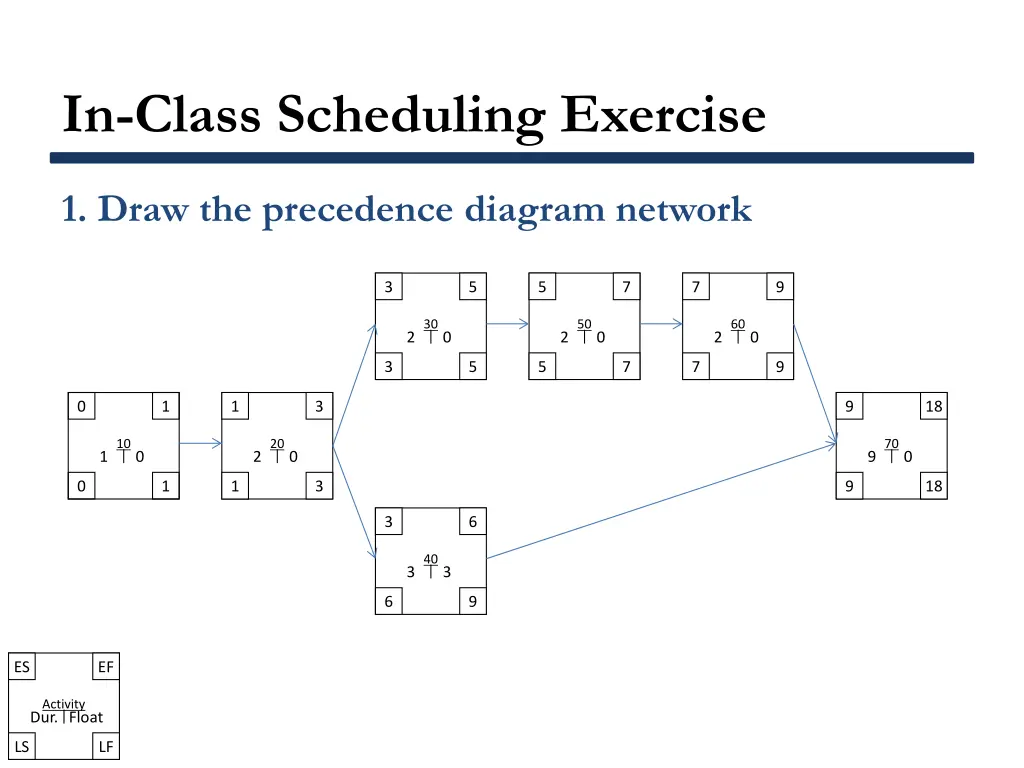
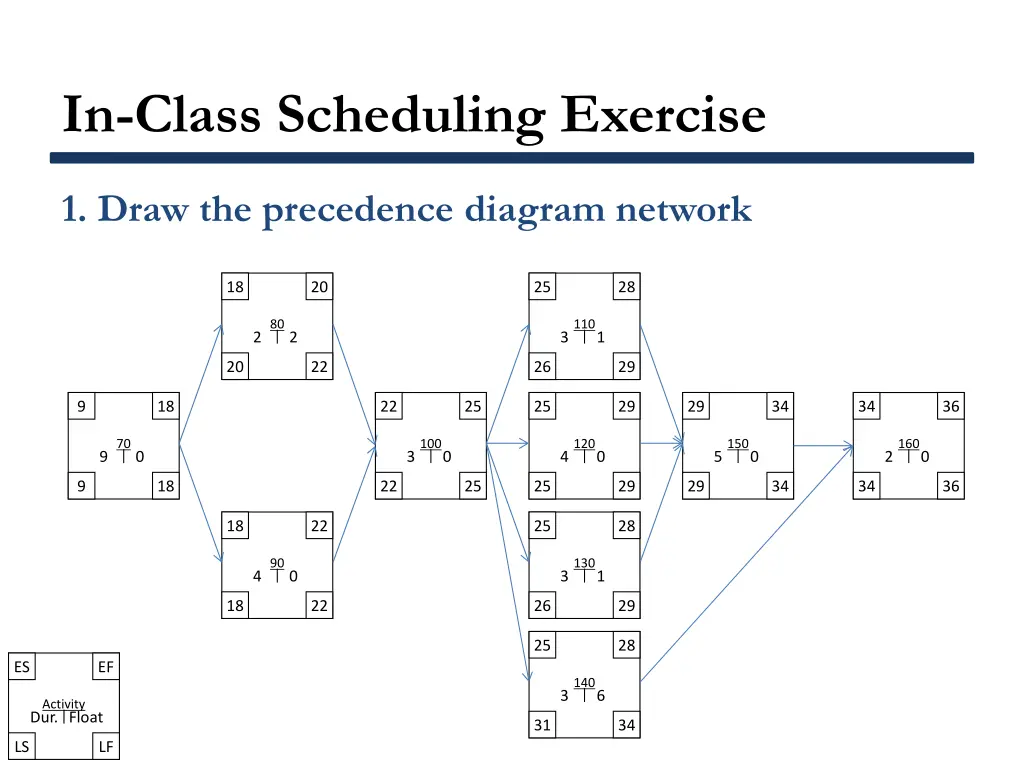
Create a precedence diagram network for an in-class scheduling exercise with various activities and durations. Use Critical Path Method (CPM) calculations to determine project duration, develop a Gantt chart, and identify critical activities. The exercise involves tasks like mobilization, excavation, concrete pouring, carpentry, roofing, painting, and clean-up. Visual representations provided for better understanding.

Download Presentation

Please find below an Image/Link to download the presentation.
The content on the website is provided AS IS for your information and personal use only. It may not be sold, licensed, or shared on other websites without obtaining consent from the author.If you encounter any issues during the download, it is possible that the publisher has removed the file from their server.
You are allowed to download the files provided on this website for personal or commercial use, subject to the condition that they are used lawfully. All files are the property of their respective owners.
The content on the website is provided AS IS for your information and personal use only. It may not be sold, licensed, or shared on other websites without obtaining consent from the author.
E N D
Presentation Transcript
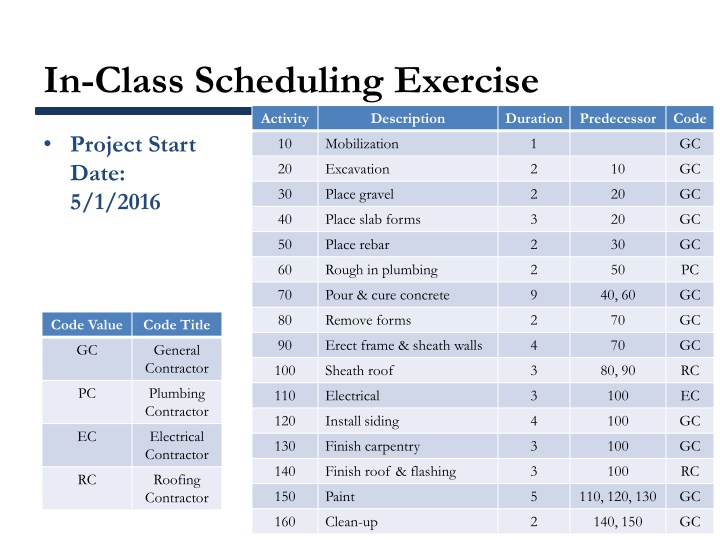
In-Class Scheduling Exercise Activity Description Duration Predecessor Code Project Start Date: 5/1/2016 10 Mobilization 1 GC 20 Excavation 2 10 GC 30 Place gravel 2 20 GC 40 Place slab forms 3 20 GC 50 Place rebar 2 30 GC 60 Rough in plumbing 2 50 PC 70 Pour & cure concrete 9 40, 60 GC 80 Remove forms 2 70 GC Code Value Code Title 90 Erect frame & sheath walls 4 70 GC GC General Contractor 100 Sheath roof 3 80, 90 RC PC Plumbing Contractor 110 Electrical 3 100 EC 120 Install siding 4 100 GC EC Electrical Contractor 130 Finish carpentry 3 100 GC 140 Finish roof & flashing 3 100 RC RC Roofing Contractor 150 Paint 5 110, 120, 130 GC 160 Clean-up 2 140, 150 GC
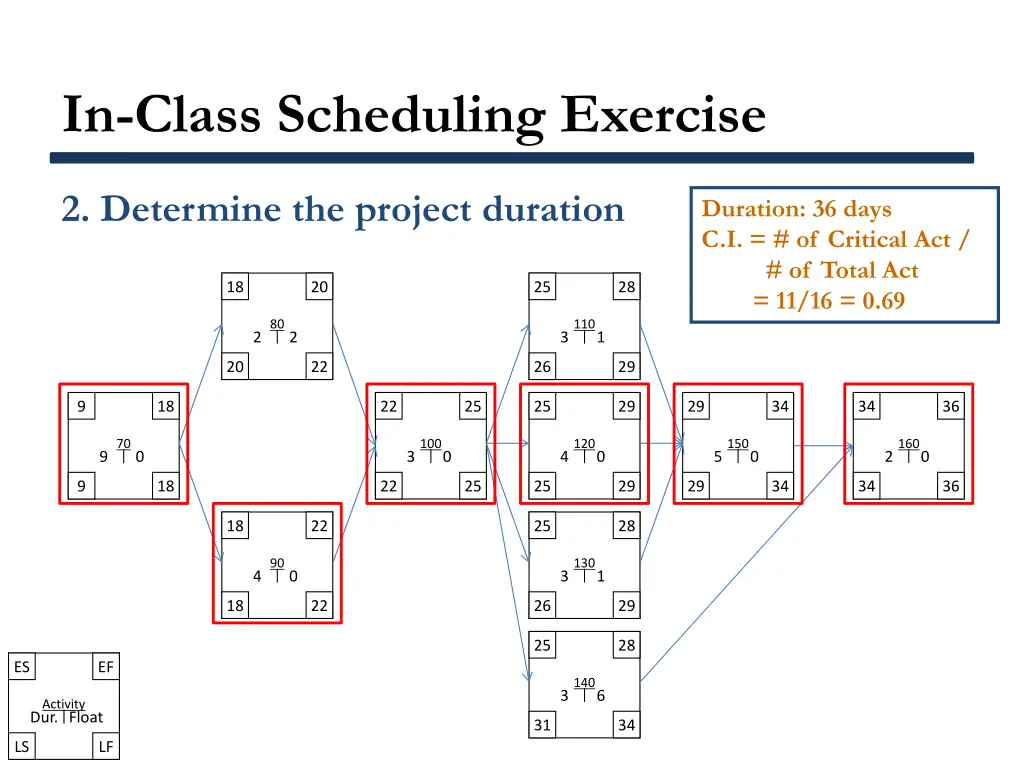
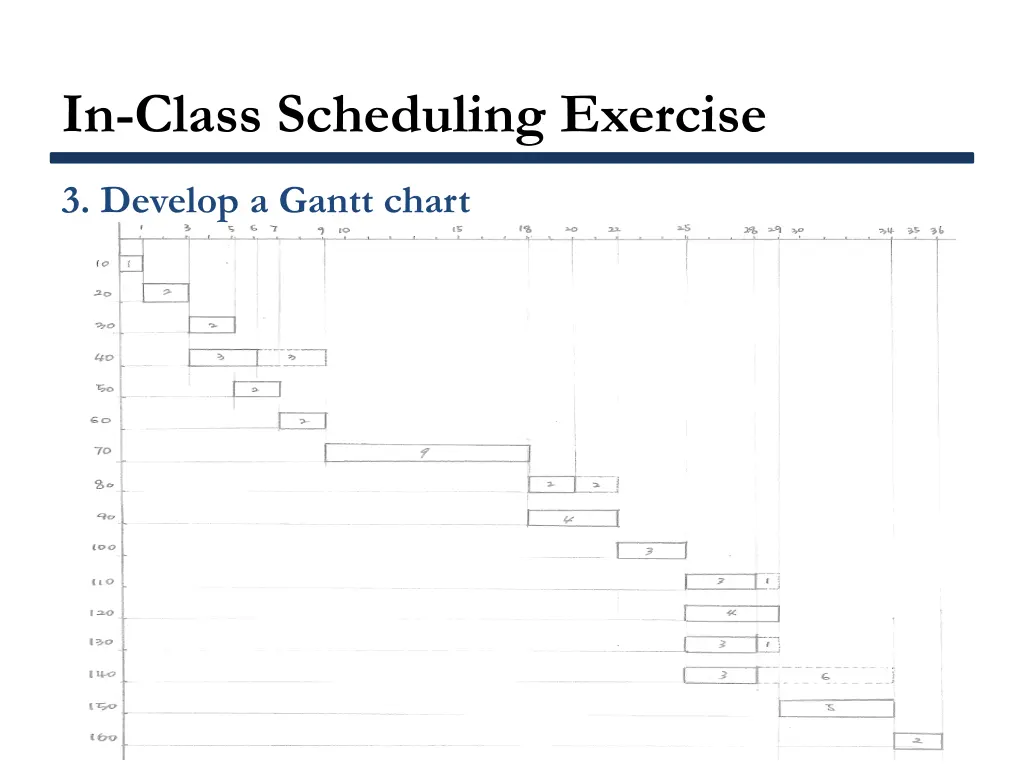
In-Class Scheduling Exercise 1. Draw the precedence diagram network 2. Use CPM calculations to determine the project duration 3. Develop a Gantt chart
In-Class Scheduling Exercise 1. Draw the precedence diagram network 3 5 5 7 7 9 30 50 60 2 0 2 0 2 0 3 5 5 7 7 9 0 1 1 3 9 18 10 20 70 1 0 2 0 9 0 0 1 1 3 9 18 3 6 40 3 3 6 9 ES EF Activity Dur. Float LS LF
In-Class Scheduling Exercise 1. Draw the precedence diagram network 18 20 25 28 80 110 2 2 3 1 20 22 26 29 9 18 22 25 25 29 29 34 34 36 70 100 120 150 160 9 0 3 0 4 0 5 0 2 0 9 18 22 25 25 29 29 34 34 36 18 22 25 28 90 130 4 0 3 1 18 22 26 29 25 28 ES EF 140 3 6 Activity Dur. Float 31 34 LS LF
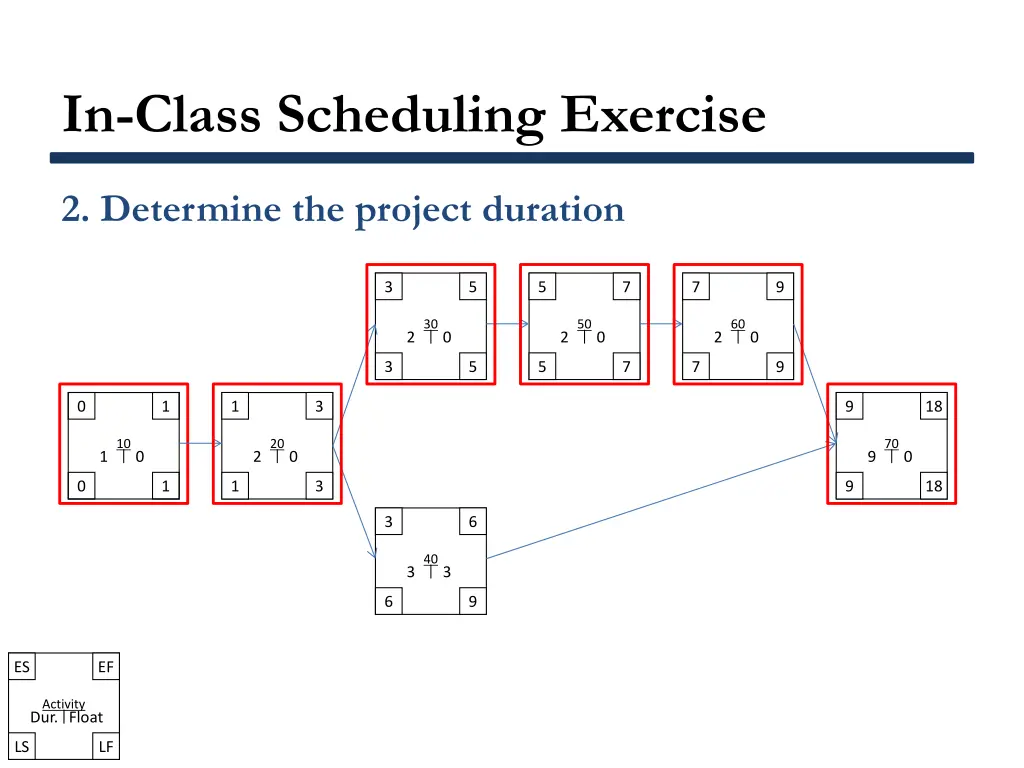
In-Class Scheduling Exercise 2. Determine the project duration 3 5 5 7 7 9 30 50 60 2 0 2 0 2 0 3 5 5 7 7 9 0 1 1 3 9 18 10 20 70 1 0 2 0 9 0 0 1 1 3 9 18 3 6 40 3 3 6 9 ES EF Activity Dur. Float LS LF
In-Class Scheduling Exercise 2. Determine the project duration Duration: 36 days C.I. = # of Critical Act / # of Total Act = 11/16 = 0.69 18 20 25 28 80 110 2 2 3 1 20 22 26 29 9 18 22 25 25 29 29 34 34 36 70 100 120 150 160 9 0 3 0 4 0 5 0 2 0 9 18 22 25 25 29 29 34 34 36 18 22 25 28 90 130 4 0 3 1 18 22 26 29 25 28 ES EF 140 3 6 Activity Dur. Float 31 34 LS LF
In-Class Scheduling Exercise 3. Develop a Gantt chart