Mobile App Development with Android Studio: Frameworks and Project Components
"Learn about Android Studio, the official IDE for Android app development, and explore its frameworks, project components, activities, and manifests. Discover the capabilities, add-ons, and key elements essential for building successful mobile applications."

Download Presentation

Please find below an Image/Link to download the presentation.
The content on the website is provided AS IS for your information and personal use only. It may not be sold, licensed, or shared on other websites without obtaining consent from the author. If you encounter any issues during the download, it is possible that the publisher has removed the file from their server.
You are allowed to download the files provided on this website for personal or commercial use, subject to the condition that they are used lawfully. All files are the property of their respective owners.
The content on the website is provided AS IS for your information and personal use only. It may not be sold, licensed, or shared on other websites without obtaining consent from the author.
E N D
Presentation Transcript
IS457 Mobile Applications Lecture 3 Mobile Programming-Android Studio COMPUTER INFORMATION SYSTEM DEPARTMENT ASS.LEC. ZAINAB H. ALFAYEZ
Android Studio Java Eclipse was the programming language to build applications. In May 2013, it was announced at the Google I/O conference of 2013 that Google had bought Android Studio. Android Studio is the official IDE and specialized for Android application development. COMPUTER INFORMATION SYSTEM DEPARTMENT ASS.LEC. ZAINAB H. ALFAYEZ
Framework Capabilities and Add-Ons Tailored to mobile apps Built-in services: GUI, OS services (file I/O, threads, device management), Graphics, Device, access (GPS, camera, music and video players, sensors), Web services, Networking, XML processing, Standard language libraries. Add-ons: Maps Database support (SQLite) WebKit COMPUTER INFORMATION SYSTEM DEPARTMENT ASS.LEC. ZAINAB H. ALFAYEZ
Android Studio Project Components Activity: a single screen that s visible to user Service: long-running background part of app. ContentProvider: manages app data (usually stored in database) and data access for queries. BroadcastReceiver: component that listens for particular Android system events , e.g., found wireless device , and responds accordingly. COMPUTER INFORMATION SYSTEM DEPARTMENT ASS.LEC. ZAINAB H. ALFAYEZ
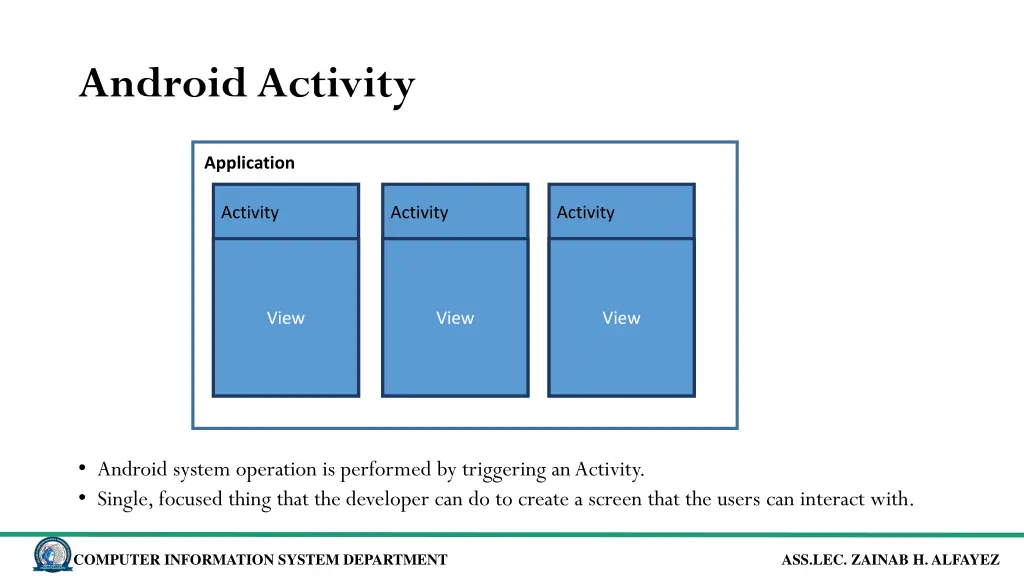
Android Activity Application Activity Activity Activity View View View Android system operation is performed by triggering an Activity. Single, focused thing that the developer can do to create a screen that the users can interact with. COMPUTER INFORMATION SYSTEM DEPARTMENT ASS.LEC. ZAINAB H. ALFAYEZ
Android Manifest Every app must have AndroidManifest.xml The manifest file provides essential information about your app to the Android system, which the system must have before it can run any of the app's code. COMPUTER INFORMATION SYSTEM DEPARTMENT ASS.LEC. ZAINAB H. ALFAYEZ
Android Manifest The manifest specifies: App s Activities, Services, etc. Permissions requested by app Minimum API required External libraries to which app is linked, e.g., Google Maps library. COMPUTER INFORMATION SYSTEM DEPARTMENT ASS.LEC. ZAINAB H. ALFAYEZ