Online HPC Workshop Using Torque Moab Cluster at DCCN
"Discover how to manage jobs on the powerful HPC cluster at DCCN using Torque and Moab. Learn job submission, monitoring, and examples for interactive and batch computations."

Download Presentation

Please find below an Image/Link to download the presentation.
The content on the website is provided AS IS for your information and personal use only. It may not be sold, licensed, or shared on other websites without obtaining consent from the author. If you encounter any issues during the download, it is possible that the publisher has removed the file from their server.
You are allowed to download the files provided on this website for personal or commercial use, subject to the condition that they are used lawfully. All files are the property of their respective owners.
The content on the website is provided AS IS for your information and personal use only. It may not be sold, licensed, or shared on other websites without obtaining consent from the author.
E N D
Presentation Transcript
Welcome Online HPC workshop Edward Gerrits http://hpc.dccn.nl http://hpc.dccn.nl/tutorial.html
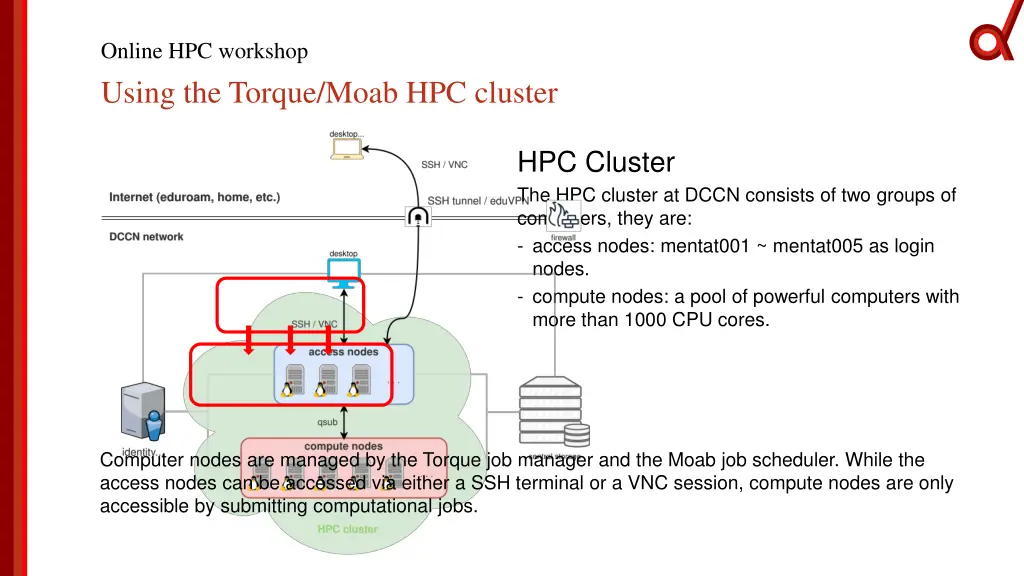
Online HPC workshop Using the Torque/Moab HPC cluster HPC Cluster The HPC cluster at DCCN consists of two groups of computers, they are: - access nodes: mentat001 ~ mentat005 as login nodes. - compute nodes: a pool of powerful computers with more than 1000 CPU cores. Computer nodes are managed by the Torque job manager and the Moab job scheduler. While the access nodes can be accessed via either a SSH terminal or a VNC session, compute nodes are only accessible by submitting computational jobs.
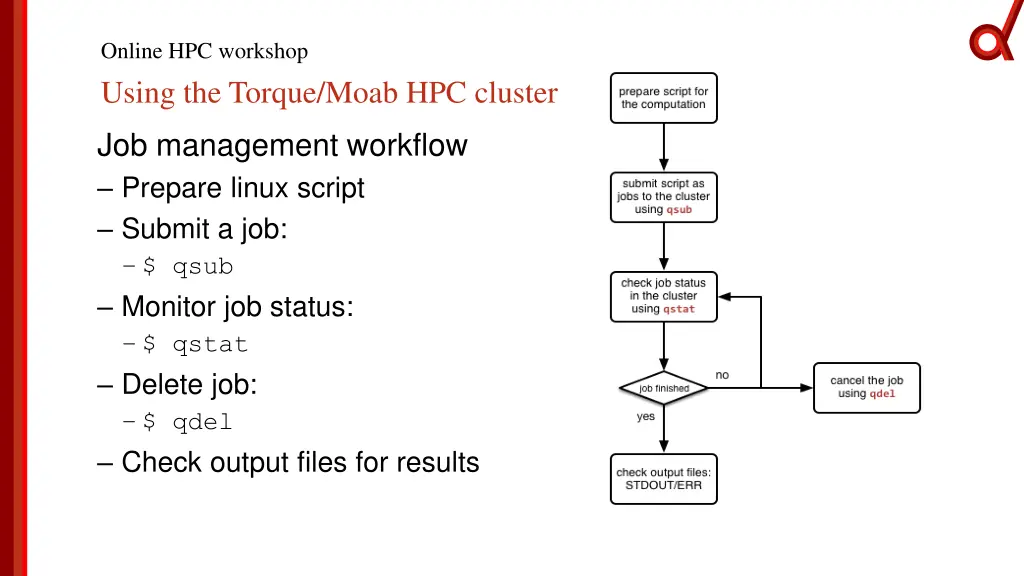
Online HPC workshop Using the Torque/Moab HPC cluster Job management workflow Prepare linux script Submit a job: $ qsub Monitor job status: $ qstat Delete job: $ qdel Check output files for results
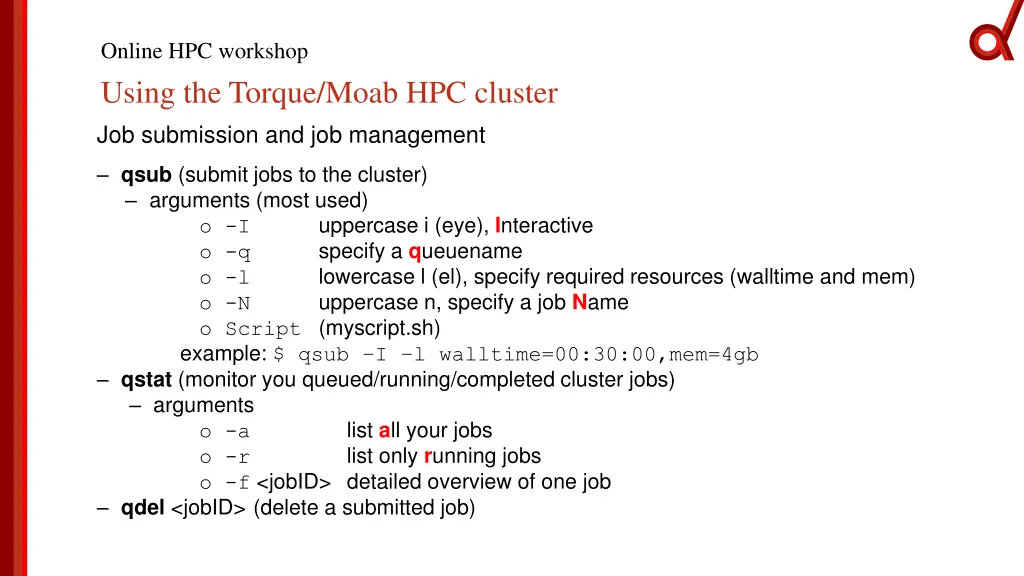
Online HPC workshop Using the Torque/Moab HPC cluster Job submission and job management qsub (submit jobs to the cluster) arguments (most used) o -I o -q o -l o -N o Script (myscript.sh) example: $ qsub I l walltime=00:30:00,mem=4gb qstat (monitor you queued/running/completed cluster jobs) arguments o -a list all your jobs o -r list only running jobs o -f <jobID> detailed overview of one job qdel <jobID> (delete a submitted job) uppercase i (eye), Interactive specify a queuename lowercase l (el), specify required resources (walltime and mem) uppercase n, specify a job Name
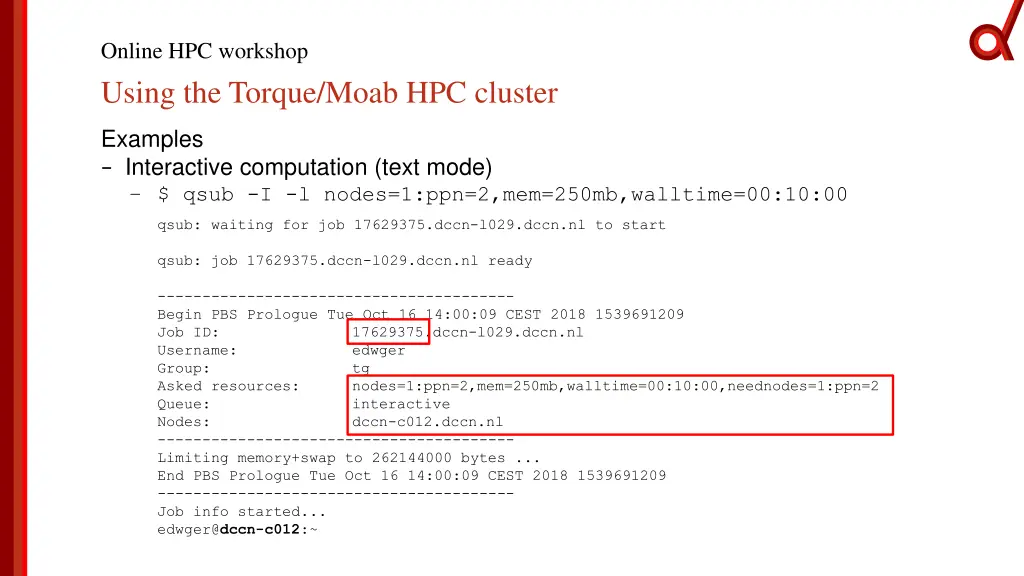
Online HPC workshop Using the Torque/Moab HPC cluster Examples Interactive computation (text mode) $ qsub -I -l nodes=1:ppn=2,mem=250mb,walltime=00:10:00 qsub: waiting for job 17629375.dccn-l029.dccn.nl to start qsub: job 17629375.dccn-l029.dccn.nl ready ---------------------------------------- Begin PBS Prologue Tue Oct 16 14:00:09 CEST 2018 1539691209 Job ID: 17629375.dccn-l029.dccn.nl Username: edwger Group: tg Asked resources: nodes=1:ppn=2,mem=250mb,walltime=00:10:00,neednodes=1:ppn=2 Queue: interactive Nodes: dccn-c012.dccn.nl ---------------------------------------- Limiting memory+swap to 262144000 bytes ... End PBS Prologue Tue Oct 16 14:00:09 CEST 2018 1539691209 ---------------------------------------- Job info started... edwger@dccn-c012:~
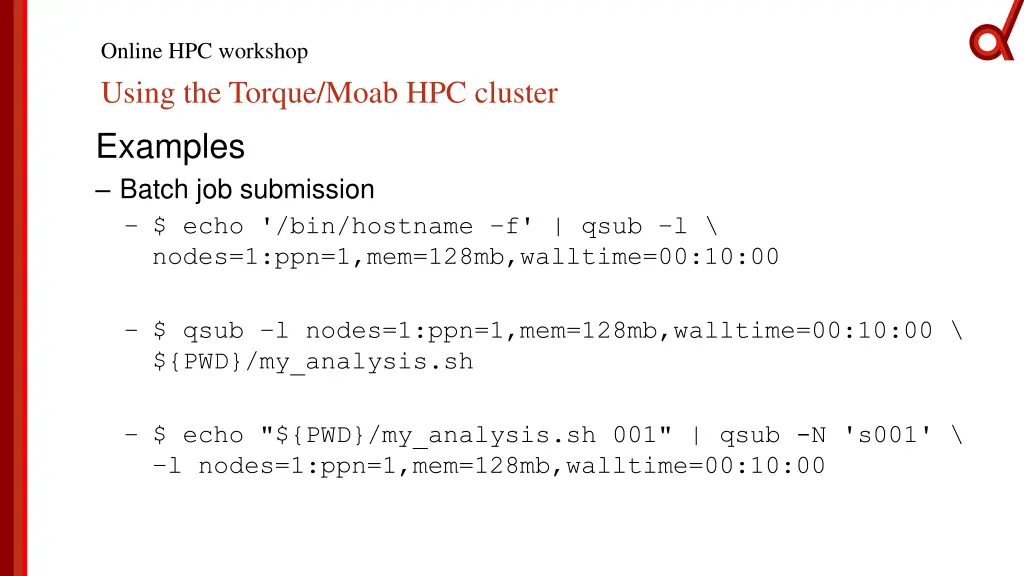
Online HPC workshop Using the Torque/Moab HPC cluster Examples Batch job submission $ echo '/bin/hostname f' | qsub l \ nodes=1:ppn=1,mem=128mb,walltime=00:10:00 $ qsub l nodes=1:ppn=1,mem=128mb,walltime=00:10:00 \ ${PWD}/my_analysis.sh $ echo "${PWD}/my_analysis.sh 001" | qsub -N 's001' \ l nodes=1:ppn=1,mem=128mb,walltime=00:10:00
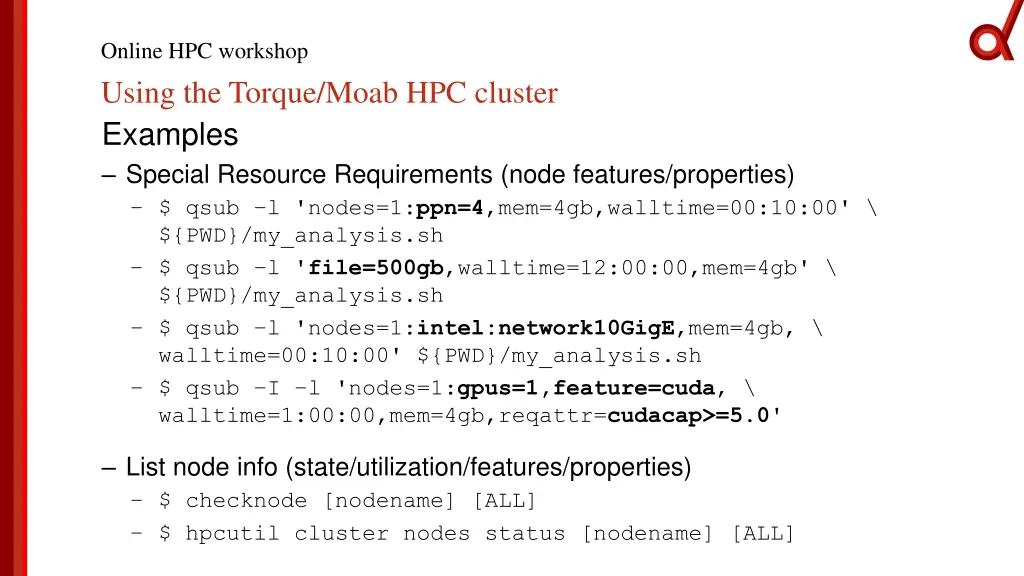
Online HPC workshop Using the Torque/Moab HPC cluster Examples Special Resource Requirements (node features/properties) $ qsub l 'nodes=1:ppn=4,mem=4gb,walltime=00:10:00' \ ${PWD}/my_analysis.sh $ qsub l 'file=500gb,walltime=12:00:00,mem=4gb' \ ${PWD}/my_analysis.sh $ qsub l 'nodes=1:intel:network10GigE,mem=4gb, \ walltime=00:10:00' ${PWD}/my_analysis.sh $ qsub I l 'nodes=1:gpus=1,feature=cuda, \ walltime=1:00:00,mem=4gb,reqattr=cudacap>=5.0' List node info (state/utilization/features/properties) $ checknode [nodename] [ALL] $ hpcutil cluster nodes status [nodename] [ALL]
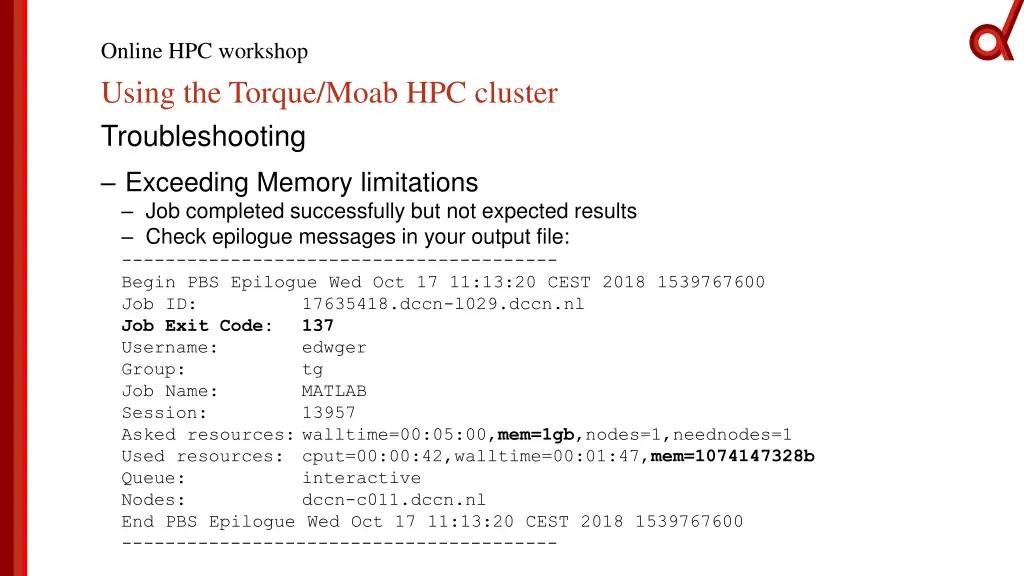
Online HPC workshop Using the Torque/Moab HPC cluster Troubleshooting Exceeding Memory limitations Job completed successfully but not expected results Check epilogue messages in your output file: ---------------------------------------- Begin PBS Epilogue Wed Oct 17 11:13:20 CEST 2018 1539767600 Job ID: 17635418.dccn-l029.dccn.nl Job Exit Code: 137 Username: edwger Group: tg Job Name: MATLAB Session: 13957 Asked resources: walltime=00:05:00,mem=1gb,nodes=1,neednodes=1 Used resources: cput=00:00:42,walltime=00:01:47,mem=1074147328b Queue: interactive Nodes: dccn-c011.dccn.nl End PBS Epilogue Wed Oct 17 11:13:20 CEST 2018 1539767600 ----------------------------------------
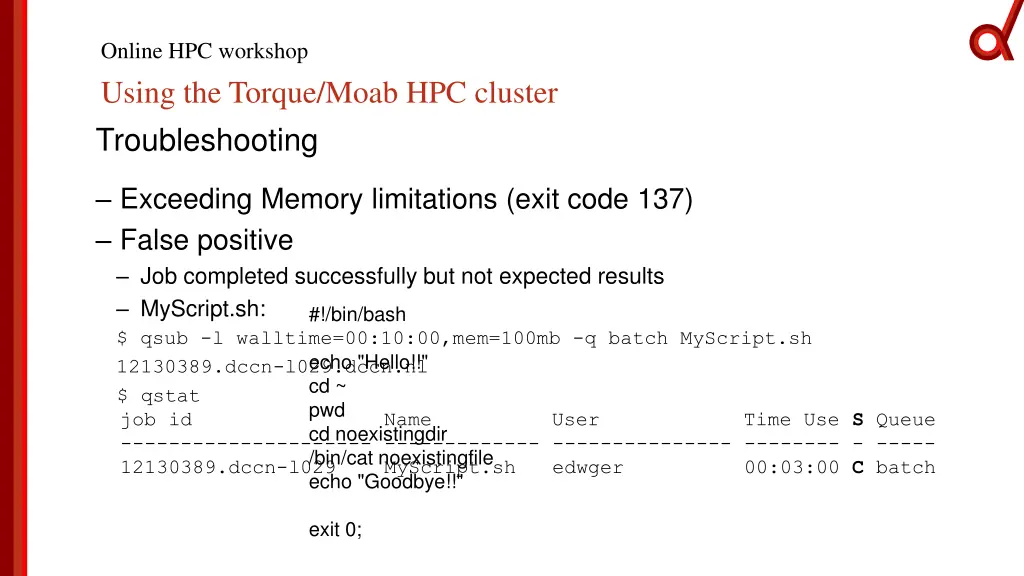
Online HPC workshop Using the Torque/Moab HPC cluster Troubleshooting Exceeding Memory limitations (exit code 137) False positive Job completed successfully but not expected results MyScript.sh: $ qsub -l walltime=00:10:00,mem=100mb -q batch MyScript.sh 12130389.dccn-l029.dccn.nl $ qstat job id Name User Time Use S Queue --------------------- ------------- --------------- -------- - ----- 12130389.dccn-l029 MyScript.sh edwger echo "Goodbye!!" #!/bin/bash echo "Hello!!" cd ~ pwd cd noexistingdir /bin/cat noexistingfile 00:03:00 C batch exit 0;
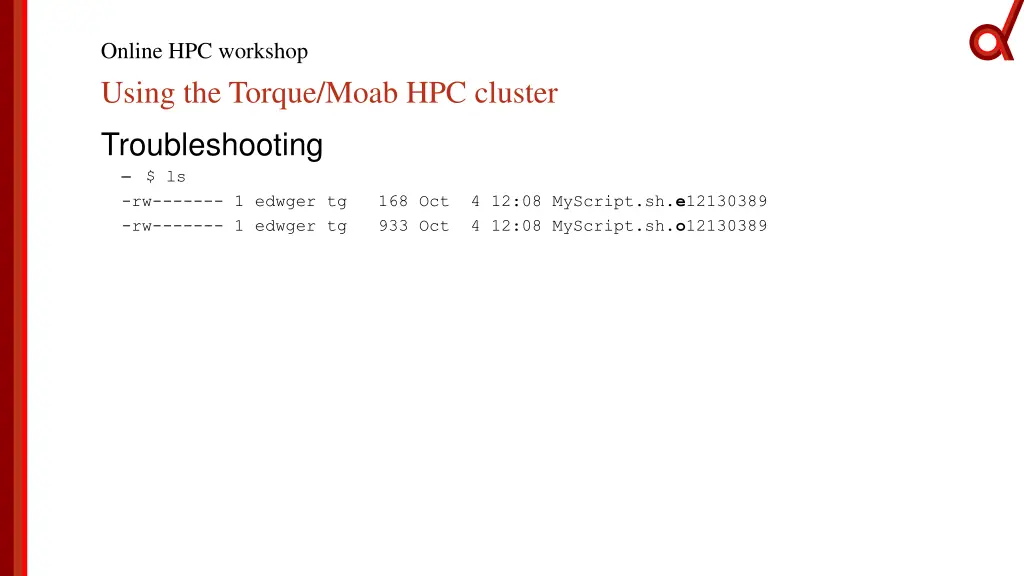
Online HPC workshop Using the Torque/Moab HPC cluster Troubleshooting $ ls -rw------- 1 edwger tg -rw------- 1 edwger tg 168 Oct 4 12:08 MyScript.sh.e12130389 933 Oct 4 12:08 MyScript.sh.o12130389
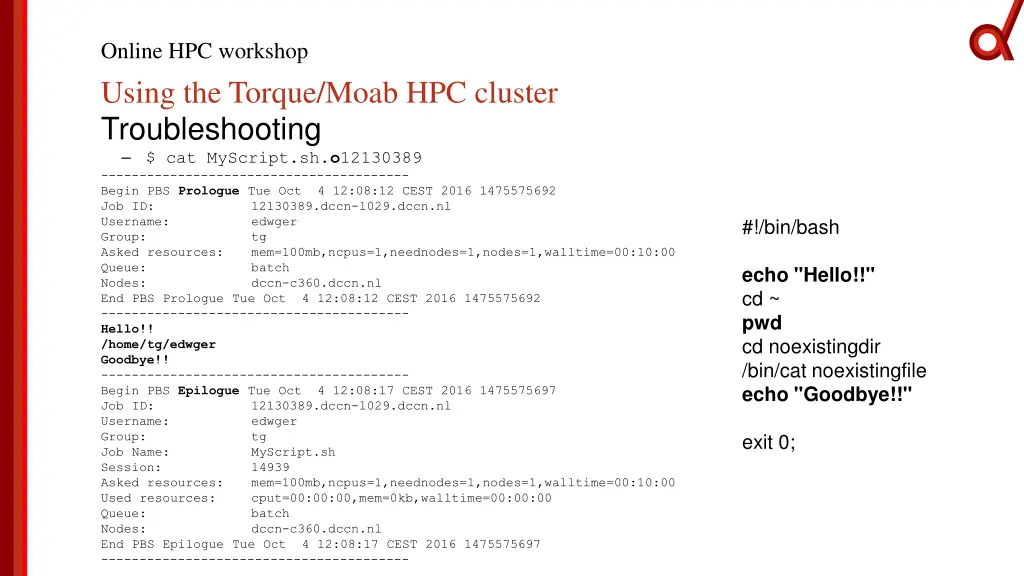
Online HPC workshop Using the Torque/Moab HPC cluster Troubleshooting $ cat MyScript.sh.o12130389 ---------------------------------------- Begin PBS Prologue Tue Oct 4 12:08:12 CEST 2016 1475575692 Job ID: 12130389.dccn-l029.dccn.nl Username: edwger Group: tg Asked resources: mem=100mb,ncpus=1,neednodes=1,nodes=1,walltime=00:10:00 Queue: batch Nodes: dccn-c360.dccn.nl End PBS Prologue Tue Oct 4 12:08:12 CEST 2016 1475575692 ---------------------------------------- Hello!! /home/tg/edwger Goodbye!! ---------------------------------------- Begin PBS Epilogue Tue Oct 4 12:08:17 CEST 2016 1475575697 Job ID: 12130389.dccn-l029.dccn.nl Username: edwger Group: tg Job Name: MyScript.sh Session: 14939 Asked resources: mem=100mb,ncpus=1,neednodes=1,nodes=1,walltime=00:10:00 Used resources: cput=00:00:00,mem=0kb,walltime=00:00:00 Queue: batch Nodes: dccn-c360.dccn.nl End PBS Epilogue Tue Oct 4 12:08:17 CEST 2016 1475575697 ---------------------------------------- #!/bin/bash echo "Hello!!" cd ~ pwd cd noexistingdir /bin/cat noexistingfile echo "Goodbye!!" exit 0;
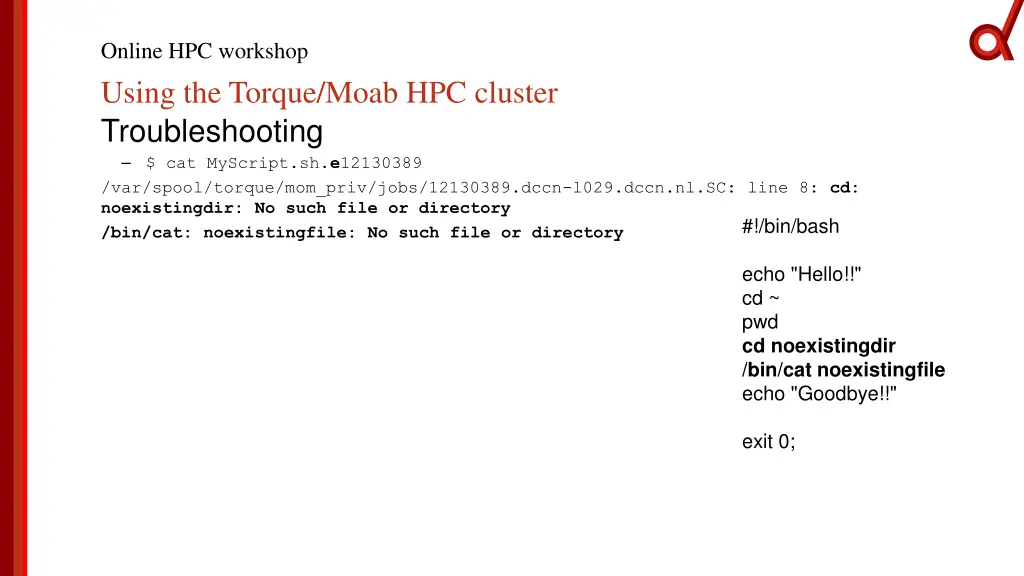
Online HPC workshop Using the Torque/Moab HPC cluster Troubleshooting $ cat MyScript.sh.e12130389 /var/spool/torque/mom_priv/jobs/12130389.dccn-l029.dccn.nl.SC: line 8: cd: noexistingdir: No such file or directory /bin/cat: noexistingfile: No such file or directory #!/bin/bash echo "Hello!!" cd ~ pwd cd noexistingdir /bin/cat noexistingfile echo "Goodbye!!" exit 0;
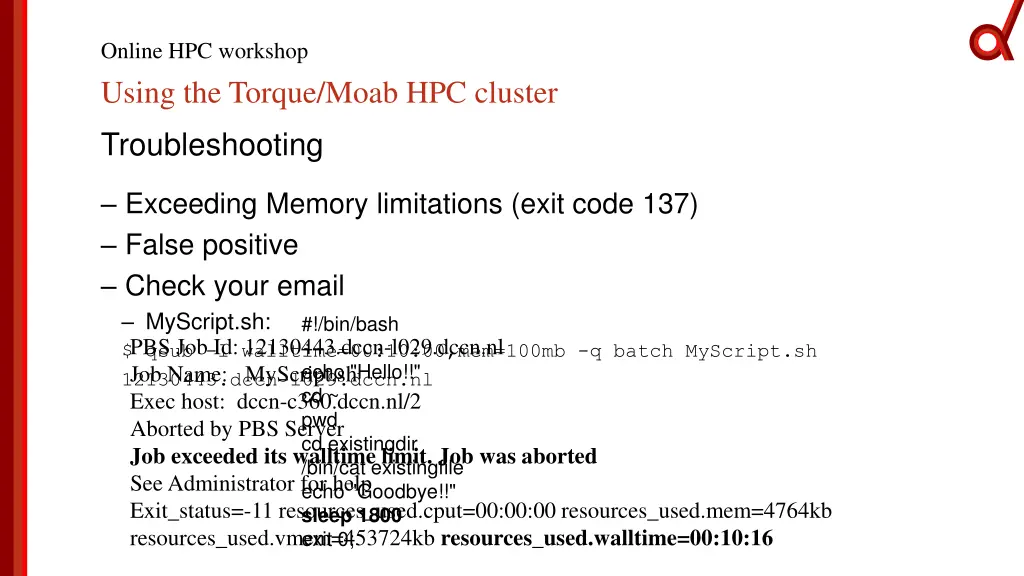
Online HPC workshop Using the Torque/Moab HPC cluster Troubleshooting Exceeding Memory limitations (exit code 137) False positive Check your email MyScript.sh: $ qsub -l walltime=00:10:00,mem=100mb -q batch MyScript.sh 12130443.dccn-l029.dccn.nl cd ~ pwd cd existingdir /bin/cat existingfile echo "Goodbye!!" sleep 1800 #!/bin/bash PBS Job Id: 12130443.dccn-l029.dccn.nl Job Name: MyScript.sh Exec host: dccn-c360.dccn.nl/2 Aborted by PBS Server Job exceeded its walltime limit. Job was aborted See Administrator for help Exit_status=-11 resources_used.cput=00:00:00 resources_used.mem=4764kb resources_used.vmem=453724kb resources_used.walltime=00:10:16 exit 0; echo "Hello!!"
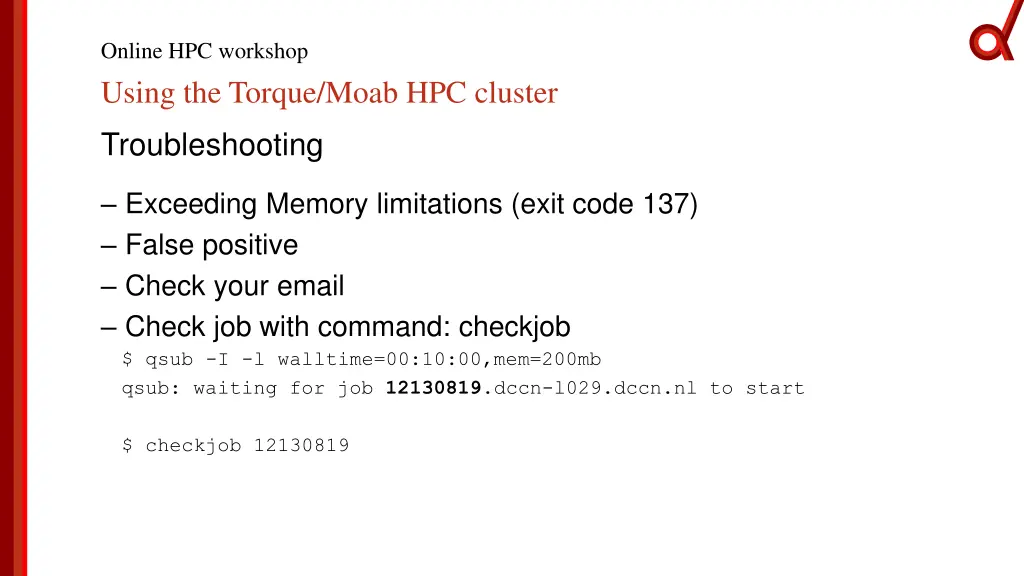
Online HPC workshop Using the Torque/Moab HPC cluster Troubleshooting Exceeding Memory limitations (exit code 137) False positive Check your email Check job with command: checkjob $ qsub -I -l walltime=00:10:00,mem=200mb qsub: waiting for job 12130819.dccn-l029.dccn.nl to start $ checkjob 12130819
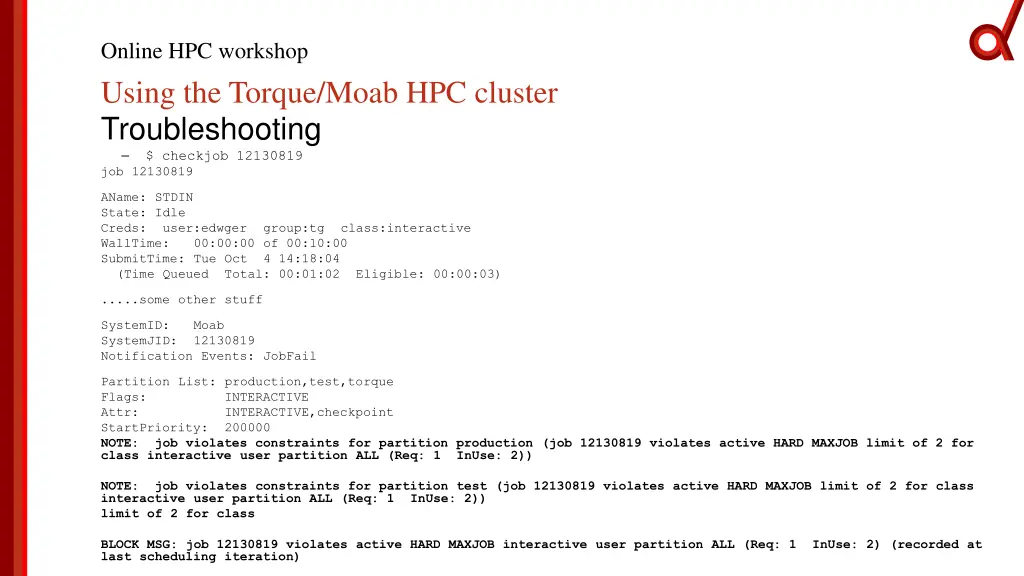
Online HPC workshop Using the Torque/Moab HPC cluster Troubleshooting $ checkjob 12130819 job 12130819 AName: STDIN State: Idle Creds: user:edwger WallTime: 00:00:00 of 00:10:00 SubmitTime: Tue Oct 4 14:18:04 (Time Queued Total: 00:01:02 Eligible: 00:00:03) group:tg class:interactive .....some other stuff SystemID: Moab SystemJID: 12130819 Notification Events: JobFail Partition List: production,test,torque Flags: INTERACTIVE Attr: INTERACTIVE,checkpoint StartPriority: 200000 NOTE: job violates constraints for partition production (job 12130819 violates active HARD MAXJOB limit of 2 for class interactive user partition ALL (Req: 1 InUse: 2)) NOTE: job violates constraints for partition test (job 12130819 violates active HARD MAXJOB limit of 2 for class interactive user partition ALL (Req: 1 InUse: 2)) limit of 2 for class BLOCK MSG: job 12130819 violates active HARD MAXJOB interactive user partition ALL (Req: 1 InUse: 2) (recorded at last scheduling iteration)
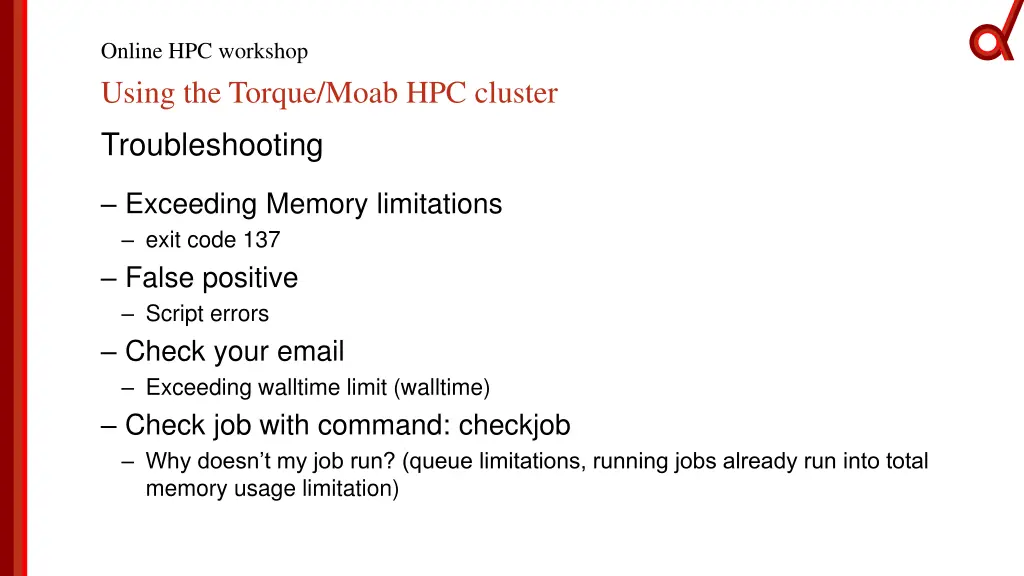
Online HPC workshop Using the Torque/Moab HPC cluster Troubleshooting Exceeding Memory limitations exit code 137 False positive Script errors Check your email Exceeding walltime limit (walltime) Check job with command: checkjob Why doesn t my job run? (queue limitations, running jobs already run into total memory usage limitation)
Thank you for attending Using the Torque/Moab HPC cluster Online HPC workshop Edward Gerrits