Merchandise planners need to plan ratio metrics at aggregate levels like AIR, AUC, Discount %, Shrink $, Shrink U, Receipt AUC, and more. This detailed planning process involves entering and applying metrics at various levels in the hierarchy, making them editable at different intersections. Learn how to manage and apply these metrics effectively for comprehensive planning.
Please find below an Image/Link to download the presentation.
The content on the website is provided AS IS for your information and personal use only. It may not be sold, licensed, or shared on other websites without obtaining consent from the author. If you encounter any issues during the download, it is possible that the publisher has removed the file from their server.
You are allowed to download the files provided on this website for personal or commercial use, subject to the condition that they are used lawfully. All files are the property of their respective owners.
The content on the website is provided AS IS for your information and personal use only. It may not be sold, licensed, or shared on other websites without obtaining consent from the author.
E N D
Presentation Transcript
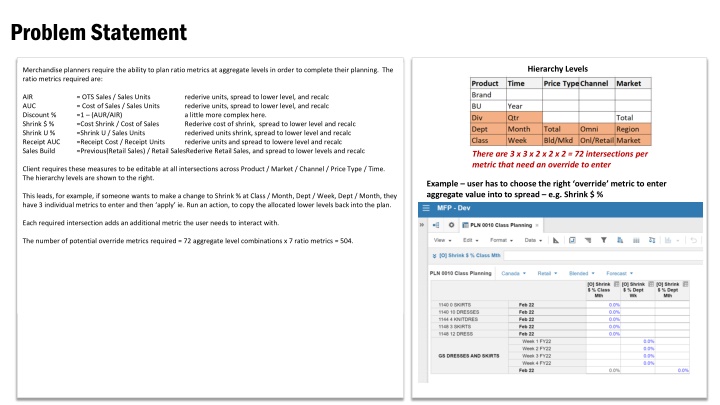
Problem Statement Hierarchy Levels Merchandise planners require the ability to plan ratio metrics at aggregate levels in order to complete their planning. The ratio metrics required are: AIR AUC Discount % Shrink $ % Shrink U % Receipt AUC Sales Build = OTS Sales / Sales Units = Cost of Sales / Sales Units =1 (AUR/AIR) =Cost Shrink / Cost of Sales =Shrink U / Sales Units =Receipt Cost / Receipt Units =Previous(Retail Sales) / Retail SalesRederive Retail Sales, and spread to lower levels and recalc rederive units, spread to lower level, and recalc rederive units, spread to lower level, and recalc a little more complex here. Rederive cost of shrink, spread to lower level and recalc rederived units shrink, spread to lower level and recalc rederive units and spread to lowere level and recalc There are 3 x 3 x 2 x 2 x 2 = 72 intersections per metric that need an override to enter Client requires these measures to be editable at all intersections across Product / Market / Channel / Price Type / Time. The hierarchy levels are shown to the right. Example user has to choose the right override metric to enter aggregate value into to spread e.g. Shrink $ % This leads, for example, if someone wants to make a change to Shrink % at Class / Month, Dept / Week, Dept / Month, they have 3 individual metrics to enter and then apply ie. Run an action, to copy the allocated lower levels back into the plan. Each required intersection adds an additional metric the user needs to interact with. The number of potential override metrics required = 72 aggregate level combinations x 7 ratio metrics = 504.
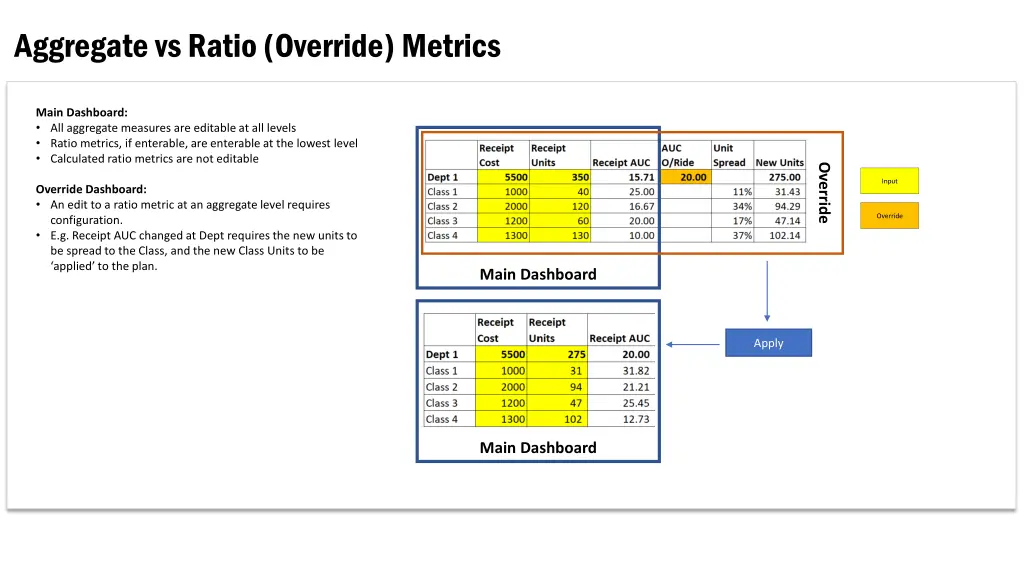
Aggregate vs Ratio (Override) Metrics Main Dashboard: All aggregate measures are editable at all levels Ratio metrics, if enterable, are enterable at the lowest level Calculated ratio metrics are not editable Override Input Override Dashboard: An edit to a ratio metric at an aggregate level requires configuration. E.g. Receipt AUC changed at Dept requires the new units to be spread to the Class, and the new Class Units to be applied to the plan. Override Main Dashboard Apply Main Dashboard
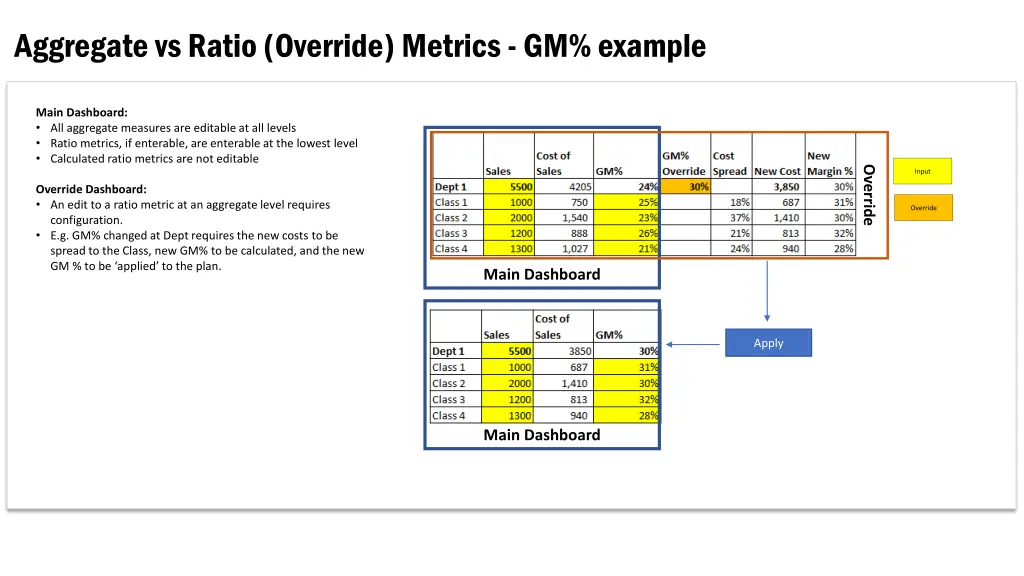
Aggregate vs Ratio (Override) Metrics - GM% example Main Dashboard: All aggregate measures are editable at all levels Ratio metrics, if enterable, are enterable at the lowest level Calculated ratio metrics are not editable Override Input Override Dashboard: An edit to a ratio metric at an aggregate level requires configuration. E.g. GM% changed at Dept requires the new costs to be spread to the Class, new GM% to be calculated, and the new GM % to be applied to the plan. Override Main Dashboard Apply Main Dashboard
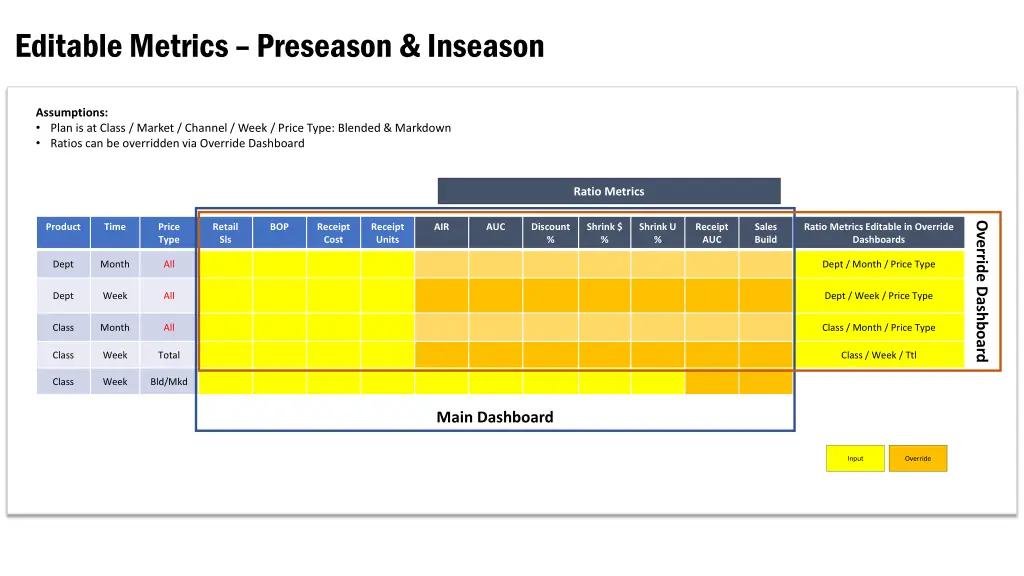
Editable Metrics Preseason & Inseason Assumptions: Plan is at Class / Market / Channel / Week / Price Type: Blended & Markdown Ratios can be overridden via Override Dashboard Ratio Metrics Override Dashboard Product Time Price Type Retail Sls BOP Receipt Cost Receipt Units AIR AUC Discount % Shrink $ % Shrink U % Receipt AUC Sales Build Ratio Metrics Editable in Override Dashboards Dept Month All Dept / Month / Price Type Dept Week All Dept / Week / Price Type Class Month All Class / Month / Price Type Class Week Total Class / Week / Ttl Class Week Bld/Mkd Main Dashboard Input Override