Processor Datapath and Control Components
Explore the essential components of a processor datapath and control system, including datapath functionalities, MIPS processor implementation, instruction execution cycle, and more. Dive into the fundamental aspects of building a processor, from datapath collection to control mechanisms, as explained in NUS Lecture #11 by Aaron Tan.

Download Presentation

Please find below an Image/Link to download the presentation.
The content on the website is provided AS IS for your information and personal use only. It may not be sold, licensed, or shared on other websites without obtaining consent from the author. If you encounter any issues during the download, it is possible that the publisher has removed the file from their server.
You are allowed to download the files provided on this website for personal or commercial use, subject to the condition that they are used lawfully. All files are the property of their respective owners.
The content on the website is provided AS IS for your information and personal use only. It may not be sold, licensed, or shared on other websites without obtaining consent from the author.
E N D
Presentation Transcript
http://www.comp.nus.edu.sg/~cs2100/ Note You will only learn the components in the next half of the semester. For now, it is easier to just think about them as a function BUT created as a hardware. explanation is explanation. So the functional a Lecture #11 The Processor: Datapath
Questions? Ask at https://sets.netlify.app/module/676ca3a07d7f5ffc1741dc65 OR Scan and ask your questions here! (May be obscured in some slides)
Questions? IMPORTANT: DO NOT SCAN THE QR CODE IN THE VIDEO RECORDINGS. THEY NO LONGER WORK Ask at https://sets.netlify.app/module/676ca3a07d7f5ffc1741dc65 OR Scan and ask your questions here! (May be obscured in some slides)
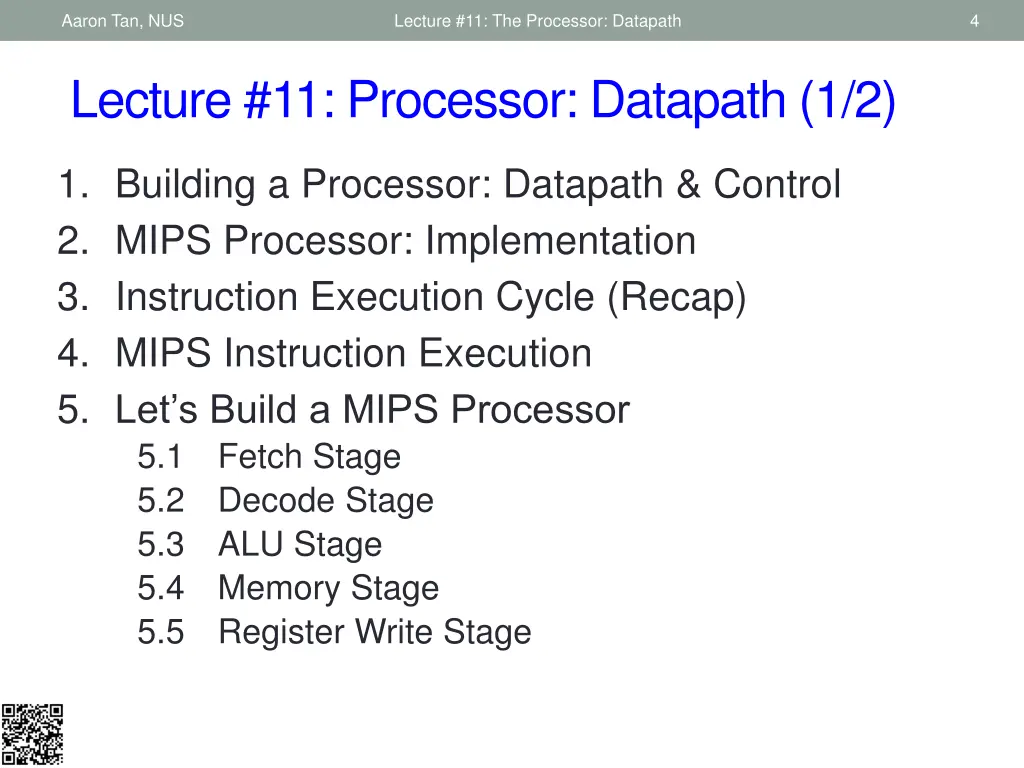
Aaron Tan, NUS Lecture #11: The Processor: Datapath 4 Lecture #11: Processor: Datapath (1/2) 1. Building a Processor: Datapath & Control 2. MIPS Processor: Implementation 3. Instruction Execution Cycle (Recap) 4. MIPS Instruction Execution 5. Let s Build a MIPS Processor 5.1 Fetch Stage 5.2 Decode Stage 5.3 ALU Stage 5.4 Memory Stage 5.5 Register Write Stage
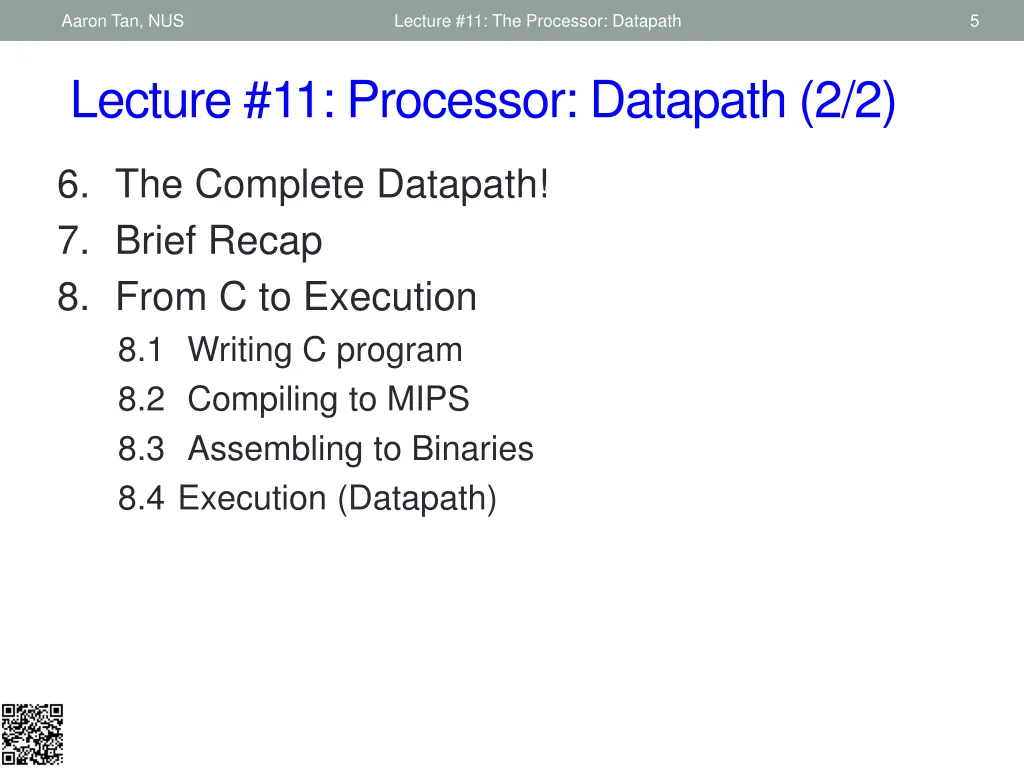
Aaron Tan, NUS Lecture #11: The Processor: Datapath 5 Lecture #11: Processor: Datapath (2/2) 6. The Complete Datapath! 7. Brief Recap 8. From C to Execution 8.1 Writing C program 8.2 Compiling to MIPS 8.3 Assembling to Binaries 8.4 Execution (Datapath)
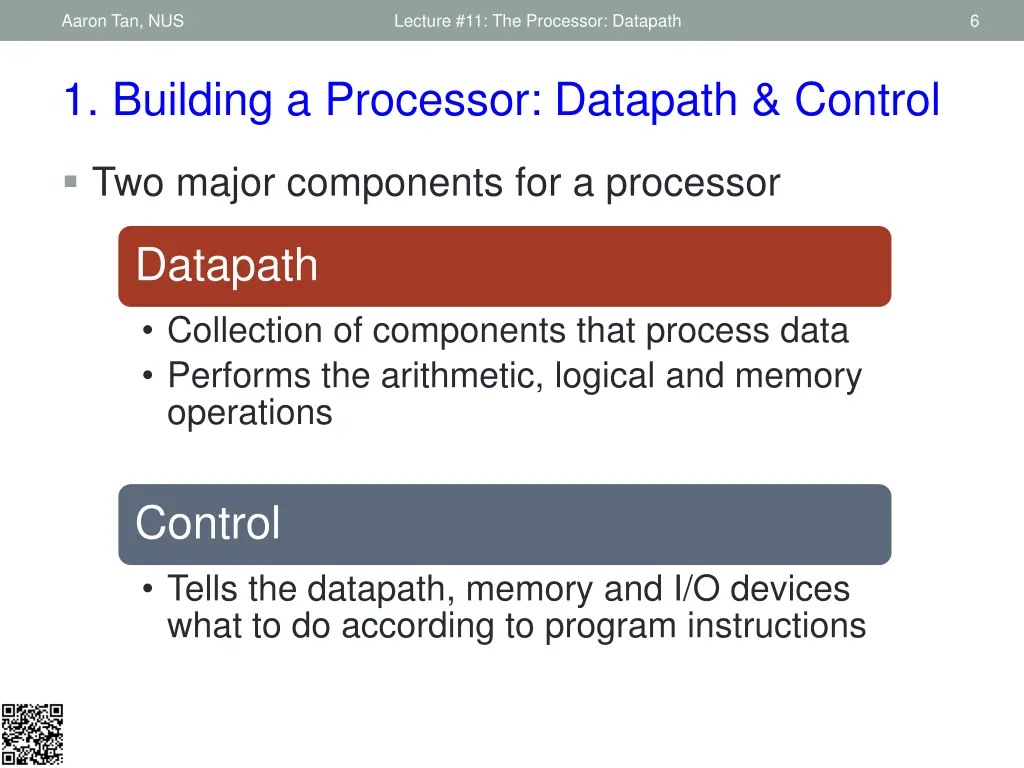
Aaron Tan, NUS Lecture #11: The Processor: Datapath 6 1. Building a Processor: Datapath & Control Two major components for a processor Datapath Collection of components that process data Performs the arithmetic, logical and memory operations Control Tells the datapath, memory and I/O devices what to do according to program instructions
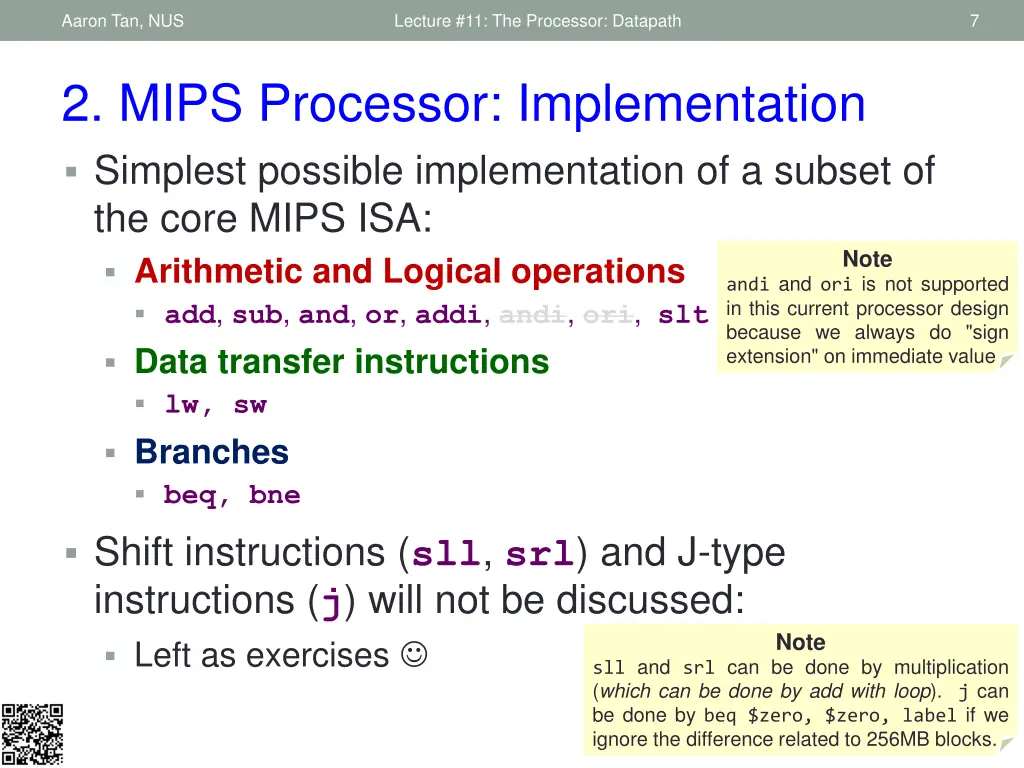
Aaron Tan, NUS Lecture #11: The Processor: Datapath 7 2. MIPS Processor: Implementation Simplest possible implementation of a subset of the core MIPS ISA: Arithmetic and Logical operations add, sub, and, or, addi, andi, ori, slt Data transfer instructions lw, sw Branches beq, bne Shift instructions (sll, srl) and J-type instructions (j) will not be discussed: Left as exercises Note andi and ori is not supported in this current processor design because we always do "sign extension" on immediate value Note sll and srl can be done by multiplication (which can be done by add with loop). j can be done by beq $zero, $zero, label if we ignore the difference related to 256MB blocks.
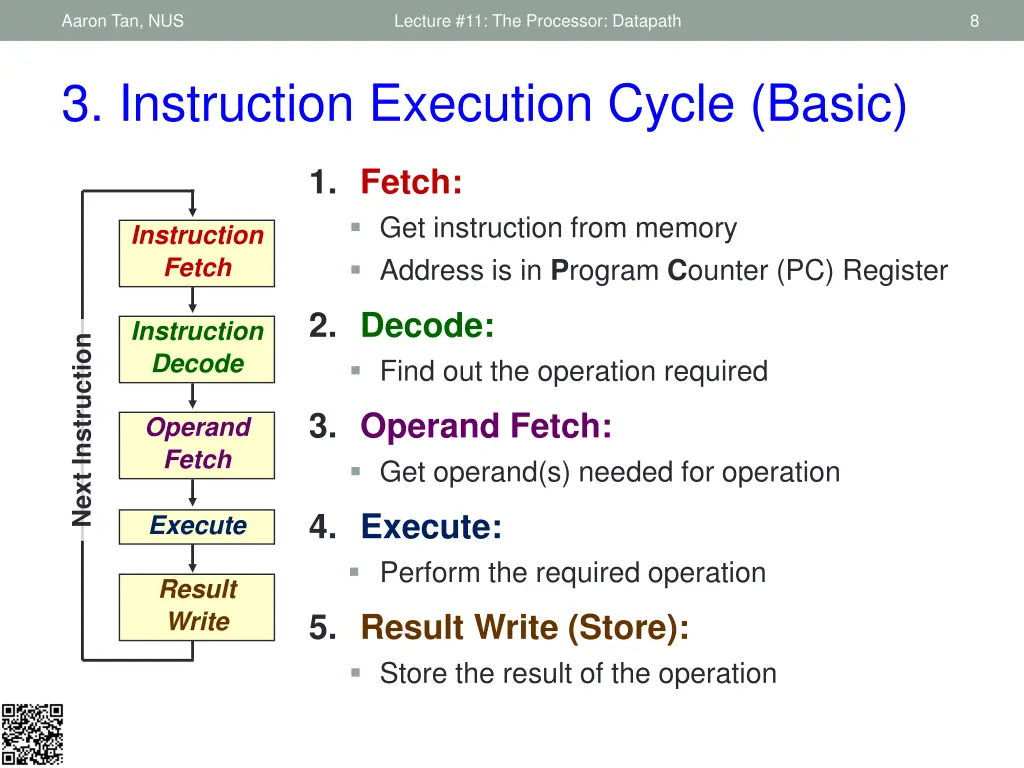
Aaron Tan, NUS Lecture #11: The Processor: Datapath 8 3. Instruction Execution Cycle (Basic) 1. Fetch: Get instruction from memory Address is in Program Counter (PC) Register Instruction Fetch 2. Decode: Find out the operation required Instruction Decode Next Instruction 3. Operand Fetch: Get operand(s) needed for operation Operand Fetch 4. Execute: Perform the required operation Execute Result Write 5. Result Write (Store): Store the result of the operation
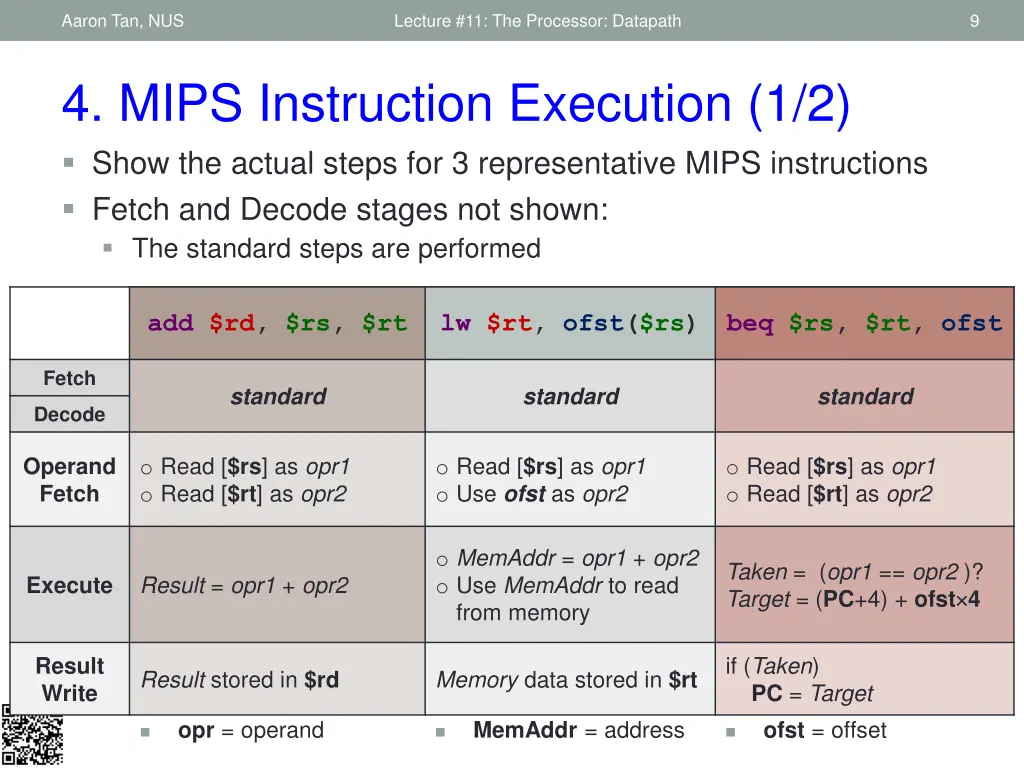
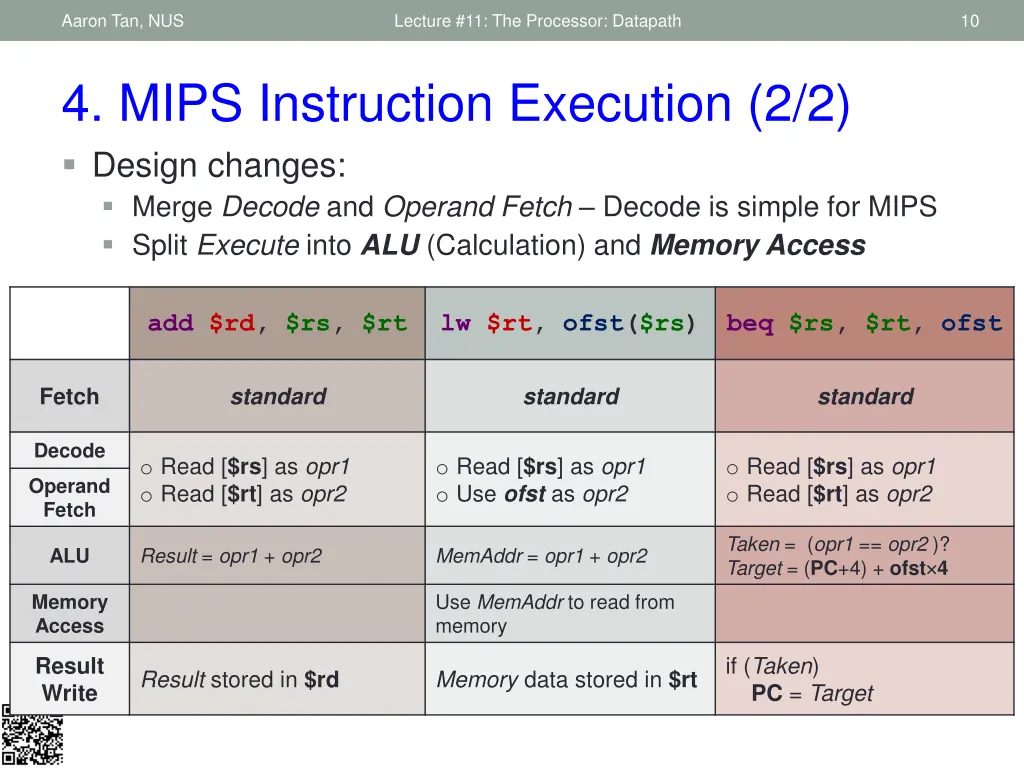
Aaron Tan, NUS Lecture #11: The Processor: Datapath 9 4. MIPS Instruction Execution (1/2) Show the actual steps for 3 representative MIPS instructions Fetch and Decode stages not shown: The standard steps are performed add $rd, $rs, $rt add $rd, $rs, $rt lw $rt, ofst($rs) lw $rt, ofst($rs) beq $rs, $rt, labl beq $rs, $rt, ofst Fetch standard standard standard Decode o Read [$rs] as opr1 o Read [$rt] as opr2 o Read [$rs] as opr1 o Use ofst as opr2 o Read [$rs] as opr1 o Read [$rt] as opr2 Operand Fetch o MemAddr = opr1 + opr2 o Use MemAddr to read from memory Taken = (opr1 == opr2 )? Target = (PC+4) + ofst 4 Result = opr1 + opr2 Execute if (Taken) PC = Target Result Write Result stored in $rd Memory data stored in $rt opr =operand MemAddr =address ofst =offset
Aaron Tan, NUS Lecture #11: The Processor: Datapath 10 4. MIPS Instruction Execution (2/2) Design changes: Merge Decode and Operand Fetch Decode is simple for MIPS Split Execute into ALU (Calculation) and Memory Access add $rd, $rs, $rt lw $rt, ofst($rs) beq $rs, $rt, ofst standard standard standard Fetch Decode o Read [$rs] as opr1 o Read [$rt] as opr2 o Read [$rs] as opr1 o Use ofst as opr2 o Read [$rs] as opr1 o Read [$rt] as opr2 Operand Fetch Taken = (opr1 == opr2 )? Target = (PC+4) + ofst 4 Result = opr1 + opr2 MemAddr = opr1 + opr2 ALU Use MemAddr to read from memory Memory Access if (Taken) PC = Target Result Write Result stored in $rd Memory data stored in $rt
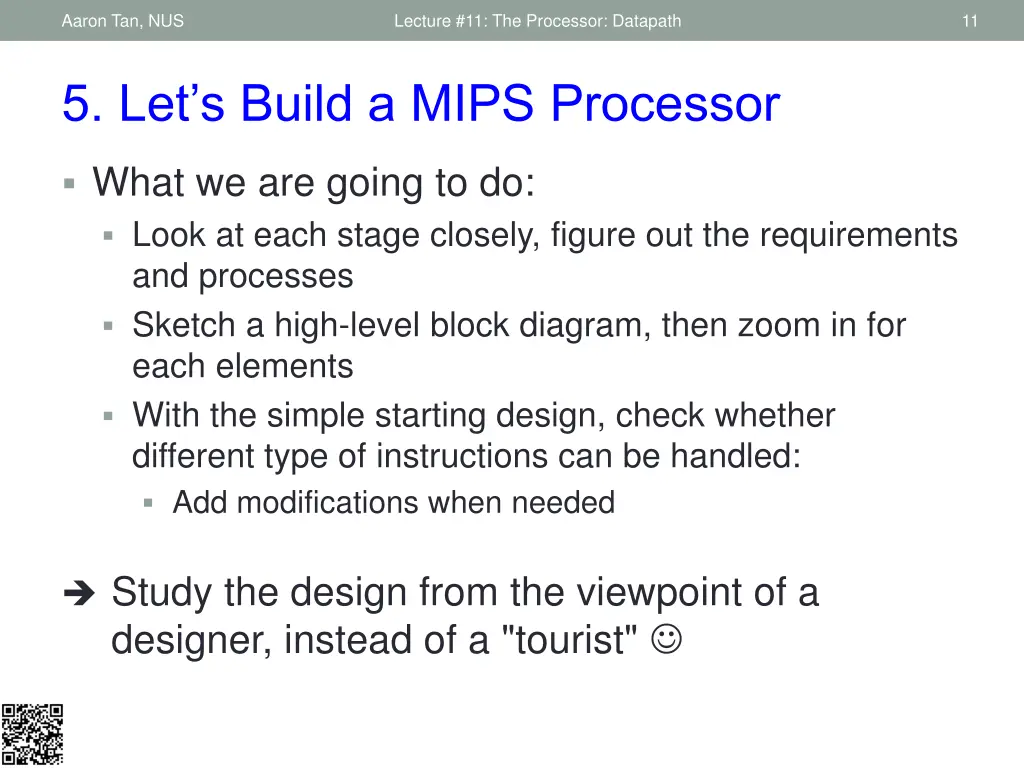
Aaron Tan, NUS Lecture #11: The Processor: Datapath 11 5. Let s Build a MIPS Processor What we are going to do: Look at each stage closely, figure out the requirements and processes Sketch a high-level block diagram, then zoom in for each elements With the simple starting design, check whether different type of instructions can be handled: Add modifications when needed Study the design from the viewpoint of a designer, instead of a "tourist"
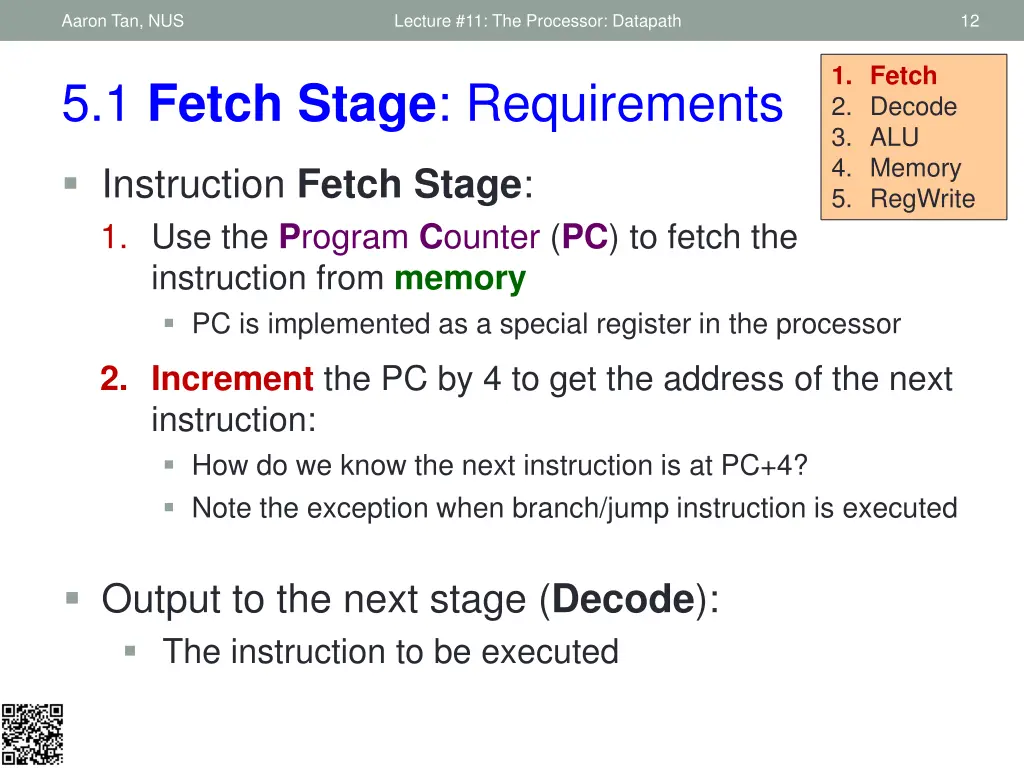
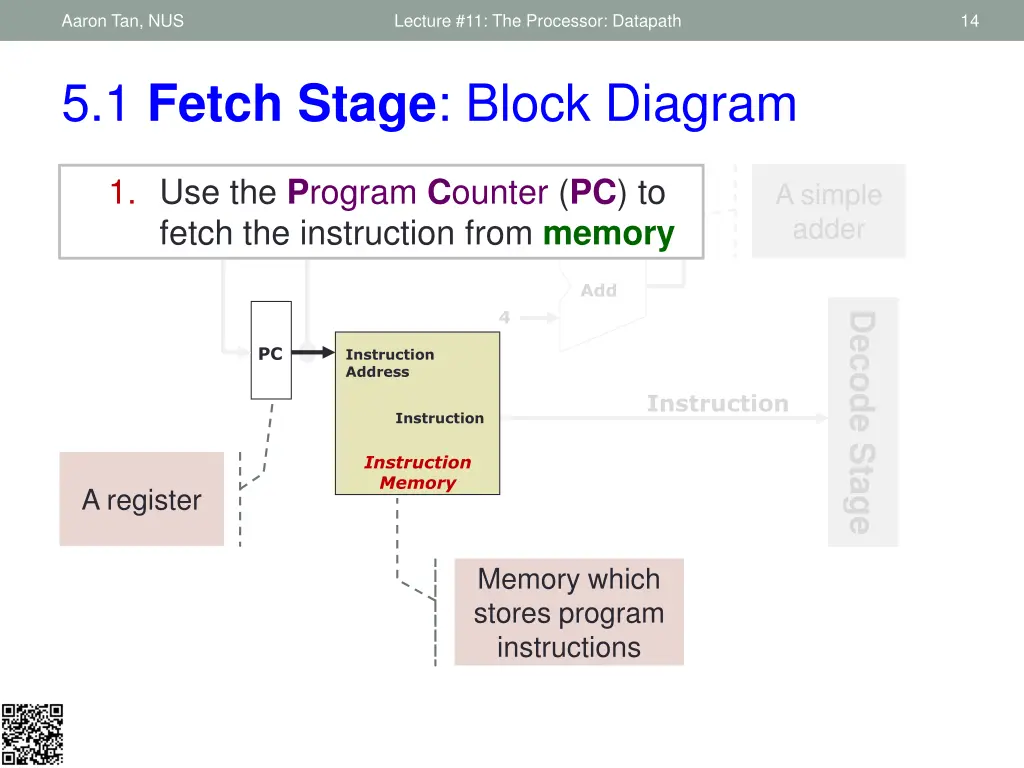
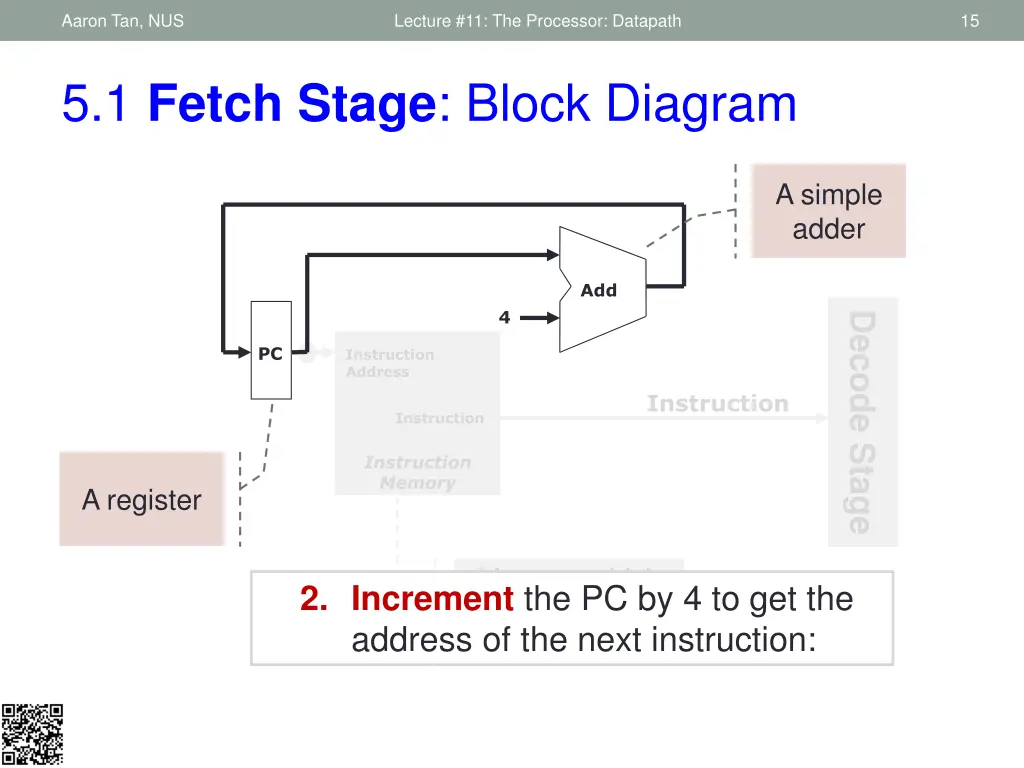
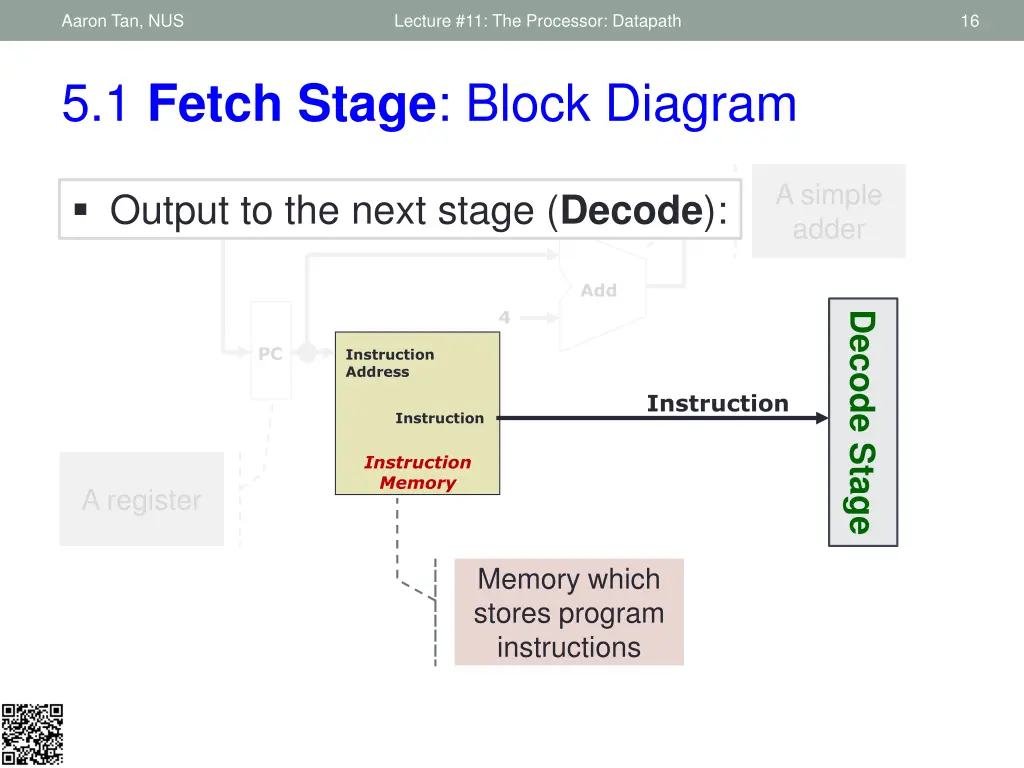
Aaron Tan, NUS Lecture #11: The Processor: Datapath 12 1. Fetch 2. Decode 3. ALU 4. Memory 5. RegWrite 5.1 Fetch Stage: Requirements Instruction Fetch Stage: 1. Use the Program Counter(PC) to fetch the instruction from memory PC is implemented as a special register in the processor 2. Increment the PC by 4 to get the address of the next instruction: How do we know the next instruction is at PC+4? Note the exception when branch/jump instruction is executed Output to the next stage (Decode): The instruction to be executed
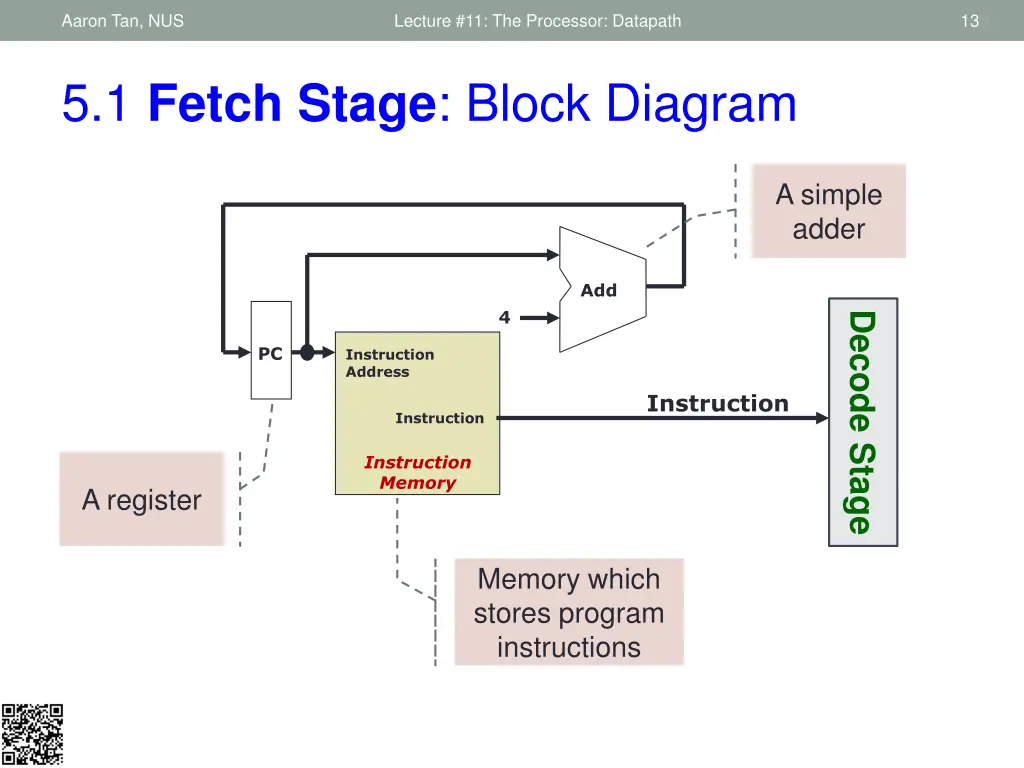
Aaron Tan, NUS Lecture #11: The Processor: Datapath 13 5.1 Fetch Stage: Block Diagram A simple adder Add 4 Decode Stage PC Instruction Address Instruction Instruction Instruction Memory A register Memory which stores program instructions
Aaron Tan, NUS Lecture #11: The Processor: Datapath 14 5.1 Fetch Stage: Block Diagram 1. Use the Program Counter(PC) to fetch the instruction from memory A simple adder Add 4 Decode Stage PC Instruction Address Instruction Instruction Instruction Memory A register Memory which stores program instructions
Aaron Tan, NUS Lecture #11: The Processor: Datapath 15 5.1 Fetch Stage: Block Diagram A simple adder Add 4 Decode Stage PC Instruction Address Instruction Instruction Instruction Memory A register Memory which stores program instructions 2. Increment the PC by 4 to get the address of the next instruction:
Aaron Tan, NUS Lecture #11: The Processor: Datapath 16 5.1 Fetch Stage: Block Diagram A simple adder Output to the next stage (Decode): Add 4 Decode Stage PC Instruction Address Instruction Instruction Instruction Memory A register Memory which stores program instructions
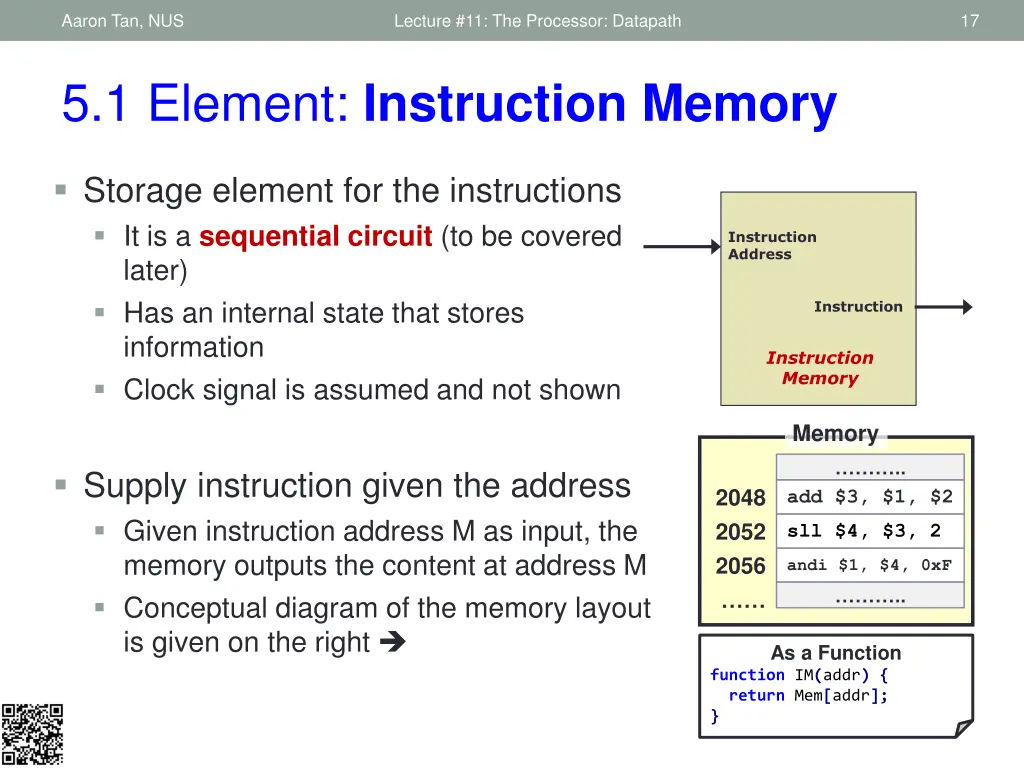
Aaron Tan, NUS Lecture #11: The Processor: Datapath 17 5.1 Element: Instruction Memory Storage element for the instructions It is a sequential circuit (to be covered later) Has an internal state that stores information Clock signal is assumed and not shown Instruction Address Instruction Instruction Memory Memory .. Supply instruction given the address Given instruction address M as input, the memory outputs the content at address M Conceptual diagram of the memory layout is given on the right 2048 2052 2056 add $3, $1, $2 sll $4, $3, 2 andi $1, $4, 0xF .. As a Function function IM(addr) { return Mem[addr]; }
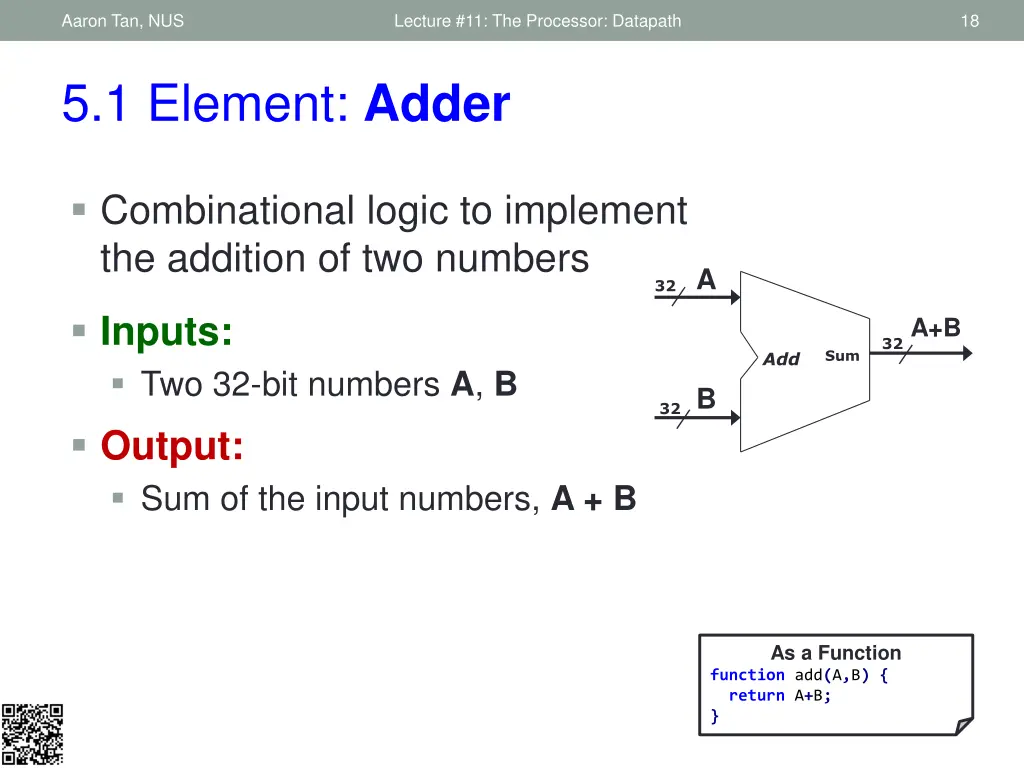
Aaron Tan, NUS Lecture #11: The Processor: Datapath 18 5.1 Element: Adder Combinational logic to implement the addition of two numbers A 32 Inputs: Two 32-bit numbers A, B Output: Sum of the input numbers, A + B A+B 32 Sum Add B 32 As a Function function add(A,B) { return A+B; }
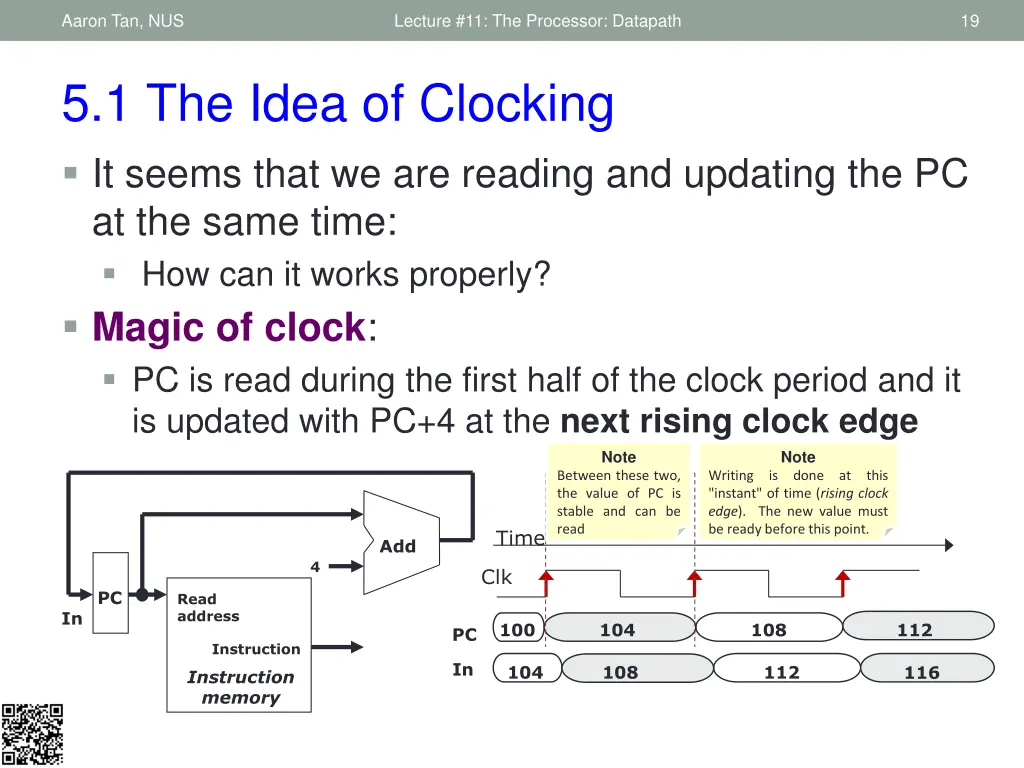
Aaron Tan, NUS Lecture #11: The Processor: Datapath 19 5.1 The Idea of Clocking It seems that we are reading and updating the PC at the same time: How can it works properly? Magic of clock: PC is read during the first half of the clock period and it is updated with PC+4 at the next rising clock edge Note Note Between these two, the value of PC is stable and can be read Writing is done at this "instant" of time (rising clock edge). The new value must be ready before this point. Time Add 4 Clk PC Read address In 100 104 108 112 PC Instruction In 104 108 112 116 Instruction memory
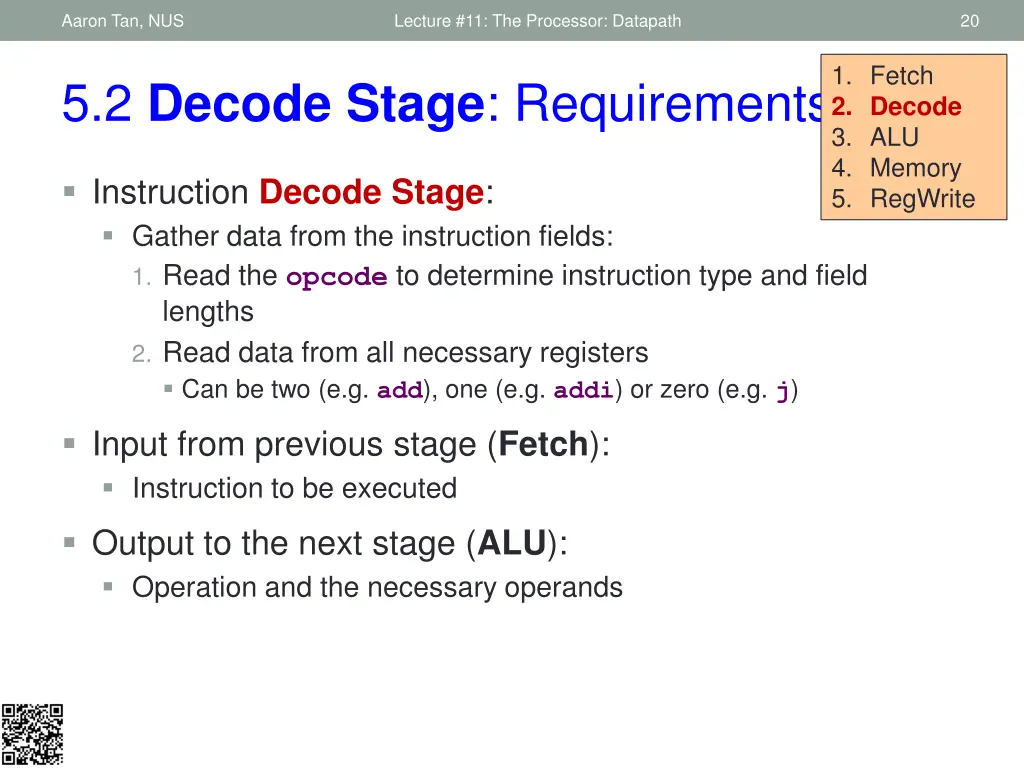
Aaron Tan, NUS Lecture #11: The Processor: Datapath 20 1. Fetch 2. Decode 3. ALU 4. Memory 5. RegWrite 5.2 Decode Stage: Requirements Instruction Decode Stage: Gather data from the instruction fields: 1. Read the opcode to determine instruction type and field lengths 2. Read data from all necessary registers Can be two (e.g. add), one (e.g. addi) or zero (e.g. j) Input from previous stage (Fetch): Instruction to be executed Output to the next stage (ALU): Operation and the necessary operands
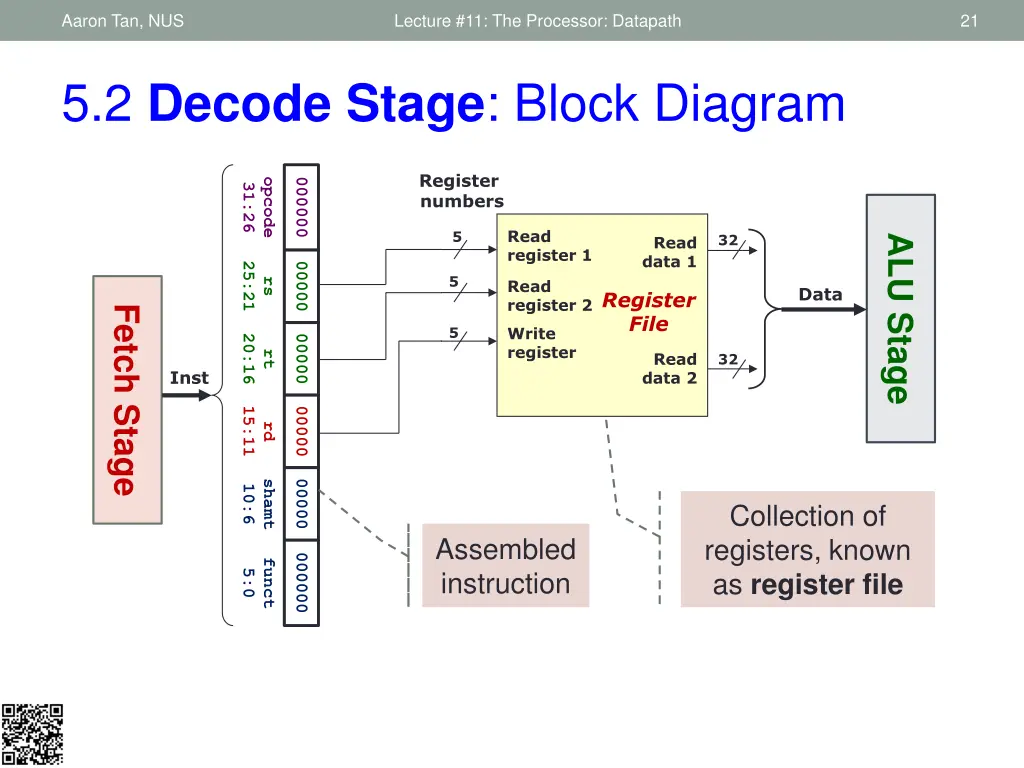
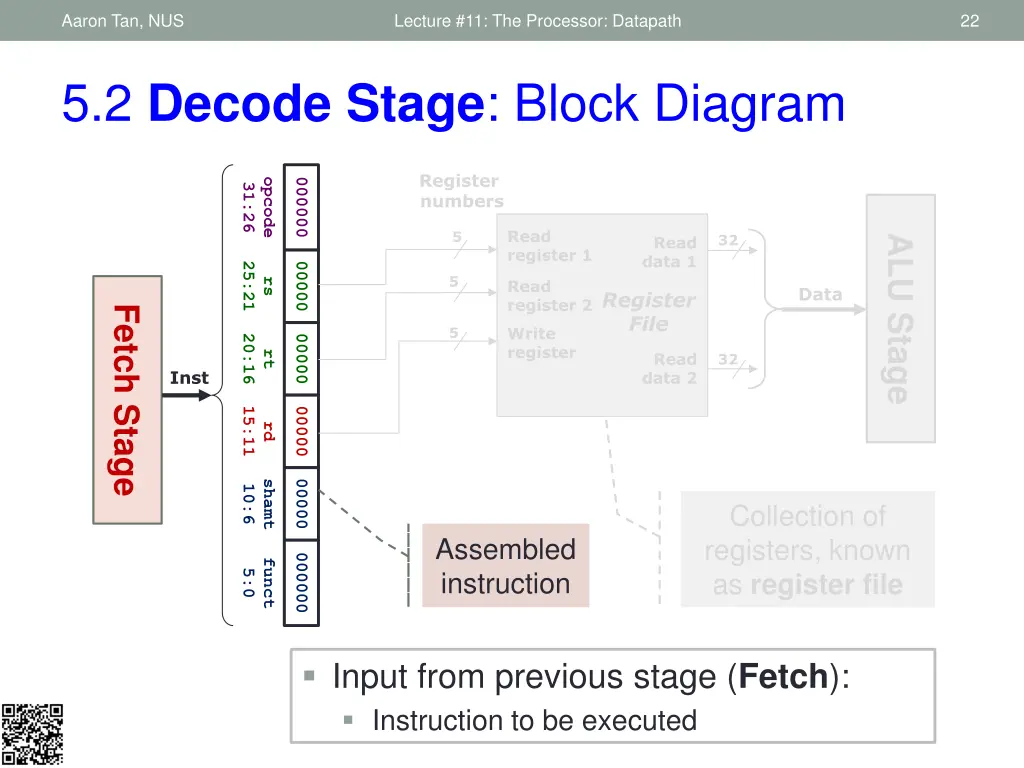
Aaron Tan, NUS Lecture #11: The Processor: Datapath 21 5.2 Decode Stage: Block Diagram Register numbers opcode 000000 31:26 Read register 1 5 32 ALU Stage Read data 1 25:21 00000 5 rs Read register 2 Data Register File Fetch Stage Write register 5 20:16 00000 rt Read data 2 32 Inst 15:11 00000 rd shamt 00000 10:6 Collection of registers, known as register file Assembled instruction 000000 funct 5:0
Aaron Tan, NUS Lecture #11: The Processor: Datapath 22 5.2 Decode Stage: Block Diagram Register numbers opcode 000000 31:26 Read register 1 5 32 ALU Stage Read data 1 25:21 00000 5 rs Read register 2 Data Register File Fetch Stage Write register 5 20:16 00000 rt Read data 2 32 Inst 15:11 00000 rd shamt 00000 10:6 Collection of registers, known as register file Assembled instruction 000000 funct 5:0 Input from previous stage (Fetch): Instruction to be executed
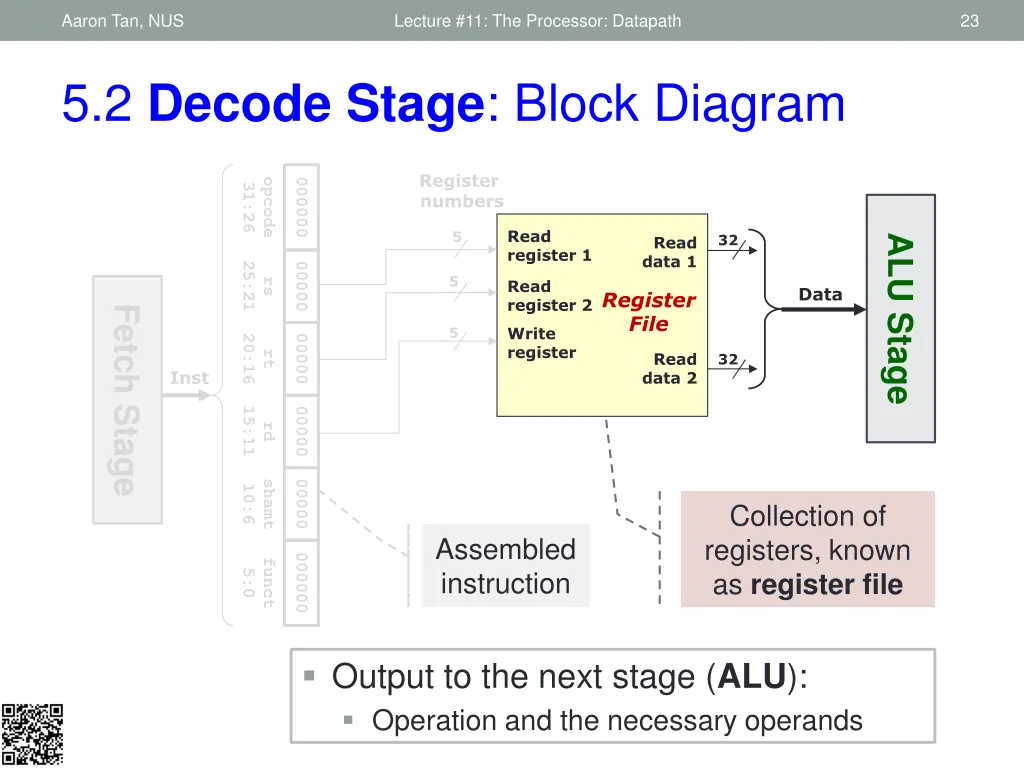
Aaron Tan, NUS Lecture #11: The Processor: Datapath 23 5.2 Decode Stage: Block Diagram Register numbers opcode 000000 31:26 Read register 1 5 32 ALU Stage Read data 1 25:21 00000 5 rs Read register 2 Data Register File Fetch Stage Write register 5 20:16 00000 rt Read data 2 32 Inst 15:11 00000 rd shamt 00000 10:6 Collection of registers, known as register file Assembled instruction 000000 funct 5:0 Output to the next stage (ALU): Operation and the necessary operands
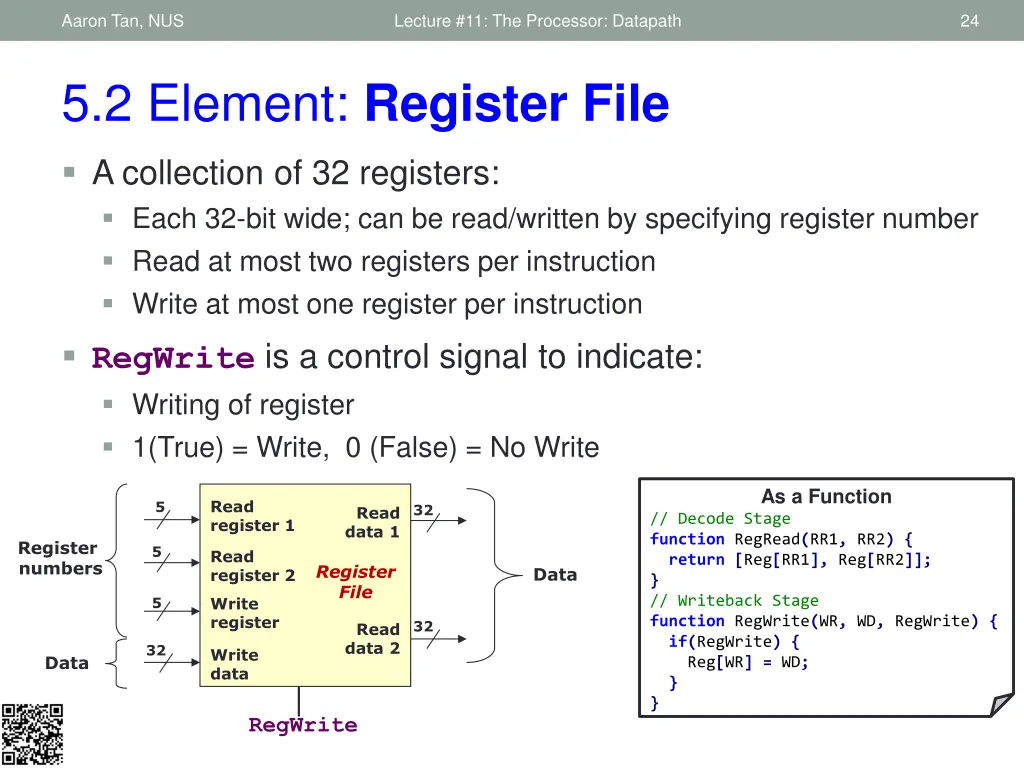
Aaron Tan, NUS Lecture #11: The Processor: Datapath 24 5.2 Element: Register File A collection of 32 registers: Each 32-bit wide; can be read/written by specifying register number Read at most two registers per instruction Write at most one register per instruction RegWrite is a control signal to indicate: Writing of register 1(True) = Write, 0 (False) = No Write As a Function Read register 1 5 32 Read data 1 // Decode Stage function RegRead(RR1, RR2) { return [Reg[RR1], Reg[RR2]]; } // Writeback Stage function RegWrite(WR, WD, RegWrite) { if(RegWrite) { Reg[WR] = WD; } } Register numbers 5 Read register 2 Register File Data Write register 5 32 Read data 2 32 Write data Data RegWrite
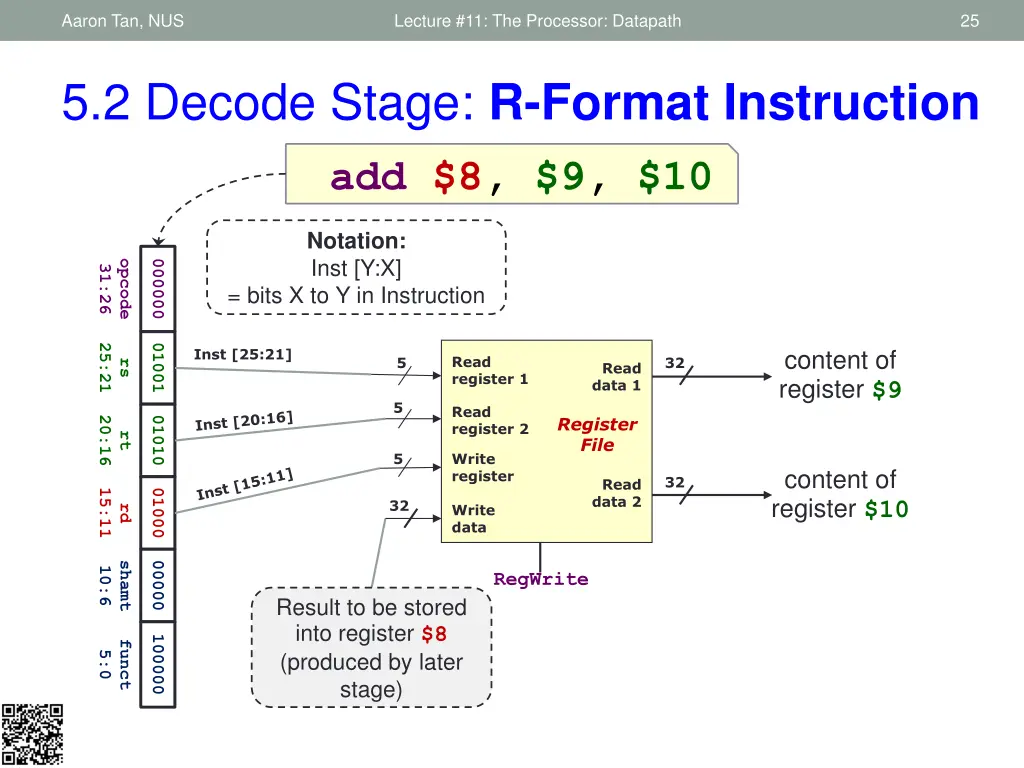
Aaron Tan, NUS Lecture #11: The Processor: Datapath 25 5.2 Decode Stage: R-Format Instruction add $8, $9, $10 Notation: Inst [Y:X] opcode 000000 31:26 = bits X to Y in Instruction 25:21 01001 content of register $9 Inst [25:21] Read register 1 5 32 rs Read data 1 5 Read register 2 Register File 20:16 01010 rt 5 Write register content of register $10 32 Read data 2 15:11 01000 32 Write data rd shamt 00000 10:6 RegWrite Result to be stored into register $8 (produced by later stage) 100000 funct 5:0
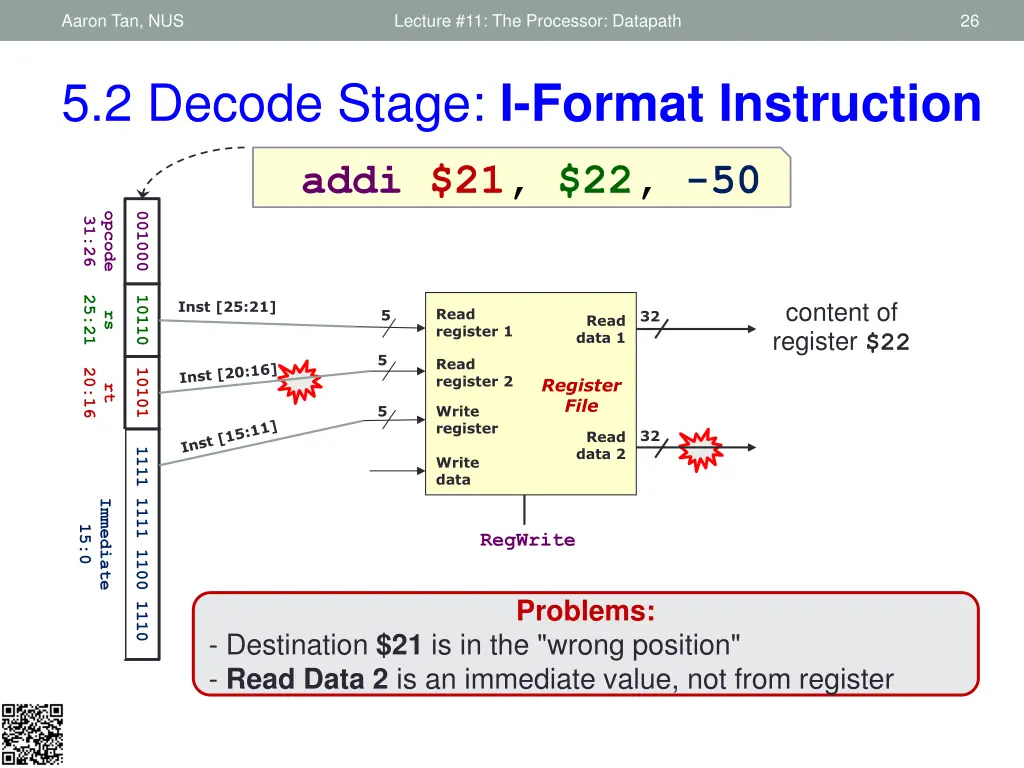
Aaron Tan, NUS Lecture #11: The Processor: Datapath 26 5.2 Decode Stage: I-Format Instruction addi $21, $22, -50 opcode 001000 31:26 25:21 10110 content of register $22 Inst [25:21] Read register 1 5 32 rs Read data 1 5 Read register 2 20:16 10101 Register File rt 5 Write register 32 Read data 2 1111 1111 1100 1110 Write data Immediate 15:0 RegWrite Problems: - Destination $21 is in the "wrong position" - Read Data 2 is an immediate value, not from register
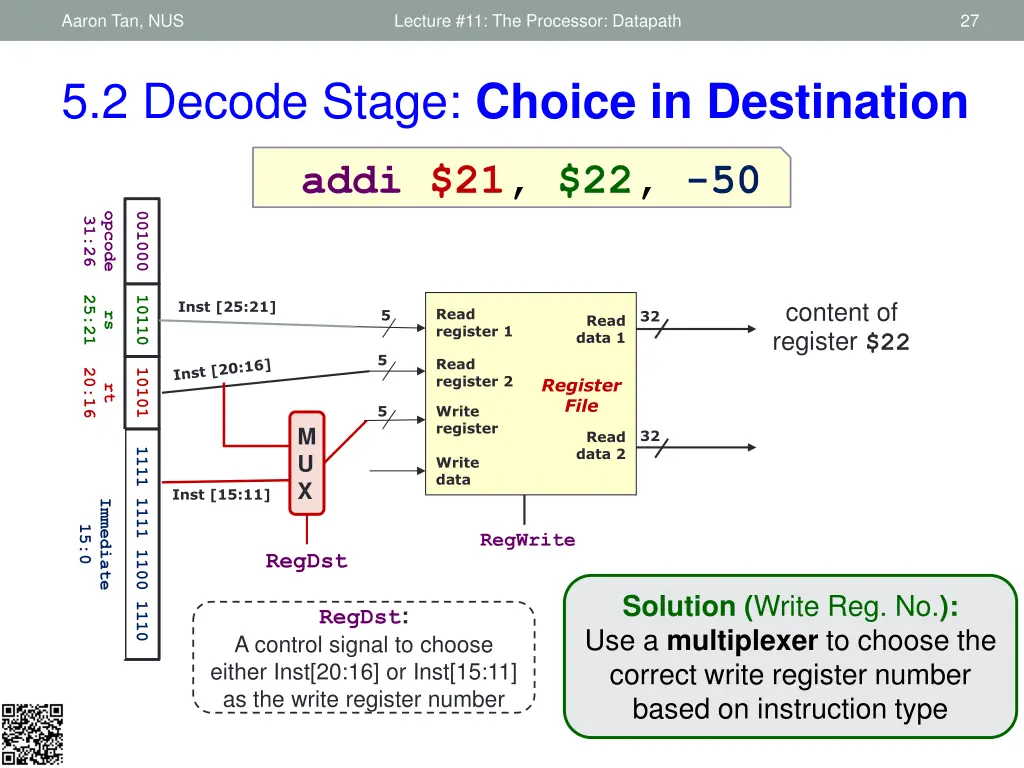
Aaron Tan, NUS Lecture #11: The Processor: Datapath 27 5.2 Decode Stage: Choice in Destination addi $21, $22, -50 opcode 001000 31:26 25:21 10110 content of register $22 Inst [25:21] Read register 1 5 32 rs Read data 1 5 Read register 2 20:16 10101 Register File rt 5 Write register M U X 32 Read data 2 1111 1111 1100 1110 Write data Inst [15:11] Immediate 15:0 RegWrite RegDst Solution (Write Reg. No.): Use a multiplexer to choose the correct write register number based on instruction type RegDst: A control signal to choose either Inst[20:16] or Inst[15:11] as the write register number
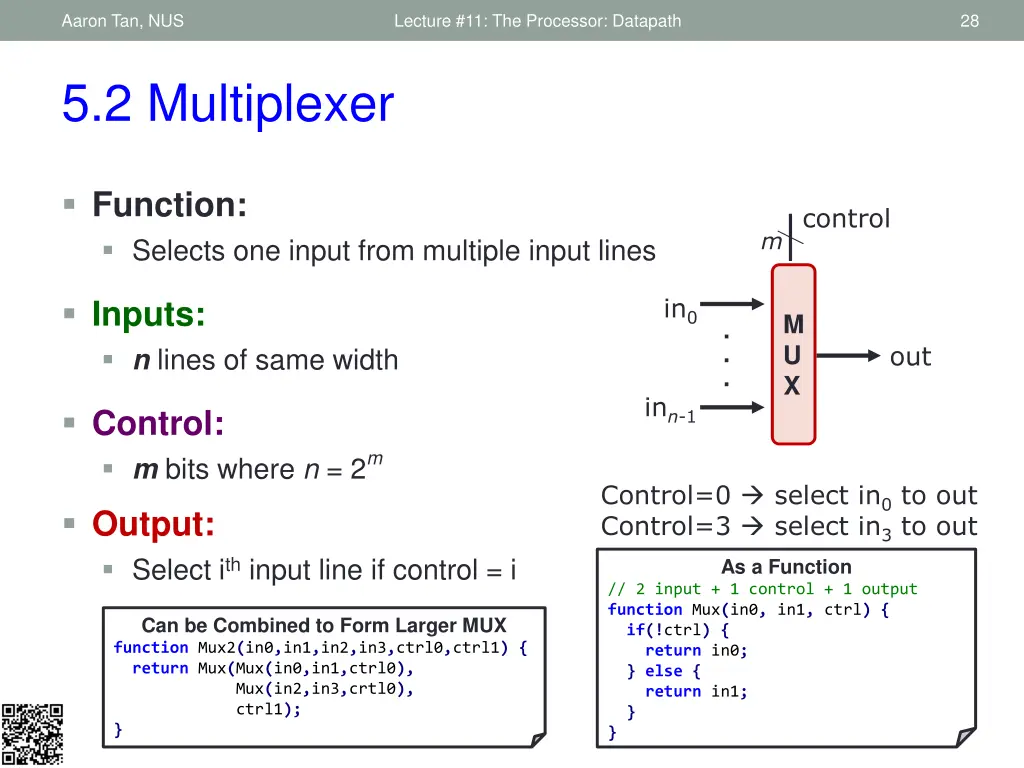
Aaron Tan, NUS Lecture #11: The Processor: Datapath 28 5.2 Multiplexer Function: Selects one input from multiple input lines control m in0 Inputs: n lines of same width M U X . . . out inn-1 Control: m bits where n = 2m Control=0 select in0 to out Control=3 select in3 to out As a Function // 2 input + 1 control + 1 output function Mux(in0, in1, ctrl) { if(!ctrl) { return in0; } else { return in1; } } Output: Select ith input line if control = i Can be Combined to Form Larger MUX function Mux2(in0,in1,in2,in3,ctrl0,ctrl1) { return Mux(Mux(in0,in1,ctrl0), Mux(in2,in3,crtl0), ctrl1); }
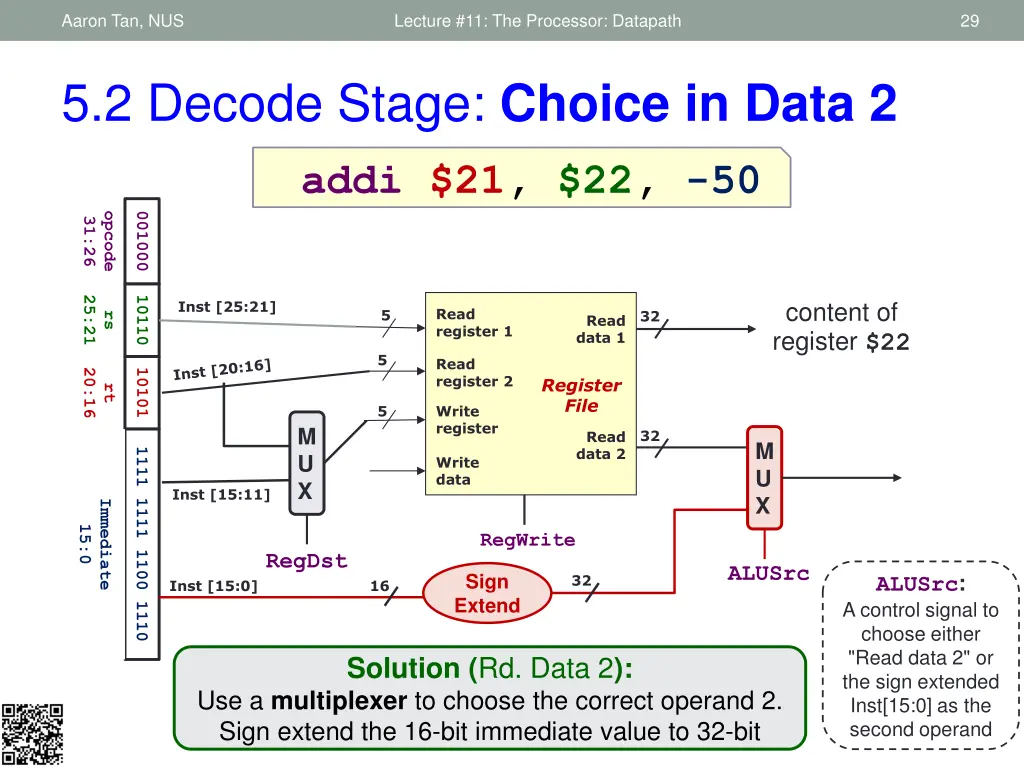
Aaron Tan, NUS Lecture #11: The Processor: Datapath 29 5.2 Decode Stage: Choice in Data 2 addi $21, $22, -50 opcode 001000 31:26 25:21 10110 content of register $22 Inst [25:21] Read register 1 5 32 rs Read data 1 5 Read register 2 20:16 10101 Register File rt 5 Write register M U X 32 Read data 2 M U X 1111 1111 1100 1110 Write data Inst [15:11] Immediate 15:0 RegWrite RegDst ALUSrc ALUSrc: A control signal to choose either "Read data 2" or the sign extended Inst[15:0] as the second operand Sign Extend 32 Inst [15:0] 16 Solution (Rd. Data 2): Use a multiplexer to choose the correct operand 2. Sign extend the 16-bit immediate value to 32-bit
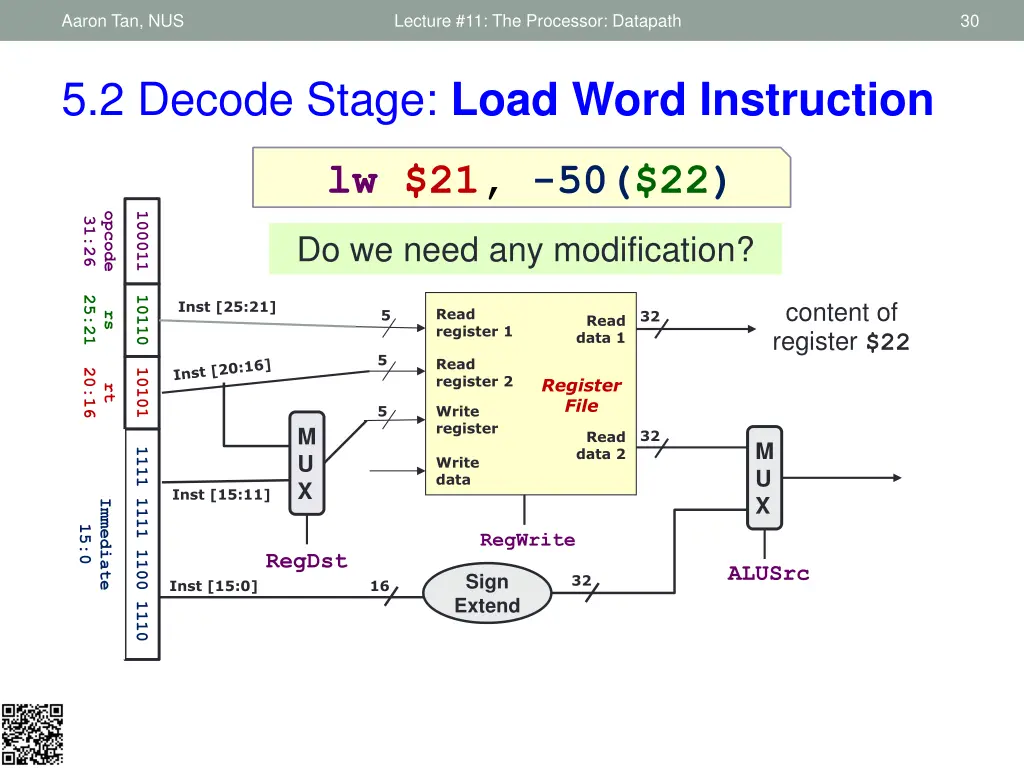
Aaron Tan, NUS Lecture #11: The Processor: Datapath 30 5.2 Decode Stage: Load Word Instruction lw $21, -50($22) opcode 100011 31:26 Do we need any modification? 25:21 10110 content of register $22 Inst [25:21] Read register 1 5 32 rs Read data 1 5 Read register 2 20:16 10101 Register File rt 5 Write register M U X 32 Read data 2 M U X 1111 1111 1100 1110 Write data Inst [15:11] Immediate 15:0 RegWrite RegDst ALUSrc Sign Extend 32 Inst [15:0] 16
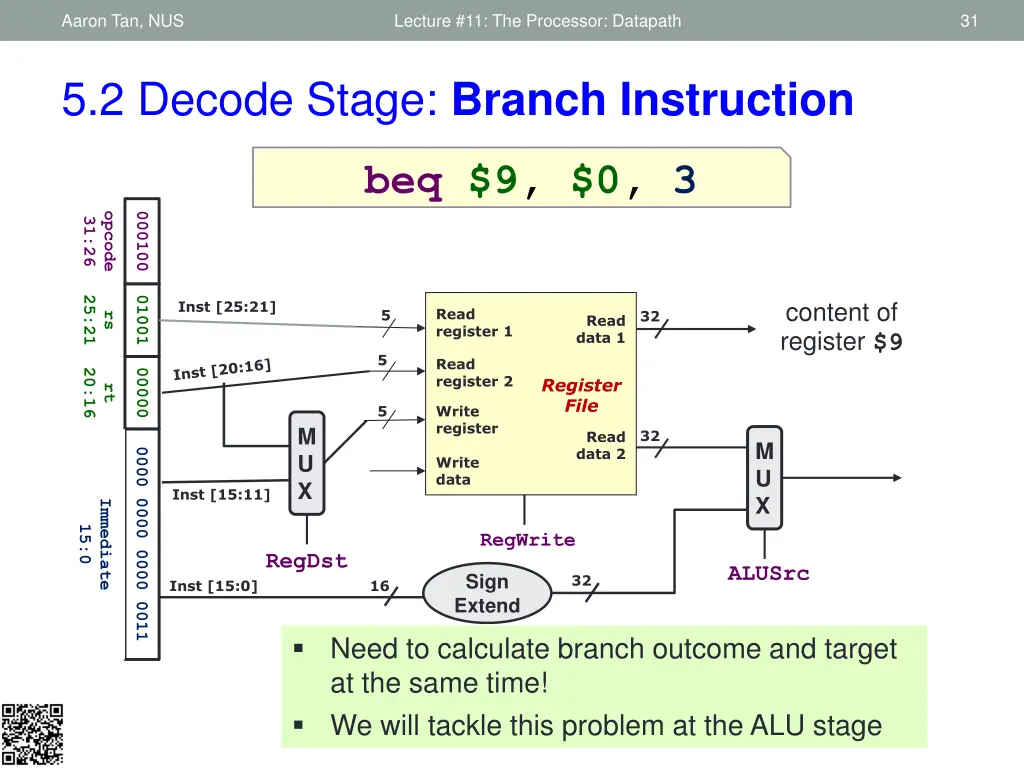
Aaron Tan, NUS Lecture #11: The Processor: Datapath 31 5.2 Decode Stage: Branch Instruction beq $9, $0, 3 opcode 000100 31:26 25:21 01001 content of register $9 Inst [25:21] Read register 1 5 32 rs Read data 1 5 Read register 2 20:16 00000 Register File rt 5 Write register M U X 32 Read data 2 M U X 0000 0000 0000 0011 Write data Inst [15:11] Immediate 15:0 RegWrite RegDst ALUSrc Sign Extend 32 Inst [15:0] 16 Need to calculate branch outcome and target at the same time! We will tackle this problem at the ALU stage
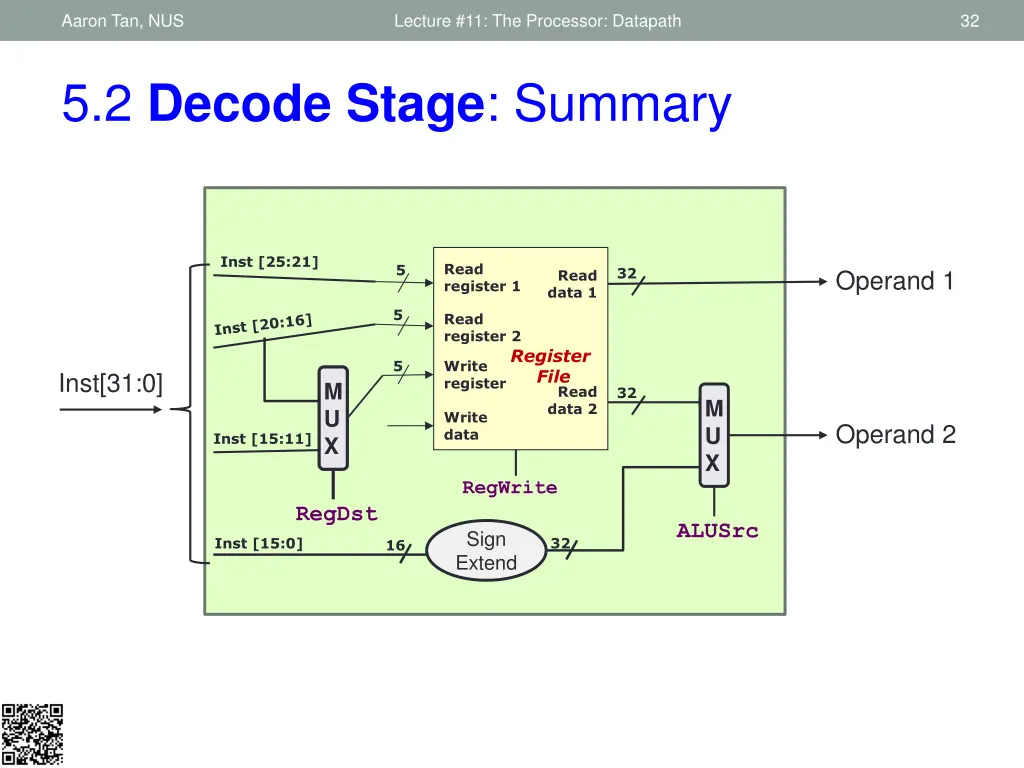
Aaron Tan, NUS Lecture #11: The Processor: Datapath 32 5.2 Decode Stage: Summary Inst [25:21] Read register 1 5 32 Operand 1 Read data 1 5 Read register 2 Register File 5 Write register Inst[31:0] M U X Read data 2 32 M U X Write data Operand 2 Inst [15:11] RegWrite RegDst ALUSrc Sign Extend Inst [15:0] 32 16
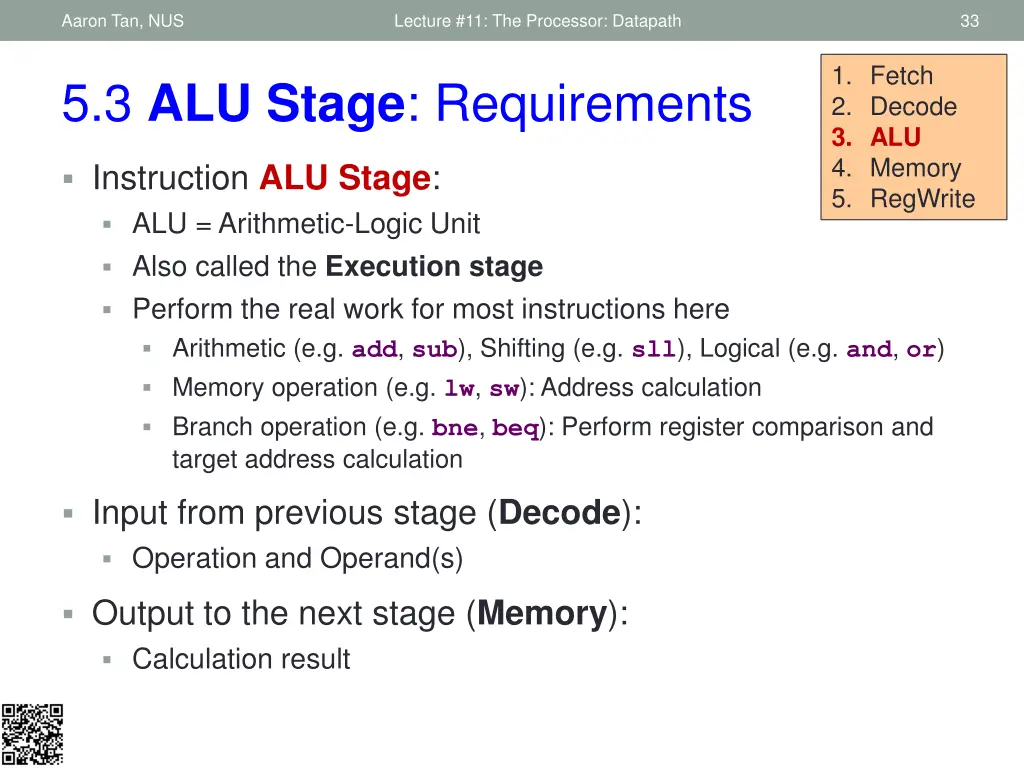
Aaron Tan, NUS Lecture #11: The Processor: Datapath 33 1. Fetch 2. Decode 3. ALU 4. Memory 5. RegWrite 5.3 ALU Stage: Requirements Instruction ALU Stage: ALU = Arithmetic-Logic Unit Also called the Execution stage Perform the real work for most instructions here Arithmetic (e.g. add, sub), Shifting (e.g. sll), Logical (e.g. and, or) Memory operation (e.g. lw, sw): Address calculation Branch operation (e.g. bne, beq): Perform register comparison and target address calculation Input from previous stage (Decode): Operation and Operand(s) Output to the next stage (Memory): Calculation result
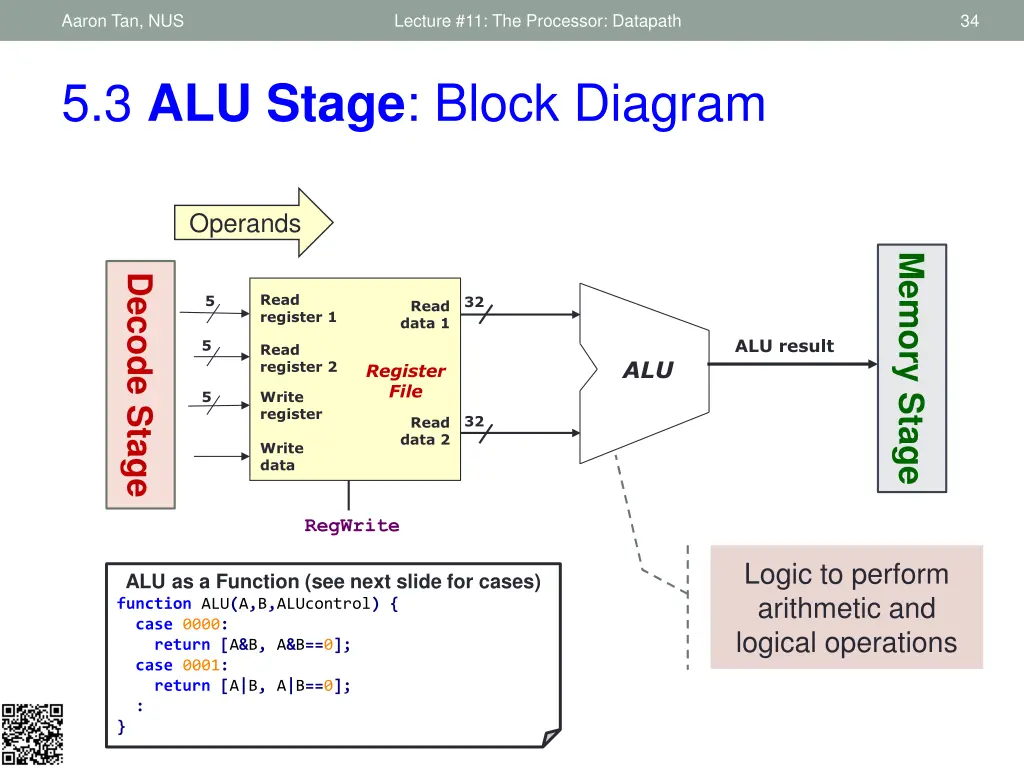
Aaron Tan, NUS Lecture #11: The Processor: Datapath 34 5.3 ALU Stage: Block Diagram Operands Memory Stage Decode Stage Read register 1 5 32 Read data 1 ALU result 5 Read register 2 ALU Register File 5 Write register 32 Read data 2 Write data RegWrite Logic to perform arithmetic and logical operations ALU as a Function (see next slide for cases) function ALU(A,B,ALUcontrol) { case 0000: return [A&B, A&B==0]; case 0001: return [A|B, A|B==0]; : }
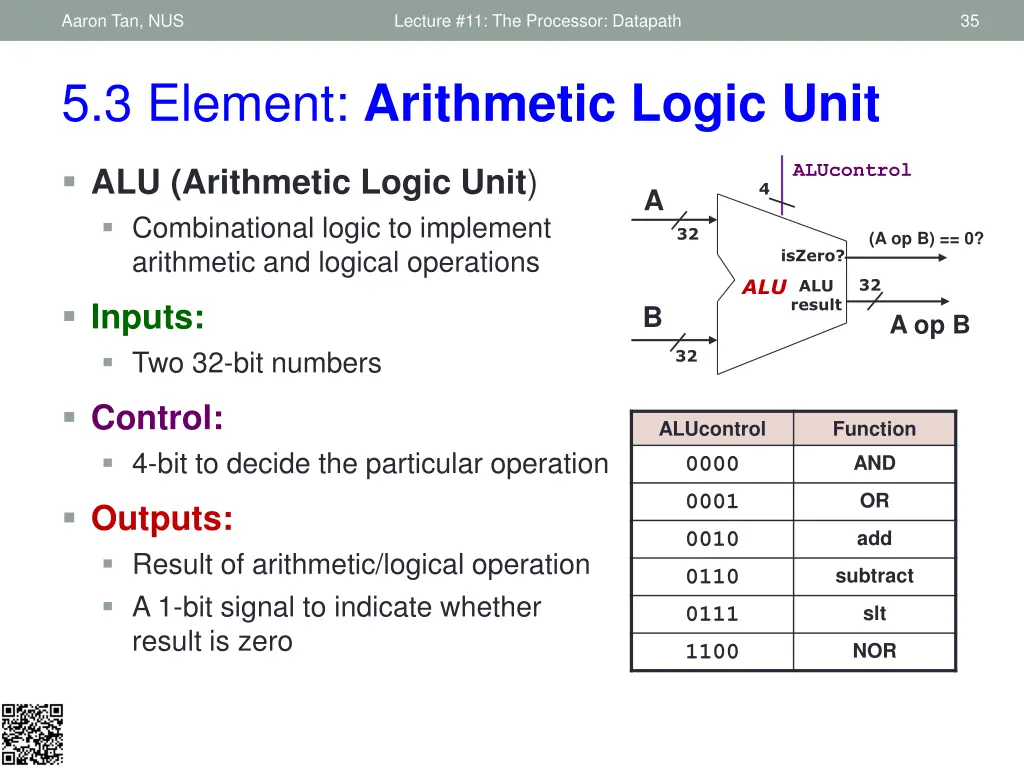
Aaron Tan, NUS Lecture #11: The Processor: Datapath 35 5.3 Element: Arithmetic Logic Unit ALUcontrol ALU (Arithmetic Logic Unit) Combinational logic to implement arithmetic and logical operations 4 A 32 (A op B) == 0? isZero? ALU 32 ALU result Inputs: Two 32-bit numbers B A op B 32 Control: 4-bit to decide the particular operation ALUcontrol Function AND 0000 OR 0001 Outputs: Result of arithmetic/logical operation A 1-bit signal to indicate whether result is zero add 0010 subtract 0110 slt 0111 NOR 1100
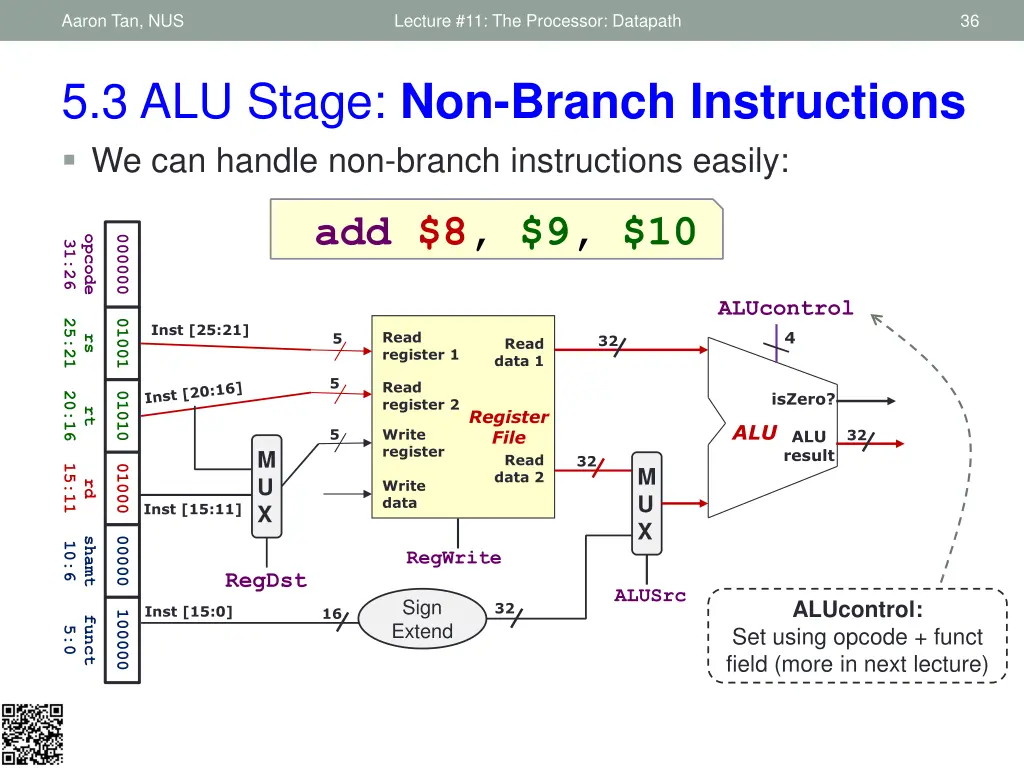
Aaron Tan, NUS Lecture #11: The Processor: Datapath 36 5.3 ALU Stage: Non-Branch Instructions We can handle non-branch instructions easily: add $8, $9, $10 opcode 000000 31:26 ALUcontrol 4 25:21 01001 Inst [25:21] Read register 1 5 32 rs Read data 1 5 Read register 2 isZero? 20:16 01010 rt Register File ALU 5 Write register 32 ALU result M U X Read data 2 32 15:11 01000 M U X Write data rd Inst [15:11] shamt 00000 10:6 RegWrite RegDst ALUSrc Sign Extend ALUcontrol: Set using opcode + funct field (more in next lecture) 32 Inst [15:0] 16 100000 funct 5:0
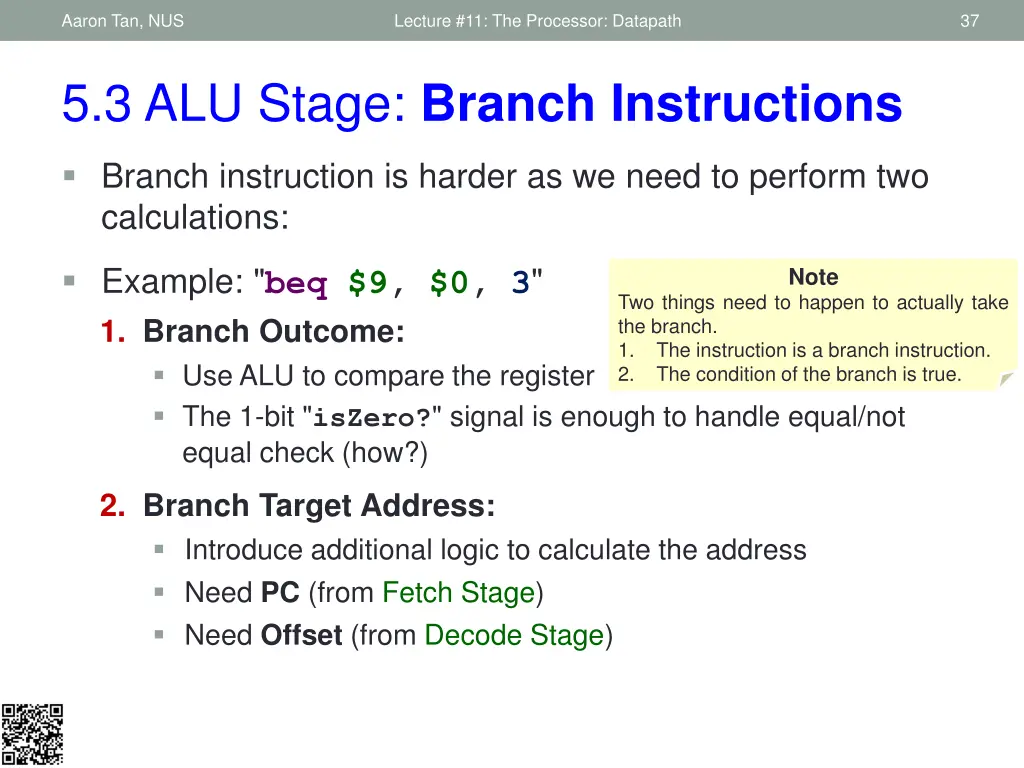
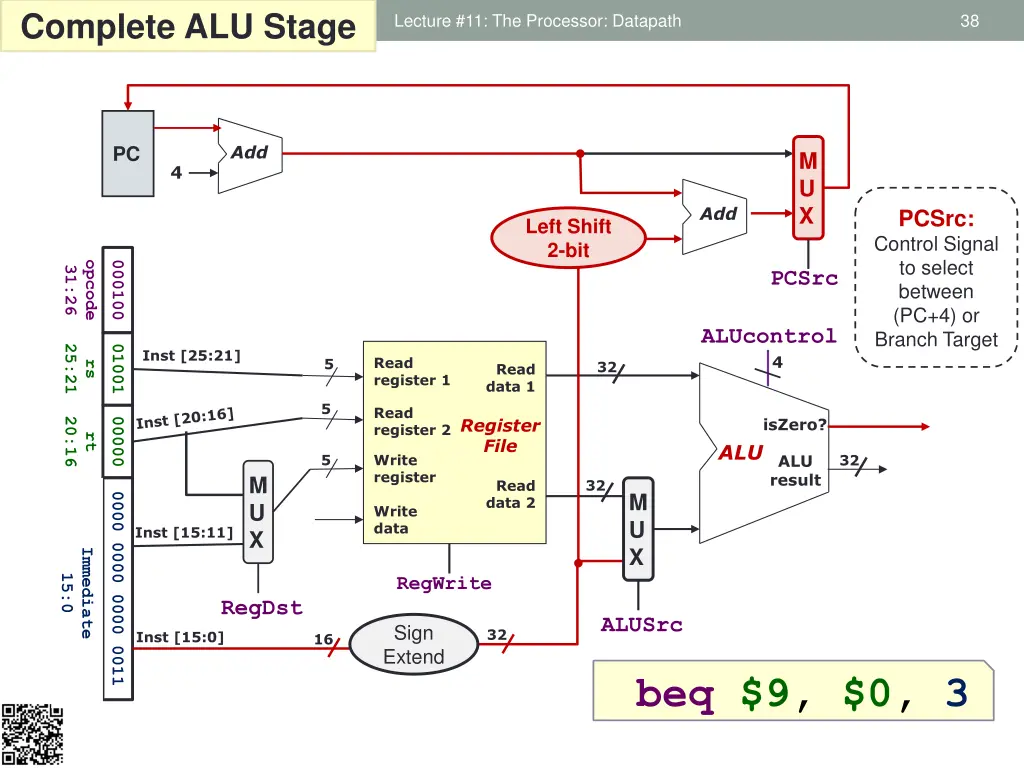
Aaron Tan, NUS Lecture #11: The Processor: Datapath 37 5.3 ALU Stage: Branch Instructions Branch instruction is harder as we need to perform two calculations: Example: "beq $9, $0, 3" 1. Branch Outcome: Use ALU to compare the register The 1-bit "isZero?" signal is enough to handle equal/not equal check (how?) Note Two things need to happen to actually take the branch. 1. The instruction is a branch instruction. 2. The condition of the branch is true. 2. Branch Target Address: Introduce additional logic to calculate the address Need PC (from Fetch Stage) Need Offset (from Decode Stage)
Aaron Tan, NUS Complete ALU Stage Lecture #11: The Processor: Datapath 38 Add PC M U X 4 Add PCSrc: Control Signal to select between (PC+4) or Branch Target Left Shift 2-bit opcode 000100 31:26 PCSrc ALUcontrol 25:21 01001 Inst [25:21] 4 Read register 1 5 32 rs Read data 1 5 Read register 2 Register File isZero? 20:16 00000 rt ALU 5 Write register ALU result 32 M U X 32 Read data 2 M U X 0000 0000 0000 0011 Write data Inst [15:11] Immediate 15:0 RegWrite RegDst ALUSrc Sign Extend 32 Inst [15:0] 16 beq $9, $0, 3
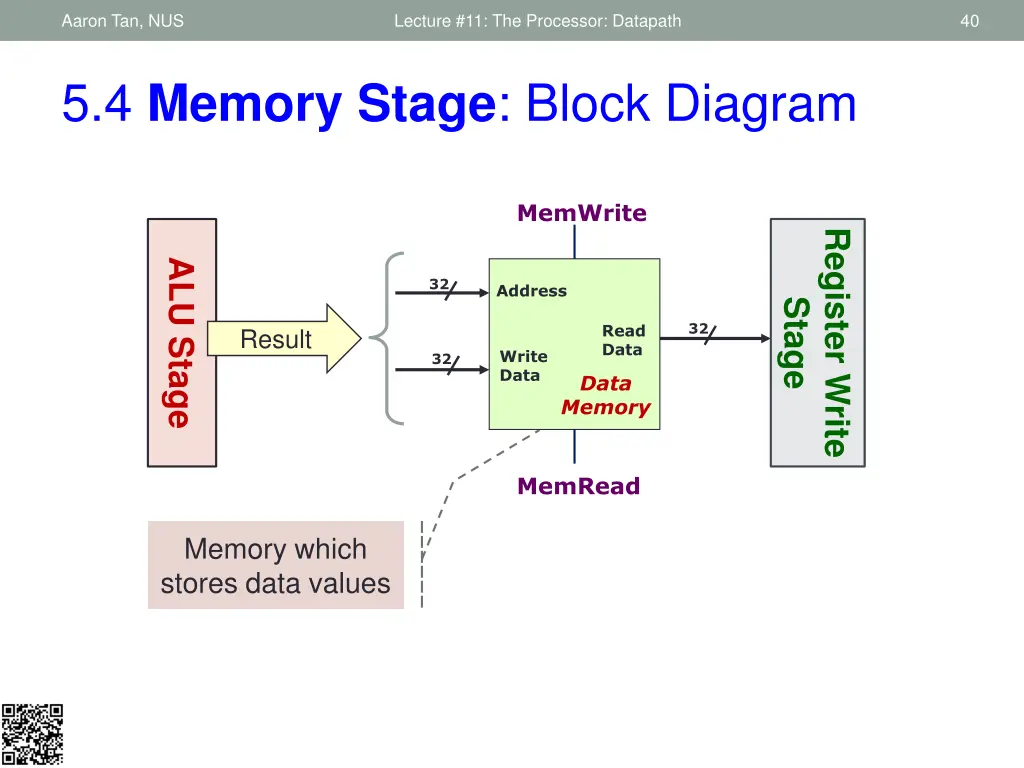
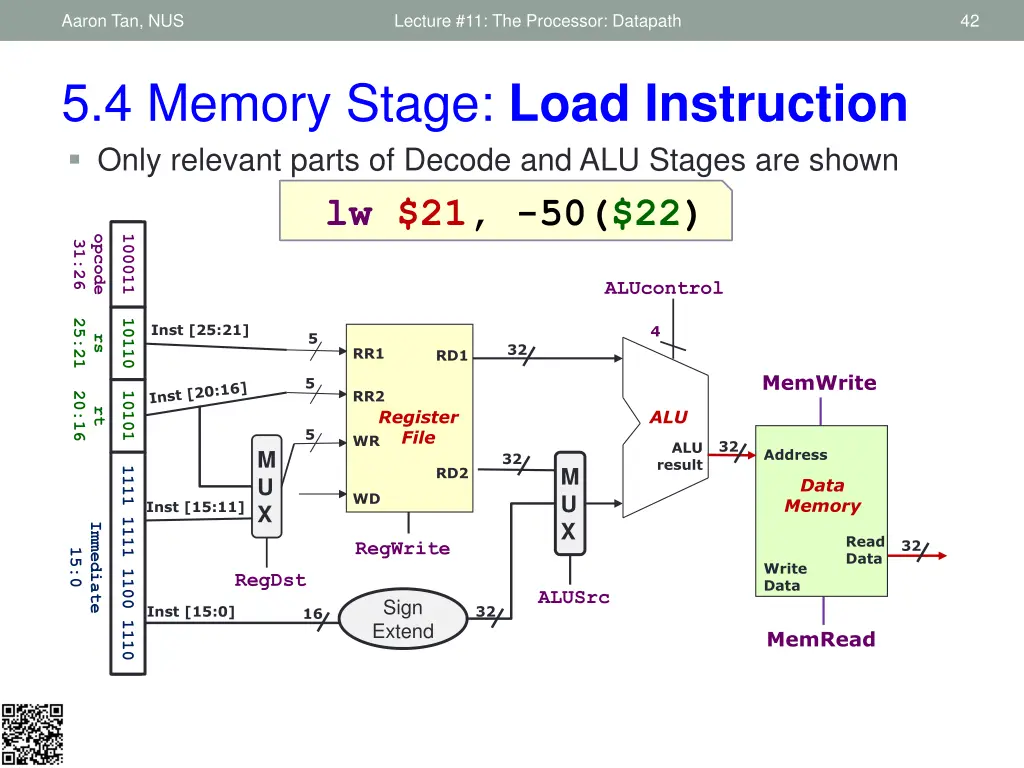
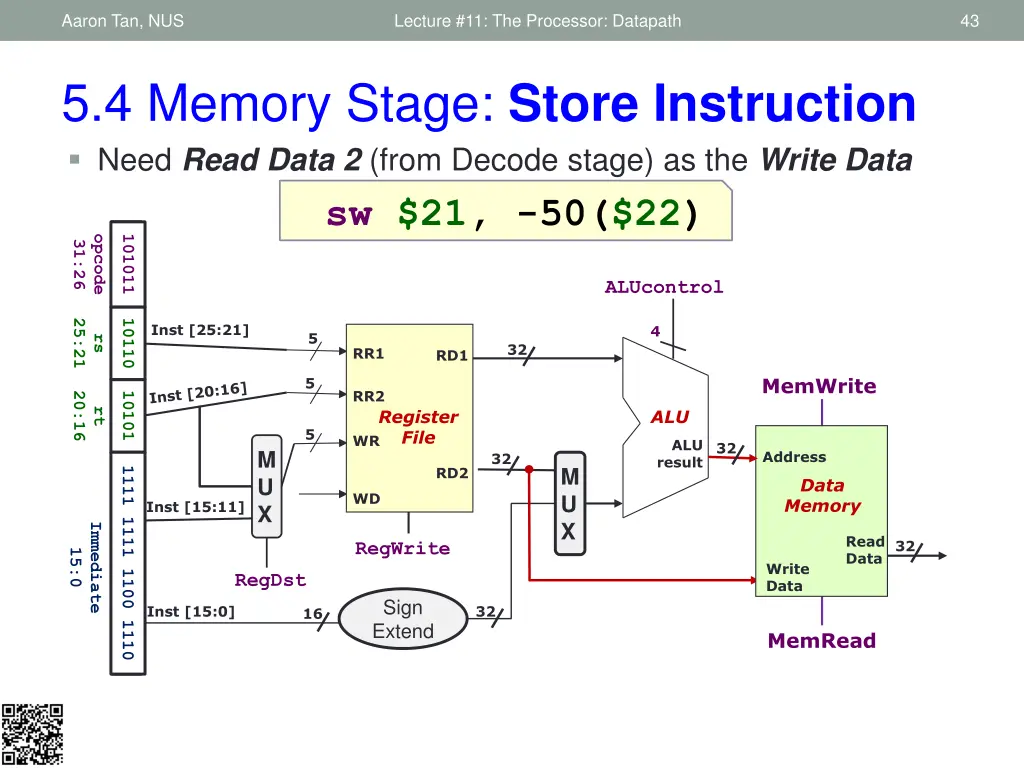
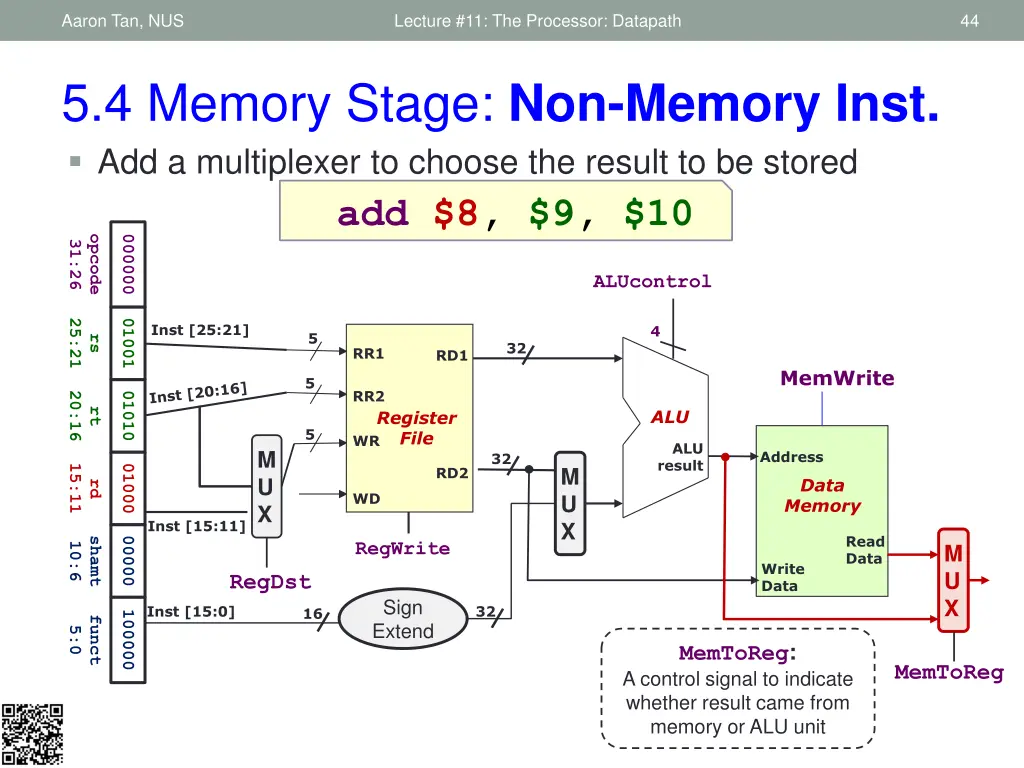
Aaron Tan, NUS Lecture #11: The Processor: Datapath 39 1. Fetch 2. Decode 3. ALU 4. Memory 5. RegWrite 5.4 Memory Stage: Requirements Instruction Memory Access Stage: Only the load and store instructions need to perform operation in this stage: Use memory address calculated by ALU Stage Read from or write to data memory All other instructions remain idle Result from ALU Stage will pass through to be used in Register Write stage (see section 5.5) if applicable Input from previous stage (ALU): Computation result to be used as memory address (if applicable) Output to the next stage (Register Write): Result to be stored (if applicable)
Aaron Tan, NUS Lecture #11: The Processor: Datapath 40 5.4 Memory Stage: Block Diagram MemWrite Register Write ALU Stage 32 Address Stage 32 Read Data Result Write Data 32 Data Memory MemRead Memory which stores data values
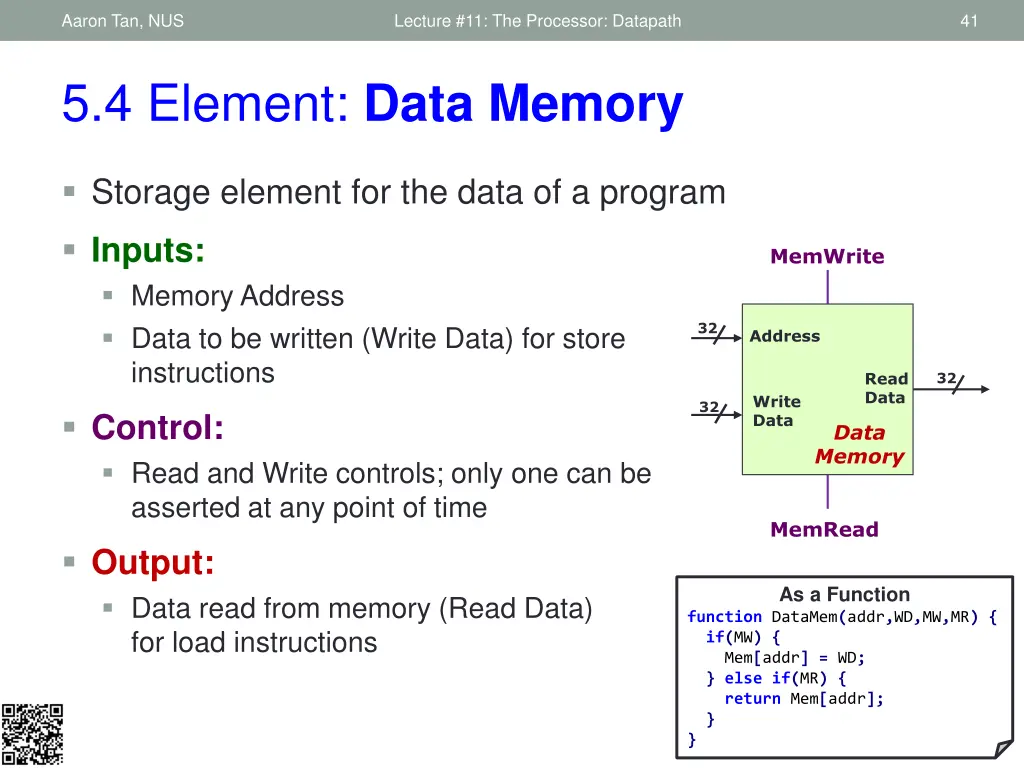
Aaron Tan, NUS Lecture #11: The Processor: Datapath 41 5.4 Element: Data Memory Storage element for the data of a program Inputs: Memory Address Data to be written (Write Data) for store instructions MemWrite 32 Address Read Data 32 Write Data 32 Control: Read and Write controls; only one can be asserted at any point of time Data Memory MemRead Output: Data read from memory (Read Data) for load instructions As a Function function DataMem(addr,WD,MW,MR) { if(MW) { Mem[addr] = WD; } else if(MR) { return Mem[addr]; } }
Aaron Tan, NUS Lecture #11: The Processor: Datapath 42 5.4 Memory Stage: Load Instruction Only relevant parts of Decode and ALU Stages are shown lw $21, -50($22) 000100 opcode 100011 31:26 ALUcontrol 25:21 01001 10110 Inst [25:21] 4 5 rs 32 RR1 RD1 MemWrite 5 RR2 20:16 00000 10101 rt Register File ALU 5 WR 32 ALU result Address M U X 32 M U X RD2 0000 0000 0000 0011 1111 1111 1100 1110 Data Memory WD Inst [15:11] Immediate Read Data 32 RegWrite 15:0 Write Data RegDst ALUSrc Sign Extend Inst [15:0] 32 16 MemRead
Aaron Tan, NUS Lecture #11: The Processor: Datapath 43 5.4 Memory Stage: Store Instruction Need Read Data 2 (from Decode stage) as the Write Data sw $21, -50($22) 000100 opcode 101011 31:26 ALUcontrol 25:21 01001 10110 Inst [25:21] 4 5 rs 32 RR1 RD1 MemWrite 5 RR2 20:16 00000 10101 rt Register File ALU 5 WR ALU result 32 M U X Address 32 M U X RD2 0000 0000 0000 0011 1111 1111 1100 1110 Data Memory WD Inst [15:11] Immediate Read Data 32 RegWrite 15:0 Write Data RegDst Sign Extend Inst [15:0] 32 16 MemRead
Aaron Tan, NUS Lecture #11: The Processor: Datapath 44 5.4 Memory Stage: Non-Memory Inst. Add a multiplexer to choose the result to be stored add $8, $9, $10 opcode 000000 31:26 ALUcontrol 25:21 01001 Inst [25:21] 4 5 rs 32 RR1 RD1 MemWrite 5 RR2 20:16 01010 rt ALU Register File 5 WR ALU result M U X Address 32 15:11 01000 M U X RD2 Data Memory rd WD Inst [15:11] Read Data shamt 00000 RegWrite M U X 10:6 Write Data RegDst Sign Extend Inst [15:0] 32 16 100000 funct 5:0 MemToReg: A control signal to indicate whether result came from memory or ALU unit MemToReg
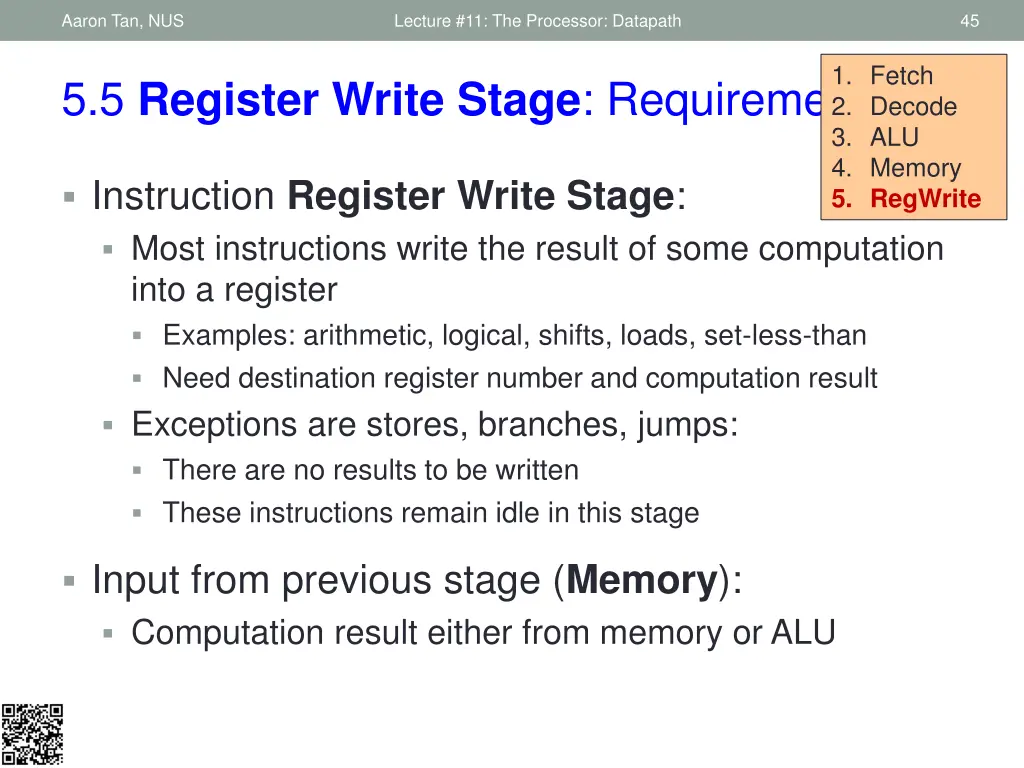
Aaron Tan, NUS Lecture #11: The Processor: Datapath 45 1. Fetch 2. Decode 3. ALU 4. Memory 5. RegWrite 5.5 Register Write Stage: Requirements Instruction Register Write Stage: Most instructions write the result of some computation into a register Examples: arithmetic, logical, shifts, loads, set-less-than Need destination register number and computation result Exceptions are stores, branches, jumps: There are no results to be written These instructions remain idle in this stage Input from previous stage (Memory): Computation result either from memory or ALU
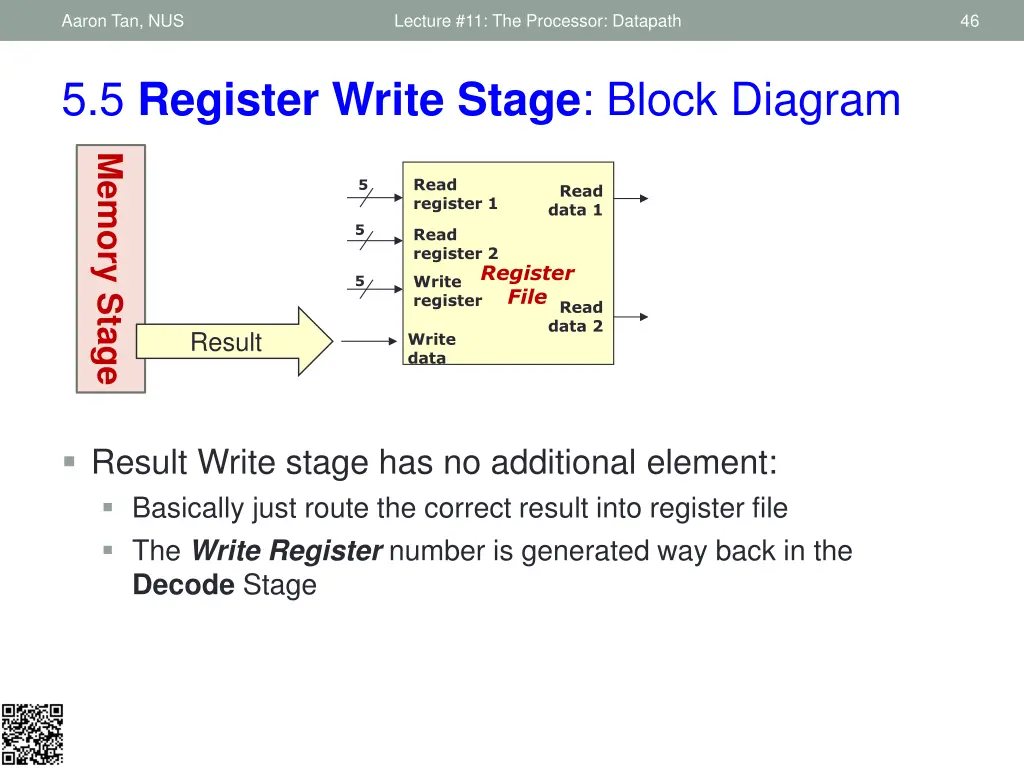
Aaron Tan, NUS Lecture #11: The Processor: Datapath 46 5.5 Register Write Stage: Block Diagram Memory Stage Read register 1 5 Read data 1 5 Read register 2 Register File Write register 5 Read data 2 Result Write data Result Write stage has no additional element: Basically just route the correct result into register file The Write Register number is generated way back in the Decode Stage
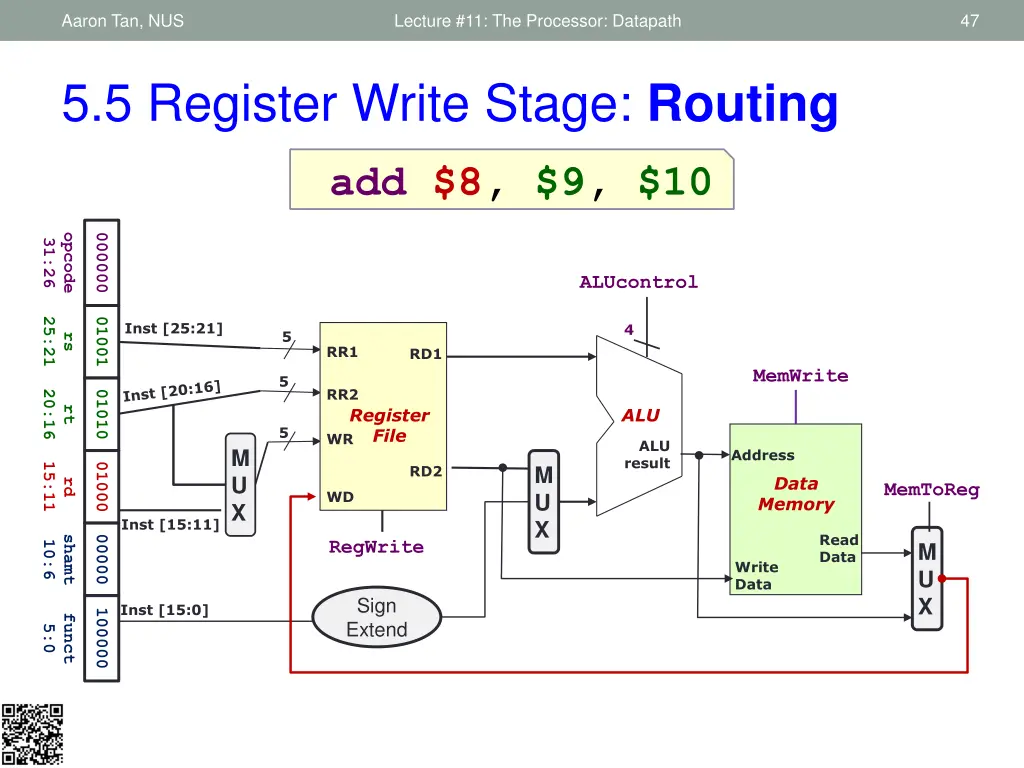
Aaron Tan, NUS Lecture #11: The Processor: Datapath 47 5.5 Register Write Stage: Routing add $8, $9, $10 opcode 000000 31:26 ALUcontrol 25:21 01001 Inst [25:21] 4 5 rs RR1 RD1 MemWrite 5 RR2 20:16 01010 rt Register File ALU 5 WR ALU result M U X Address 15:11 01000 M U X RD2 Data Memory rd MemToReg WD Inst [15:11] Read Data shamt 00000 RegWrite M U X 10:6 Write Data Sign Extend Inst [15:0] 100000 funct 5:0
Aaron Tan, NUS Lecture #11: The Processor: Datapath 48 6. The Complete Datapath! We have just finished designing the datapath for a subset of MIPS instructions: Shifting and Jump are not supported Check your understanding: Take the complete datapath and play the role of controller: See how supported instructions are executed Figure out the correct control signals for the datapath elements Coming up next lecture: Control
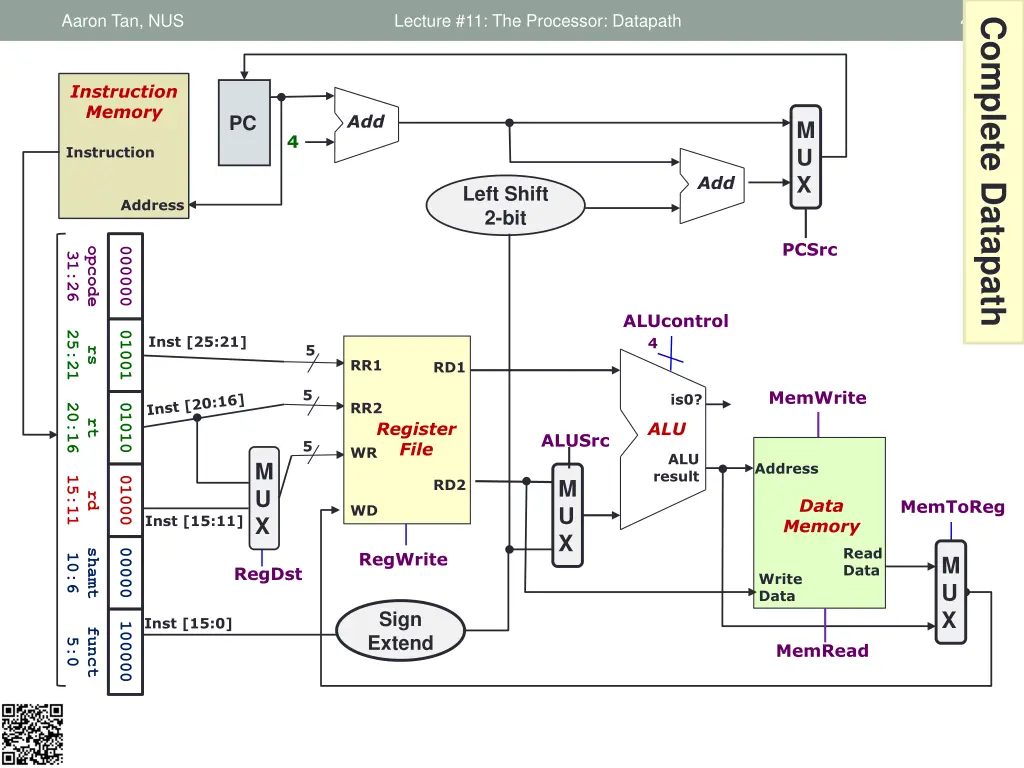
49 Complete Datapath Aaron Tan, NUS Lecture #11: The Processor: Datapath Instruction Memory Add PC M U X 4 Instruction Add Left Shift 2-bit Address PCSrc opcode 000000 31:26 ALUcontrol 4 25:21 01001 Inst [25:21] 5 rs RR1 RD1 5 MemWrite is0? RR2 20:16 01010 rt Register File ALU ALUSrc 5 WR ALU result M U X Address 15:11 01000 M U X RD2 rd Data Memory MemToReg WD Inst [15:11] Read Data shamt 00000 RegWrite M U X 10:6 RegDst Write Data Sign Extend Inst [15:0] 100000 funct 5:0 MemRead
Aaron Tan, NUS Lecture #11: The Processor: Datapath 50 Stages Summaries Since the components are already described as function, we will also describe the stages as function. You should look back at the component as a function to understand how we can call them. This is merely an alternative explanation, you should depend on the original explanation rather than this.