Explore the concept of recursion in Python programming, focusing on recursive functions and base cases. Learn how recursive functions call themselves, the importance of base cases for termination, and the recursive thinking process. Dive into examples and analyses to deepen your understanding of Python recursion.
Please find below an Image/Link to download the presentation.
The content on the website is provided AS IS for your information and personal use only. It may not be sold, licensed, or shared on other websites without obtaining consent from the author. If you encounter any issues during the download, it is possible that the publisher has removed the file from their server.
You are allowed to download the files provided on this website for personal or commercial use, subject to the condition that they are used lawfully. All files are the property of their respective owners.
The content on the website is provided AS IS for your information and personal use only. It may not be sold, licensed, or shared on other websites without obtaining consent from the author.
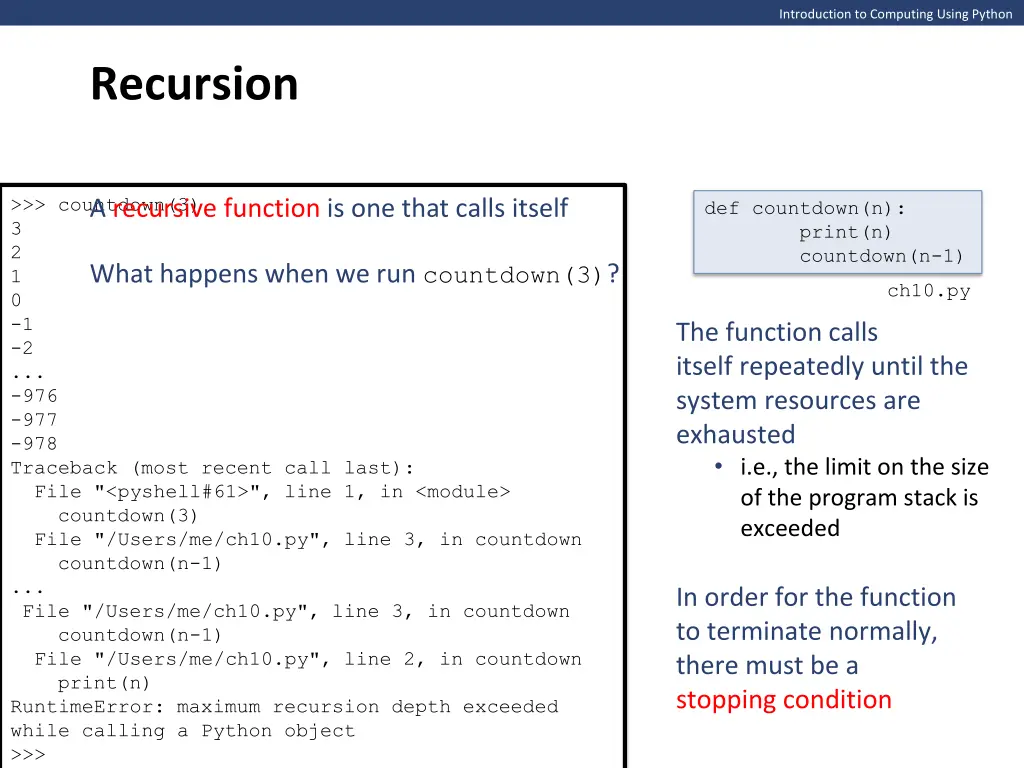
Introduction to Computing Using Python Recursion >>> countdown(3) 3 2 1 0 -1 -2 ... -976 -977 -978 Traceback (most recent call last): File "<pyshell#61>", line 1, in <module> countdown(3) File "/Users/me/ch10.py", line 3, in countdown countdown(n-1) ... File "/Users/me/ch10.py", line 3, in countdown countdown(n-1) File "/Users/me/ch10.py", line 2, in countdown print(n) RuntimeError: maximum recursion depth exceeded while calling a Python object >>> A recursive function is one that calls itself def countdown(n): print(n) countdown(n-1) What happens when we run countdown(3)? ch10.py The function calls itself repeatedly until the system resources are exhausted i.e., the limit on the size of the program stack is exceeded In order for the function to terminate normally, there must be a stopping condition
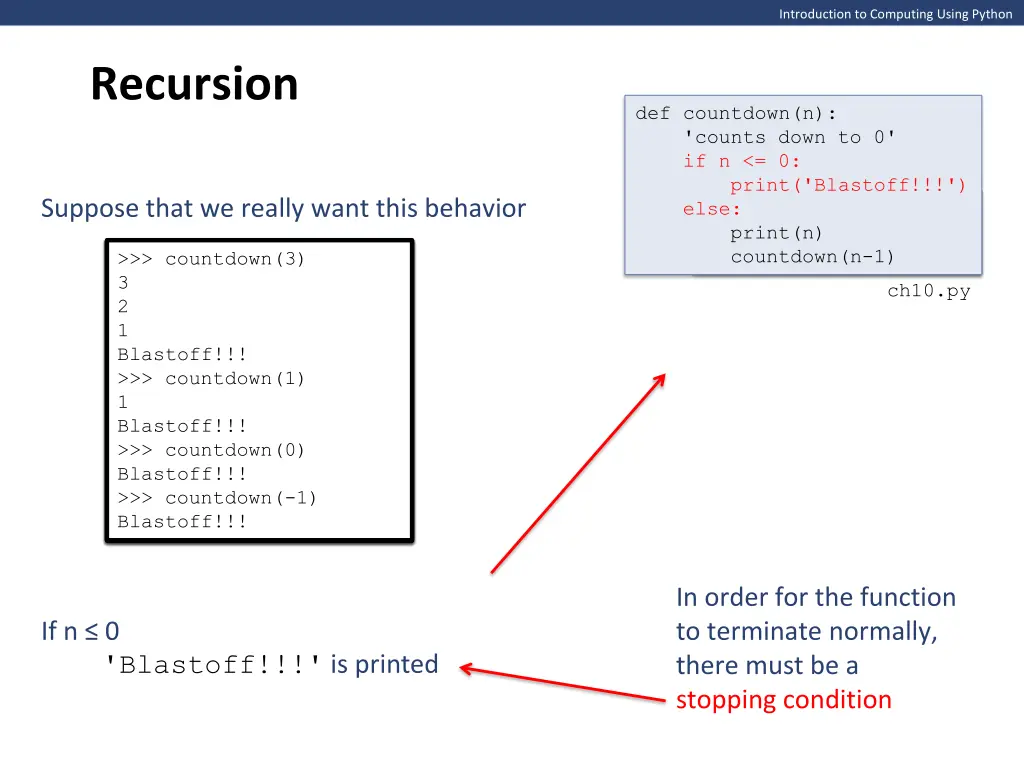
Introduction to Computing Using Python Recursion def countdown(n): 'counts down to 0' if n <= 0: print('Blastoff!!!') else: print(n) Suppose that we really want this behavior def countdown(n): print(n) countdown(n-1) countdown(n-1) >>> countdown(3) 3 2 1 Blastoff!!! Blastoff!!! >>> countdown(1) 1 Blastoff!!! Blastoff!!! >>> countdown(0) Blastoff!!! >>> countdown(3) 3 2 1 1 Blastoff!!! >>> countdown(1) 1 >>> countdown(3) 3 2 >>> countdown(3) 3 2 1 Blastoff!!! >>> >>> countdown(1) 1 Blastoff!!! >>> >>> countdown(0) Blastoff!!! >>> >>> countdown(-1) Blastoff!!! ch10.py In order for the function to terminate normally, there must be a stopping condition If n 0 'Blastoff!!!' is printed
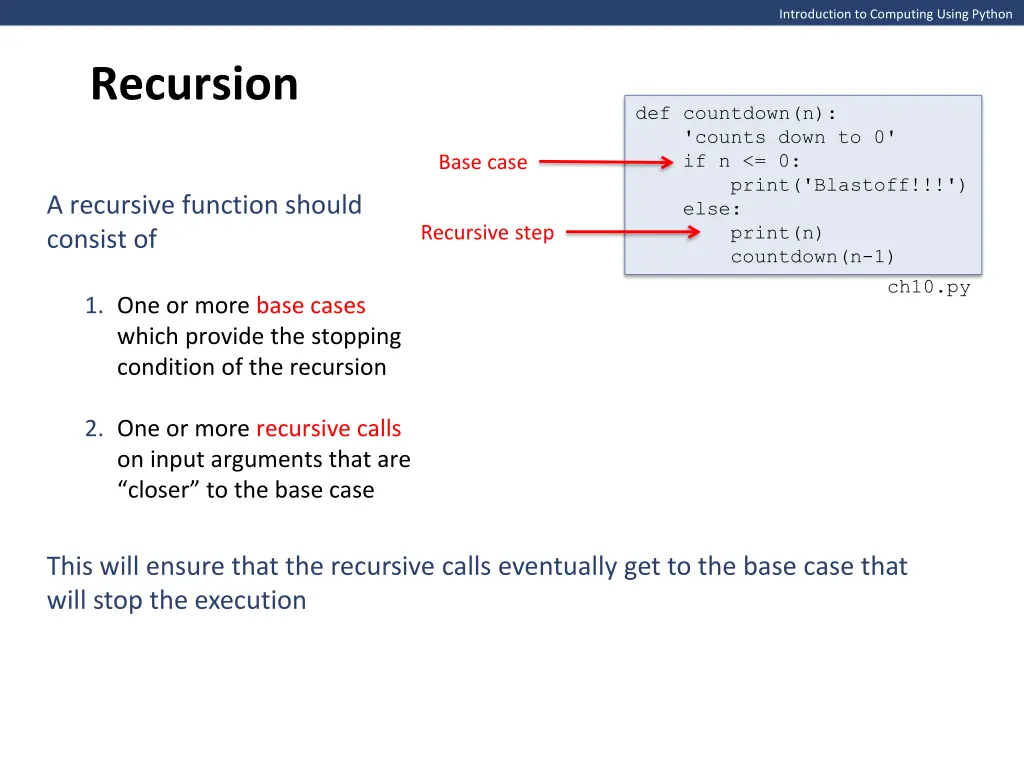
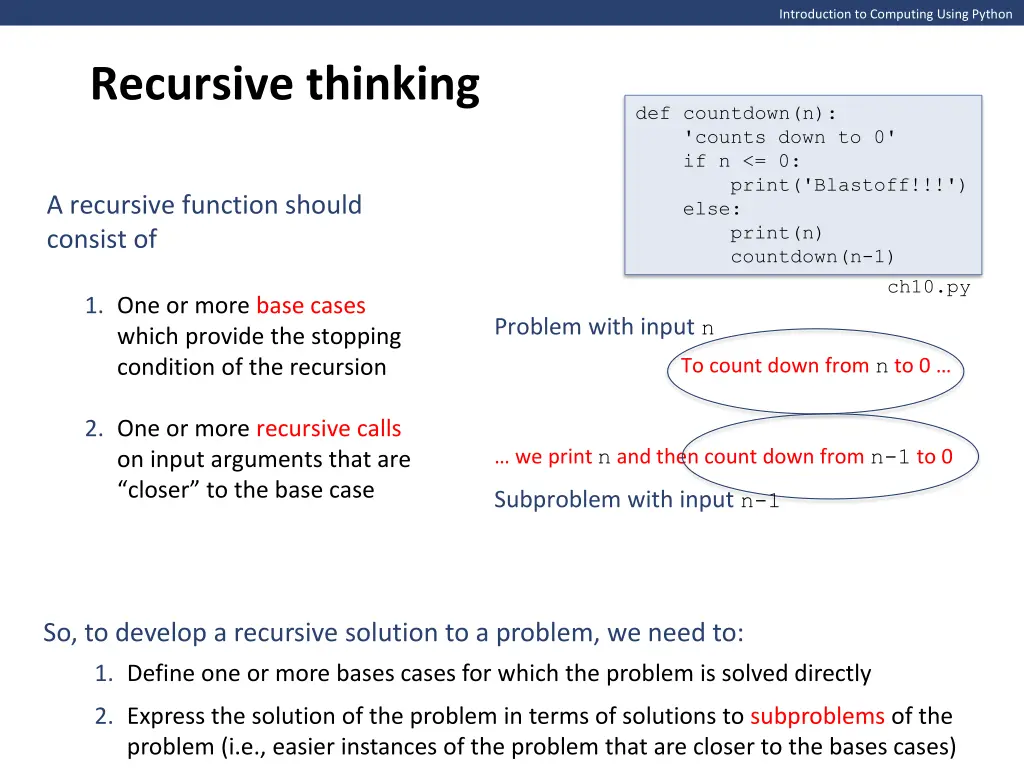
Introduction to Computing Using Python Recursion def countdown(n): 'counts down to 0' if n <= 0: print('Blastoff!!!') else: print(n) countdown(n-1) Base case A recursive function should consist of Recursive step ch10.py 1. One or more base cases which provide the stopping condition of the recursion 2. One or more recursive calls on input arguments that are closer to the base case This will ensure that the recursive calls eventually get to the base case that will stop the execution
Introduction to Computing Using Python Recursive thinking def countdown(n): 'counts down to 0' if n <= 0: print('Blastoff!!!') else: print(n) countdown(n-1) A recursive function should consist of ch10.py 1. One or more base cases which provide the stopping condition of the recursion Problem with input n To count down from nto 0 2. One or more recursive calls on input arguments that are closer to the base case we print n and then count down from n-1 to 0 Subproblem with input n-1 So, to develop a recursive solution to a problem, we need to: 1. Define one or more bases cases for which the problem is solved directly 2. Express the solution of the problem in terms of solutions to subproblems of the problem (i.e., easier instances of the problem that are closer to the bases cases)
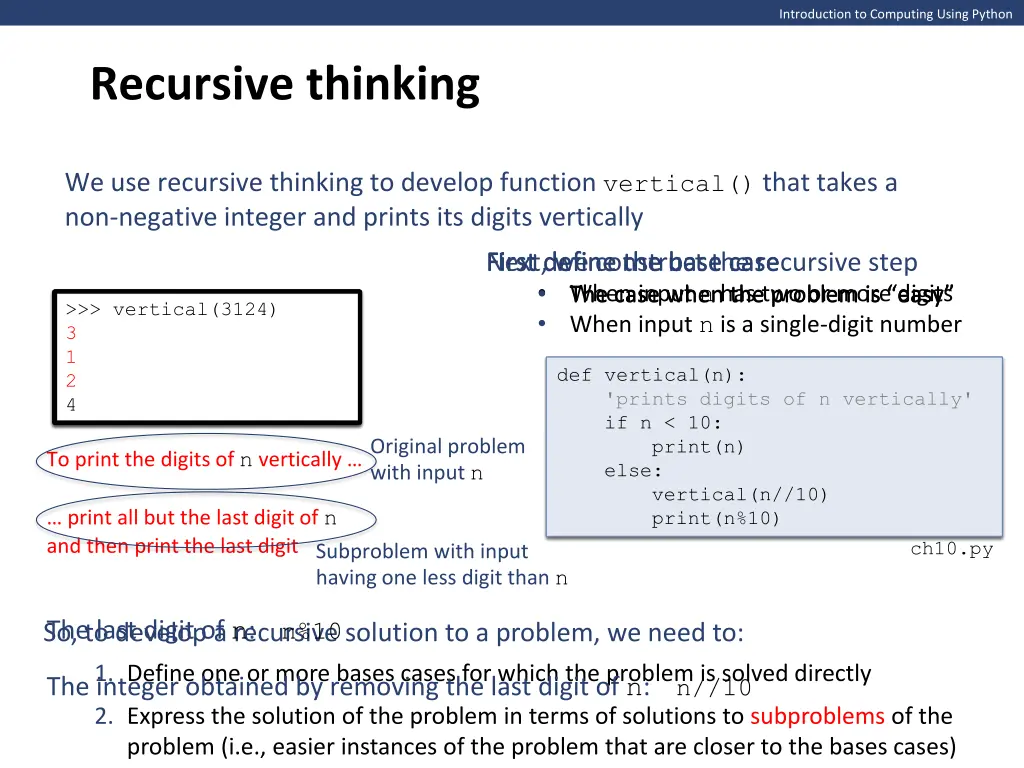
Introduction to Computing Using Python Recursive thinking We use recursive thinking to develop function vertical() that takes a non-negative integer and prints its digits vertically First define the base case The case when the problem is easy When input n has two or more digits The case when the problem is easy When input n is a single-digit number Next, we construct the recursive step First define the base case >>> vertical(3124) >>> vertical(3124) 3 1 2 >>> vertical(7) 7 3 1 2 4 4 def vertical(n): 'prints digits of n vertically' if n < 10: print(n) else: # to do vertical(n//10) print(n%10) def vertical(n): 'prints digits of n vertically' if n < 10: print(n) else: Original problem with input n To print the digits of nvertically print all but the last digit of n and then print the last digit ch10.py Subproblem with input having one less digit than n So, to develop a recursive solution to a problem, we need to: The last digit of n: n%10 1. Define one or more bases cases for which the problem is solved directly The integer obtained by removing the last digit of n: n//10 2. Express the solution of the problem in terms of solutions to subproblems of the problem (i.e., easier instances of the problem that are closer to the bases cases)
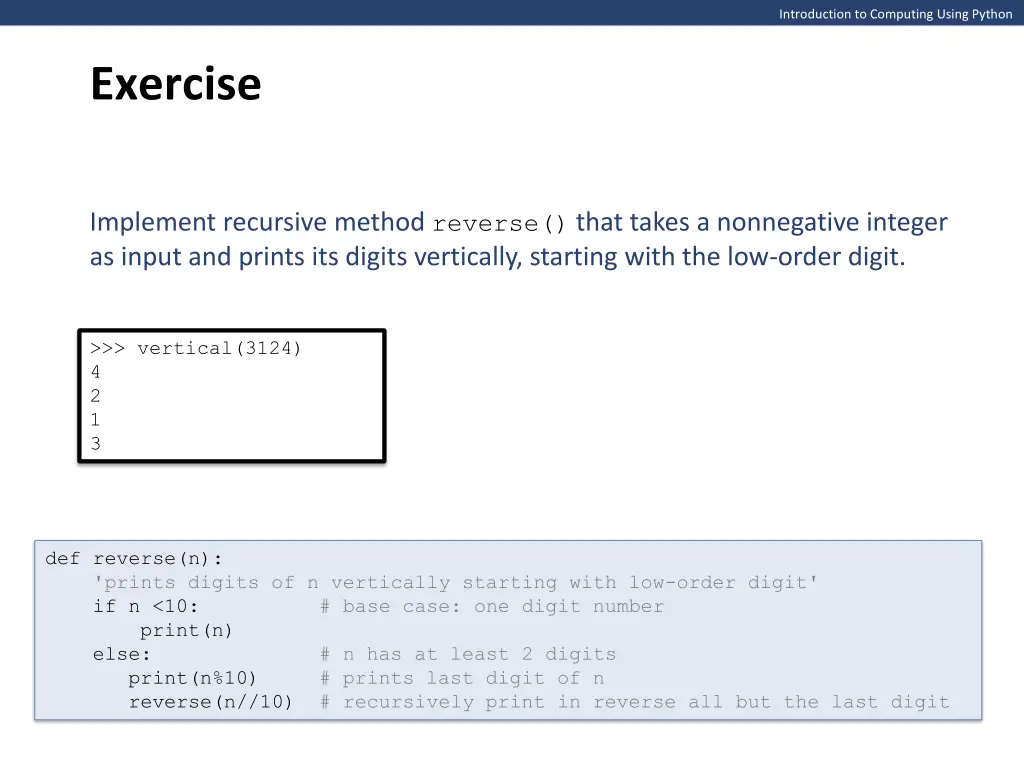
Introduction to Computing Using Python Exercise Implement recursive method reverse() that takes a nonnegative integer as input and prints its digits vertically, starting with the low-order digit. >>> vertical(3124) 4 2 1 3 def reverse(n): 'prints digits of n vertically starting with low-order digit' if n <10: # base case: one digit number print(n) else: # n has at least 2 digits print(n%10) # prints last digit of n reverse(n//10) # recursively print in reverse all but the last digit
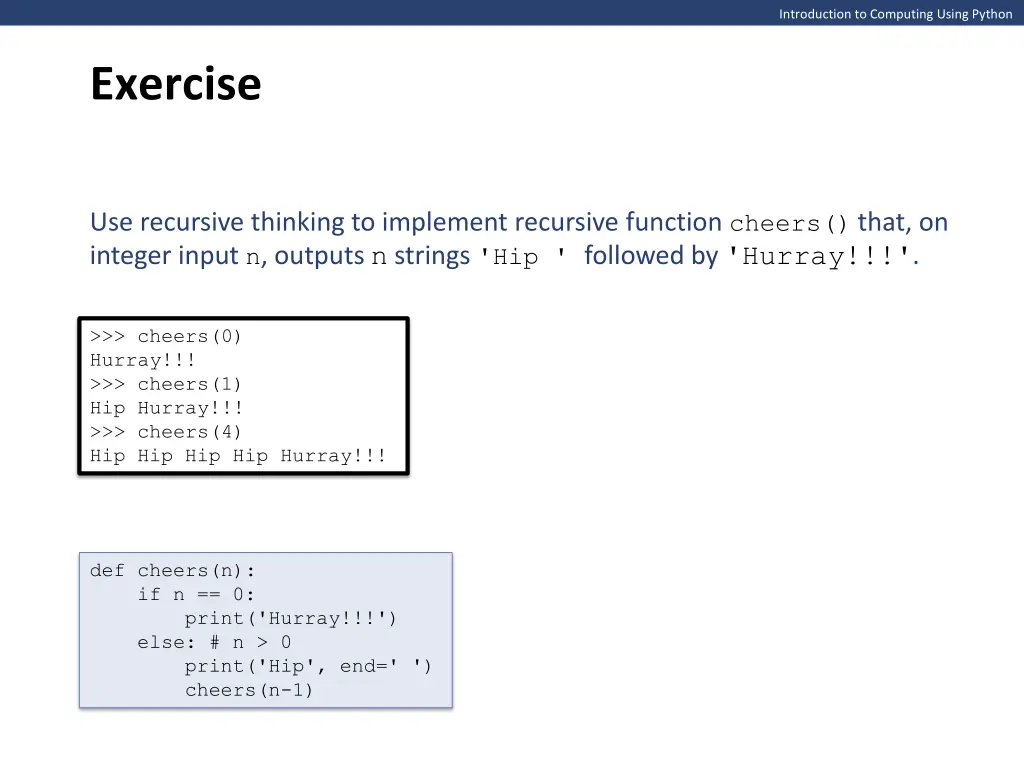
Introduction to Computing Using Python Exercise Use recursive thinking to implement recursive function cheers() that, on integer input n, outputs n strings 'Hip ' followed by 'Hurray!!!'. >>> cheers(0) Hurray!!! >>> cheers(1) Hip Hurray!!! >>> cheers(4) Hip Hip Hip Hip Hurray!!! def cheers(n): if n == 0: print('Hurray!!!') else: # n > 0 print('Hip', end=' ') cheers(n-1)
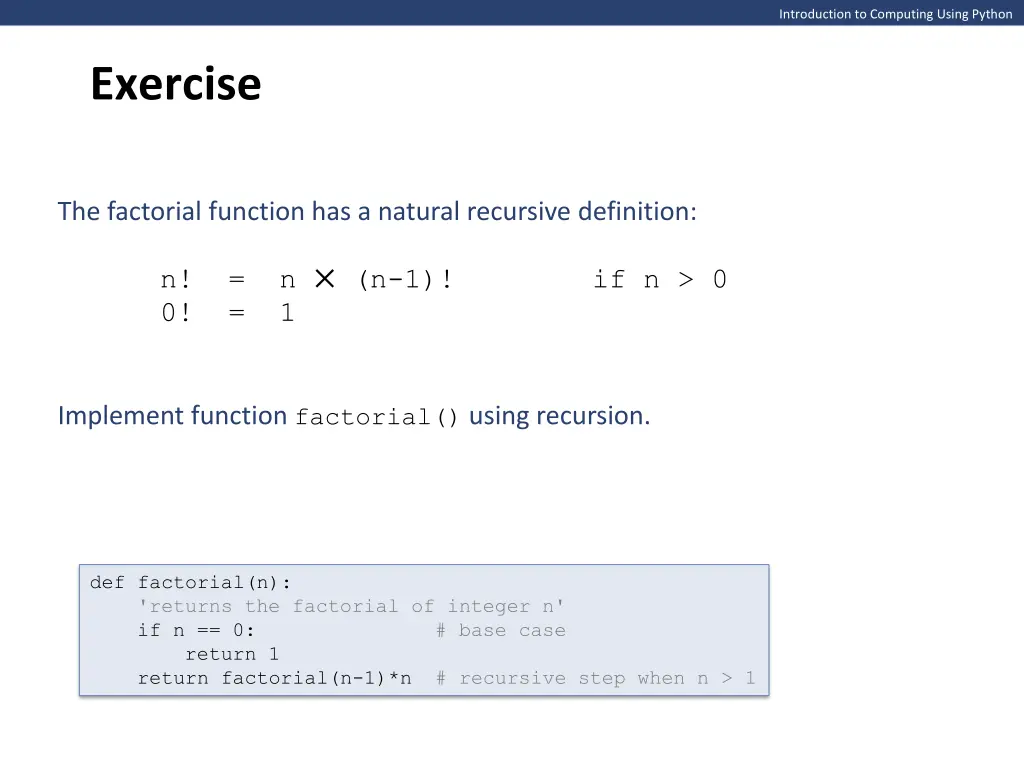
Introduction to Computing Using Python Exercise The factorial function has a natural recursive definition: n! = n (n-1)! if n > 0 0! = 1 Implement function factorial() using recursion. def factorial(n): 'returns the factorial of integer n' if n == 0: # base case return 1 return factorial(n-1)*n # recursive step when n > 1
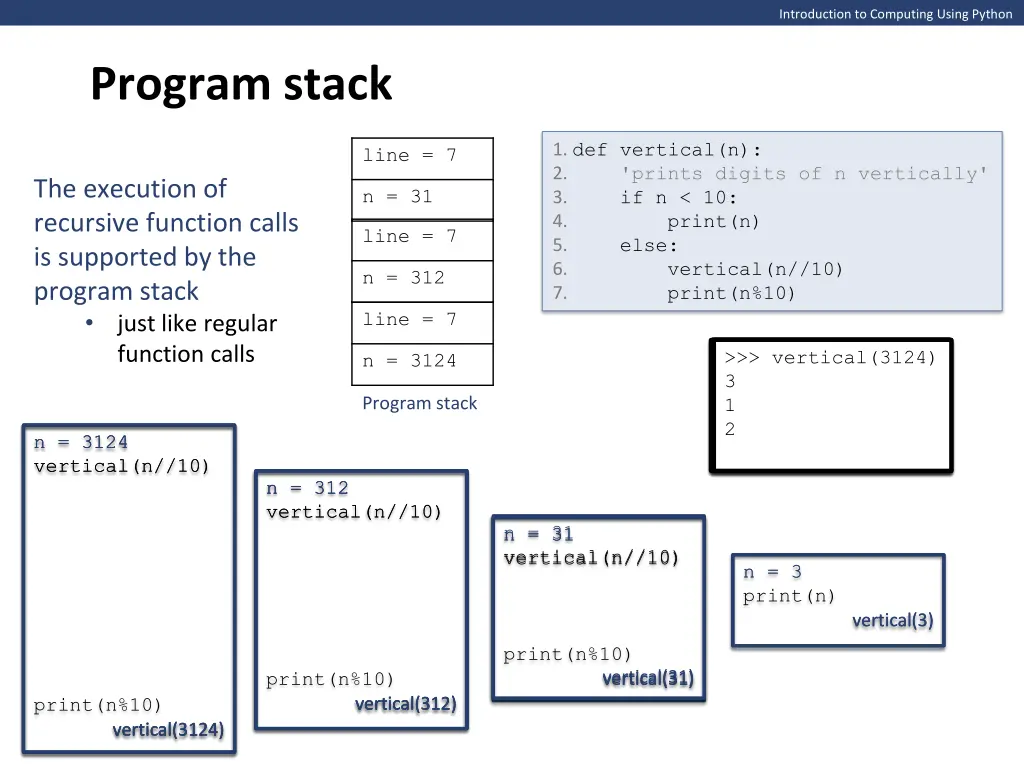
Introduction to Computing Using Python Program stack 1. def vertical(n): 2. 'prints digits of n vertically' 3. if n < 10: 4. print(n) 5. else: 6. vertical(n//10) 7. print(n%10) line = 7 The execution of recursive function calls is supported by the program stack just like regular function calls n = 31 line = 7 n = 312 line = 7 >>> vertical(3124) 3 3 1 1 2 >>> vertical(4312) >>> vertical(3124) 3 1 2 4 >>> vertical(3124) >>> vertical(3124) 3 n = 3124 Program stack n = 3124 vertical(n//10) vertical(n//10) n = 3124 n = 3124 n = 312 n = 312 n = 312 vertical(n//10) vertical(n//10) n = 31 n = 31 vertical(n//10) n = 31 vertical(n//10) n = 3 n = 3 print(n) vertical(3) vertical(3) print(n%10) print(n%10) vertical(31) vertical(31) vertical(31) print(n%10) vertical(312) vertical(312) vertical(312) vertical(3124) vertical(3124) vertical(3124)
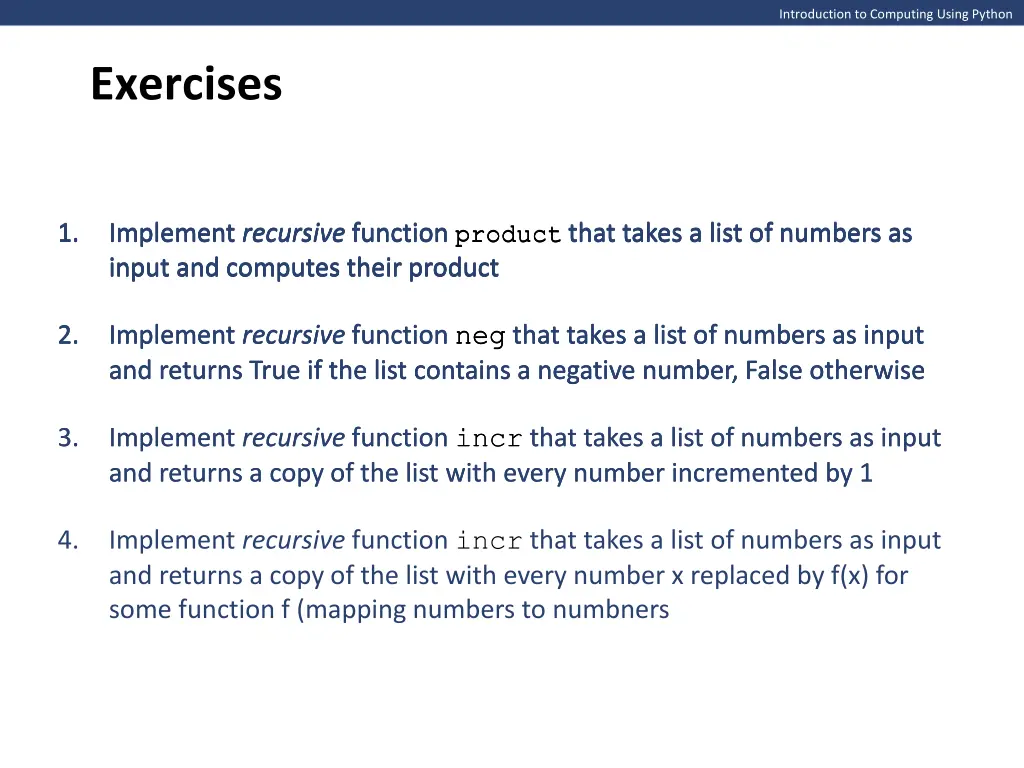
Introduction to Computing Using Python Exercises 1. 1. 1. 1. Implement recursive function product that takes a list of numbers as Implement recursive function product that takes a list of numbers as Implement recursive function product that takes a list of numbers as Implement recursive function product that takes a list of numbers as input and computes their product input and computes their product input and computes their product input and computes their product Implement recursive function neg that takes a list of numbers as input Implement recursive function neg that takes a list of numbers as input Implement recursive function neg that takes a list of numbers as input and returns True if the list contains a negative number, False otherwise and returns True if the list contains a negative number, False otherwise and returns True if the list contains a negative number, False otherwise 2. 2. 2. Implement recursive function incr that takes a list of numbers as input Implement recursive function incr that takes a list of numbers as input and returns a copy of the list with every number incremented by 1 and returns a copy of the list with every number incremented by 1 3. 3. Implement recursive function incr that takes a list of numbers as input and returns a copy of the list with every number x replaced by f(x) for some function f (mapping numbers to numbners 4.
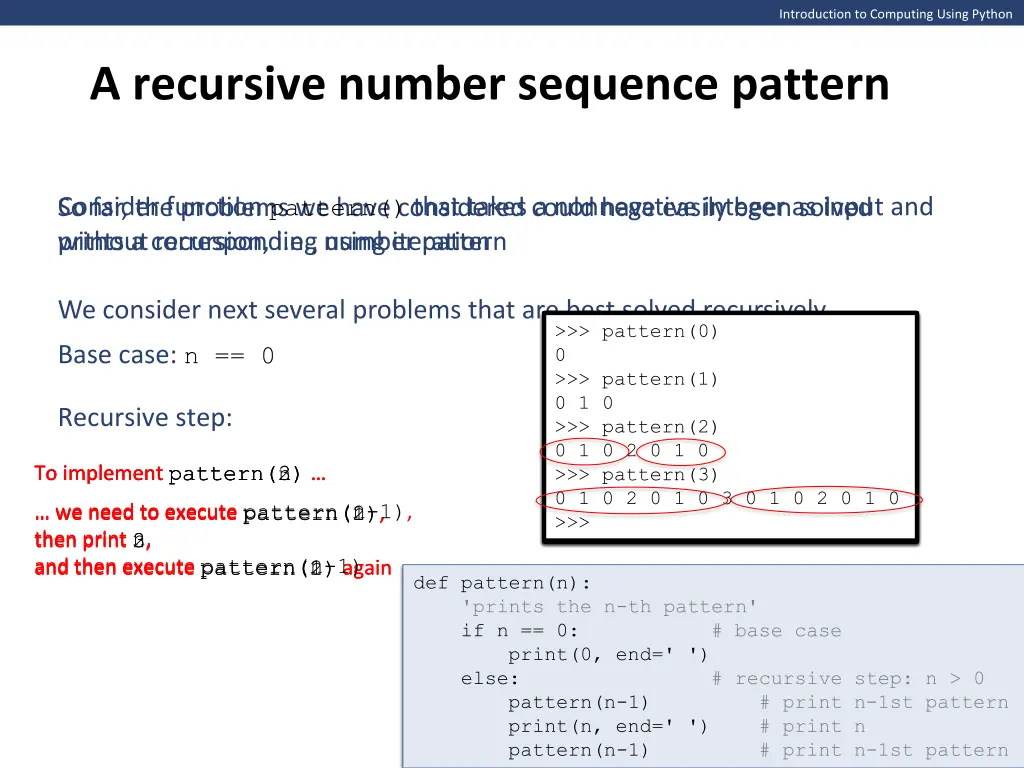
Introduction to Computing Using Python A recursive number sequence pattern Consider function pattern() that takes a nonnegative integer as input and So far, the problems we have considered could have easily been solved without recursion, i.e., using iteration prints a corresponding number pattern We consider next several problems that are best solved recursively. >>> pattern(0) 0 >>> >>> pattern(1) 0 1 0 >>> >>> pattern(2) 0 1 0 2 0 1 0 >>> >>> pattern(3) 0 1 0 2 0 1 0 3 0 1 0 2 0 1 0 >>> >>> pattern(0) >>> pattern(0) 0 >>> pattern(1) >>> pattern(0) 0 0 >>> pattern(1) 0 1 0 0 1 0 >>> pattern(2) 0 1 0 2 0 1 0 Base case: n == 0 Recursive step: To implement pattern(2) To implement pattern(3) To implement pattern(n) we need to executepattern(n-1), we need to executepattern(1), then print 2, and then execute pattern(1) again and then execute pattern(2) again and then execute pattern(n-1) we need to executepattern(2), then print 3, then print n, def pattern(n): 'prints the n-th pattern' if n == 0: # base case print(0, end=' ') else: # recursive step: n > 0 # to do print(n, end=' ') # print n pattern(n-1) # print n-1st pattern def pattern(n): 'prints the n-th pattern' if n == 0: # base case print(0, end=' ') else: # recursive step: n > 0 pattern(n-1) # print n-1st pattern
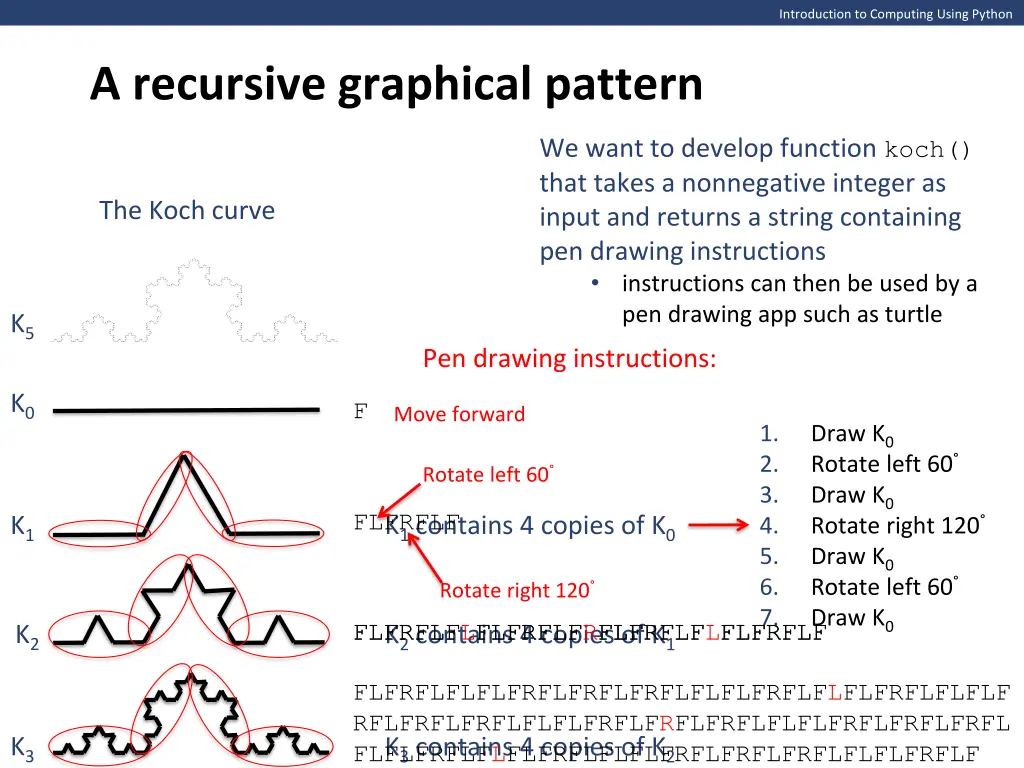
Introduction to Computing Using Python A recursive graphical pattern We want to develop function koch() that takes a nonnegative integer as input and returns a string containing pen drawing instructions instructions can then be used by a pen drawing app such as turtle The Koch curve K5 Pen drawing instructions: K0 F Move forward 1. 2. 3. 4. 5. 6. 7. Draw K0 Rotate left 60 Draw K0 Rotate right 120 Draw K0 Rotate left 60 Draw K0 Rotate left 60 K1 contains 4 copies of K0 FLFRFLF K1 Rotate right 120 K2 contains 4 copies of K1 FLFRFLF FLFRFLF FLFRFLF FLFRFLF FLFRFLFLFLFRFLFRFLFRFLFLFLFRFLF K2 FLFRFLFLFLFRFLFRFLFRFLFLFLFRFLFLFLFRFLFLFLF RFLFRFLFRFLFLFLFRFLFRFLFRFLFLFLFRFLFRFLFRFL K3 K3 contains 4 copies of K2 FLFLFRFLFLFLFRFLFLFLFRFLFRFLFRFLFLFLFRFLF
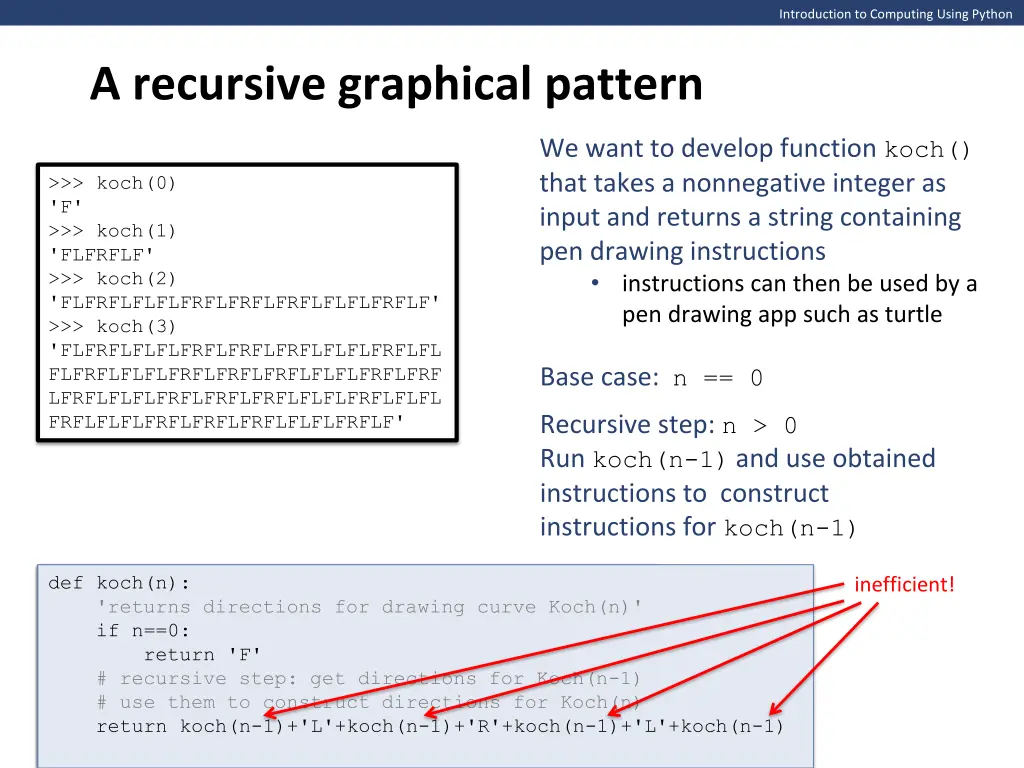
Introduction to Computing Using Python A recursive graphical pattern We want to develop function koch() that takes a nonnegative integer as input and returns a string containing pen drawing instructions instructions can then be used by a pen drawing app such as turtle >>> koch(0) 'F' >>> koch(1) 'FLFRFLF' >>> koch(2) 'FLFRFLFLFLFRFLFRFLFRFLFLFLFRFLF' >>> koch(3) 'FLFRFLFLFLFRFLFRFLFRFLFLFLFRFLFL FLFRFLFLFLFRFLFRFLFRFLFLFLFRFLFRF LFRFLFLFLFRFLFRFLFRFLFLFLFRFLFLFL FRFLFLFLFRFLFRFLFRFLFLFLFRFLF' Base case: n == 0 Recursive step: n > 0 Run koch(n-1) and use obtained instructions to construct instructions for koch(n-1) def koch(n): 'returns directions for drawing curve Koch(n)' if n==0: return 'F' # recursive step: to do # recursive step: get directions for Koch(n-1) tmp = koch(n-1) # use them to construct directions for Koch(n) return tmp+'L'+tmp+'R'+tmp+'L'+tmp def koch(n): 'returns directions for drawing curve Koch(n)' if n==0: return 'F' return 'F' # recursive step: get directions for Koch(n-1) # use them to construct directions for Koch(n) return koch(n-1)+'L'+koch(n-1)+'R'+koch(n-1)+'L'+koch(n-1) def koch(n): 'returns directions for drawing curve Koch(n)' if n==0: inefficient!
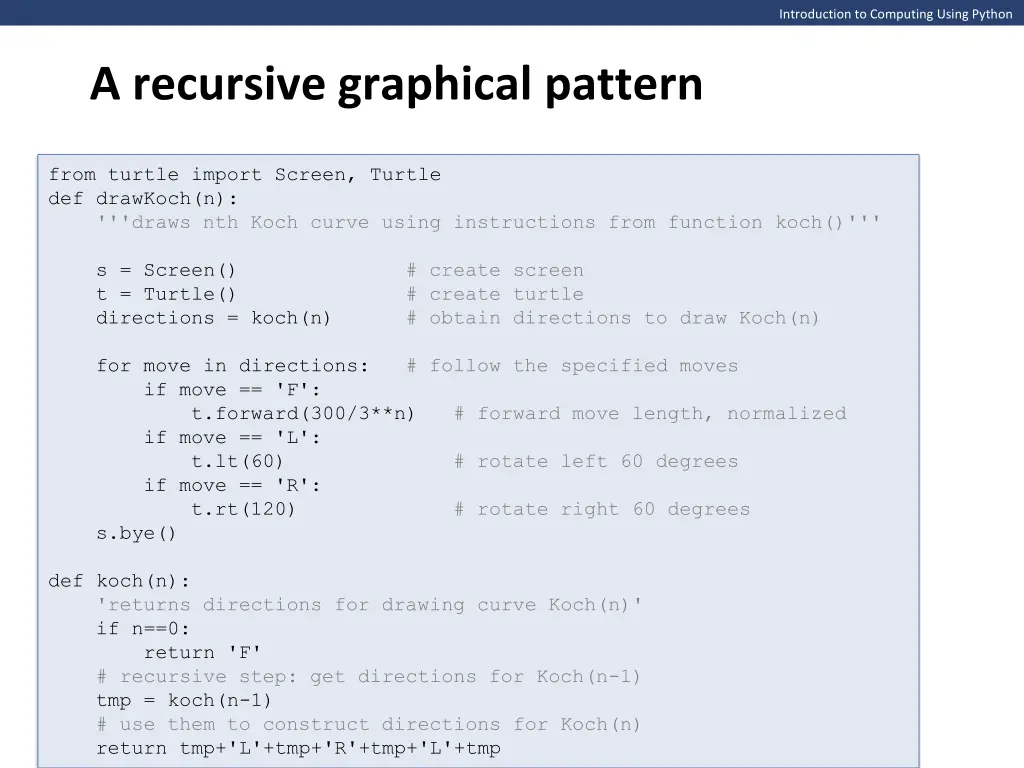
Introduction to Computing Using Python A recursive graphical pattern from turtle import Screen, Turtle def drawKoch(n): '''draws nth Koch curve using instructions from function koch()''' s = Screen() # create screen t = Turtle() # create turtle directions = koch(n) # obtain directions to draw Koch(n) for move in directions: # follow the specified moves if move == 'F': t.forward(300/3**n) # forward move length, normalized if move == 'L': t.lt(60) # rotate left 60 degrees if move == 'R': t.rt(120) # rotate right 60 degrees s.bye() def koch(n): 'returns directions for drawing curve Koch(n)' if n==0: return 'F' # recursive step: get directions for Koch(n-1) tmp = koch(n-1) # use them to construct directions for Koch(n) return tmp+'L'+tmp+'R'+tmp+'L'+tmp
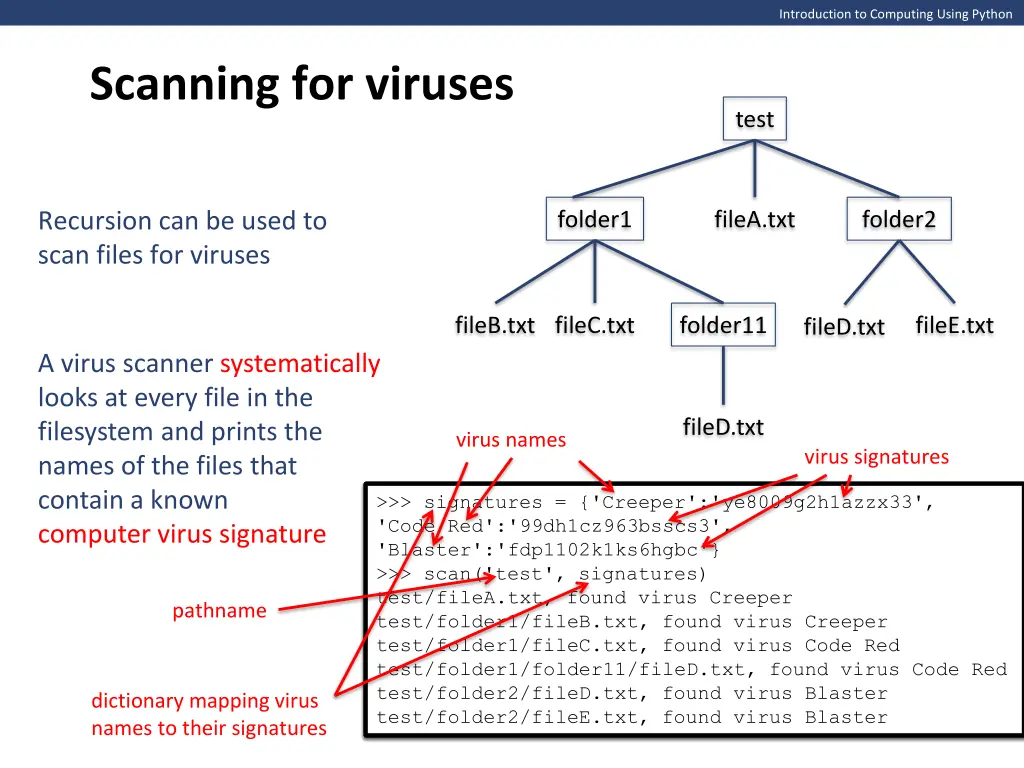
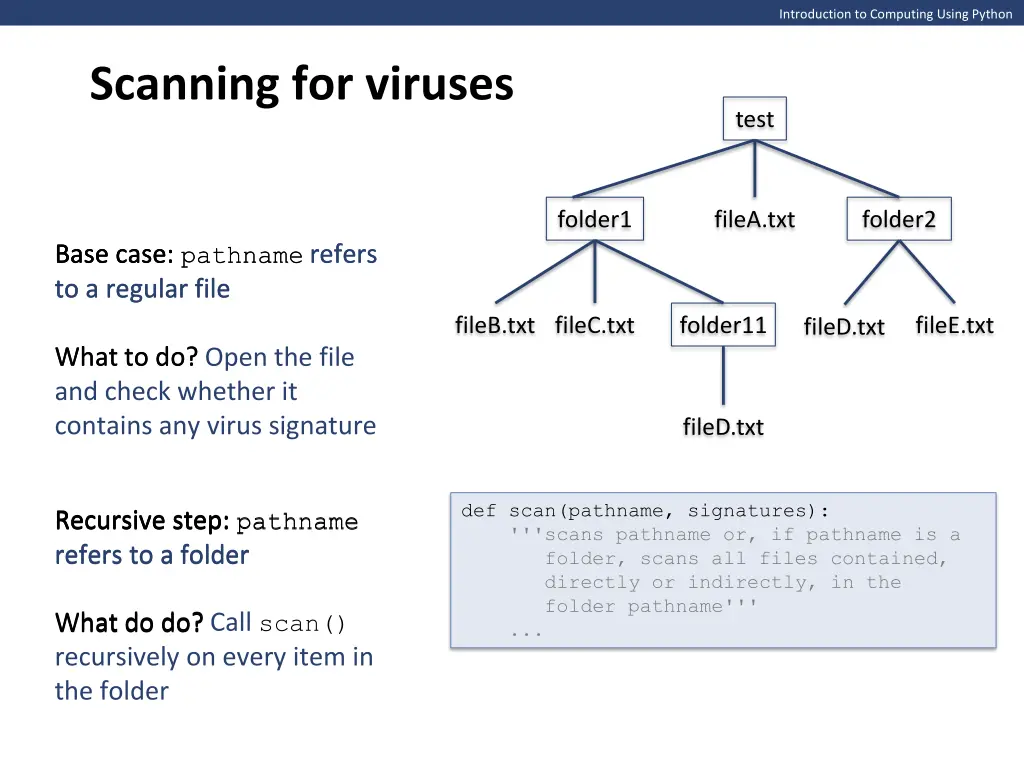
Introduction to Computing Using Python Scanning for viruses test folder1 fileA.txt folder2 Recursion can be used to scan files for viruses fileB.txt fileC.txt folder11 fileE.txt fileD.txt A virus scanner systematically looks at every file in the filesystem and prints the names of the files that contain a known computer virus signature fileD.txt virus names virus signatures >>> signatures = {'Creeper':'ye8009g2h1azzx33', 'Code Red':'99dh1cz963bsscs3', 'Blaster':'fdp1102k1ks6hgbc'} >>> signatures = {'Creeper':'ye8009g2h1azzx33', 'Code Red':'99dh1cz963bsscs3', 'Blaster':'fdp1102k1ks6hgbc'} >>> >>> scan('test', signatures) test/fileA.txt, found virus Creeper test/folder1/fileB.txt, found virus Creeper test/folder1/fileC.txt, found virus Code Red test/folder1/folder11/fileD.txt, found virus Code Red test/folder2/fileD.txt, found virus Blaster test/folder2/fileE.txt, found virus Blaster pathname dictionary mapping virus names to their signatures
Introduction to Computing Using Python Scanning for viruses test folder1 fileA.txt folder2 Base case: pathname refers Base case: Base case: pathname refers to a regular file to a regular file fileB.txt fileC.txt folder11 fileE.txt fileD.txt What to do? What to do? Open the file and check whether it contains any virus signature fileD.txt def scan(pathname, signatures): '''scans pathname or, if pathname is a folder, scans all files contained, directly or indirectly, in the folder pathname''' ... Recursive step: pathname refers to a folder refers to a folder Recursive step: pathname Recursive step: What do do? Call scan() recursively on every item in the folder What do do?
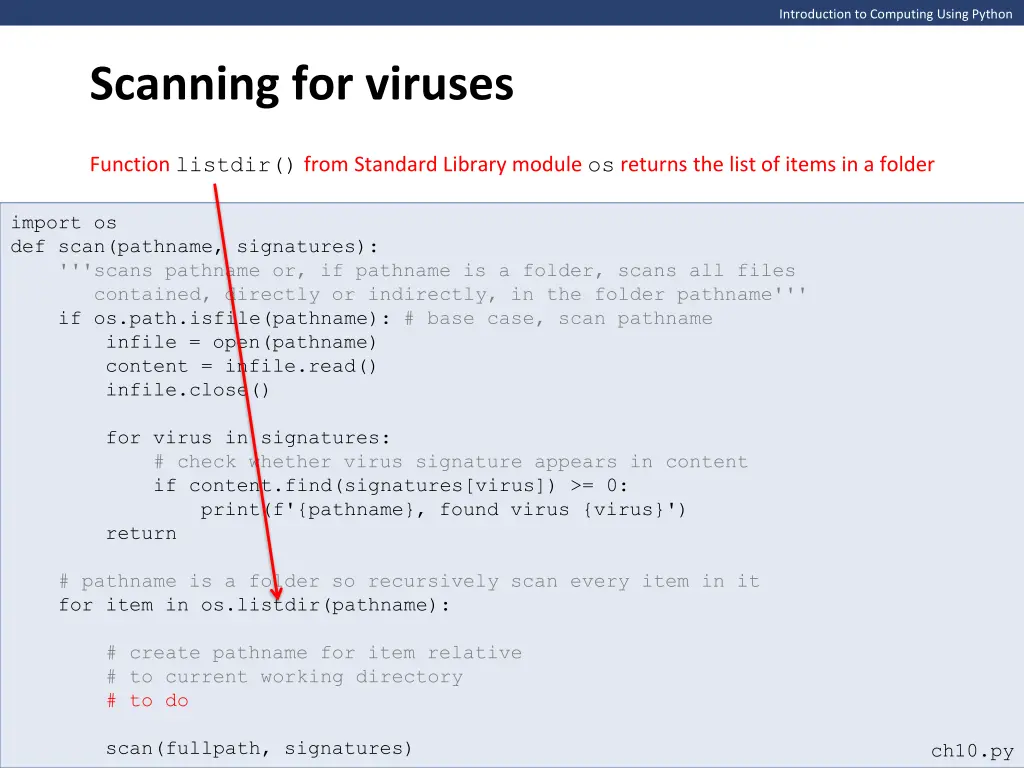
Introduction to Computing Using Python Scanning for viruses Function listdir() from Standard Library module os returns the list of items in a folder import os def scan(pathname, signatures): '''scans pathname or, if pathname is a folder, scans all files contained, directly or indirectly, in the folder pathname''' if os.path.isfile(pathname): # base case, scan pathname infile = open(pathname) content = infile.read() infile.close() for virus in signatures: # check whether virus signature appears in content if content.find(signatures[virus]) >= 0: print(f'{pathname}, found virus {virus}') return # pathname is a folder so recursively scan every item in it for item in os.listdir(pathname): # create pathname for item relative # to current working directory # to do scan(fullpath, signatures) ch10.py
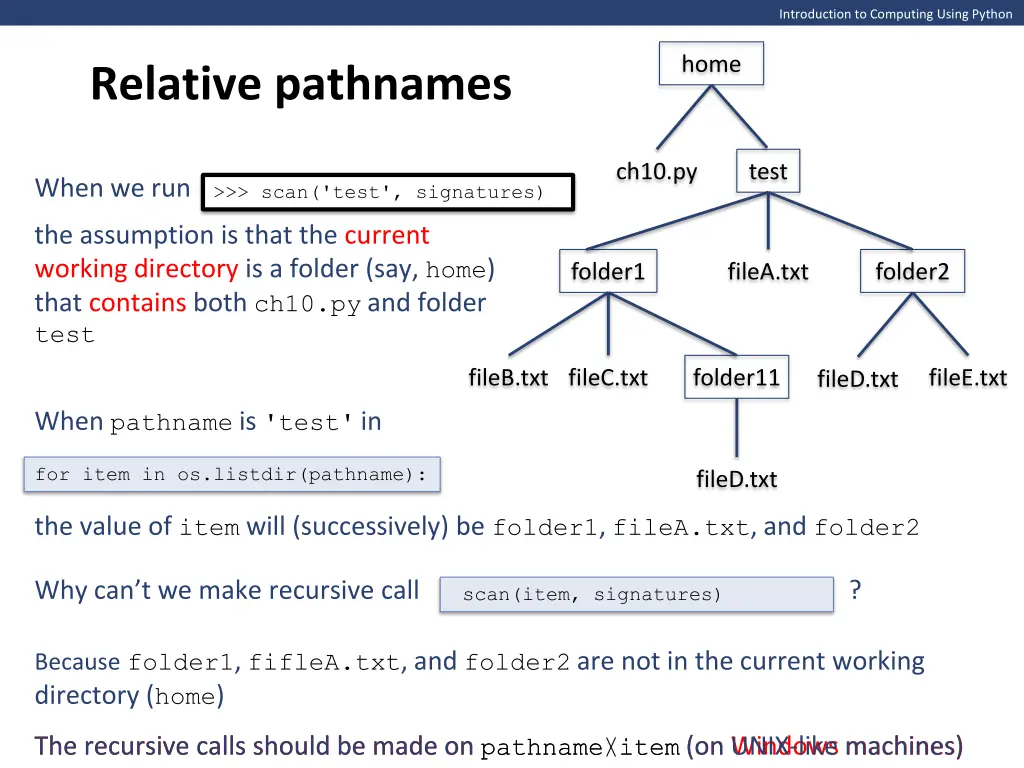
Introduction to Computing Using Python home Relative pathnames ch10.py test When we run >>> scan('test', signatures) the assumption is that the current working directory is a folder (say, home) that contains both ch10.py and folder test folder1 fileA.txt folder2 fileB.txt fileC.txt folder11 fileE.txt fileD.txt When pathname is 'test'in for item in os.listdir(pathname): fileD.txt the value of item will (successively) be folder1, fileA.txt, and folder2 Why can t we make recursive call ? scan(item, signatures) Becausefolder1, fifleA.txt, and folder2are not in the current working directory (home) The recursive calls should be made on pathname\item (on Windows machines) The recursive calls should be made on pathname/item (on UNIX-like machines)
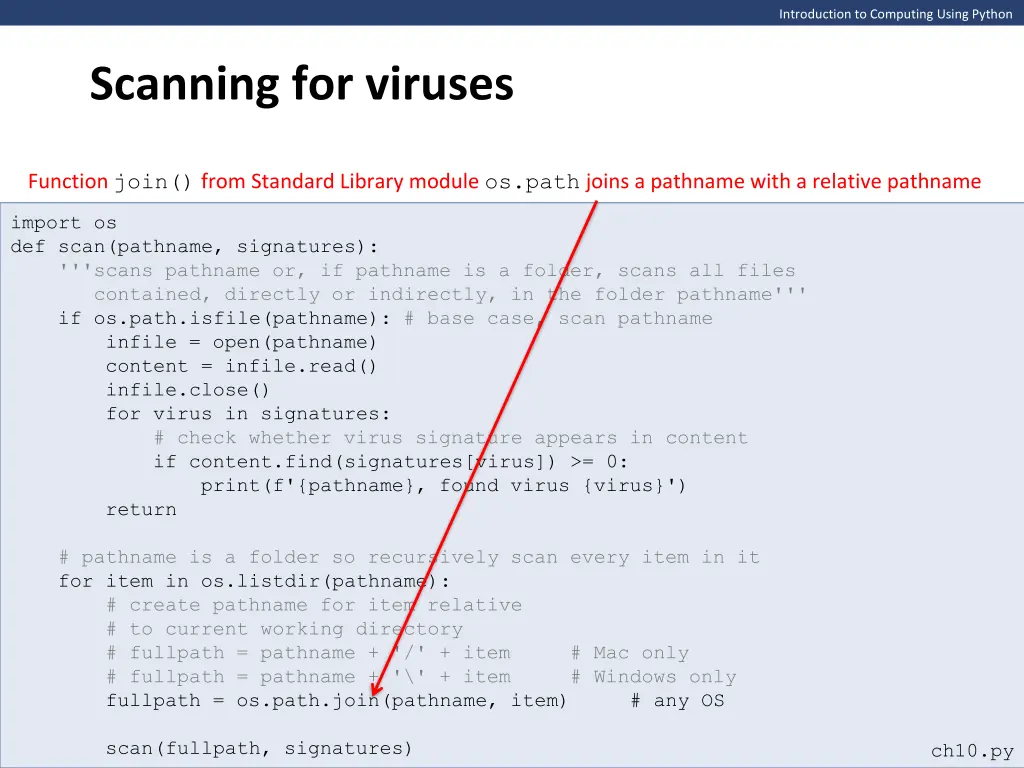
Introduction to Computing Using Python Scanning for viruses Function join() from Standard Library module os.path joins a pathname with a relative pathname import os def scan(pathname, signatures): '''scans pathname or, if pathname is a folder, scans all files contained, directly or indirectly, in the folder pathname''' if os.path.isfile(pathname): # base case, scan pathname infile = open(pathname) content = infile.read() infile.close() for virus in signatures: # check whether virus signature appears in content if content.find(signatures[virus]) >= 0: print(f'{pathname}, found virus {virus}') return # pathname is a folder so recursively scan every item in it for item in os.listdir(pathname): # create pathname for item relative # to current working directory # fullpath = pathname + '/' + item # Mac only # fullpath = pathname + '\' + item # Windows only fullpath = os.path.join(pathname, item) # any OS scan(fullpath, signatures) ch10.py
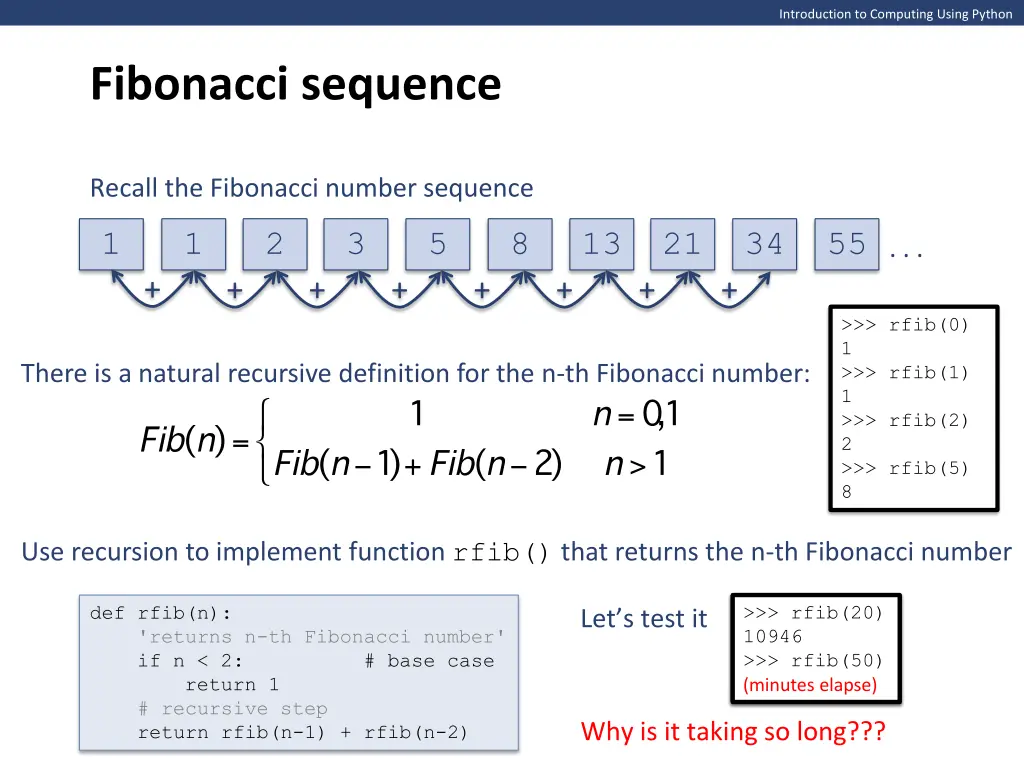
Introduction to Computing Using Python Fibonacci sequence Recall the Fibonacci number sequence 1 1 2 3 5 8 13 21 34 55 . . . + + + + + + + + >>> rfib(0) 1 >>> rfib(1) 1 >>> rfib(2) 2 >>> rfib(5) 8 There is a natural recursive definition for the n-th Fibonacci number: Use recursion to implement function rfib() that returns the n-th Fibonacci number >>> rfib(20) 10946 >>> rfib(20) 10946 >>> rfib(50) >>> rfib(50) (minutes elapse) def rfib(n): 'returns n-th Fibonacci number' if n < 2: # base case return 1 # recursive step return rfib(n-1) + rfib(n-2) Let s test it Why is it taking so long???
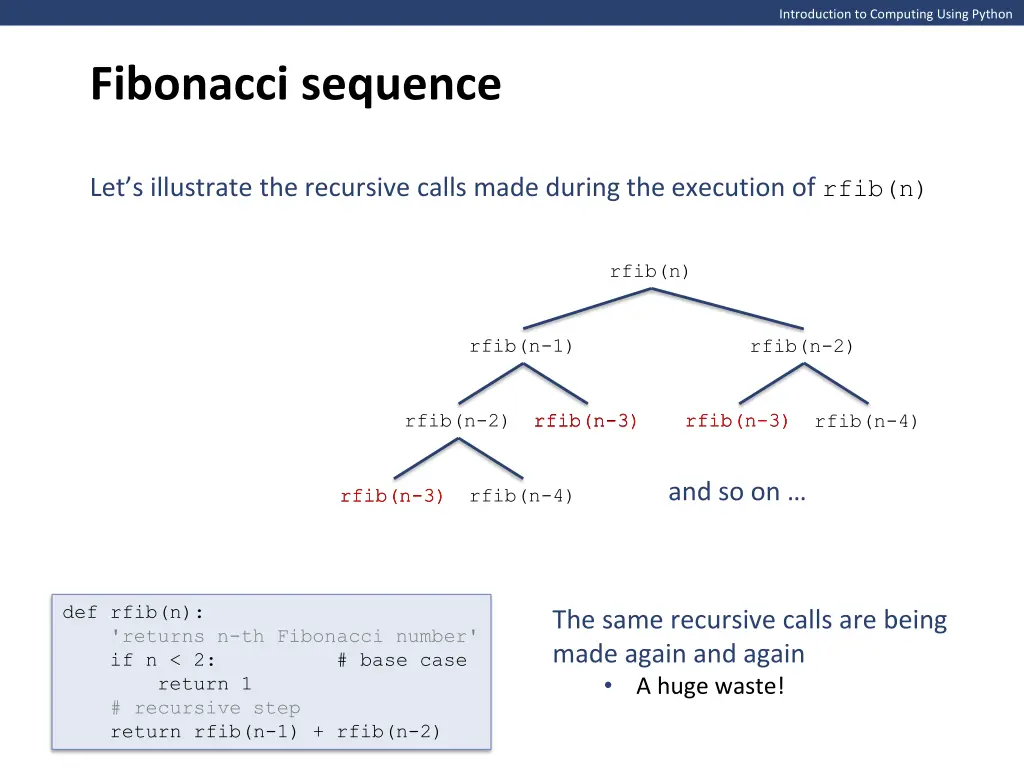
Introduction to Computing Using Python Fibonacci sequence Let s illustrate the recursive calls made during the execution of rfib(n) rfib(n) rfib(n-1) rfib(n-2) rfib(n-3) rfib(n-3) rfib(n-3) rfib(n-3) rfib(n-2) rfib(n-4) and so on rfib(n-3) rfib(n-3) rfib(n-4) def rfib(n): 'returns n-th Fibonacci number' if n < 2: # base case return 1 # recursive step return rfib(n-1) + rfib(n-2) The same recursive calls are being made again and again A huge waste!
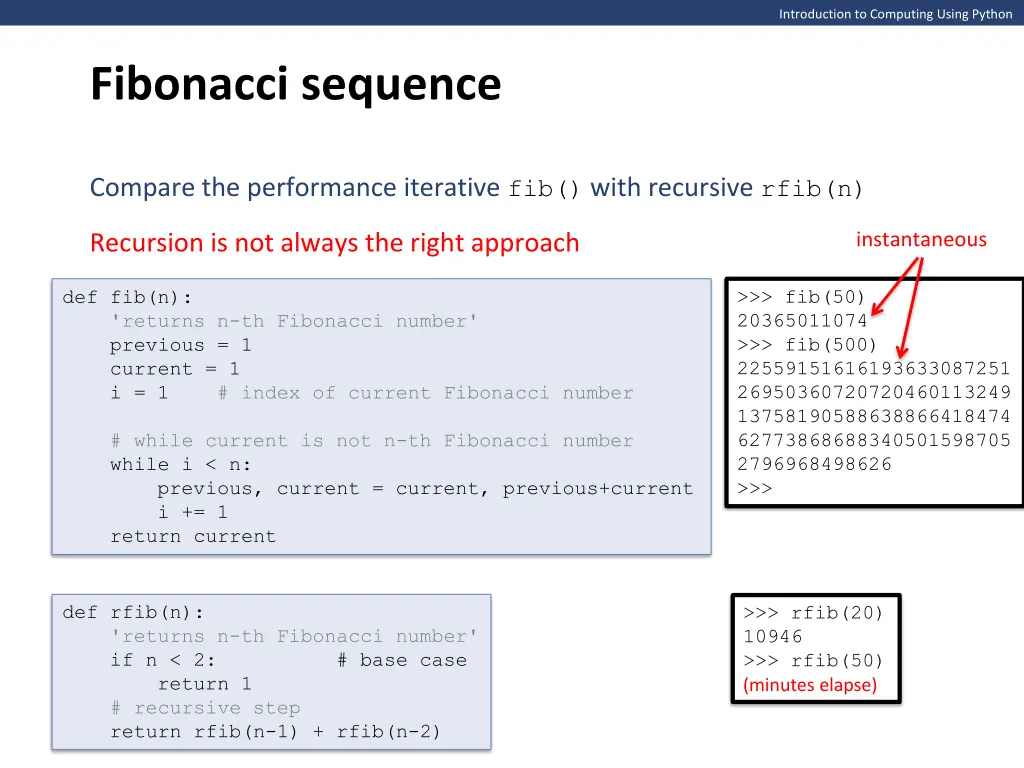
Introduction to Computing Using Python Fibonacci sequence Compare the performance iterative fib() with recursive rfib(n) instantaneous Recursion is not always the right approach >>> fib(50) 20365011074 >>> fib(500) 22559151616193633087251 26950360720720460113249 13758190588638866418474 62773868688340501598705 2796968498626 >>> def fib(n): 'returns n-th Fibonacci number' previous = 1 current = 1 i = 1 # index of current Fibonacci number # while current is not n-th Fibonacci number while i < n: previous, current = current, previous+current i += 1 return current def rfib(n): 'returns n-th Fibonacci number' if n < 2: # base case return 1 # recursive step return rfib(n-1) + rfib(n-2) >>> rfib(20) 10946 >>> rfib(50) (minutes elapse)
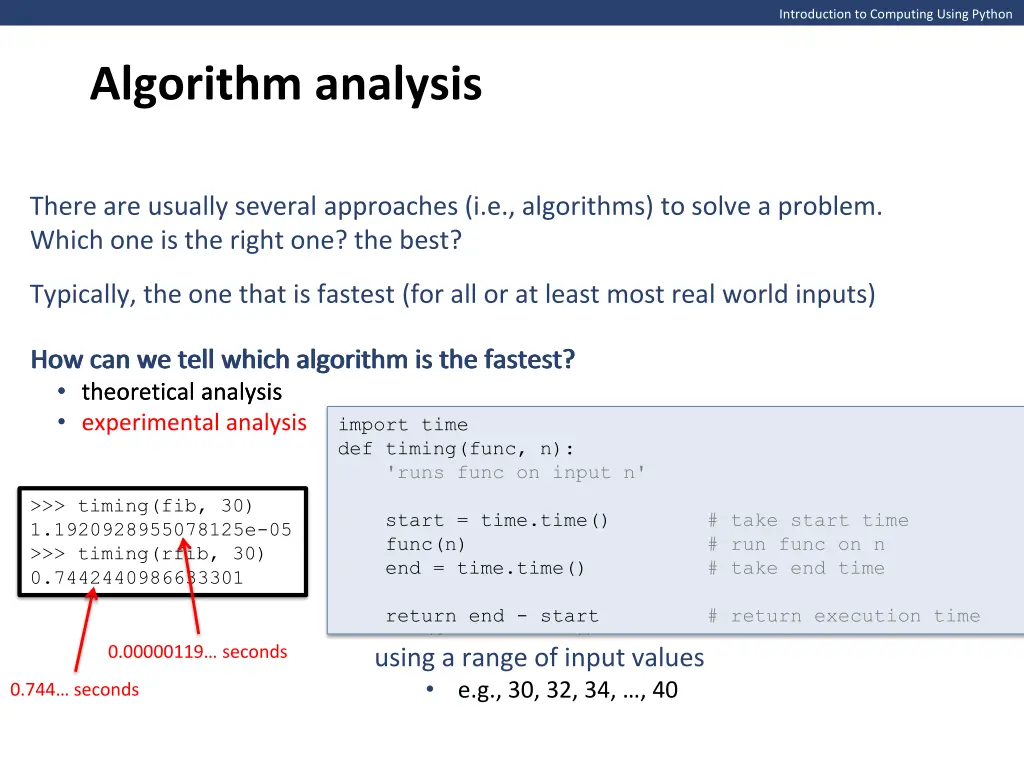
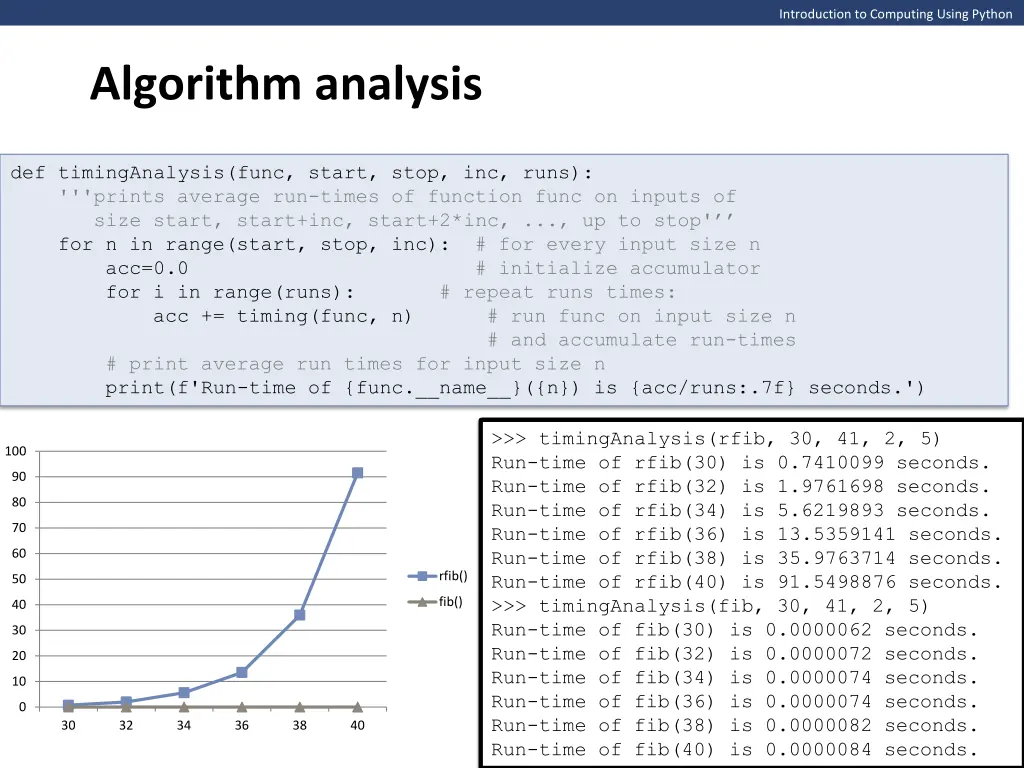
Introduction to Computing Using Python Algorithm analysis There are usually several approaches (i.e., algorithms) to solve a problem. Which one is the right one? the best? Typically, the one that is fastest (for all or at least most real world inputs) How can we tell which algorithm is the fastest? How can we tell which algorithm is the fastest? theoretical analysis theoretical analysis experimental analysis How can we tell which algorithm is the fastest? import time def timing(func, n): 'runs func on input n' This experiment only compares the performance of fib() and rfib() for input 30 start = time.time() # take start time func(n) # run func on n end = time.time() # take end time >>> timing(fib, 30) 1.1920928955078125e-05 >>> timing(rfib, 30) 0.7442440986633301 To get a better sense of the relative performance of fib() and rfib() we should time them both using a range of input values e.g., 30, 32, 34, , 40 return end - start # return execution time 0.00000119 seconds 0.744 seconds
Introduction to Computing Using Python Algorithm analysis def timingAnalysis(func, start, stop, inc, runs): '''prints average run-times of function func on inputs of size start, start+inc, start+2*inc, ..., up to stop' for n in range(start, stop, inc): # for every input size n acc=0.0 # initialize accumulator for i in range(runs): # repeat runs times: acc += timing(func, n) # run func on input size n # and accumulate run-times # print average run times for input size n print(f'Run-time of {func.__name__}({n}) is {acc/runs:.7f} seconds.') >>> timingAnalysis(rfib, 30, 41, 2, 5) Run-time of rfib(30) is 0.7410099 seconds. Run-time of rfib(32) is 1.9761698 seconds. Run-time of rfib(34) is 5.6219893 seconds. Run-time of rfib(36) is 13.5359141 seconds. Run-time of rfib(38) is 35.9763714 seconds. Run-time of rfib(40) is 91.5498876 seconds. Run-time of rfib(40) is 91.5498876 seconds. >>> timingAnalysis(rfib, 30, 41, 2, 5) Run-time of rfib(30) is 0.7410099 seconds. Run-time of rfib(32) is 1.9761698 seconds. Run-time of rfib(34) is 5.6219893 seconds. Run-time of rfib(36) is 13.5359141 seconds. Run-time of rfib(38) is 35.9763714 seconds. 100 90 80 70 60 The running time of rfib() increases much more rapidly with input size >>> >>> timingAnalysis(fib, 30, 41, 2, 5) Run-time of fib(30) is 0.0000062 seconds. Run-time of fib(32) is 0.0000072 seconds. Run-time of fib(34) is 0.0000074 seconds. Run-time of fib(36) is 0.0000074 seconds. Run-time of fib(38) is 0.0000082 seconds. Run-time of fib(40) is 0.0000084 seconds. rfib() 50 fib() 40 30 20 10 0 30 32 34 36 38 40
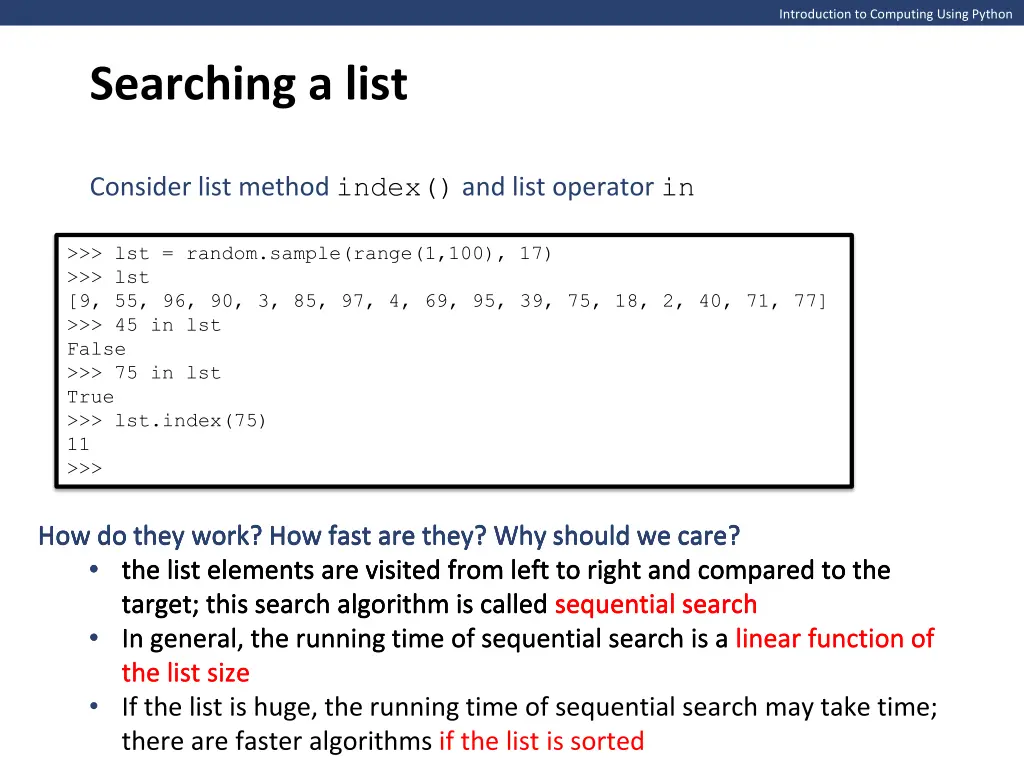
Introduction to Computing Using Python Searching a list Consider list method index() and list operator in >>> lst = random.sample(range(1,100), 17) >>> lst [9, 55, 96, 90, 3, 85, 97, 4, 69, 95, 39, 75, 18, 2, 40, 71, 77] >>> 45 in lst False >>> 75 in lst True >>> lst.index(75) 11 >>> How do they work? How fast are they? Why should we care? How do they work? How fast are they? Why should we care? the list elements are visited from left to right and compared to the target; this search algorithm is called sequential search target; this search algorithm is called sequential search In general, the running time of sequential search is a linear function of the list size the list size If the list is huge, the running time of sequential search may take time; there are faster algorithms if the list is sorted How do they work? How fast are they? Why should we care? the list elements are visited from left to right and compared to the the list elements are visited from left to right and compared to the target; this search algorithm is called sequential search In general, the running time of sequential search is a linear function of How do they work? How fast are they? Why should we care?
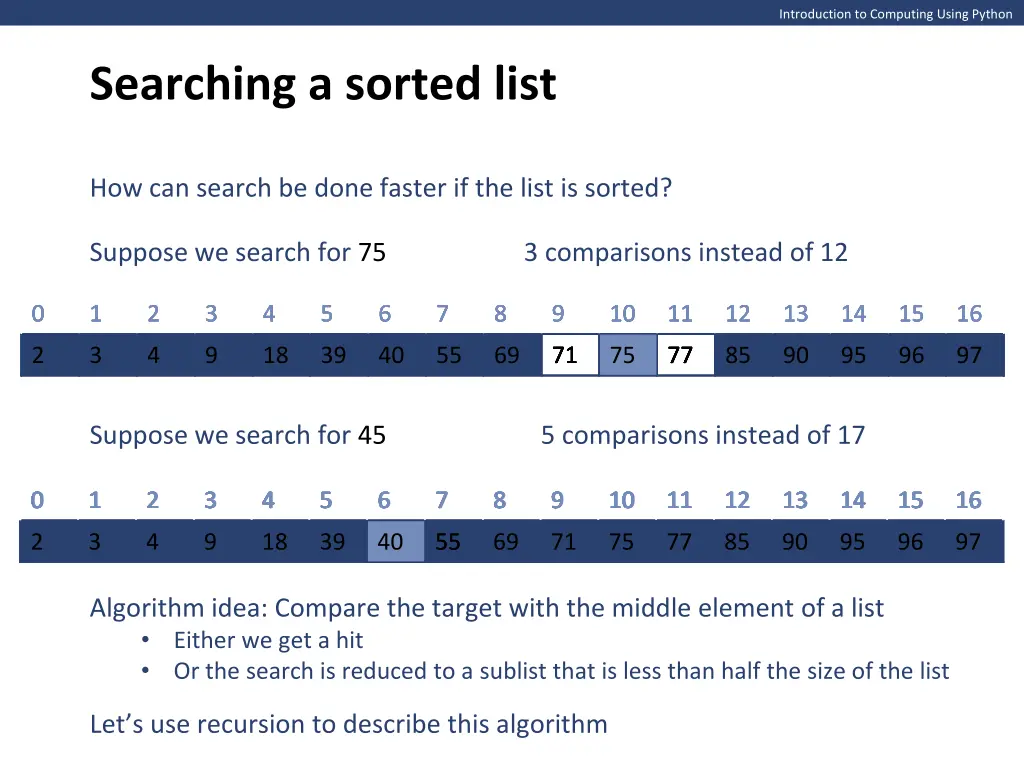
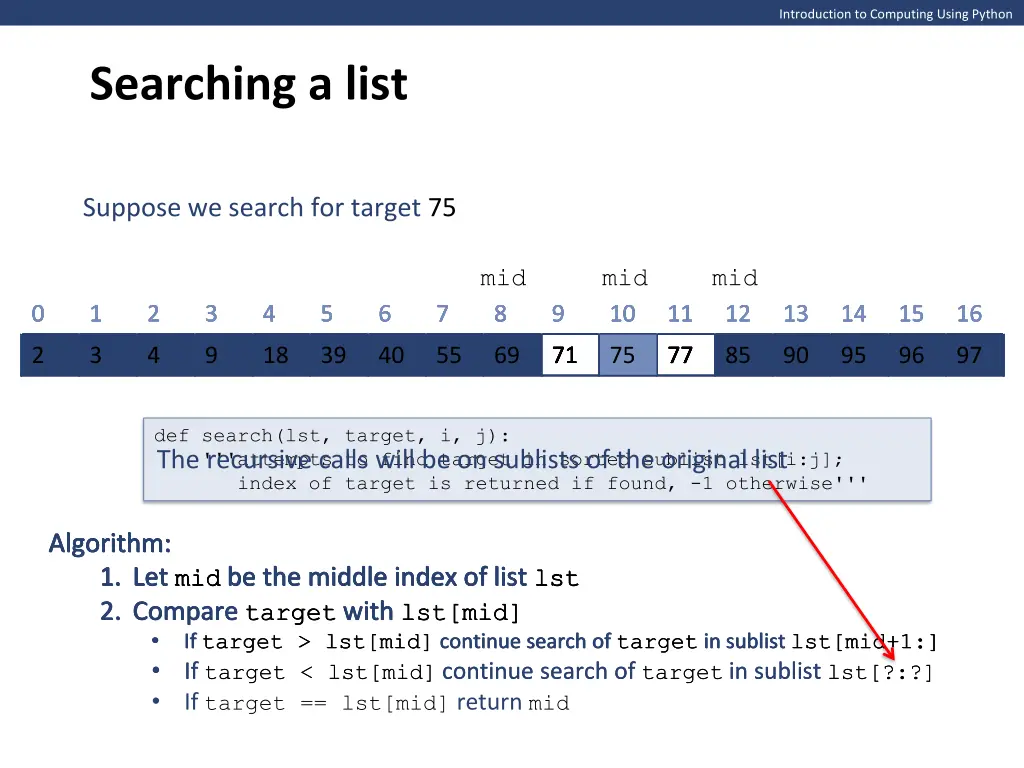
Introduction to Computing Using Python Searching a list Suppose we search for target 75 mid mid mid 0 0 0 0 0 0 1 1 1 1 1 1 2 2 2 2 2 2 3 3 3 3 3 3 4 4 4 4 4 4 5 5 5 5 5 5 6 6 6 6 6 6 7 7 7 7 7 7 8 8 8 8 8 8 9 9 9 9 9 9 10 10 10 10 10 10 11 11 11 11 11 11 12 12 12 12 12 12 13 13 13 13 13 13 14 14 14 14 14 14 15 15 15 15 15 15 16 16 16 16 16 16 2 2 2 2 2 2 3 3 3 3 3 3 4 4 4 4 4 4 9 9 9 9 9 9 18 18 18 18 18 18 39 39 39 39 39 39 40 40 40 40 40 40 55 55 55 55 55 55 69 69 69 69 69 69 71 71 71 71 71 71 75 75 75 75 75 75 77 77 77 77 77 77 85 85 85 85 85 85 90 90 90 90 90 90 95 95 95 95 95 95 96 96 96 96 96 96 97 97 97 97 97 97 def search(lst, target, i, j): '''attempts to find target in sorted sublist lst[i:j]; index of target is returned if found, -1 otherwise''' The recursive calls will be on sublists of the original list Algorithm: 1. Let mid be the middle index of list lst 1. Let mid be the middle index of list lst 2. Compare target with lst[mid] 2. Compare target with lst[mid] If target > lst[mid] continue search of target in sublist lst[mid+1:] If target > lst[mid] continue search of target in sublist lst[mid+1:] If target < lst[mid]continue search of targetin sublist lst[?:?] If target < lst[mid]continue search of targetin sublist lst[?:?] If target == lst[mid] return mid Algorithm: Algorithm: 1. Let mid be the middle index of list lst 1. Let mid be the middle index of list lst 2. Compare target with lst[mid] 2. Compare target with lst[mid] If target > lst[mid] continue search of target in sublist lst[mid+1:] Algorithm: Algorithm: 1. Let mid be the middle index of list lst
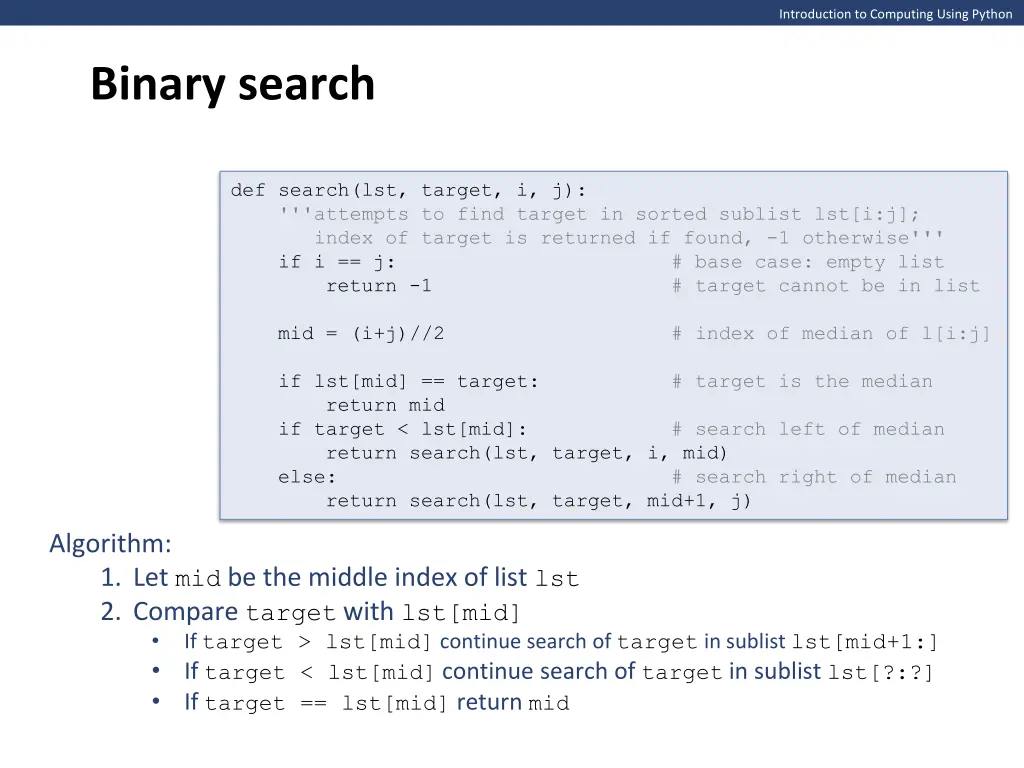
Introduction to Computing Using Python Binary search def search(lst, target, i, j): '''attempts to find target in sorted sublist lst[i:j]; index of target is returned if found, -1 otherwise''' if i == j: # base case: empty list return -1 # target cannot be in list mid = (i+j)//2 # index of median of l[i:j] if lst[mid] == target: # target is the median return mid if target < lst[mid]: # search left of median return search(lst, target, i, mid) else: # search right of median return search(lst, target, mid+1, j) Algorithm: 1. Let mid be the middle index of list lst 2. Compare target with lst[mid] If target > lst[mid] continue search of target in sublist lst[mid+1:] If target < lst[mid]continue search of targetin sublist lst[?:?] If target == lst[mid] return mid
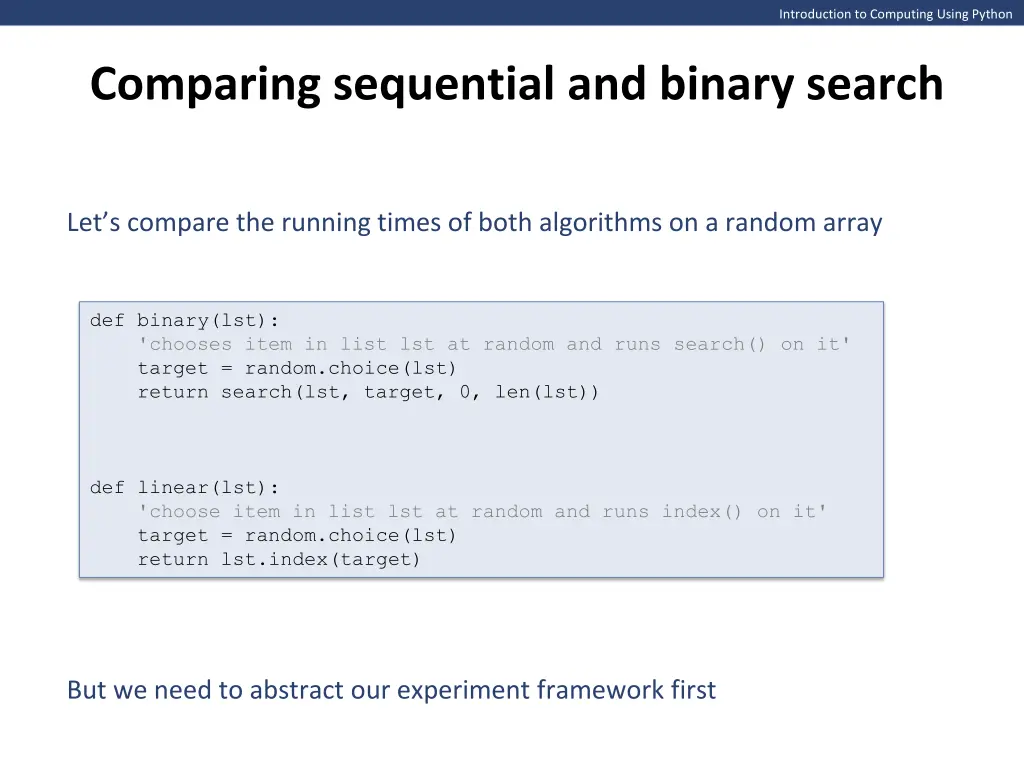
Introduction to Computing Using Python Comparing sequential and binary search Let s compare the running times of both algorithms on a random array def binary(lst): 'chooses item in list lst at random and runs search() on it' target = random.choice(lst) return search(lst, target, 0, len(lst)) def linear(lst): 'choose item in list lst at random and runs index() on it' target = random.choice(lst) return lst.index(target) But we need to abstract our experiment framework first
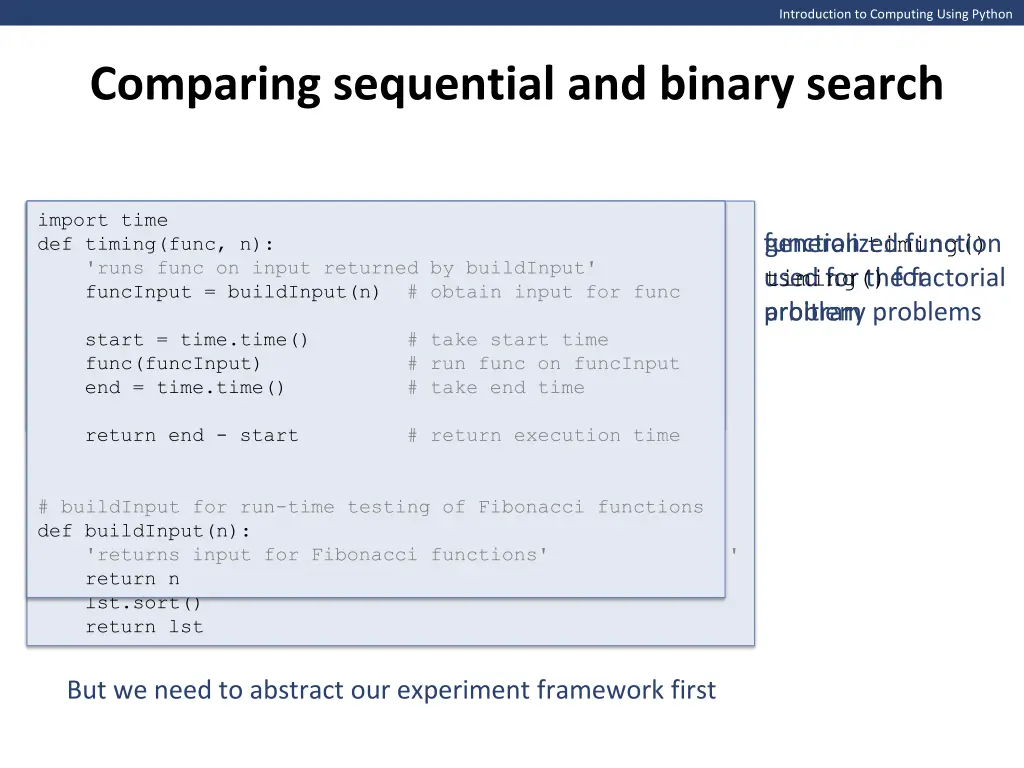
Introduction to Computing Using Python Comparing sequential and binary search import time def timing(func, n): 'runs func on input n' 'runs func on input returned by buildInput' funcInput = buildInput(n) # obtain input for func import time def timing(func, n): import time def timing(func, n): 'runs func on input returned by buildInput' funcInput = buildInput(n) # obtain input for func start = time.time() # take start time func(n) # run func on n end = time.time() # take end time func(funcInput) # run func on funcInput end = time.time() # take end time function timing() used for the factorial problem arbitrary problems generalized function timing() for start = time.time() # take start time start = time.time() # take start time func(funcInput) # run func on funcInput end = time.time() # take end time return end - start # return execution time return end - start # return execution time return end - start # return execution time # buildInput for run-time testing of Fibonacci functions def buildInput(n): 'returns input for Fibonacci functions' return n # buildInput for comparing Linear and Binary search def buildInput(n): 'returns a random sample of n numbers in range [0, 2n)' lst = random.sample(range(2*n), n) lst.sort() return lst But we need to abstract our experiment framework first
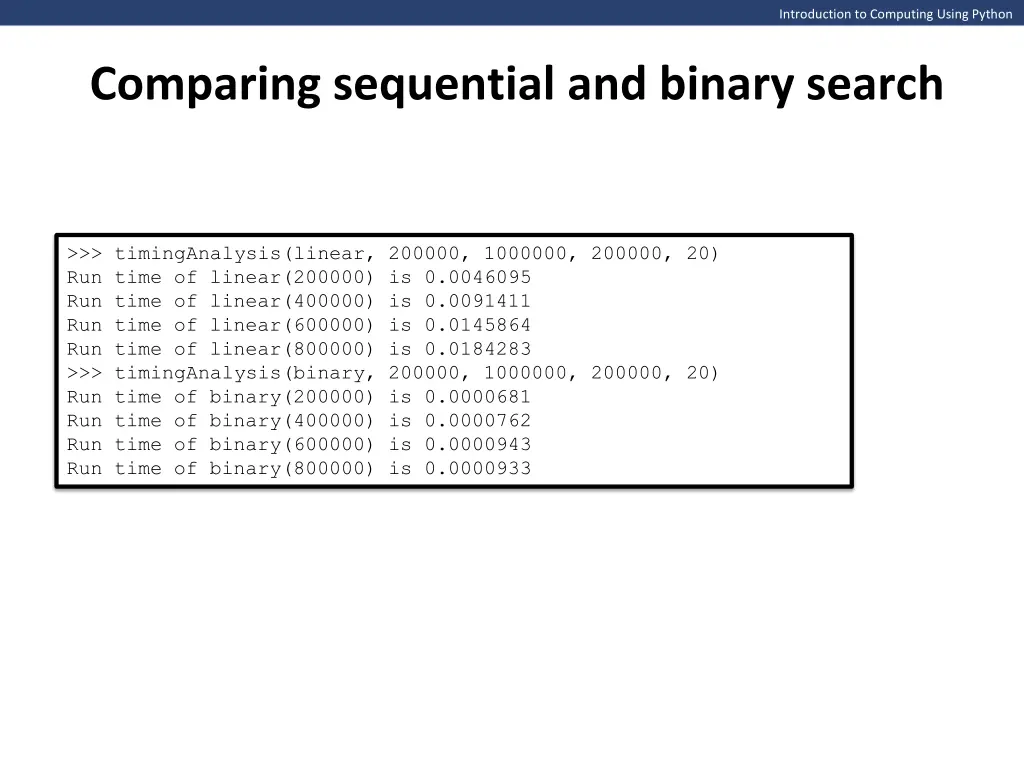
Introduction to Computing Using Python Comparing sequential and binary search >>> timingAnalysis(linear, 200000, 1000000, 200000, 20) Run time of linear(200000) is 0.0046095 Run time of linear(400000) is 0.0091411 Run time of linear(600000) is 0.0145864 Run time of linear(800000) is 0.0184283 >>> timingAnalysis(binary, 200000, 1000000, 200000, 20) Run time of binary(200000) is 0.0000681 Run time of binary(400000) is 0.0000762 Run time of binary(600000) is 0.0000943 Run time of binary(800000) is 0.0000933
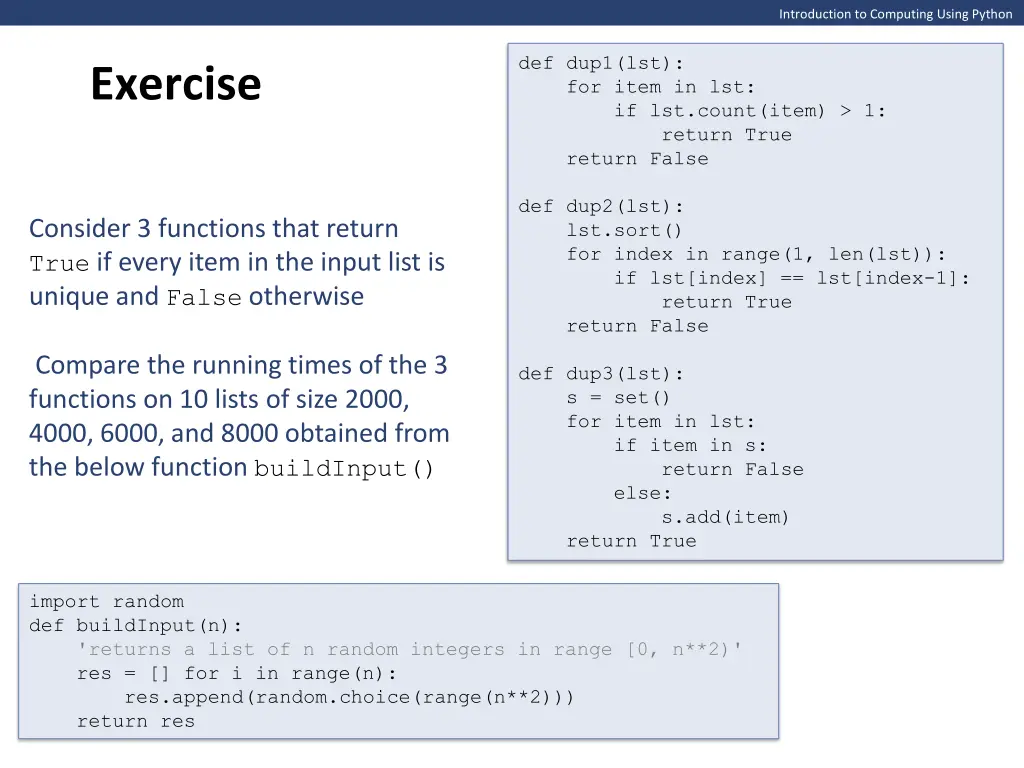
Introduction to Computing Using Python def dup1(lst): for item in lst: if lst.count(item) > 1: return True return False Exercise def dup2(lst): lst.sort() for index in range(1, len(lst)): if lst[index] == lst[index-1]: return True return False Consider 3 functions that return True if every item in the input list is unique and False otherwise Compare the running times of the 3 functions on 10 lists of size 2000, 4000, 6000, and 8000 obtained from the below function buildInput() def dup3(lst): s = set() for item in lst: if item in s: return False else: s.add(item) return True import random def buildInput(n): 'returns a list of n random integers in range [0, n**2)' res = [] for i in range(n): res.append(random.choice(range(n**2))) return res