Explore the Redfish Fabric Model insights which depict the connectivity through ports, endpoints, and devices in the fabric. Understand how physical fabric connections are established between ports and devices, and how switches play a role in relaying packets in the fabric topology.
Please find below an Image/Link to download the presentation.
The content on the website is provided AS IS for your information and personal use only. It may not be sold, licensed, or shared on other websites without obtaining consent from the author. If you encounter any issues during the download, it is possible that the publisher has removed the file from their server.
You are allowed to download the files provided on this website for personal or commercial use, subject to the condition that they are used lawfully. All files are the property of their respective owners.
The content on the website is provided AS IS for your information and personal use only. It may not be sold, licensed, or shared on other websites without obtaining consent from the author.
E N D
Presentation Transcript
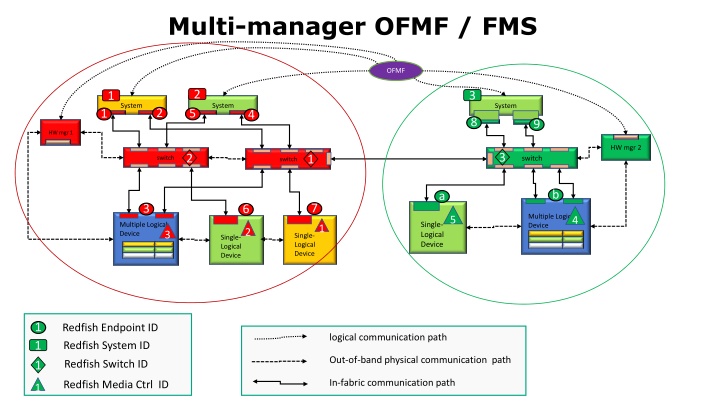
Multi-manager OFMF / FMS OFMF 2 3 1 System System System 2 5 1 4 8 9 HW mgr 1 HW mgr 2 3 2 1 switch switch switch b a 7 3 6 Multiple Logical Device 5 4 Single- Logical Device Multiple Logical Device 1 2 3 Single- Logical Device Single- Logical Device 1 1 1 Redfish Endpoint ID Redfish System ID logical communication path Out-of-band physical communication path Redfish Switch ID In-fabric communication path Redfish Media Ctrl ID 1
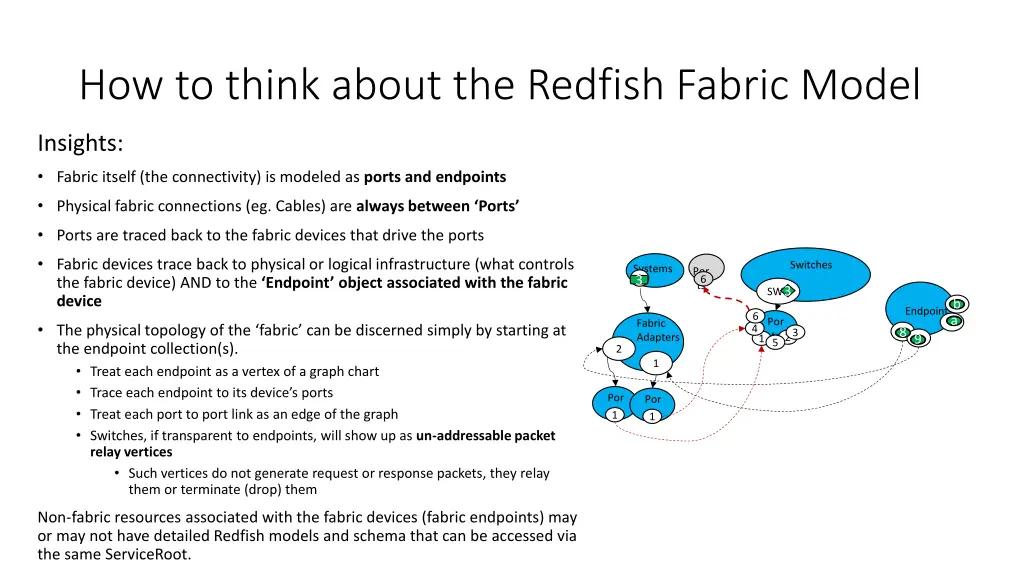
How to think about the Redfish Fabric Model Insights: Fabric itself (the connectivity) is modeled as ports and endpoints Physical fabric connections (eg. Cables) are always between Ports Ports are traced back to the fabric devices that drive the ports Fabric devices trace back to physical or logical infrastructure (what controls the fabric device) AND to the Endpoint object associated with the fabric device Switches Systems 1 3 Por ts6 3 SW1 3 b Endpoints 6 6 a Por ts 5 Fabric Adapters The physical topology of the fabric can be discerned simply by starting at the endpoint collection(s). Treat each endpoint as a vertex of a graph chart Trace each endpoint to its device s ports Treat each port to port link as an edge of the graph Switches, if transparent to endpoints, will show up as un-addressable packet relay vertices Such vertices do not generate request or response packets, they relay them or terminate (drop) them 4 1 89 23 2 1 2 1 Por ts1 Por ts1 Non-fabric resources associated with the fabric devices (fabric endpoints) may or may not have detailed Redfish models and schema that can be accessed via the same ServiceRoot.
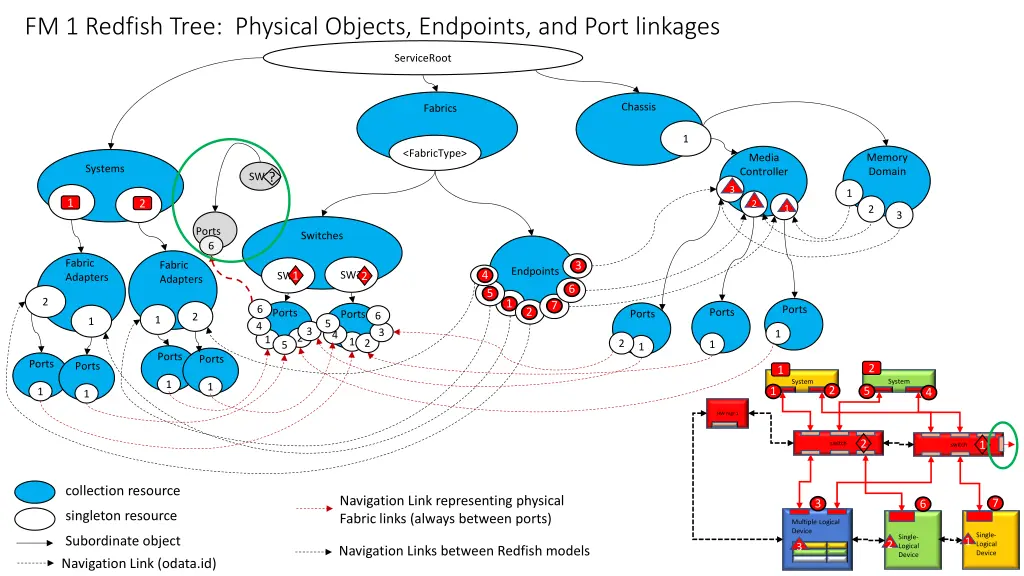
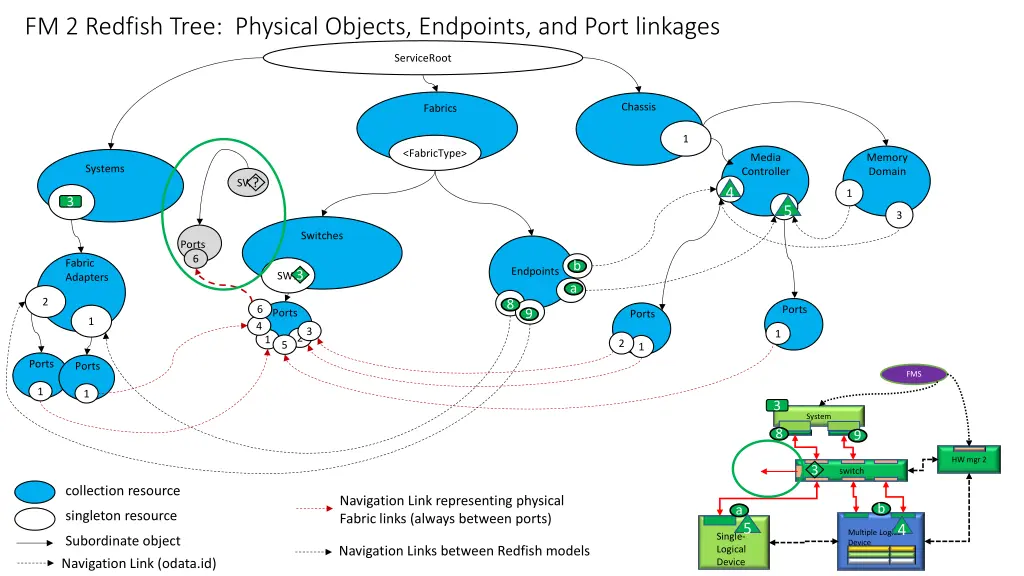
FM 2 Redfish Tree: Physical Objects, Endpoints, and Port linkages ServiceRoot Chassis Fabrics 1 <FabricType> Media Controller Memory Domain Systems ? SW3 2 4 1 1 3 1 5 3 Switches Ports 6 Fabric Adapters 3 b Endpoints 3 SW1 6 a 2 1 8 6 Ports 2 9 Ports Ports 1 4 23 1 1 2 5 1 Ports Ports FMS 1 1 3 System 8 9 HW mgr 2 3 switch collection resource Navigation Link representing physical Fabric links (always between ports) b a singleton resource 5 4 Multiple Logical Device Single- Logical Device Subordinate object Navigation Links between Redfish models Navigation Link (odata.id)
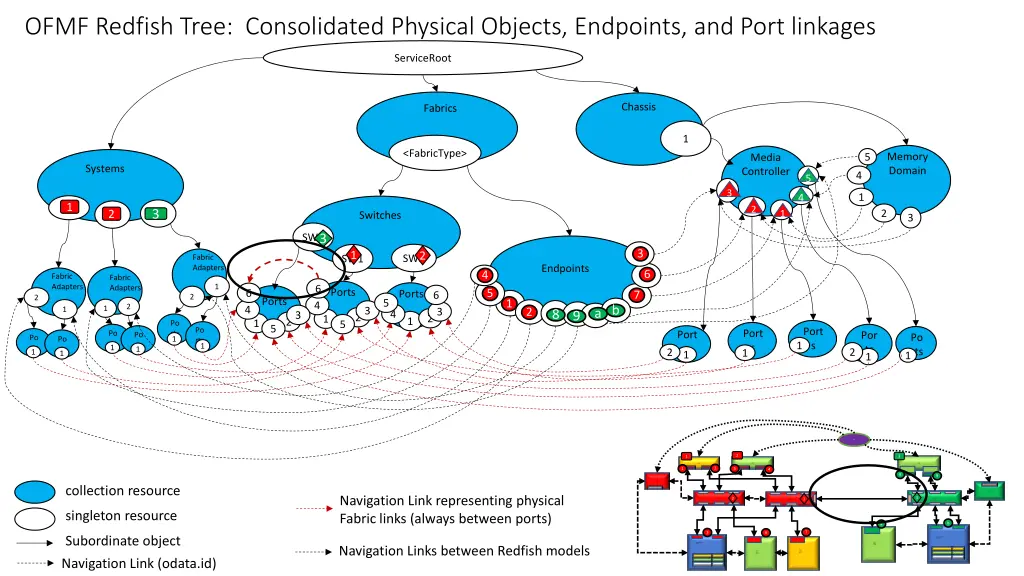
OFMF Redfish Tree: Consolidated Physical Objects, Endpoints, and Port linkages ServiceRoot Chassis Fabrics 1 <FabricType> Memory Domain 5 Media Controller Systems 4 5 5 3 3 4 4 1 1 1 2 2 1 1 3 2 2 2 3 Switches 3 3 SW3 3 3 SW1 1 2 SW2 Fabric Adapters Endpoints 6 6 4 4 Fabric Adapters Fabric Adapters 1 6 Ports 5 5 6 Ports 7 7 6 2 2 Ports 1 1 5 4 2 6 a b 4 1 3 23 1 2 2 23 1 8 9 4 2 23 1 1 1 Po rts 1 5 5 Po rts1 Port s Port s 1 Port s1 Po rts 1 Por ts 1 Po rts 1 Po rts 1 Po rts 1 Po rts 1 1 2 2 FMS 2 3 1 System System System 2 5 1 4 8 9 HW mgr 1 collection resource HW mgr 2 Navigation Link representing physical Fabric links (always between ports) 3 2 1 switch switch switch singleton resource b a 7 3 6 Subordinate object Multiple Logical Device Single- Logical Device Multiple Logical Device Navigation Links between Redfish models Single- Logical Device Single- Logical Device Navigation Link (odata.id)
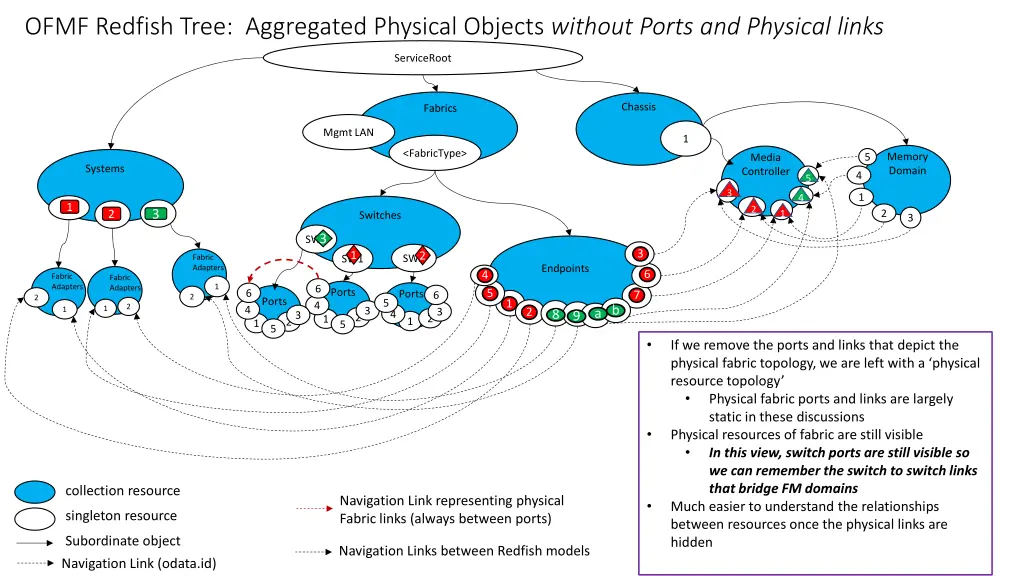
OFMF Redfish Tree: Aggregated Physical Objects without Ports and Physical links ServiceRoot Chassis Fabrics Mgmt LAN 1 <FabricType> Memory Domain 5 Media Controller Systems 4 5 5 3 3 4 4 1 1 1 2 2 1 1 3 2 2 2 3 Switches 3 SW3 3 3 3 SW1 1 2 SW2 Fabric Adapters Endpoints 6 6 4 4 Fabric Adapters Fabric Adapters 1 6 Ports 5 5 6 Ports 7 7 6 2 2 Ports 1 1 5 4 2 6 a b 4 1 3 23 1 2 2 23 1 8 9 4 2 23 1 1 1 5 5 If we remove the ports and links that depict the physical fabric topology, we are left with a physical resource topology Physical fabric ports and links are largely static in these discussions Physical resources of fabric are still visible In this view, switch ports are still visible so we can remember the switch to switch links that bridge FM domains Much easier to understand the relationships between resources once the physical links are hidden collection resource Navigation Link representing physical Fabric links (always between ports) singleton resource Subordinate object Navigation Links between Redfish models Navigation Link (odata.id)
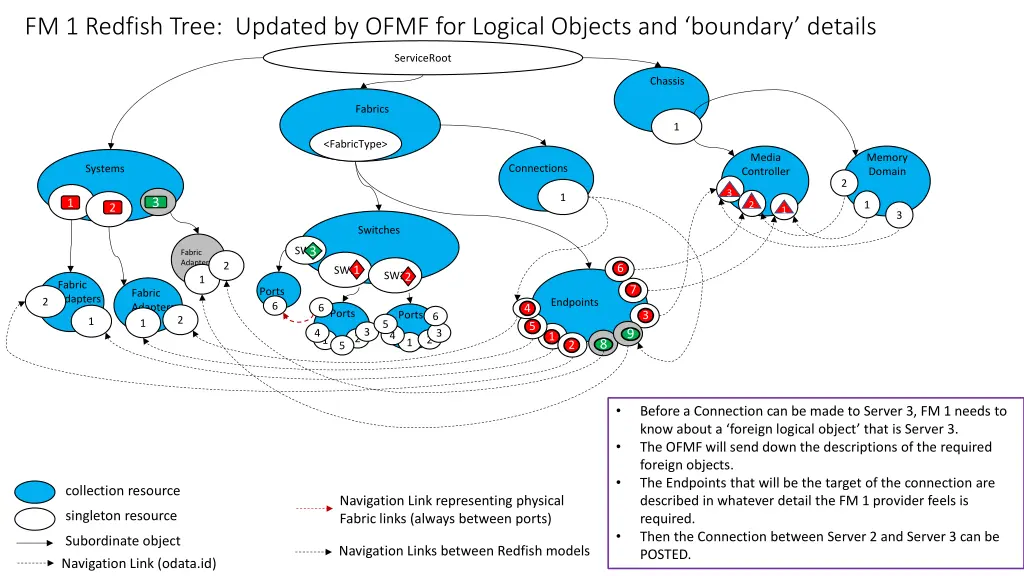
FM 1 Redfish Tree: Updated by OFMF for Logical Objects and boundary details ServiceRoot Chassis Fabrics 1 <FabricType> Media Controller Memory Domain Connections Systems 2 3 3 1 3 3 1 1 2 2 1 1 1 2 2 3 Switches 3 SW3 Fabric Adapters 2 6 6 1 SW1 SW2 2 1 Fabric Adapters 7 7 Ports 6 Fabric Adapters 1 2 Endpoints 4 4 6 Ports 3 3 Ports 6 2 1 5 5 5 23 2 9 4 23 4 1 1 1 1 8 1 2 2 5 Before a Connection can be made to Server 3, FM 1 needs to know about a foreign logical object that is Server 3. The OFMF will send down the descriptions of the required foreign objects. The Endpoints that will be the target of the connection are described in whatever detail the FM 1 provider feels is required. Then the Connection between Server 2 and Server 3 can be POSTED. collection resource Navigation Link representing physical Fabric links (always between ports) singleton resource Subordinate object Navigation Links between Redfish models Navigation Link (odata.id)