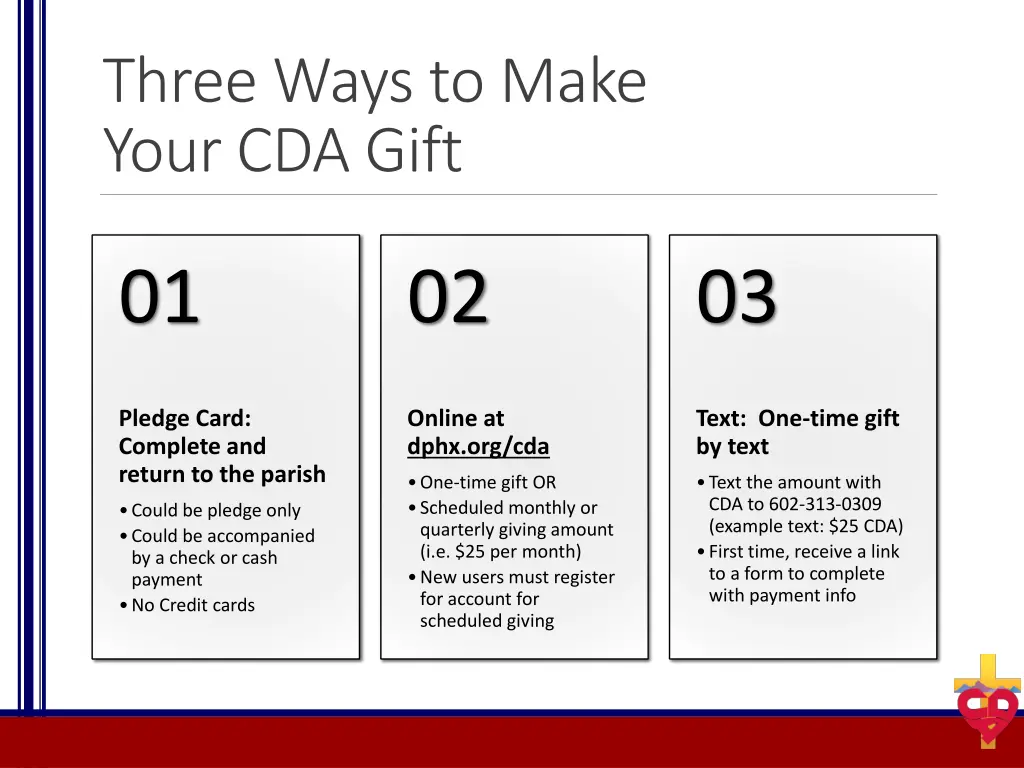
Explore three convenient methods to contribute to the CDA pledge card campaign: complete and return a pledge card, donate online without logging in, or give via text messaging. Choose the option that suits you best to support this meaningful cause.
Please find below an Image/Link to download the presentation.
The content on the website is provided AS IS for your information and personal use only. It may not be sold, licensed, or shared on other websites without obtaining consent from the author. If you encounter any issues during the download, it is possible that the publisher has removed the file from their server.
You are allowed to download the files provided on this website for personal or commercial use, subject to the condition that they are used lawfully. All files are the property of their respective owners.
The content on the website is provided AS IS for your information and personal use only. It may not be sold, licensed, or shared on other websites without obtaining consent from the author.
E N D
Presentation Transcript
Three Ways to Make Your CDA Gift 01 02 03 Pledge Card: Complete and return to the parish Online at dphx.org/cda Text: One-time gift by text One-time gift OR Scheduled monthly or quarterly giving amount (i.e. $25 per month) New users must register for account for scheduled giving Text the amount with CDA to 602-313-0309 (example text: $25 CDA) First time, receive a link to a form to complete with payment info Could be pledge only Could be accompanied by a check or cash payment No Credit cards
Donate Online dphx.org/cda One-Time Gift/No Log-In For the donor who prefers to not register for an account and make a one-time gift: Click red Donate Now button Complete form to make one-time gift without registering for account
Donate Online dphx.org/cda Create New Account Log-In Click red Donate Now button Click blue Log In button at bottom, then Register for an Account Once registered, click Give to CDA in the blue menu on the right To give on a scheduled basis Choose the frequency Choose the date Enter in Payment Amount To give one-time today Unclick the Scheduled Gift Box Enter in the payment amount Click Setup Payment Method, enter in all information, click Save Once it is set up, click Next Verify information and click Finish to complete the gift An email will be sent confirming every payment
Text to Give 602-313-0309 Sample Text: $100 CDA Will receive a link back to complete payment information One-time gift only but can send multiple texts during the appeal After one gift is made, the system will remember your information All information is highly secured PCI Compliant