How to Complete an eAF Based on Version 1.20 Webinar
This presentation offers practical and technical guidance on utilizing Electronic Application Forms (eAFs) version 1.20. It covers various topics including the introduction to eAF, variation forms, initial marketing authorization (MAA) forms for both human and veterinary applications, renewal forms, and general issues. Detailed resources and support information are provided to help stakeholders effectively engage with the eAF process in compliance with European regulations.

Download Presentation

Please find below an Image/Link to download the presentation.
The content on the website is provided AS IS for your information and personal use only. It may not be sold, licensed, or shared on other websites without obtaining consent from the author.If you encounter any issues during the download, it is possible that the publisher has removed the file from their server.
You are allowed to download the files provided on this website for personal or commercial use, subject to the condition that they are used lawfully. All files are the property of their respective owners.
The content on the website is provided AS IS for your information and personal use only. It may not be sold, licensed, or shared on other websites without obtaining consent from the author.
E N D
Presentation Transcript
How to complete an eAF based on version 1.20 Webinar for the usage of an eAF for submissions of human and veterinary applications Presented by: Georg Neuwirther (AGES), Klaus Menges (BfArM) and Kristiina Puusaari (EMA) June 2016 An agency of the European Union
Training topics 1. Introduction 2. Variation form 3. Initial MAA form human 4. Initial MAA form veterinary 5. Renewal form 6. General issues 2 eAF version 1.20 webinar for industry
Introduction This presentation provides practical and technical support on the use of the Electronic Application Forms (eAFs) version 1.20. More information can be found here: http://esubmission.ema.europa.eu/eaf/ Release Notes of version 1.20 can be found here In addition consult the regulatory USER GUIDE FOR THE ELECTRONIC APPLICATION FORM FOR A MARKETING AUTHORISATION which is available for human medicinal products at CMDh and for veterinary medicinal products at CMDv. Both guidance documents are additionally available on the eAF website. Note, all eAF related queries should be submitted to the EMA IT service desk portal: https://servicedesk.ema.europa.eu Note, all procedure specific queries should be sent directly to the relevant National Competent Authority. eAF version 1.20 webinar for industry 3
VARIATION FORM HUMAN & VET 4 eAF version 1.20 webinar for industry
VARIATION FORM HUMAN & VET: CHANGES TO SECTION 2 PRODUCTS CONCERNED 5 eAF version 1.20 webinar for industry
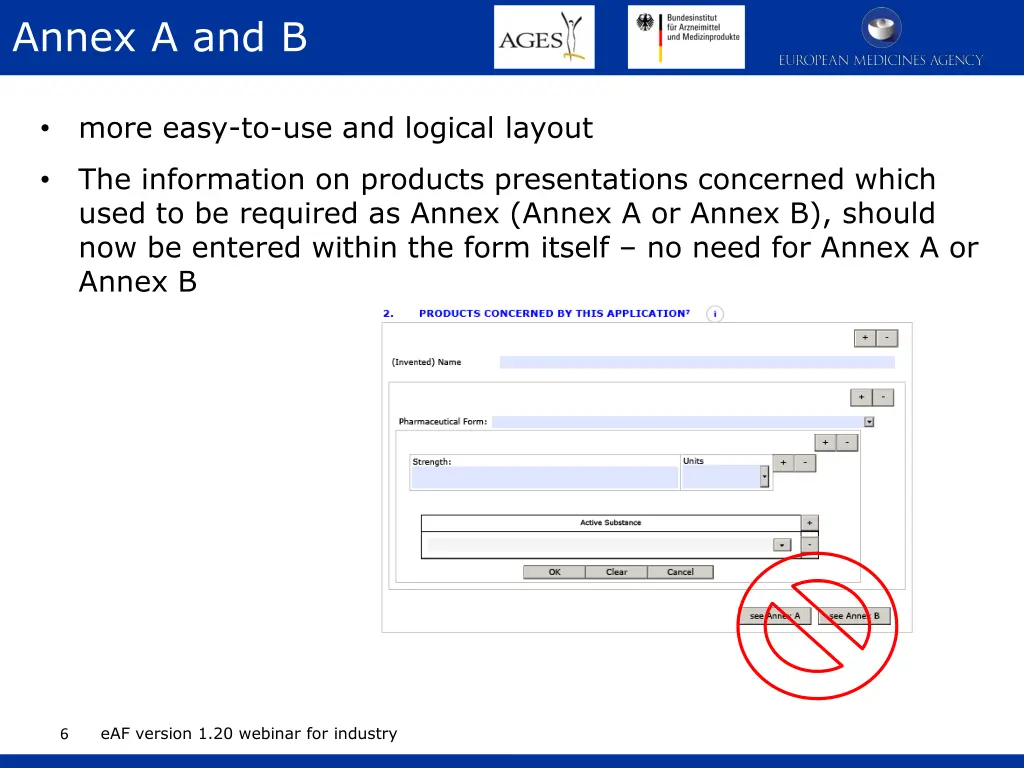
Annex A and B more easy-to-use and logical layout The information on products presentations concerned which used to be required as Annex (Annex A or Annex B), should now be entered within the form itself no need for Annex A or Annex B eAF version 1.20 webinar for industry 6
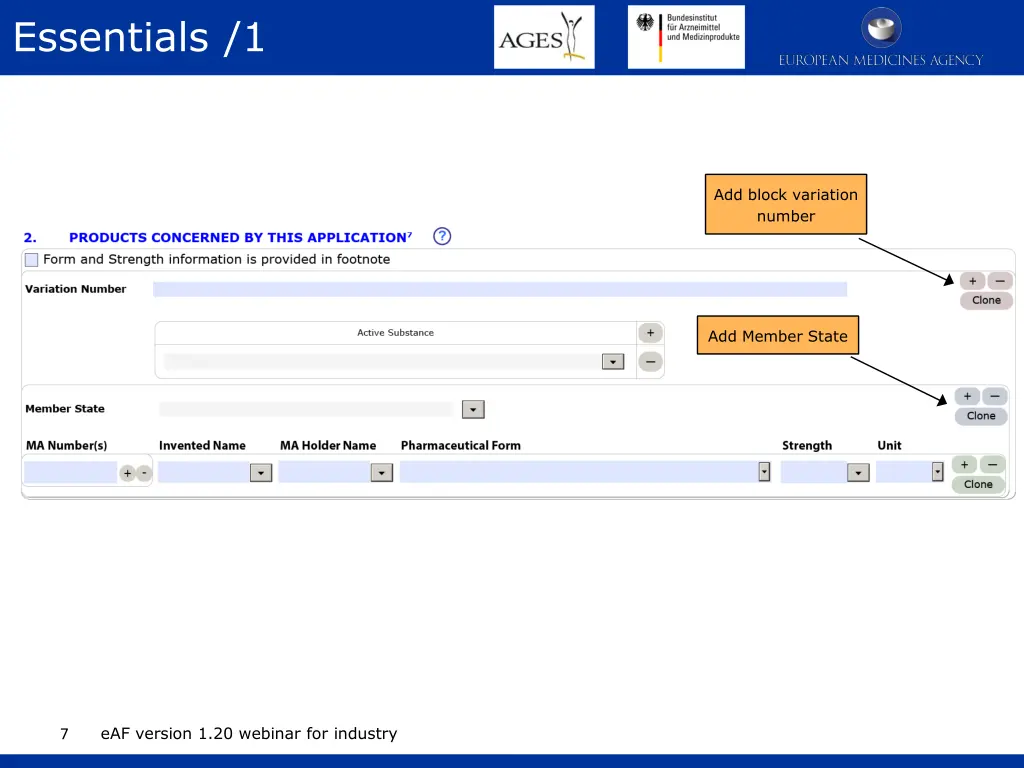
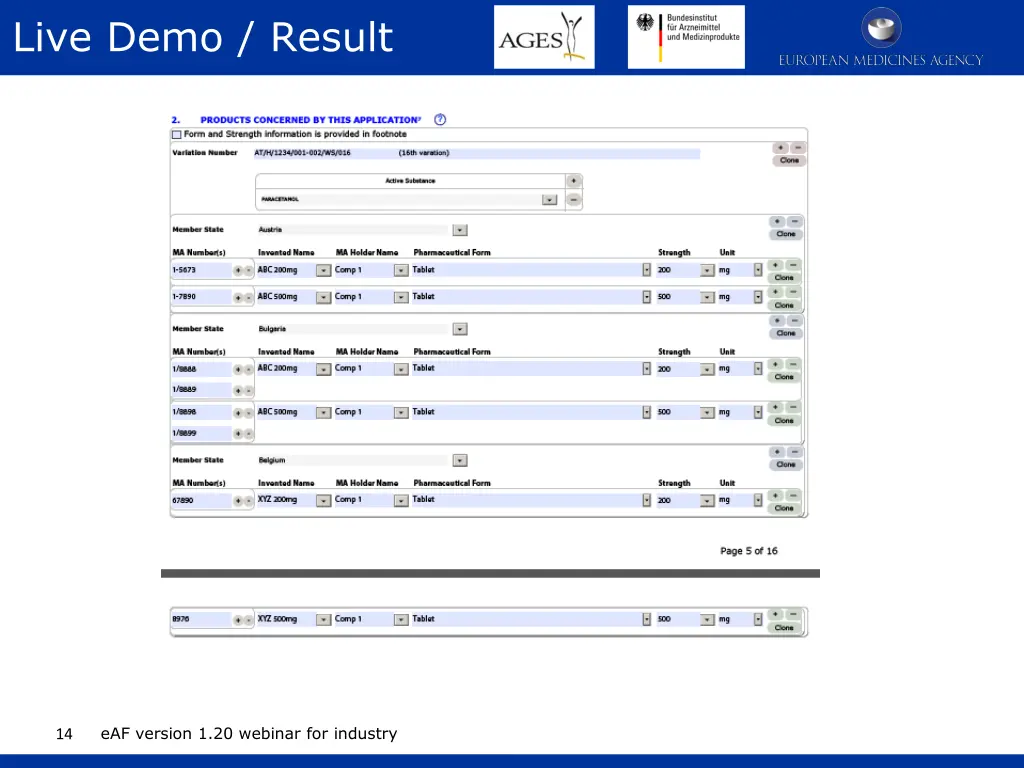
Essentials /1 Add block variation number Add Member State Demonstration follows eAF version 1.20 webinar for industry 7
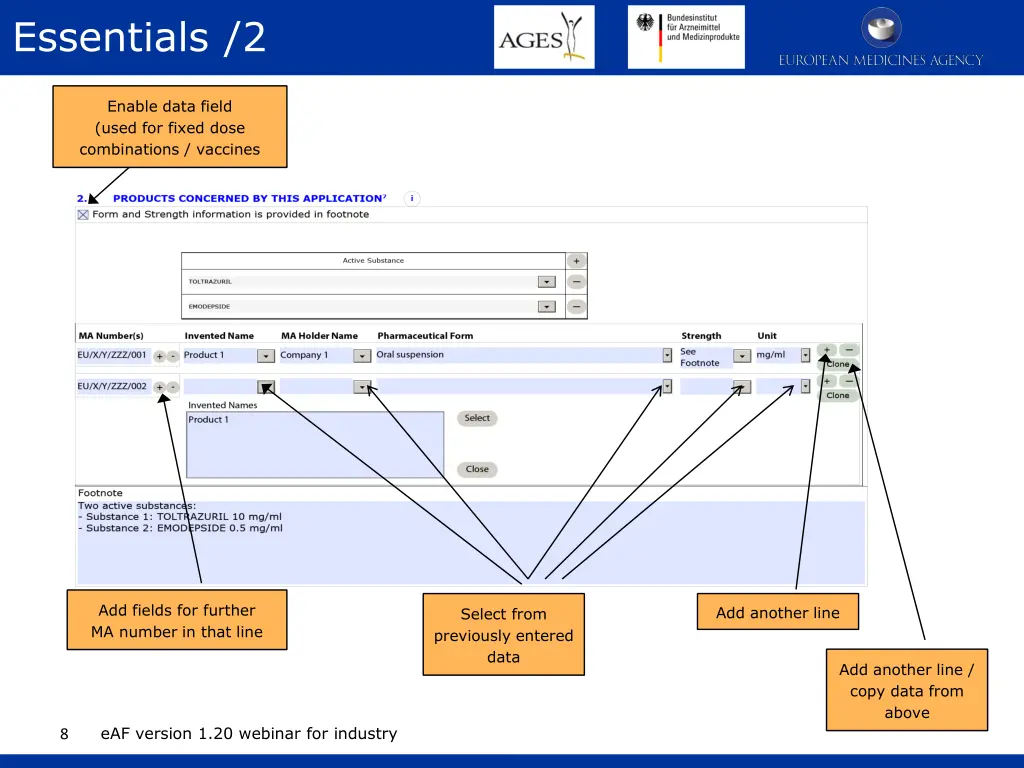
Essentials /2 Enable data field (used for fixed dose combinations / vaccines Add fields for further MA number in that line Add another line Select from previously entered data Add another line / copy data from above eAF version 1.20 webinar for industry 8
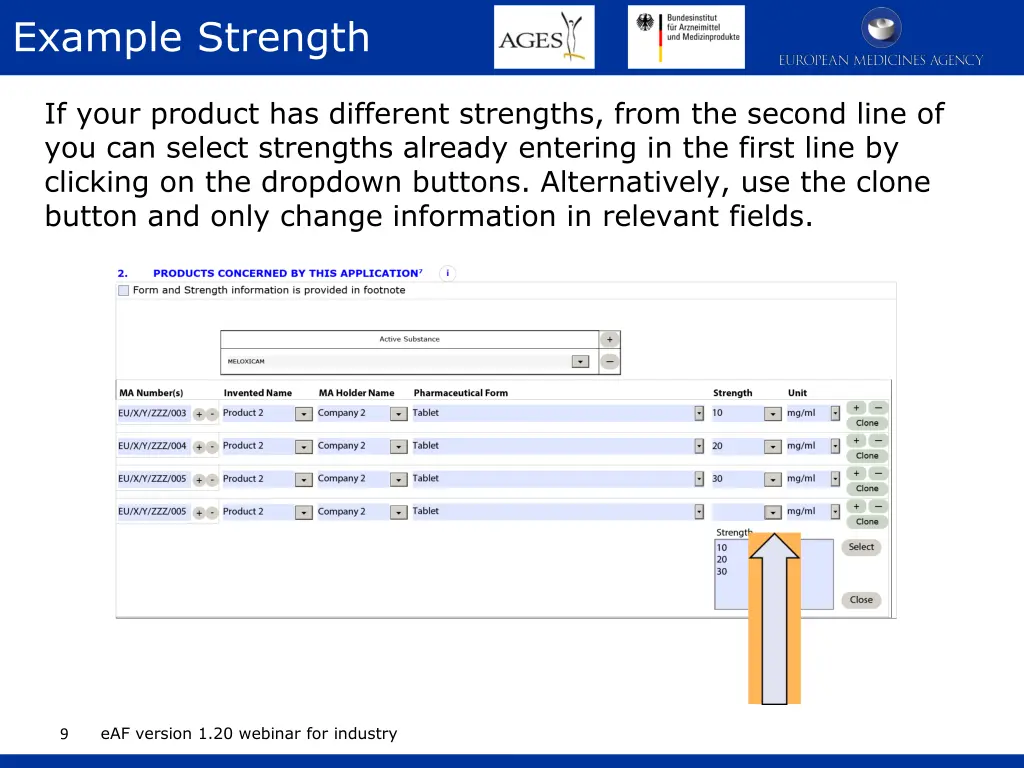
Example Strength If your product has different strengths, from the second line of you can select strengths already entering in the first line by clicking on the dropdown buttons. Alternatively, use the clone button and only change information in relevant fields. eAF version 1.20 webinar for industry 9
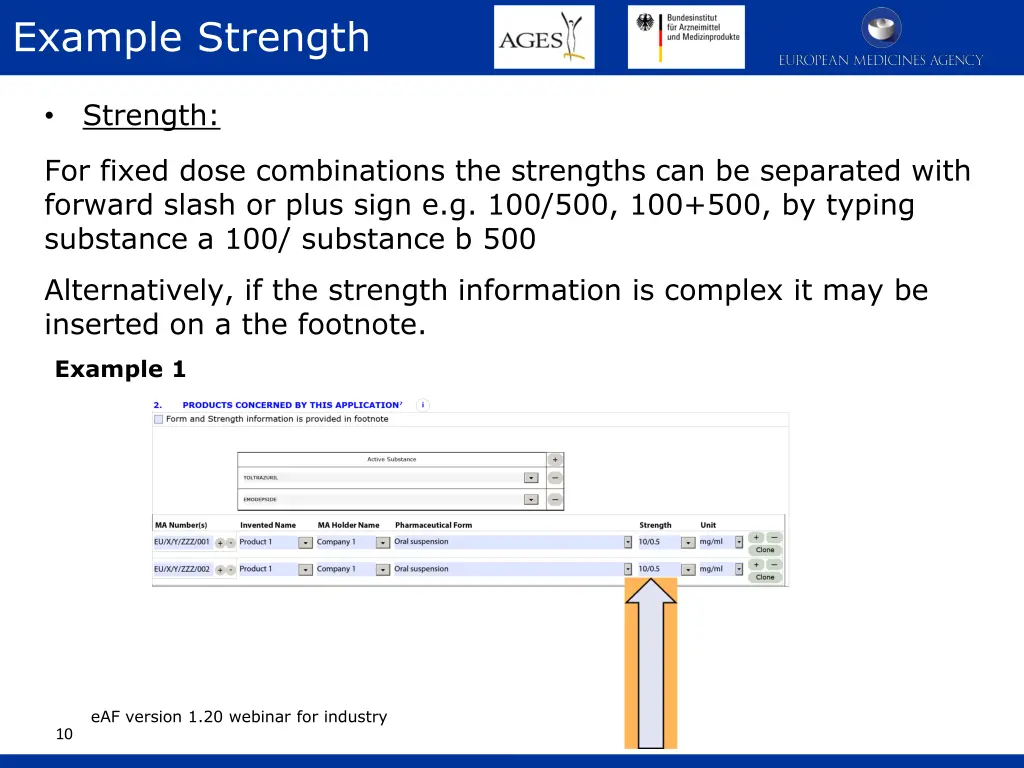
Example Strength Strength: For fixed dose combinations the strengths can be separated with forward slash or plus sign e.g. 100/500, 100+500, by typing substance a 100/ substance b 500 Alternatively, if the strength information is complex it may be inserted on a the footnote. Example 1 eAF version 1.20 webinar for industry 10
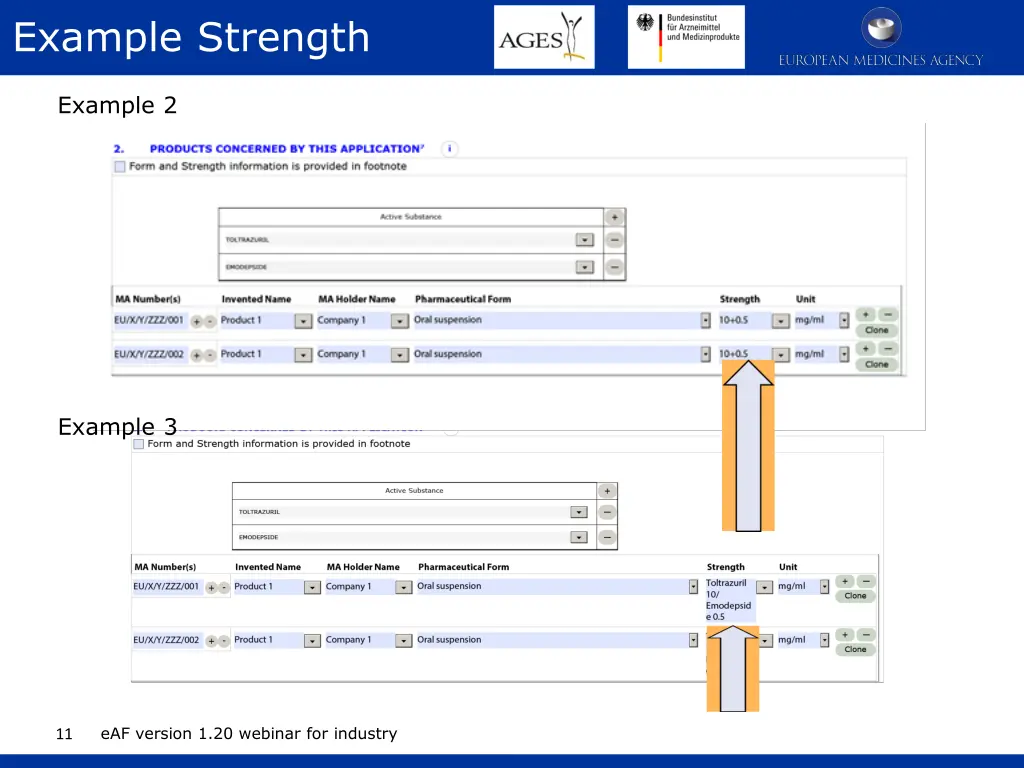
Example Strength Example 2 Example 3 eAF version 1.20 webinar for industry 11
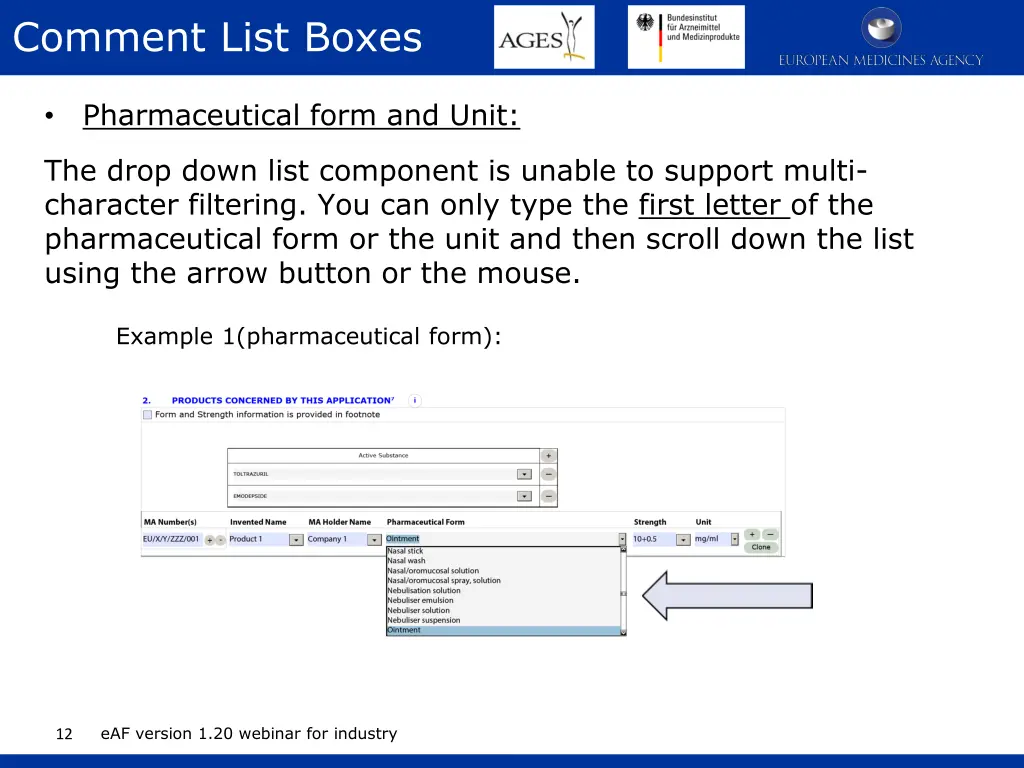
Comment List Boxes Pharmaceutical form and Unit: The drop down list component is unable to support multi- character filtering. You can only type the first letter of the pharmaceutical form or the unit and then scroll down the list using the arrow button or the mouse. Example 1(pharmaceutical form): eAF version 1.20 webinar for industry 12
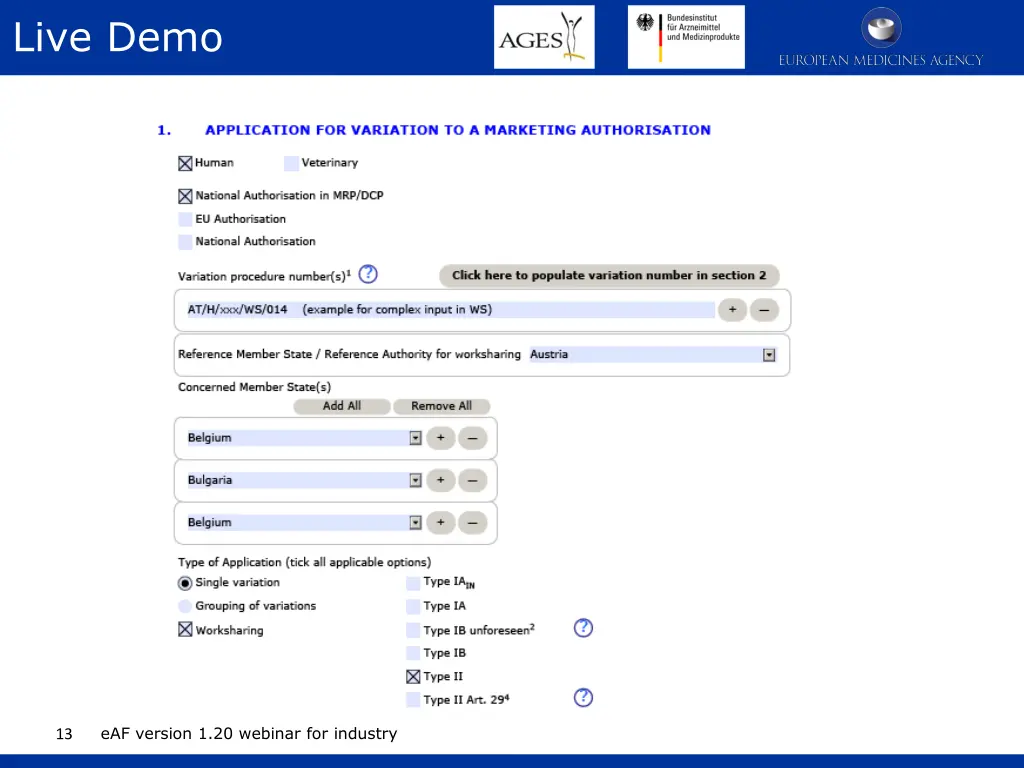
Live Demo eAF version 1.20 webinar for industry 13
Live Demo / Result eAF version 1.20 webinar for industry 14
INITIAL MAA FORM HUMAN 15 eAF version 1.20 webinar for industry
Topics being addressed No hyperlinks in the form Structure of the address fields and extended options to copy content File name convention to support differentiation of eAF and annexes in the eCTD eAF will not change national legal requirements on wet signatures Member states selection of 'all' and adjustment of single entries Structure of strength name field in value and unit of measurement Some advice in regard to container and closure systems, material Usage of free text fields to describe manufacturer tasks Composition - difference between CAP and MRP/DCP/NAP - rule on which products can be covered by one MAA-form Composition - differentiation between active substances and ingredients or different parts of a product. Composition - explaining the new operator quantum satis (qs) Pharmacovigilance System eAF version 1.20 webinar for industry 16
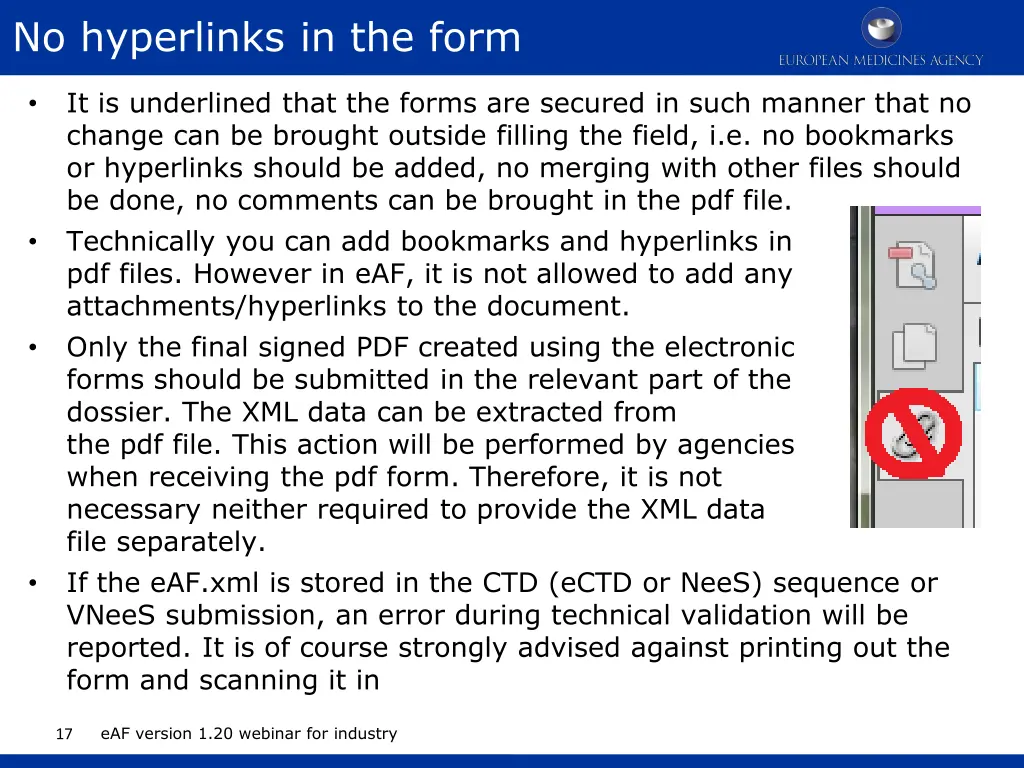
No hyperlinks in the form It is underlined that the forms are secured in such manner that no change can be brought outside filling the field, i.e. no bookmarks or hyperlinks should be added, no merging with other files should be done, no comments can be brought in the pdf file. Technically you can add bookmarks and hyperlinks in pdf files. However in eAF, it is not allowed to add any attachments/hyperlinks to the document. Only the final signed PDF created using the electronic forms should be submitted in the relevant part of the dossier. The XML data can be extracted from the pdf file. This action will be performed by agencies when receiving the pdf form. Therefore, it is not necessary neither required to provide the XML data file separately. If the eAF.xml is stored in the CTD (eCTD or NeeS) sequence or VNeeS submission, an error during technical validation will be reported. It is of course strongly advised against printing out the form and scanning it in eAF version 1.20 webinar for industry 17
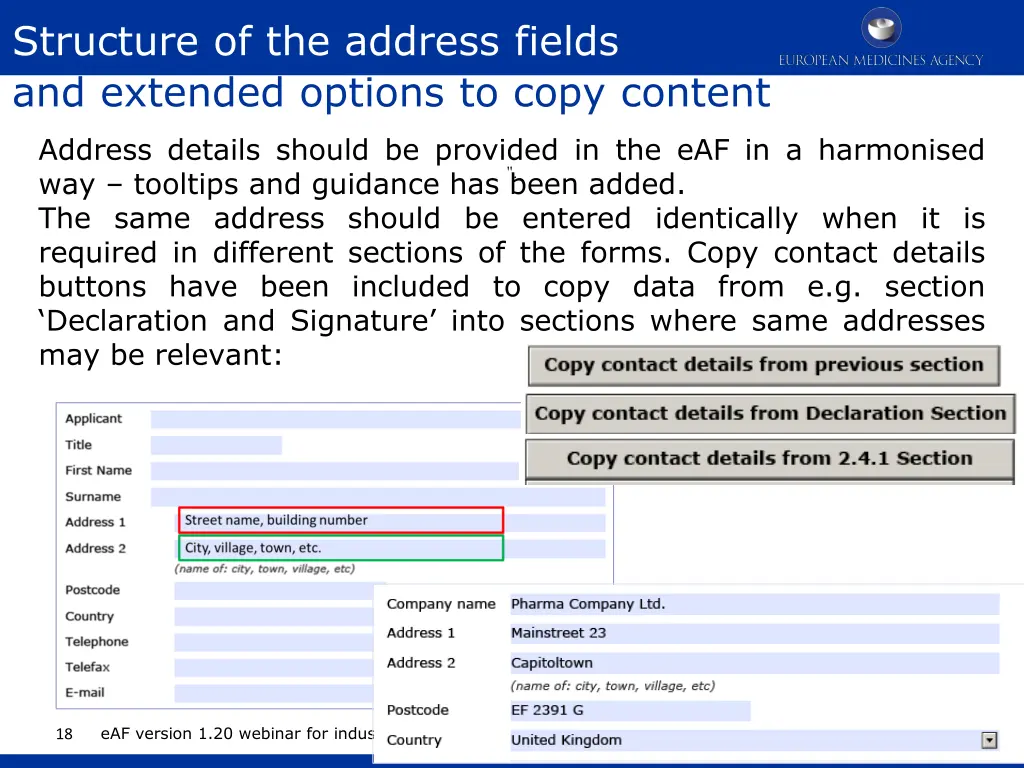
Structure of the address fields and extended options to copy content Address details should be provided in the eAF in a harmonised way tooltips and guidance has been added. The same address should be entered identically when it is required in different sections of the forms. Copy contact details buttons have been included to copy data from e.g. section Declaration and Signature into sections where same addresses may be relevant: ". eAF version 1.20 webinar for industry 18
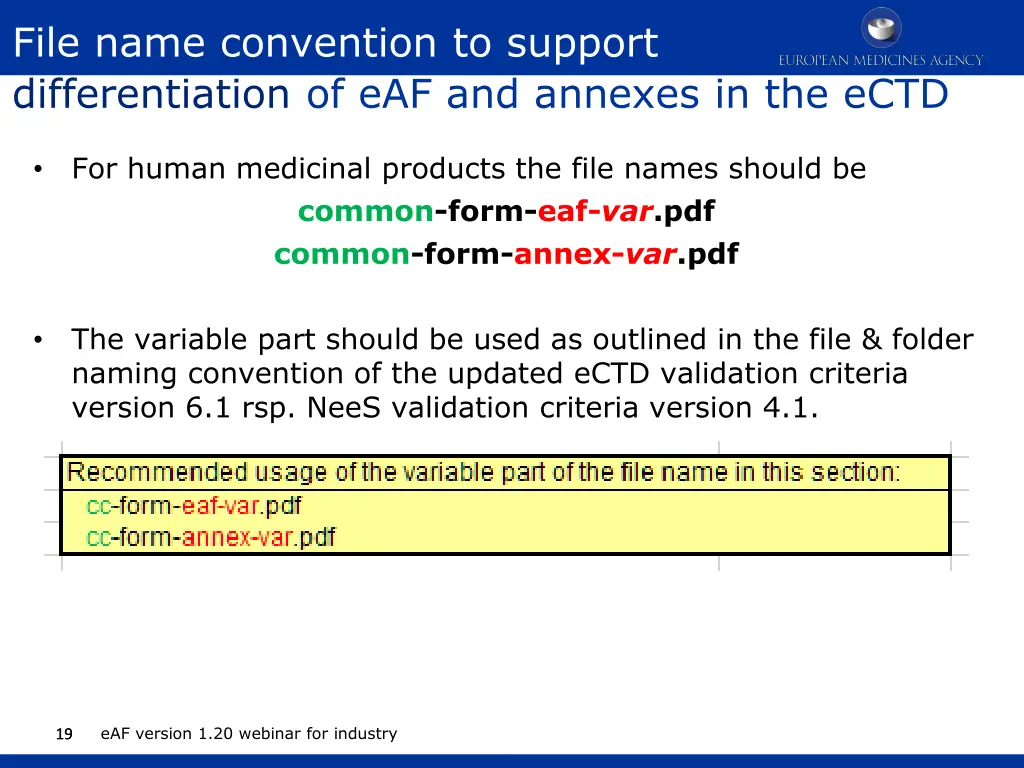
File name convention to support differentiation of eAF and annexes in the eCTD For human medicinal products the file names should be common-form-eaf-var.pdf common-form-annex-var.pdf The variable part should be used as outlined in the file & folder naming convention of the updated eCTD validation criteria version 6.1 rsp. NeeS validation criteria version 4.1. eAF version 1.20 webinar for industry 19 19
eAF will not change national legal requirements on signature Digital signatures (as opposed to scanned signatures) are not currently within the scope of this project. An image will not work as a digital advanced or qualified electronic signature nor can replace requirements of wet signed forms. EMA strongly recommends use of scanned image of the signature for Centralised Procedure applications. The eAF does not change the wet signature requirements at the NCAs. Please check the national requirements for wet signatures to avoid validation issues. In DCP/MRP an AF signed by multiple responsible persons is needed for communication with specific NCA (could be initial submission or renewal or variation). Ideally a single contact point is provided. For those NCAs that require multiple contact persons please include a separate annex with the contact details. eAF version 1.20 webinar for industry 20
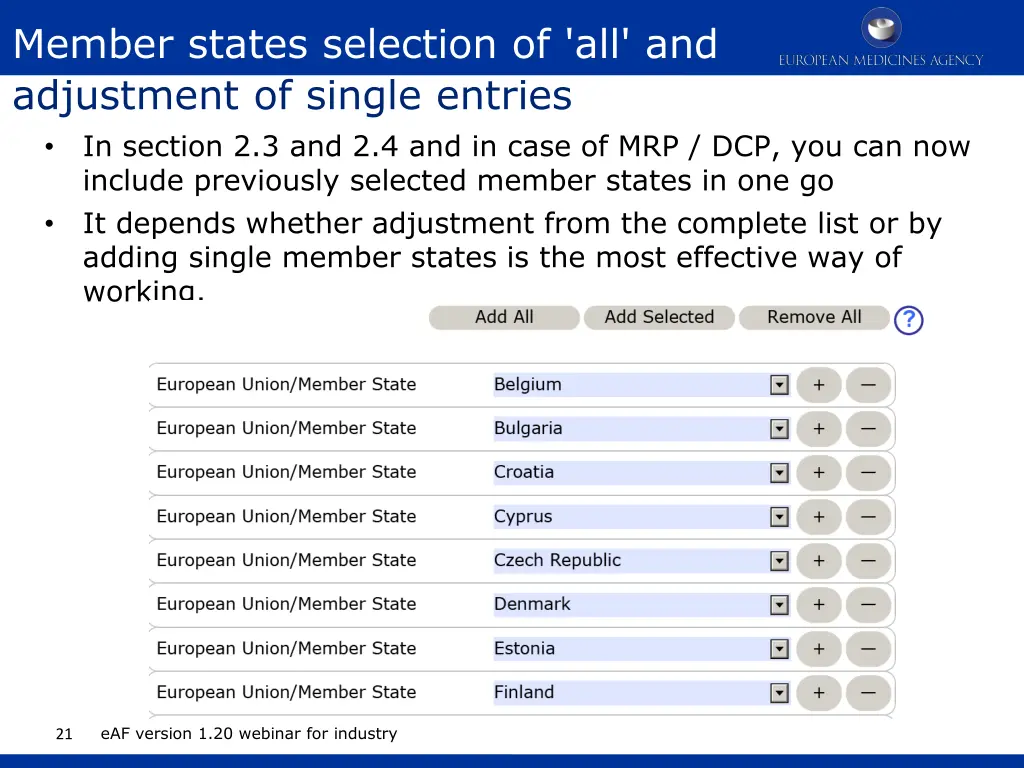
Member states selection of 'all' and adjustment of single entries In section 2.3 and 2.4 and in case of MRP / DCP, you can now include previously selected member states in one go It depends whether adjustment from the complete list or by adding single member states is the most effective way of working. eAF version 1.20 webinar for industry 21
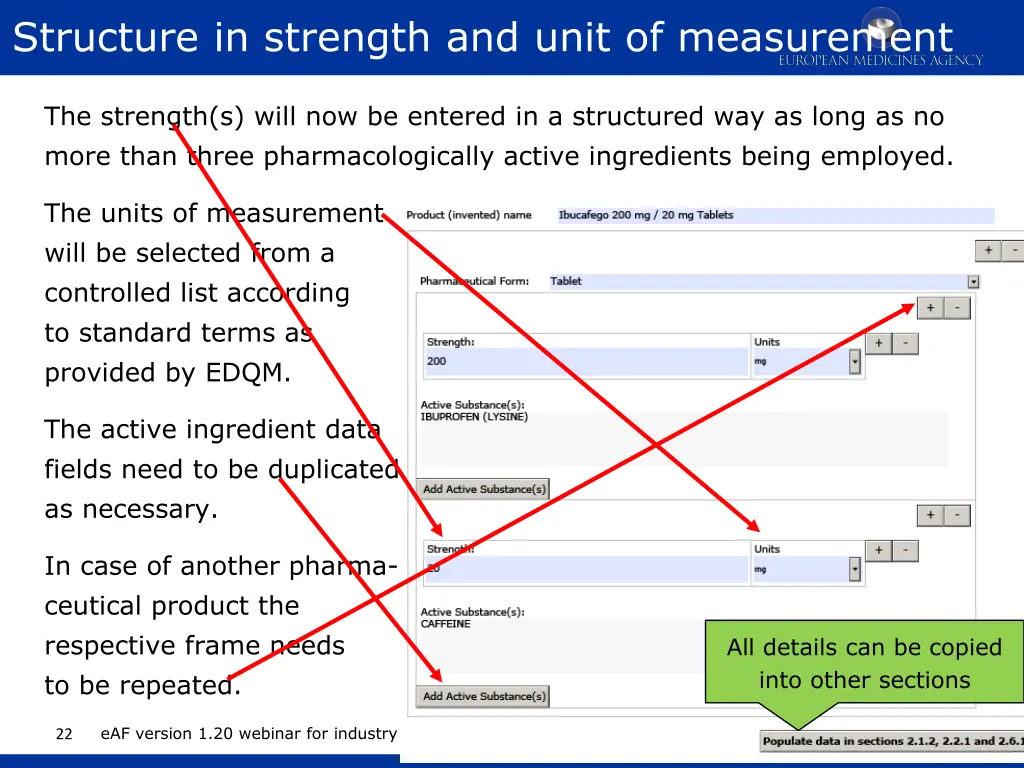
Structure in strength and unit of measurement The strength(s) will now be entered in a structured way as long as no more than three pharmacologically active ingredients being employed. The units of measurement will be selected from a controlled list according to standard terms as provided by EDQM. The active ingredient data fields need to be duplicated as necessary. In case of another pharma- ceutical product the respective frame needs to be repeated. All details can be copied into other sections eAF version 1.20 webinar for industry 22
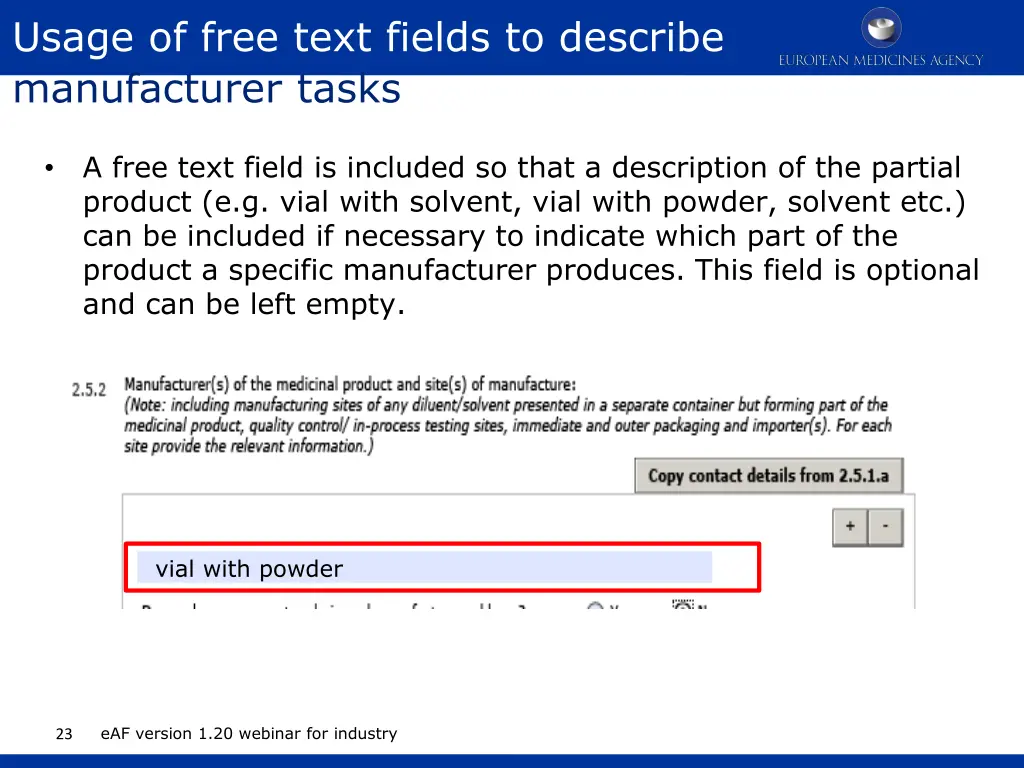
Usage of free text fields to describe manufacturer tasks A free text field is included so that a description of the partial product (e.g. vial with solvent, vial with powder, solvent etc.) can be included if necessary to indicate which part of the product a specific manufacturer produces. This field is optional and can be left empty. vial with powder eAF version 1.20 webinar for industry 23
Rule on how several products can be covered by one MAA-form For MRP/DCP new applications and renewals, a single form should be submitted for each strength and pharmaceutical form (and not for each country). This is contrary to the centralised where a combined AF for all strengths and pharmaceutical forms is possible. For variation applications you can combine several products in all procedure types. eAF version 1.20 webinar for industry 24
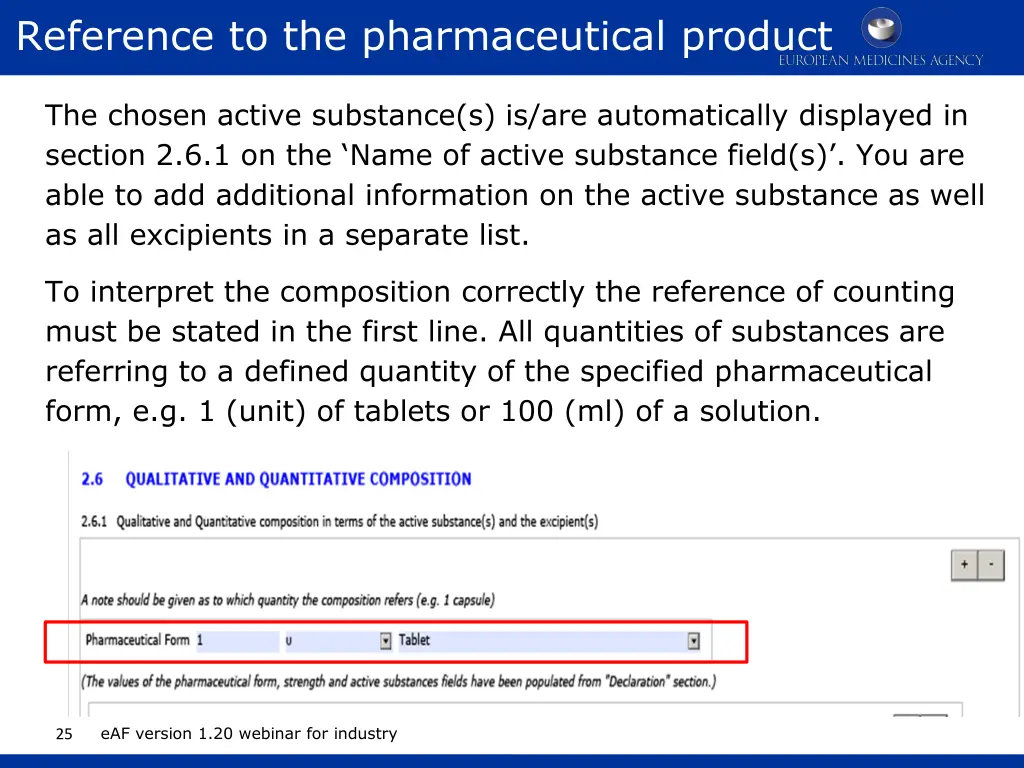
Reference to the pharmaceutical product The chosen active substance(s) is/are automatically displayed in section 2.6.1 on the Name of active substance field(s) . You are able to add additional information on the active substance as well as all excipients in a separate list. To interpret the composition correctly the reference of counting must be stated in the first line. All quantities of substances are referring to a defined quantity of the specified pharmaceutical form, e.g. 1 (unit) of tablets or 100 (ml) of a solution. eAF version 1.20 webinar for industry 25
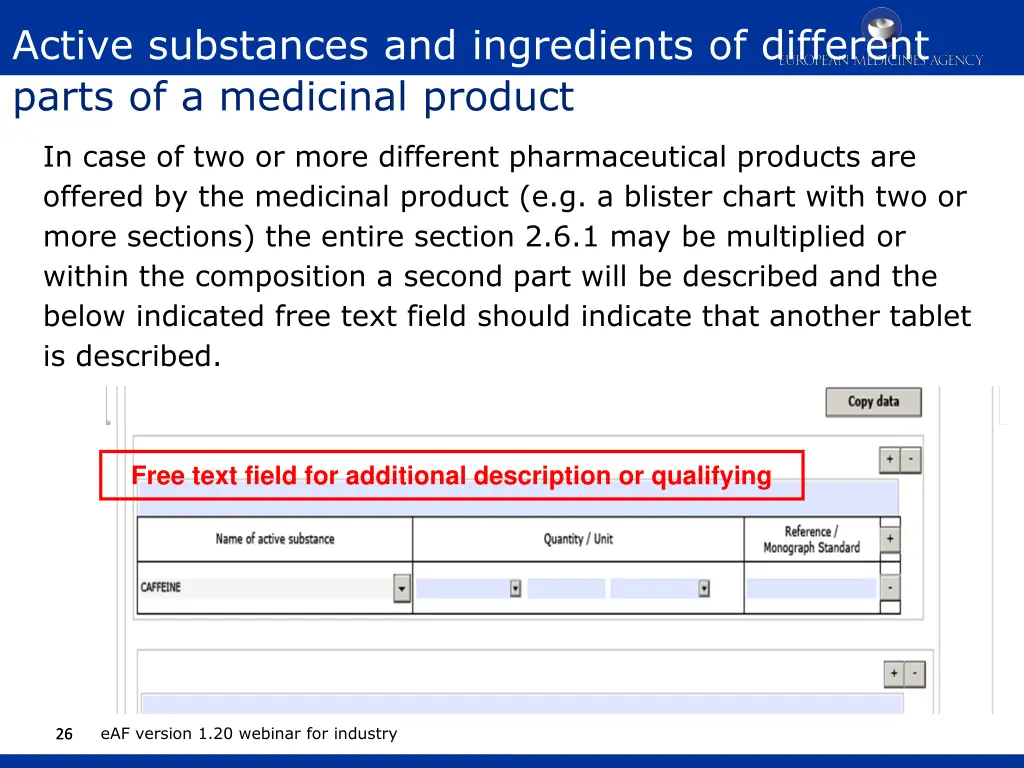
Active substances and ingredients of different parts of a medicinal product In case of two or more different pharmaceutical products are offered by the medicinal product (e.g. a blister chart with two or more sections) the entire section 2.6.1 may be multiplied or within the composition a second part will be described and the below indicated free text field should indicate that another tablet is described. Free text field for additional description or qualifying eAF version 1.20 webinar for industry 26 26
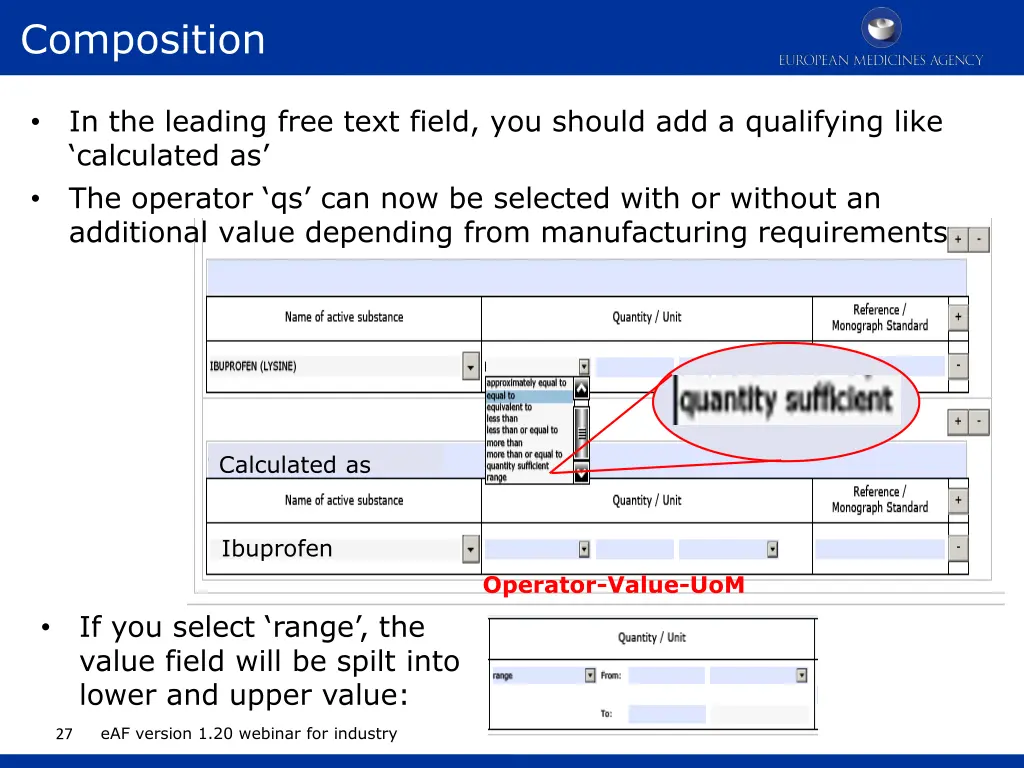
Composition In the leading free text field, you should add a qualifying like calculated as The operator qs can now be selected with or without an additional value depending from manufacturing requirements Calculated as Ibuprofen Operator-Value-UoM If you select range , the value field will be spilt into lower and upper value: eAF version 1.20 webinar for industry 27
Salt / hydrate forms Select the active substance(s) in Declaration section and use populate button to replicate the information across the form. Occasionally a salt or hydrate format is required in sections 2.2.1 and 2.6.1 and this can be added using a workaround solution by adding this additional form via excipients section, returning to 2.2.1 and 2.6.1 and selecting the required form from the list and returning to excipients section to deleted the salt/hydrate form from excipients section. populate button must not be used after the workaround has been used. Details of the workaround solution are explained in the Q&A document Q.47 http://esubmission.ema.europa.eu/eaf/docs/eAF%20Question %20and%20Answers%2014.6.2016.pdf eAF version 1.20 webinar for industry 28
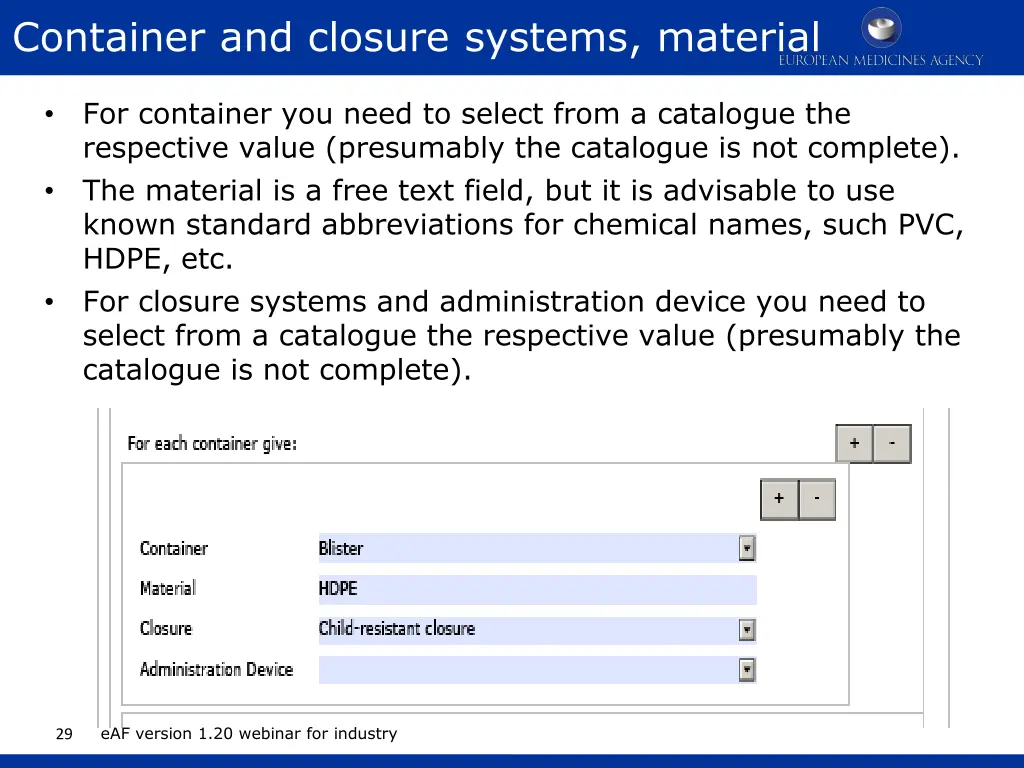
Container and closure systems, material For container you need to select from a catalogue the respective value (presumably the catalogue is not complete). The material is a free text field, but it is advisable to use known standard abbreviations for chemical names, such PVC, HDPE, etc. For closure systems and administration device you need to select from a catalogue the respective value (presumably the catalogue is not complete). eAF version 1.20 webinar for industry 29
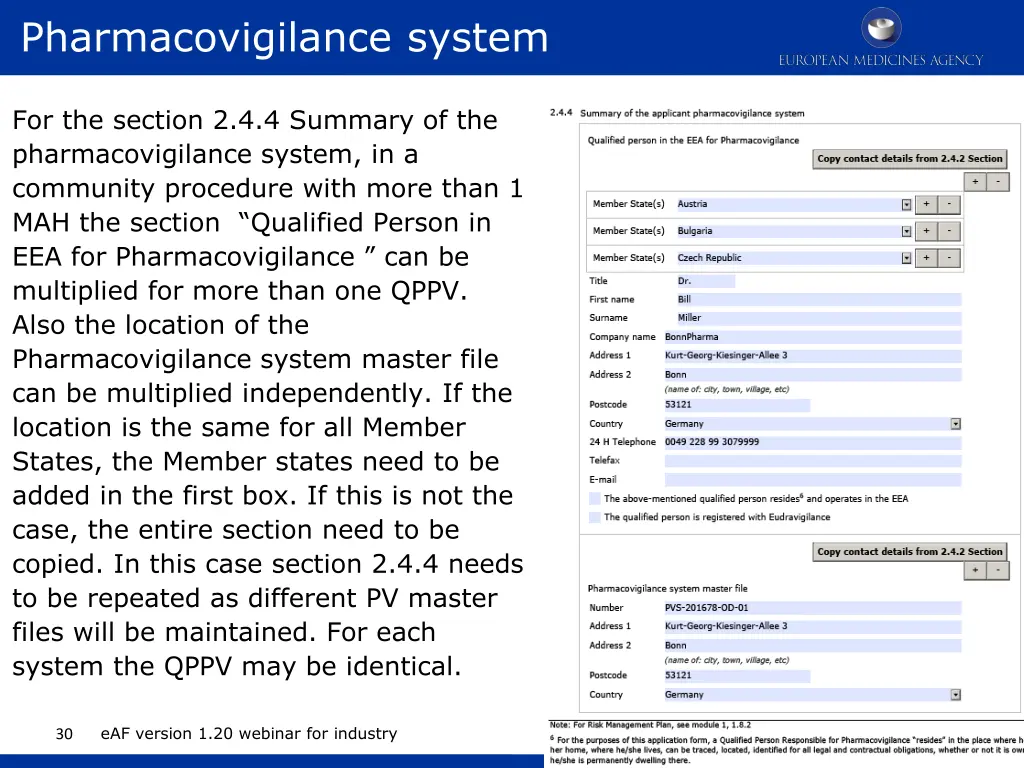
Pharmacovigilance system For the section 2.4.4 Summary of the pharmacovigilance system, in a community procedure with more than 1 MAH the section Qualified Person in EEA for Pharmacovigilance can be multiplied for more than one QPPV. Also the location of the Pharmacovigilance system master file can be multiplied independently. If the location is the same for all Member States, the Member states need to be added in the first box. If this is not the case, the entire section need to be copied. In this case section 2.4.4 needs to be repeated as different PV master files will be maintained. For each system the QPPV may be identical. eAF version 1.20 webinar for industry 30
INITIAL MAA FORM VETERINARY 31 eAF version 1.20 webinar for industry
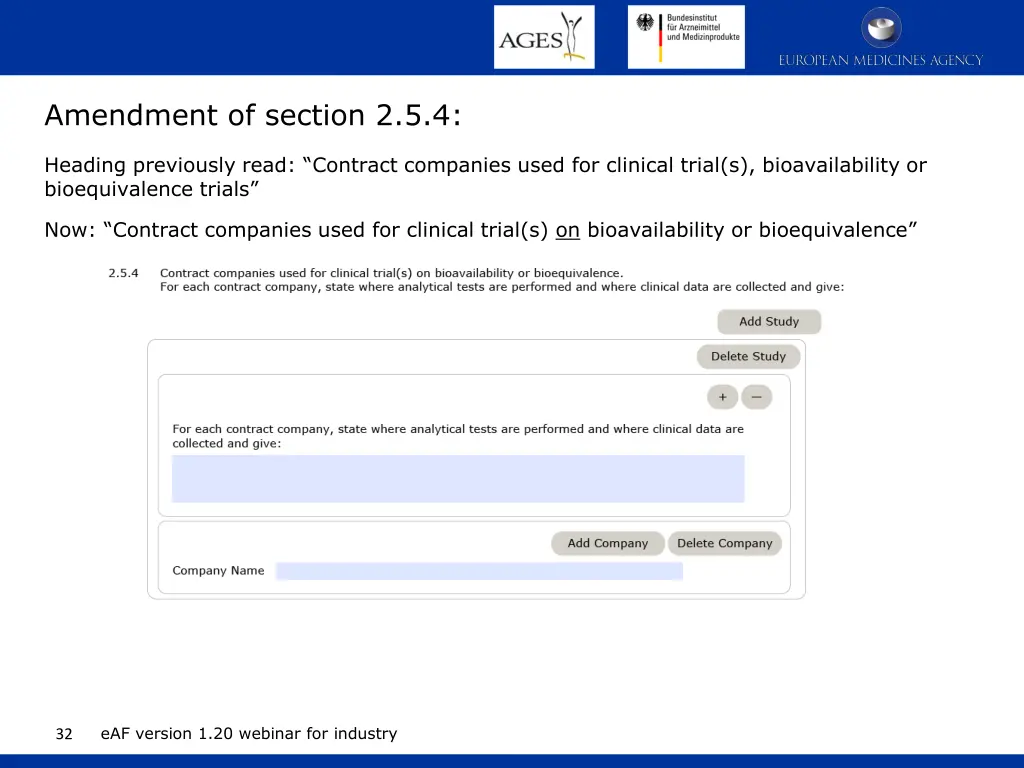
Amendment of section 2.5.4: Heading previously read: Contract companies used for clinical trial(s), bioavailability or bioequivalence trials Now: Contract companies used for clinical trial(s) on bioavailability or bioequivalence eAF version 1.20 webinar for industry 32
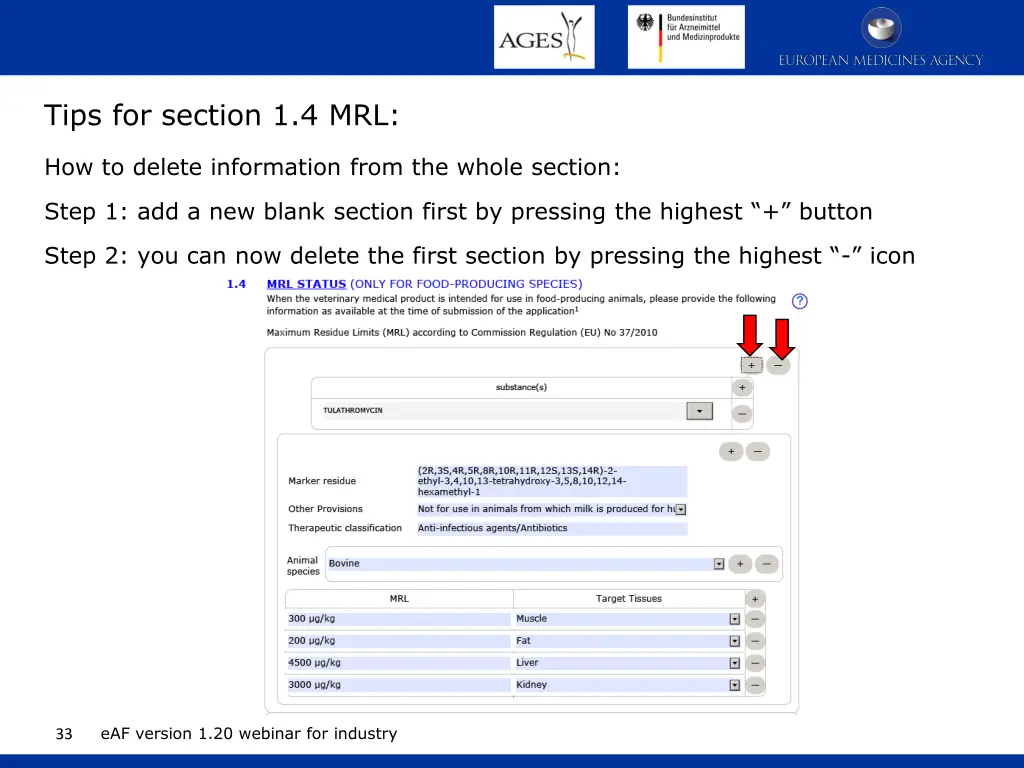
Tips for section 1.4 MRL: How to delete information from the whole section: Step 1: add a new blank section first by pressing the highest + button Step 2: you can now delete the first section by pressing the highest - icon eAF version 1.20 webinar for industry 33
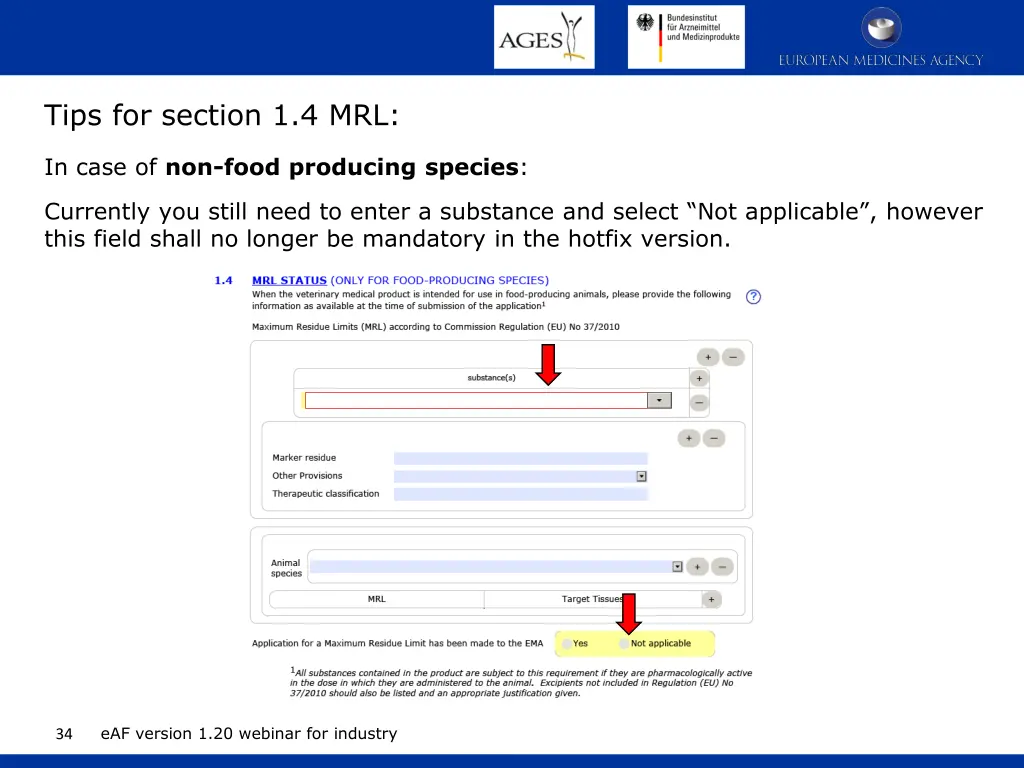
Tips for section 1.4 MRL: In case of non-food producing species: Currently you still need to enter a substance and select Not applicable , however this field shall no longer be mandatory in the hotfix version. eAF version 1.20 webinar for industry 34
RENEWAL FORM HUMAN & VET SEE KNOWN ISSUES BELOW 35 eAF version 1.20 webinar for industry
GENERAL ISSUES 36 eAF version 1.20 webinar for industry
Where to find eAFs? Option 1 - link to eAF webpage from Eudralex page Notice to Applicants (European Commission) http://ec.europa.eu/health/documents/eudralex/vol-2 http://ec.europa.eu/health/documents/eudralex/vol- 6/index_en.htm Note: The Word-AFs have been removed from the Eudralex website! Option 2 eSubmission Homepage (EMA) http://esubmission.ema.europa.eu/eaf/index.html eAF version 1.20 webinar for industry 37
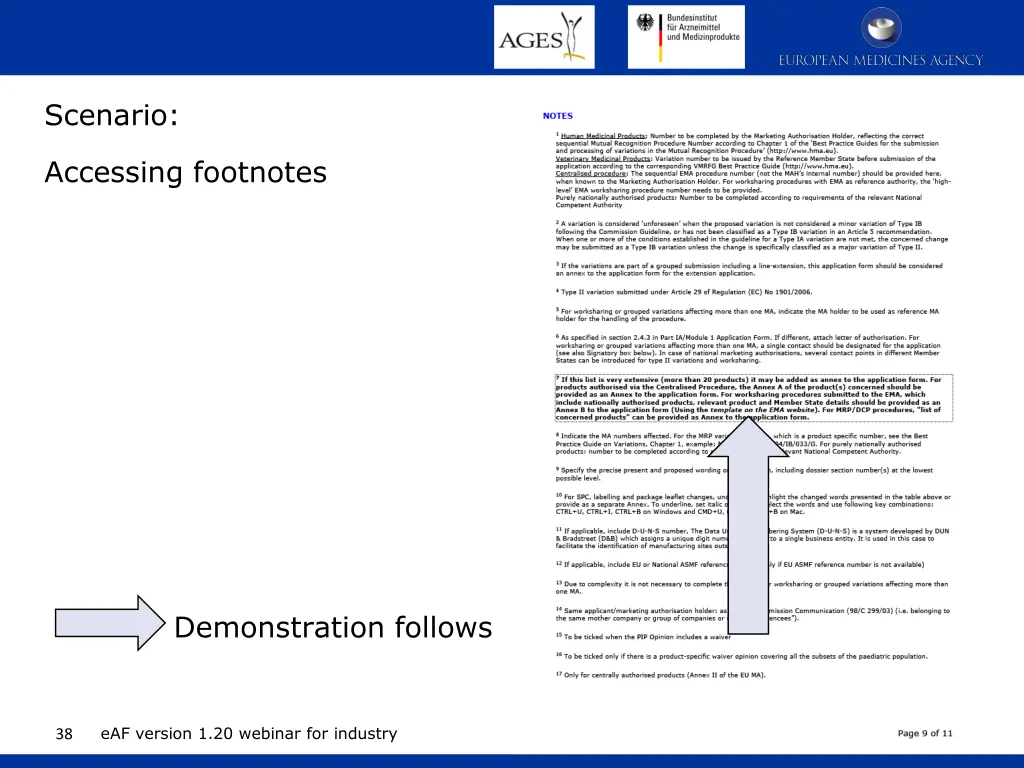
Scenario: Accessing footnotes Demonstration follows eAF version 1.20 webinar for industry 38
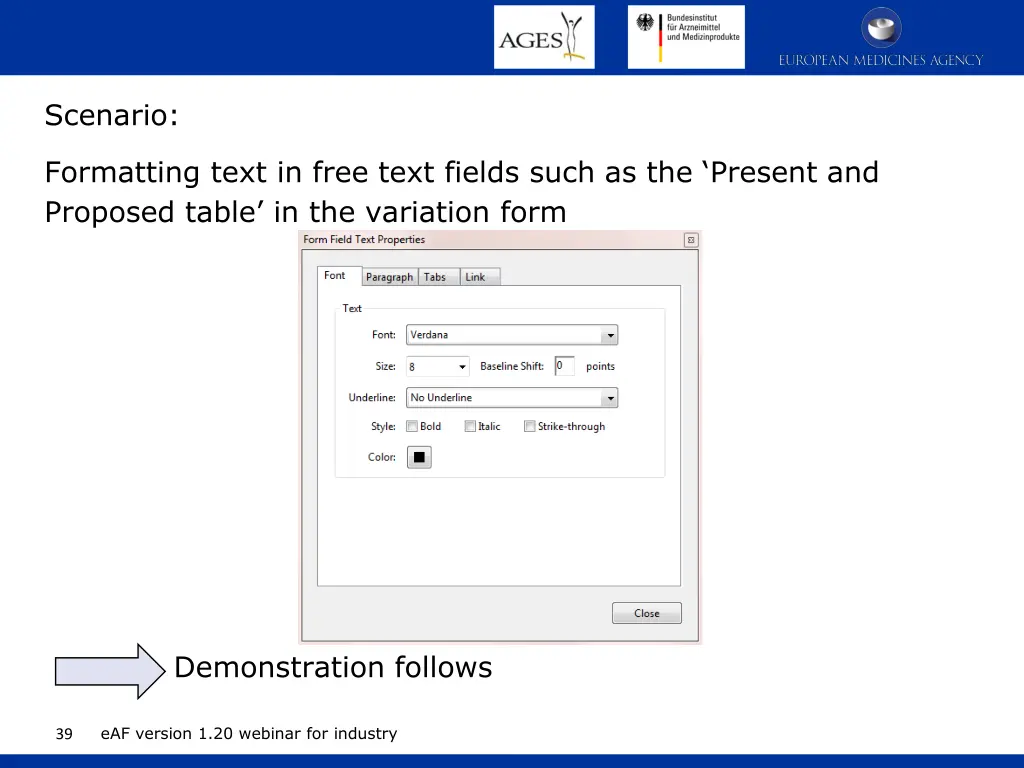
Scenario: Formatting text in free text fields such as the Present and Proposed table in the variation form Demonstration follows eAF version 1.20 webinar for industry 39
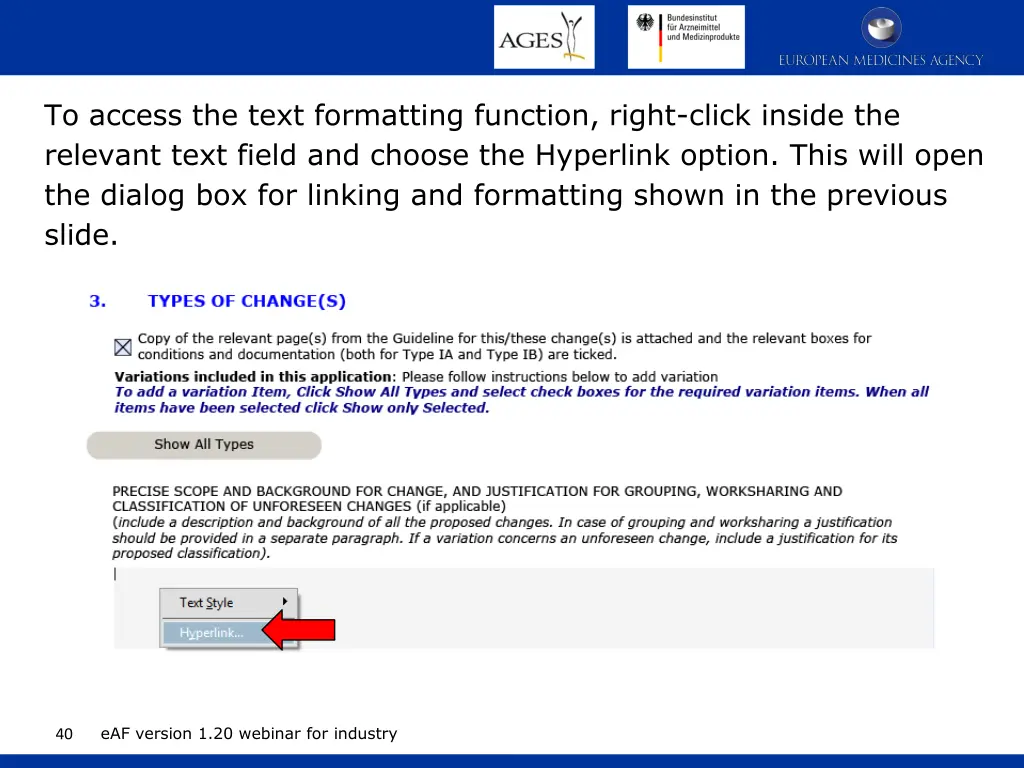
To access the text formatting function, right-click inside the relevant text field and choose the Hyperlink option. This will open the dialog box for linking and formatting shown in the previous slide. eAF version 1.20 webinar for industry 40
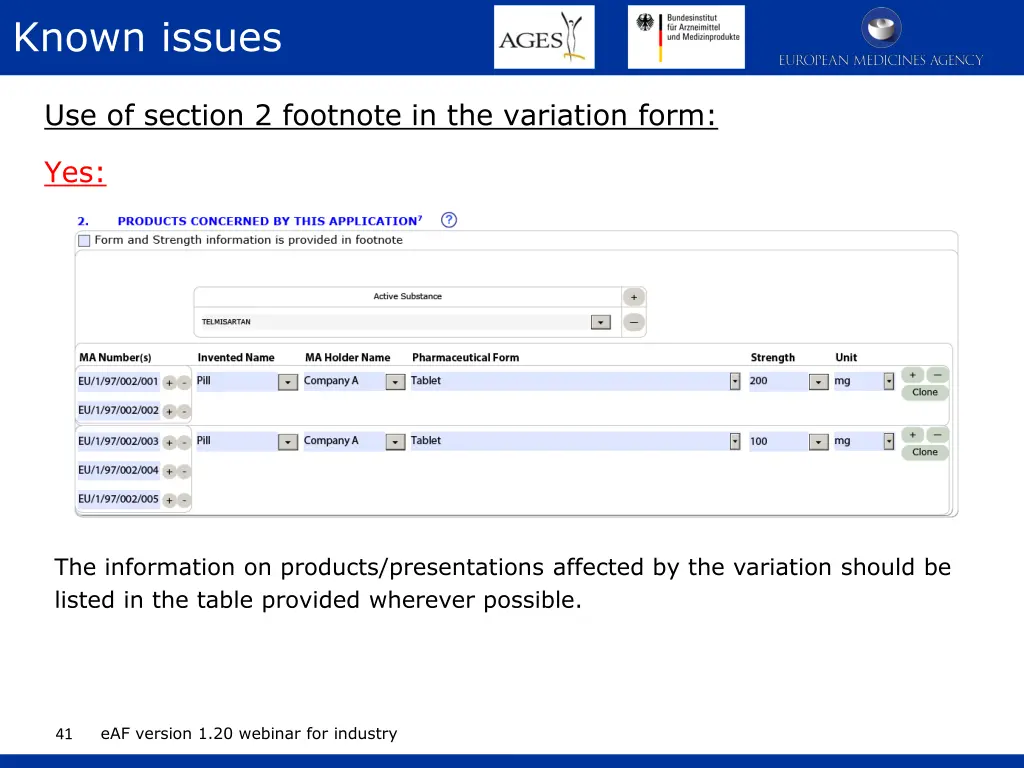
Known issues Use of section 2 footnote in the variation form: Yes: The information on products/presentations affected by the variation should be listed in the table provided wherever possible. eAF version 1.20 webinar for industry 41
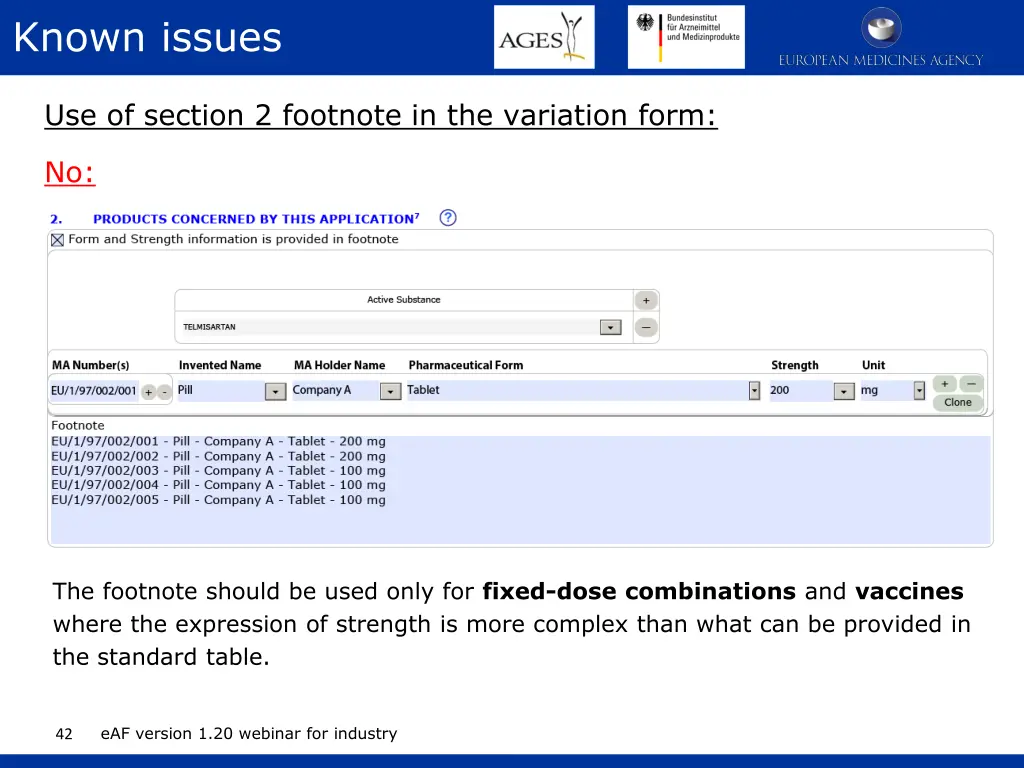
Known issues Use of section 2 footnote in the variation form: No: The footnote should be used only for fixed-dose combinations and vaccines where the expression of strength is more complex than what can be provided in the standard table. eAF version 1.20 webinar for industry 42
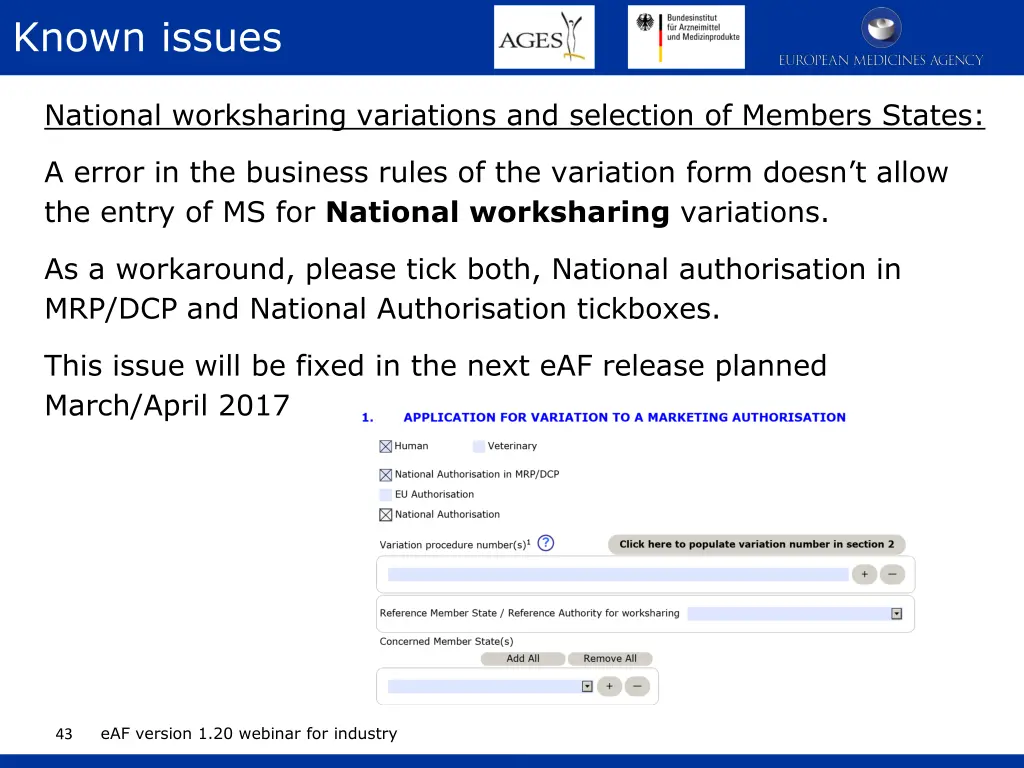
Known issues National worksharing variations and selection of Members States: A error in the business rules of the variation form doesn t allow the entry of MS for National worksharing variations. As a workaround, please tick both, National authorisation in MRP/DCP and National Authorisation tickboxes. This issue will be fixed in the next eAF release planned March/April 2017 eAF version 1.20 webinar for industry 43
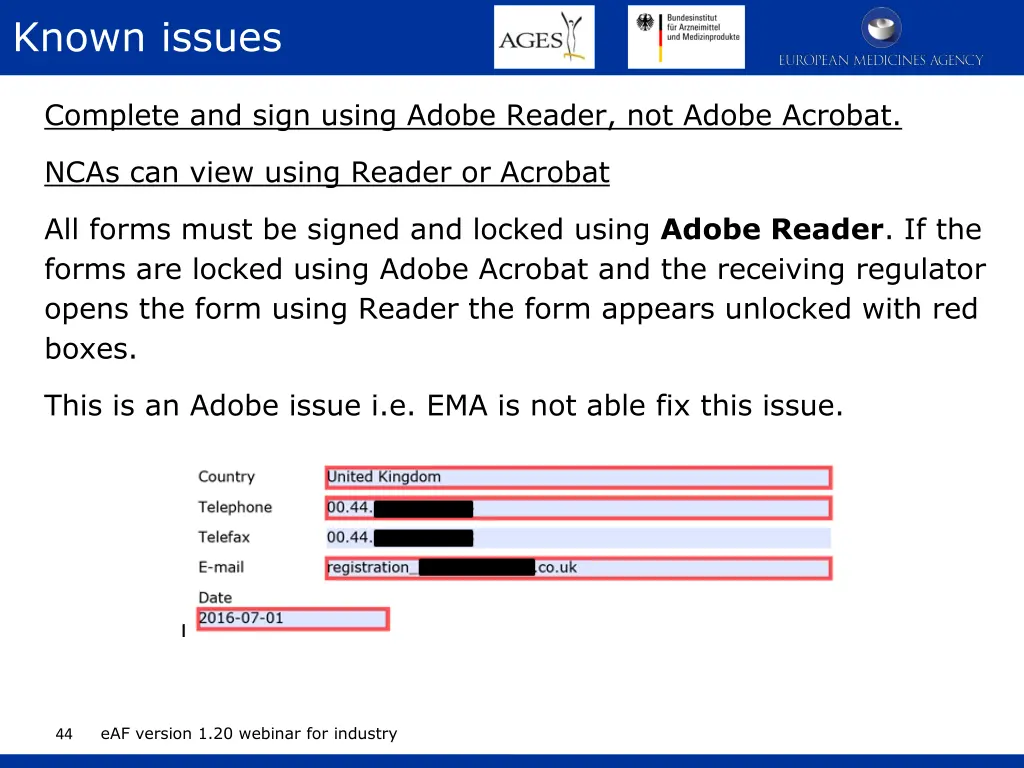
Known issues Complete and sign using Adobe Reader, not Adobe Acrobat. NCAs can view using Reader or Acrobat All forms must be signed and locked using Adobe Reader. If the forms are locked using Adobe Acrobat and the receiving regulator opens the form using Reader the form appears unlocked with red boxes. This is an Adobe issue i.e. EMA is not able fix this issue. eAF version 1.20 webinar for industry 44
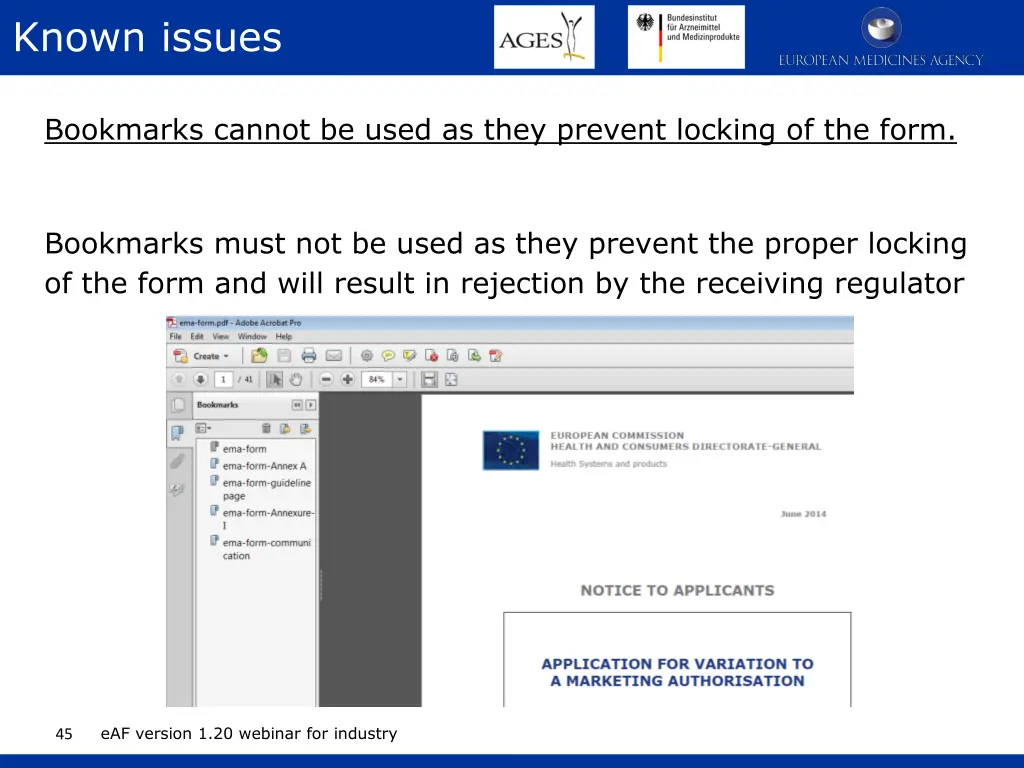
Known issues Bookmarks cannot be used as they prevent locking of the form. Bookmarks must not be used as they prevent the proper locking of the form and will result in rejection by the receiving regulator eAF version 1.20 webinar for industry 45
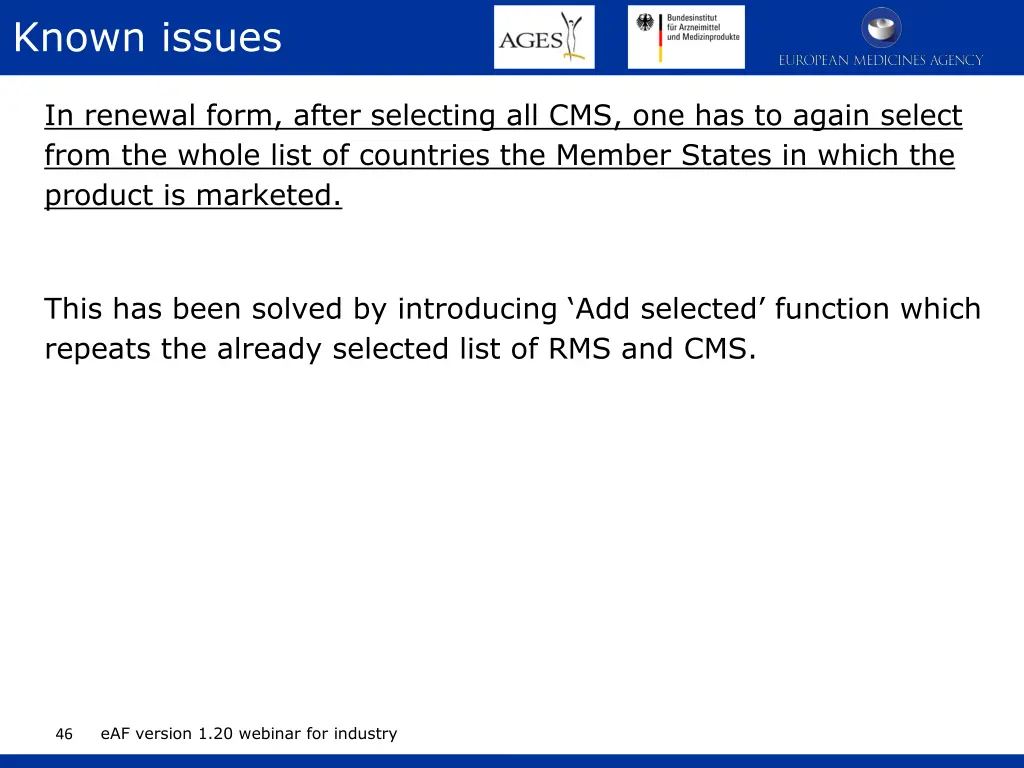
Known issues In renewal form, after selecting all CMS, one has to again select from the whole list of countries the Member States in which the product is marketed. This has been solved by introducing Add selected function which repeats the already selected list of RMS and CMS. eAF version 1.20 webinar for industry 46